In March 2026, Meta experienced a serious security incident after an internal AI agent posted incorrect technical advice on the company's forum without approval.
Another employee followed the advice, unintentionally giving unauthorized engineers access to sensitive company and user data for nearly two hours. Meta classified the incident as Sev 1, its second-highest security severity level.
What happened at Meta points to a larger problem: employees can act on AI-generated guidance before anyone has verified whether it's reliable. When companies use AI with internal knowledge, they need clear rules for which information AI can rely on, what it can change, who approves its actions, and how those actions are tracked.
In this guide, we'll cover eight AI governance best practices for company knowledge, with practical examples and established frameworks to help you put the right controls in place.
Key takeaways
- AI governance helps companies control which information AI can use, what actions it can take, and who's responsible for overseeing those actions.
- Giving an AI agent access to a document doesn't mean the information is accurate or current. Companies need to identify authoritative sources, verify them regularly, and flag outdated or conflicting information.
- Important company documents should have assigned owners, including someone responsible for keeping the instructions AI uses to find information up to date.
- Important AI-generated changes should be reviewed before they're applied to company documents, especially when agents have permission to edit them directly.
- AI-generated answers should link back to their sources and make it clear when the information is missing, outdated, or contradictory.
- Companies should be able to track what AI agents change, who approved those changes, and which sources their answers came from. They should also test these controls using real questions and different access levels.
- Frameworks such as NIST AI RMF and ISO/IEC 42001 help organizations manage AI risks, while the EU AI Act establishes legal requirements for certain AI systems and uses.
What is AI governance?
AI governance refers to the policies, responsibilities, processes, and controls organizations use to manage AI systems responsibly. It broadly covers how these systems use information, produce outputs, and take actions, while ensuring accountability, security, transparency, and human oversight.
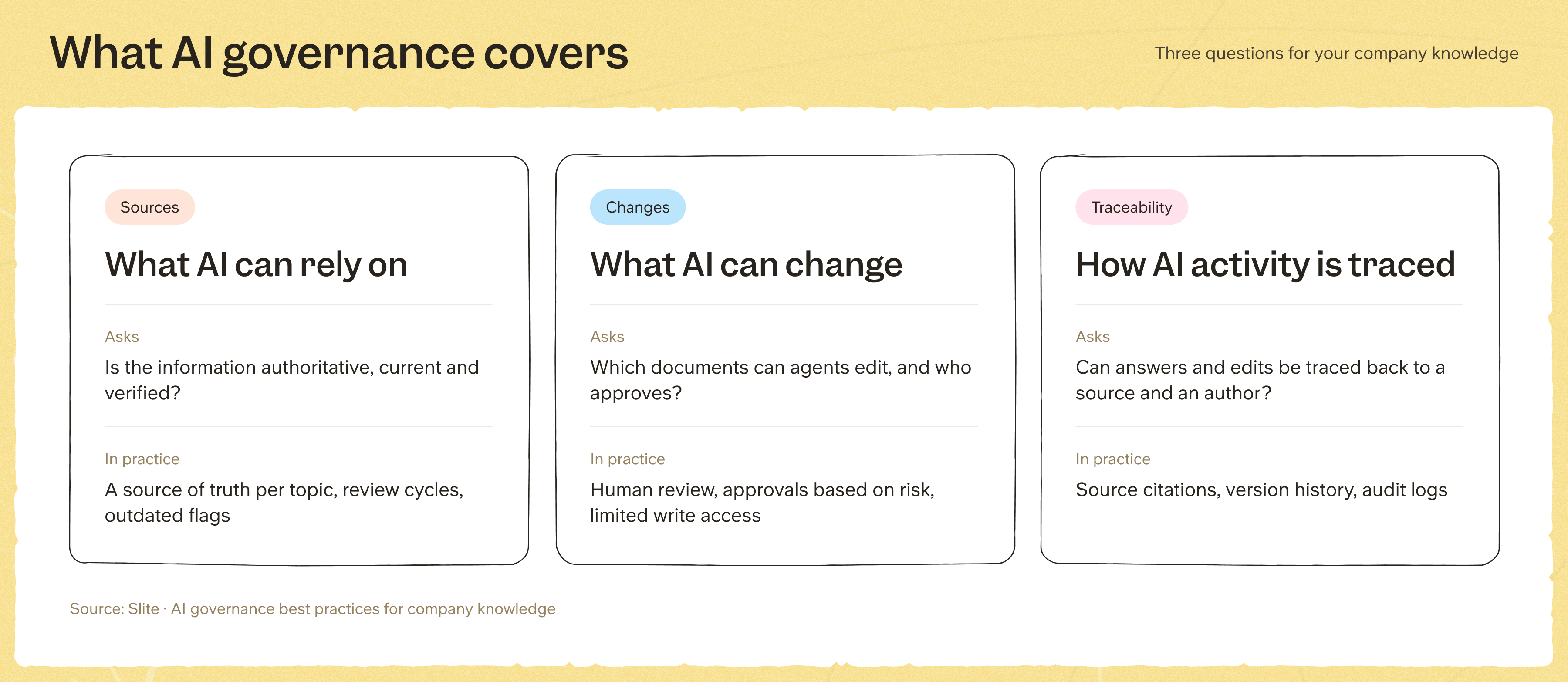
For your existing company knowledge, this comes down to three things:
- What AI can rely on: Whether the information it retrieves comes from authoritative, current, and verified sources.
- What AI can change: Which documents or knowledge sources agents can modify, and what approvals or safeguards are required.
- How AI activity can be traced: Whether AI-generated answers can be linked to their sources and changes to company knowledge can be tracked and attributed.
Core AI governance principles
There are six core principles that guide how organizations govern AI systems, including those that access or modify company knowledge:
- Transparency: People should be able to see which sources an AI answer relies on and recognize when the information is incomplete or unreliable.
- Accountability: Organizations need to establish who's responsible for their AI systems, including who investigates mistakes and makes sure they're corrected.
- Privacy: AI systems should only access, process, and disclose personal or confidential information they're authorized to use. This also applies to information included in generated answers and activity logs.
- Fairness: Organizations need to check whether biased or incomplete information could lead AI to make unfair recommendations or decisions, particularly in sensitive areas such as hiring.
- Security: AI systems should respect access restrictions across connected tools, with permissions limited to the information and actions they actually need.
- Human oversight: Authorized people should be able to review, correct, or stop AI decisions and actions, particularly when they could affect important company information or cause harm.
AI governance frameworks to know
If you're developing AI governance policies or evaluating an AI vendor, there are three frameworks and standards worth knowing.
They serve different purposes, though:
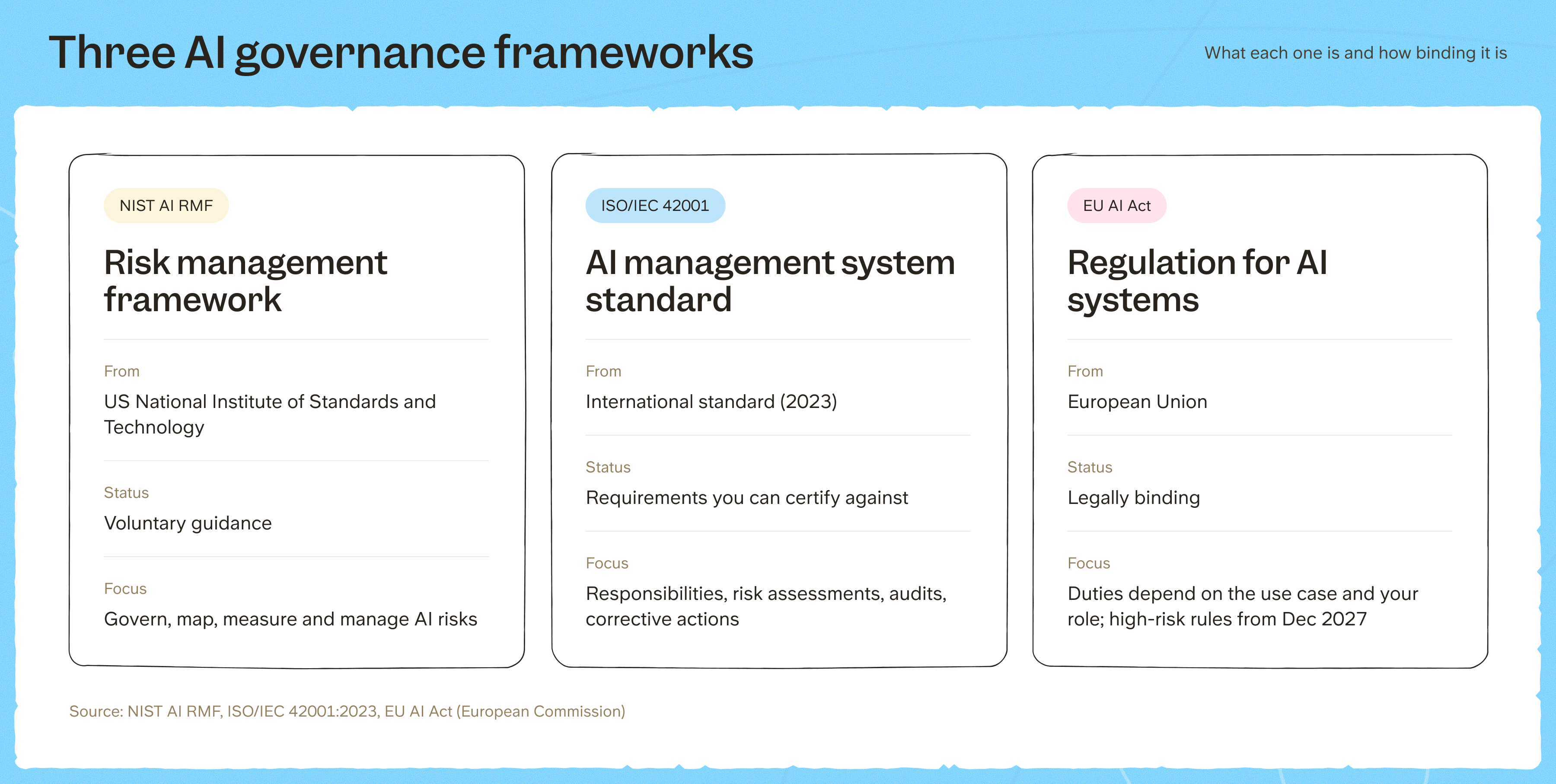
- NIST AI RMF provides voluntary guidance,
- ISO/IEC 42001 sets requirements for an AI management system,
- and the EU AI Act establishes legal obligations for AI systems within its scope.
NIST AI Risk Management Framework
The US National Institute of Standards and Technology (NIST) developed the AI Risk Management Framework (AI RMF) to help organizations identify, assess, and manage AI risks. It's voluntary and organized around four interconnected functions.
For example, if you have an internal AI assistant answering questions about company policies, here's how the four functions would apply:
- Govern: Assign responsibility for AI risk decisions, including who approves the knowledge sources an assistant can access.
- Map: Identify the systems and documents the assistant relies on, including outdated or conflicting information that could affect its answers.
- Measure: Evaluate the assistant's answers against approved sources and track errors or other identified risks.
- Manage: Respond to those risks by correcting unreliable sources, restricting permissions, or introducing approval requirements for important actions.
ISO/IEC 42001
ISO/IEC 42001:2023 is an international standard that sets requirements for an Artificial Intelligence Management System (AIMS).
It focuses on how organizations establish and maintain AI governance through documented responsibilities, risk assessments, internal audits, performance evaluations, and corrective actions.
Organizations can also pursue independent certification against the standard. This involves demonstrating how their AI management system works, including evidence of assigned responsibilities, evaluations, and corrective actions.
EU AI Act
The EU AI Act establishes binding requirements for AI systems within its scope. What an organization needs to do depends on how the system is used and the organization's role:
- How the AI system is used: An internal knowledge assistant isn't automatically considered high-risk, but an AI system used to evaluate job applicants may fall under the Act's high-risk classification.
- The organization's role: Providers and deployers have different responsibilities. Depending on their role, organizations dealing with high-risk systems may need to meet requirements for risk management, documentation, recordkeeping, and human oversight.
Following amendments introduced in 2026, the high-risk requirements will apply from December 2, 2027, for certain standalone systems and August 2, 2028, for AI systems embedded in regulated products. Other obligations under the Act already apply.
8 AI governance best practices for company knowledge
Company documentation doesn't always reflect how things actually work. When AI agents rely on outdated or inaccurate information to answer questions or take action, mistakes that might otherwise go unnoticed can have a much wider blast radius.
Here are eight best practices we've put together to help you keep your company knowledge reliable and your AI systems accountable.
1. Control which sources your AI can rely on
Someone might have legitimate permission to read an old pricing document, but when answering customer questions for example, an AI assistant should use the current policy and not make reference to the old version.
To make sure your AI relies on the right sources:
- Identify authoritative sources: Decide which document or system is the source of truth for each policy, procedure, or important piece of company information.
- Control AI retrieval: Configure which documents and connected systems an agent can retrieve information from. Exclude unapproved drafts and superseded information where possible.
- Establish rules for conflicting information: Decide what an agent should do when sources contradict one another, including when to flag discrepancies for human review rather than generate an unsupported answer.
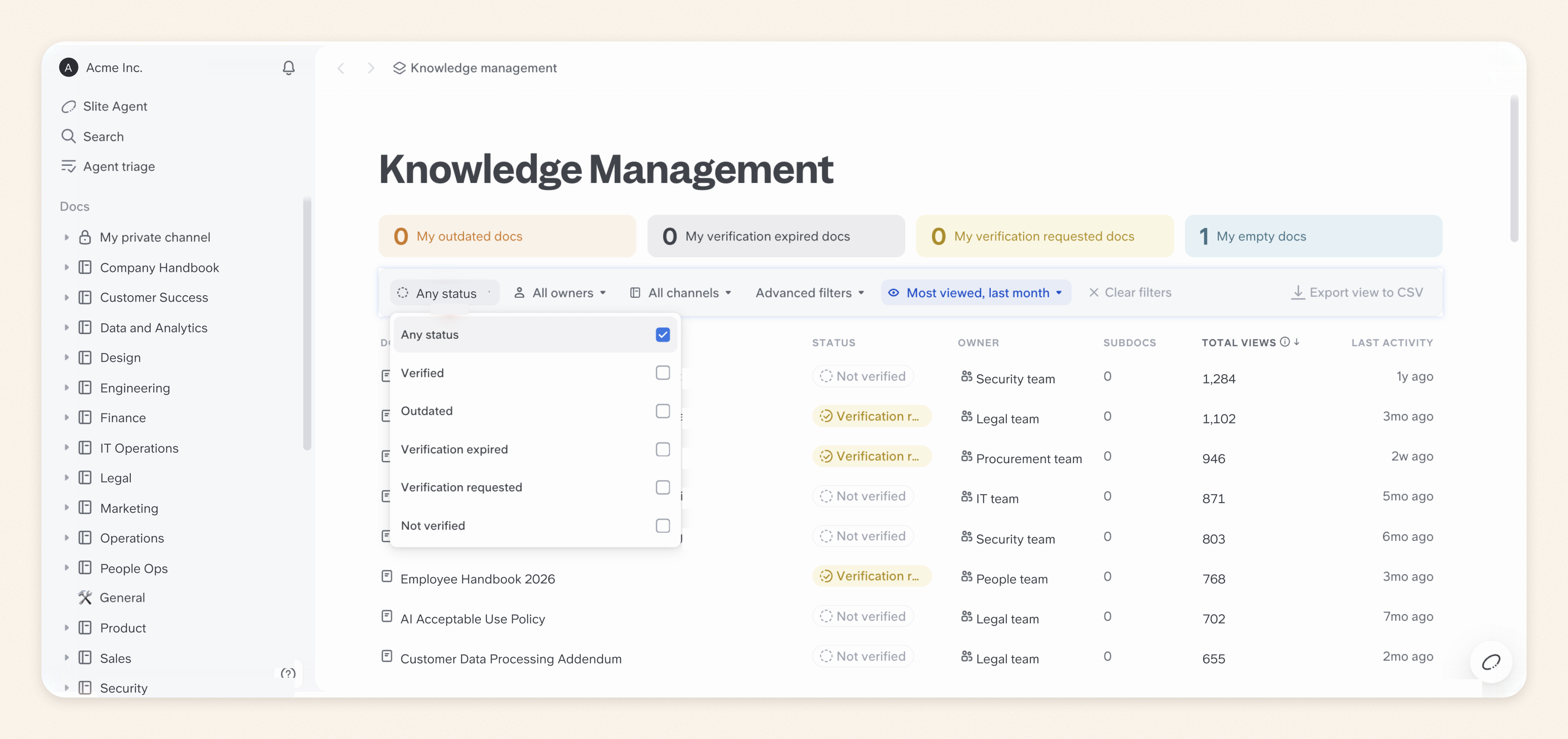
With Slite, you can mark authoritative documents as Verified so they rank higher in AI results. If a document is no longer reliable, you can flag it as Outdated so Slite Agent excludes it from retrieval.
2. Assign clear ownership and accountability
Even when several people can edit a company document, someone needs to be responsible for keeping it accurate and resolving conflicting versions.
In our survey of 149 AI-forward teams, 78% of respondents identified verification by a named human owner as a factor that made company knowledge more trustworthy.
To assign clear ownership of your company knowledge:
- Assign ownership by expertise: Your HR team should be responsible for employee policies, while engineering oversees technical documentation. Assign someone to maintain the instructions that tell AI which sources to use, too.
- Define who approves AI-generated changes: Specify who can review and approve updates to authoritative documents. Responsibility for those decisions should sit with the people accountable for the information.
- Make ownership visible: Keep a record of who's responsible for each important document and how ownership is reassigned when people change roles. Make this part of your broader knowledge management strategy.
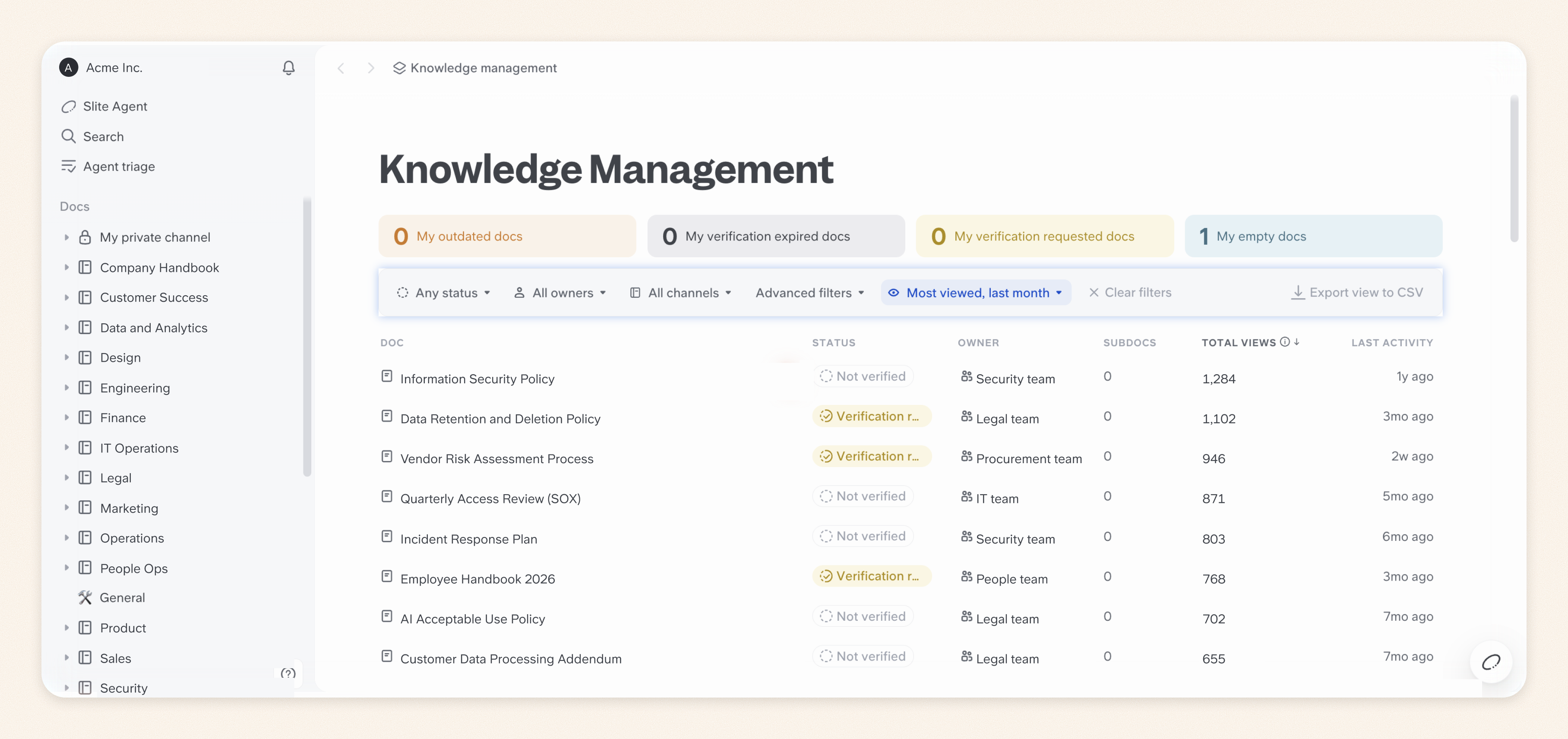
With Slite's Knowledge Management Panel, you can identify unowned documents, filter by owner, and reassign ownership in bulk. This makes it easier to address accountability gaps.
3. Keep AI source knowledge current
As time goes on, expect your company knowledge to become outdated. It's a normal part of how companies operate. Documents get copied, processes change, and information that was once accurate may no longer reflect how things work in your company.
However, without systems in place to identify and update outdated information, your AI systems may continue treating it as the current source of truth. In our research on stale documentation, 25% of respondents said they were still handling stale documentation reactively, without a formal system in place.
- Establish verification cycles: Set review schedules based on how frequently information changes, with more frequent checks for critical policies, procedures, and technical documentation.
- Do regular maintenance routines: Track changes in connected systems, identify contradictions between sources, and have document owners review discrepancies. Mark unreliable information as outdated until it's corrected, so AI agents don't continue treating it as authoritative.
With Slite, you can schedule document verification and use Slite Agent to identify potential knowledge drift and propose updates for review.
Slite Agent can read context from connected systems such as GitHub and Jira, but doesn't write changes back to those external tools.
4. Keep humans in the loop for AI-generated changes
To prevent mistakes made by AI agents from becoming part of your official company knowledge, keep humans in the loop. Document owners can inspect what an AI agent wants to change, compare the proposed edits with the original content and supporting evidence, and catch mistakes before they become part of the information employees and other AI agents rely on.
To make sure people can review, approve, and trace AI-generated changes:
- Review AI-generated changes before they're applied: Have agents present proposed edits alongside the original content and supporting evidence. An authorized reviewer should be able to approve, correct, or reject the changes.
- Set approval requirements based on risk: A minor formatting correction shouldn't require the same scrutiny as changes to an official security policy. Limit direct-write permissions for agents handling sensitive or consequential information.
- Identify activity originating from AI agents: Keep track of whether document changes and other activities came from a person or an AI agent, including those working through external integrations.
With Slite Agent, for example, you can inspect proposed document changes, review the differences and supporting context, and accept or dismiss suggestions in Triage before they're applied. Beyond this, Slite also shows whether activity in comments, the activity log, and document revisions originated from Slite Agent, MCP, or the API, so you can distinguish AI activity from human contributions.
Important: Bear in mind that the Triage approval process only applies to Slite Agent's proposals. When you use external agents connected through Slite MCP, they can edit documents directly using the connected user's permissions without going through Triage. So make sure you review their write permissions and any approval settings in your AI client before allowing them to edit important company knowledge.
5. Make AI answers traceable to their sources
Employees should be able to see where an AI-generated answer came from and verify the information before acting on it. Otherwise, they risk relying on answers that sound convincing but aren't supported by accurate or reliable company knowledge.
In our survey, 63% of respondents identified a link to a live, authoritative source as a factor that made company knowledge more trustworthy.
At Nedap, an earlier custom GPT confidently gave incorrect answers about basic company policies. André Foken, the company's CTO, appreciated that Slite Agent could provide sourced answers and acknowledge when it didn't know something:
“Previous solutions always knew something. They were never right, but they were fully convinced. That ‘I don’t know’ response was the biggest breakthrough.”
To make AI-generated answers easier to verify:
- Require source citations: Ensure AI answers include links to the documents or records supporting their claims, so employees can inspect the original information.
- Make source context available: Let users check whether a cited document is current, who owns it, and when it was last verified.
- Handle missing or conflicting evidence: Configure AI systems to acknowledge uncertainty or flag discrepancies when their sources cannot support a reliable answer.
With Slite Ask and Slite Agent, employees can follow source citations to inspect the company knowledge behind AI-generated answers, rather than relying on the response alone.
6. Control access to sensitive company knowledge
When you connect AI agents to your company tools, it shouldn't give everyone and the AI agents they use unrestricted access to the information inside them. You need proper permission checks to prevent employees from receiving AI-generated answers containing information from private documents or customer records they aren't authorized to view.
To control who can access sensitive company knowledge through AI:
- Enforce permissions during retrieval: Ensure employees can only receive AI answers based on information they're authorized to access, including across connected tools.
- Restrict access to connected sources: Review the permissions granted to integrations, service accounts, and AI agents. Apply least-privilege access, giving each agent only the permissions its tasks require.
- Test your permission boundaries: Test your knowledge base security rules using employee, contractor, and administrator accounts, particularly for private channels and restricted documents.
With Slite Agent, for instance, access to connected sources follows one of two models, depending on the integration. Mirrored access respects each user's permissions in the original tool, while Shared access lets workspace admins control which users and groups can query connected information.
7. Maintain an audit trail
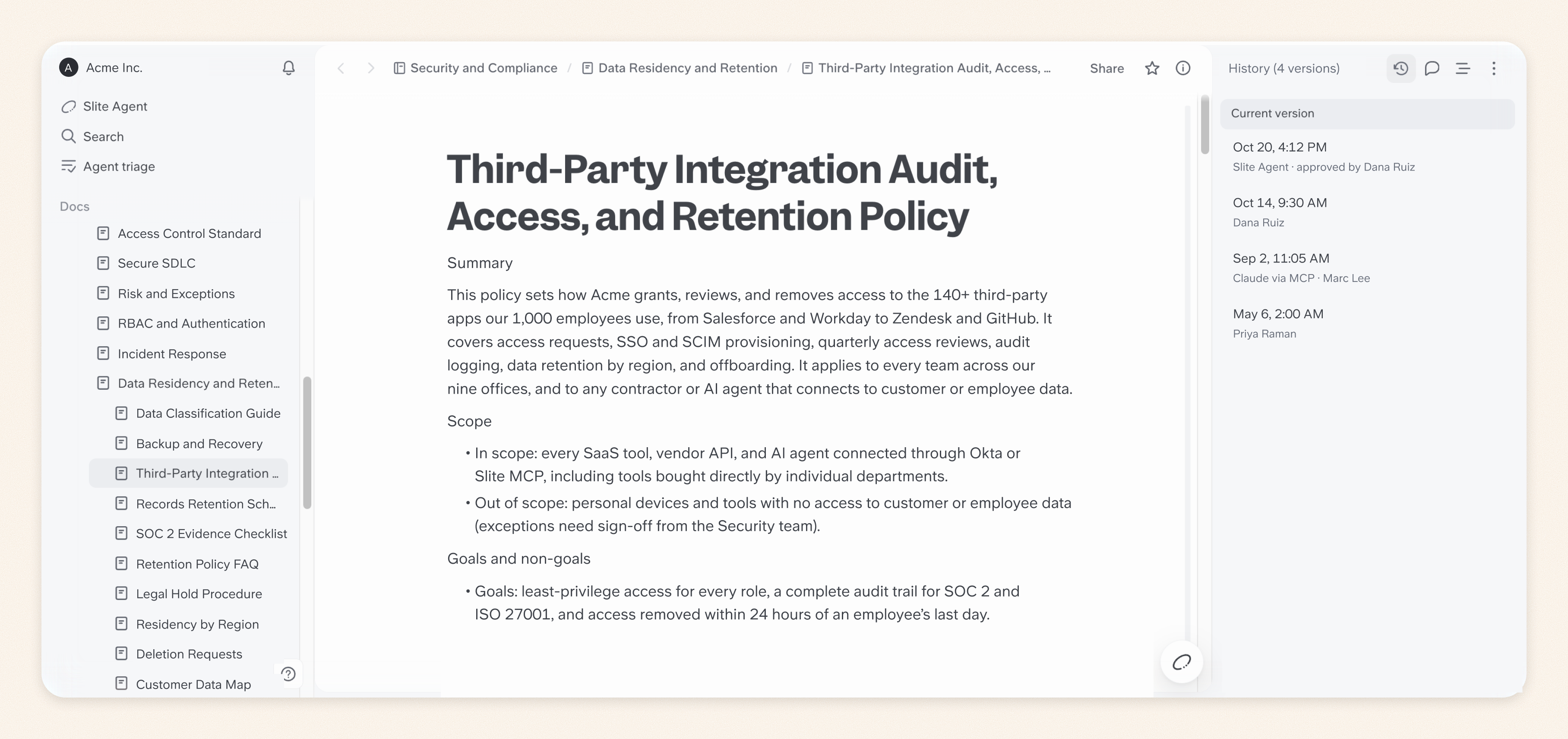
If an AI agent modifies an important company policy and someone questions the change later, you need to reconstruct what the document originally said, who changed it, and who approved the change. An audit trail gives you the evidence to investigate mistakes and establish which version of the policy was in effect at the time.
To make sure you have a reliable record to refer back to:
- Track changes and their authors: Record what was modified, when it happened, and whether a person, AI agent, or integration made the change.
- Preserve previous versions and approvals: Use document version control to keep earlier content and approval records so you can reconstruct what was in effect at a particular time.
- Review audit records: Investigate unauthorized changes, recurring errors, or discrepancies between approved and published information.
With Slite's Document History, you can inspect previous versions, compare changes, identify human or AI contributors, and restore earlier content. Enterprise audit logs provide additional visibility into workspace activity.
8. Measure whether your governance controls work
Expect new gaps to emerge in your governance processes as your company knowledge and AI systems evolve. To identify these gaps, you need to assess how well your existing controls are working and check whether the changes you make actually solve the problems you find.
To evaluate and improve your governance processes over time, track:
- Knowledge health: Monitor the percentage of important documents with assigned owners and current verification, alongside the backlog of outdated or unreviewed content.
- AI answer quality: Track incorrect or unsupported answers, unanswered questions, and whether the cited sources actually support the information provided.
- Review and resolution times: Measure how long it takes to review AI-proposed changes and resolve identified knowledge gaps or discrepancies.
With Slite, you can use the Knowledge Management Panel to monitor documentation health, while Ask Insights helps you identify unanswered questions and answers employees have flagged as incorrect.
When these metrics reveal a problem, assign it to the appropriate owner, investigate the cause, and retest the affected AI responses after making the necessary corrections.
AI governance implementation checklist
Before rolling out an AI assistant across your company, find out what happens when it encounters a restricted document or an outdated policy.
Start with one limited workflow, such as an assistant answering questions from approved company knowledge. Below is a checklist you can use to test its controls and record evidence that they're working.
- Map your AI's knowledge sources: List the documents, databases, and connected tools your AI system can retrieve information from, including which sources are approved for its intended use.
- Verify source authority: Test how the system handles outdated documents, unapproved drafts, and conflicting information. Confirm it doesn't treat these sources as equally authoritative.
- Confirm ownership and review schedules: Check that critical documents have assigned owners, verification dates, and a process for reviewing changes.
- Test access permissions: Use accounts with different permission levels to confirm the AI cannot retrieve private information for unauthorized users.
- Test human approval controls: Have an agent propose a change to a test document. Verify that consequential changes require the appropriate approval, and check whether any connected agents can bypass that process.
- Check answer provenance: Ask questions with known answers, then inspect the citations to confirm they support the responses. Test what happens when the information is missing.
- Verify audit records: Make a test change and confirm you can identify who or what made it, when it happened, and what was modified.
- Set up ongoing monitoring: Decide which metrics you'll use to measure the effectiveness of your controls, who will review the results, and how often.
For any failed check, assign an owner, document the corrective action, and retest before expanding the AI workflow. Keep the test results and relevant approval records as evidence of your governance checks.
What happens when AI governance fails?
When AI systems rely on unreliable company knowledge or operate without appropriate controls, employees may act on bad information before anyone catches the mistake, while AI agents with excessive permissions can make changes that affect the wider business.
Here are some of the consequences:
- Employees can make decisions based on incorrect information: An AI assistant might retrieve an outdated refund policy and tell a support representative that a customer isn't eligible for a refund. The team then has to correct the decision and handle the resulting complaint. This is one of the dangers of stale documentation, especially when AI makes outdated information easier to find and reuse.
- Sensitive company information is easily exposed: If AI systems don't respect access permissions, employees could receive answers containing confidential documents or customer records they aren't authorized to view. Depending on the information exposed, this could lead to security investigations and compliance issues.
- Unapproved changes affect how people work: An AI agent might modify an important procedure without human review. Employees could then start following incorrect instructions, and other AI systems retrieving that document may repeat the same mistakes.
- Investigating and correcting mistakes becomes difficult: Without source citations or reliable activity records, teams may struggle to identify where an incorrect answer came from or determine which documents an agent changed. This can delay recovery while employees continue relying on the affected information.
Govern the knowledge behind your AI with Slite
When company policies or processes change, the information your AI relies on needs to change with them. Slite helps you manage which documents are trustworthy, identify outdated information, and review AI-proposed updates before they become part of your official company knowledge.
Here's how you can put some of these controls into practice in Slite:
- Mark unreliable documents as Outdated. Open the affected document, click its verification status, and mark it as Outdated. Slite Agent excludes outdated documents from retrieval, while Slite Ask gives them lower priority in results.
- Verify documents your AI should trust. Once a document owner has reviewed and updated the information, mark the document as Verified and set a future review date. Verified documents rank higher in Slite's AI search results, and owners are notified when their verification expires.
- Check whether your documentation still reflects how things work. Connect relevant tools such as Slack or Linear to Slite Agent. Open a document and run Agent Maintenance to check it against those sources. When the Agent finds discrepancies, review its proposed changes and supporting evidence in Triage before applying them.
- Find and fix gaps in AI answers. Open Ask Insights and check the Reported and Missing answer tabs. Assign a teammate to investigate the issue, update the relevant documentation, and generate a new answer to check whether the problem has been resolved.
You can also set up maintenance routines for important documents. With Slite's self-maintaining knowledge base, Slite Agent checks for changes and proposes updates for your team to review before they're applied.
Want to see how these controls would work with your existing knowledge base and connected tools? Book a demo, and we'll walk you through it.
FAQs
What is the difference between AI governance and data governance?
Data governance focuses on how organizations manage data quality, ownership, access, and security. AI governance has a broader scope, covering how AI systems use that information, generate outputs, make decisions, and operate under human oversight.
Who is responsible for AI governance in an organization?
AI governance is typically a shared responsibility involving leadership, IT, security, compliance, and relevant business teams. Organizations should designate clear owners for specific AI systems, risks, and the knowledge those systems rely on.
How often should an AI governance framework be reviewed?
Review your AI governance framework regularly and whenever significant changes occur in your AI systems, business processes, or regulatory requirements. Higher-risk systems may require more frequent assessments and continuous monitoring.
Do AI governance rules apply to third-party AI tools?
Yes. If a third-party AI tool accesses company knowledge, you still need appropriate controls over what information it can retrieve, how that data is handled, and what actions the tool can take. Review the provider's policies and configure permissions before connecting sensitive sources.