In a lot of companies, the knowledge management process comes down to finding whoever knows.
Someone needs to know how something works, finds a document that may or may not be current, and goes looking for the person who wrote it. That person has often moved on, or no longer remembers the details.
So people piece the answer together from chat threads and colleagues, and sometimes write a new document along the way. The next person to ask goes through the same search, with one more version to choose from.
Knowledge needs a route that doesn't depend on who remembers what. That takes a repeating routine, where each stage has something that starts it, a person responsible for it and a clear result. Below, we walk through the five stages from capture to retirement, who is responsible for each one, and how to tell when a stage is failing.
Key takeaways
- Five stages are enough to give each kind of knowledge work its own trigger and owner, even though published models range from three to ten.
- Capture depends on agreeing the moments that count, such as a decision or a question asked twice.
- An old document has five possible outcomes: keep, merge, archive, delete or keep as history.
- Repeated symptoms show which stage is leaking, so you can fix that stage first.
- A maintenance routine, with an AI agent doing the checking and a person approving changes, keeps documents accurate as the work changes.
- AI agents read old and new documents alike, so outdated documents lower the accuracy of their answers even when the current answer is available.
What is the knowledge management process?
The knowledge management process is the repeating set of stages that moves knowledge from conversations and people's heads into trusted documents, confirms they're correct, keeps them accurate as things change, and retires them when they stop being useful. The five stages are capture, organize, verify, maintain and retire.
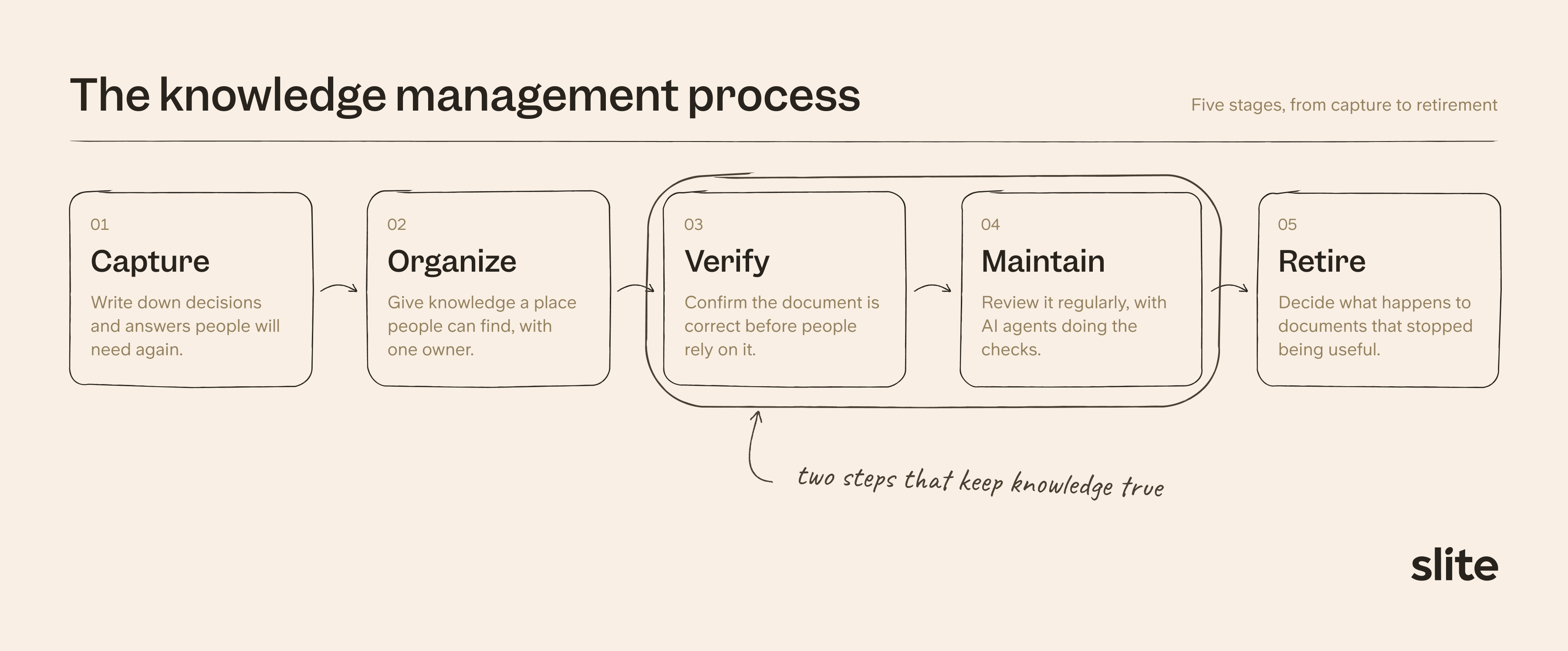
Because the stages repeat, people also call this the knowledge management cycle or lifecycle. They overlap in practice, and several can run on one document at the same time.
| Stage | What starts it | Who's responsible | What you end up with |
|---|---|---|---|
| Capture | A decision is made, or the same question comes up twice | The person who made the decision or gave the answer | A short document with the decision, the reason and the date |
| Organize | New knowledge needs a home, or a duplicate turns up | The lead of the team the knowledge belongs to | An updated document, or a new one in the right place with an owner |
| Verify | A document is new, or has changed significantly | The document owner, or someone who knows the subject | A visible status and date |
| Maintain | A review date arrives, the subject changes, or a reader flags a problem | The document owner | A correction, a new review date or a named replacement |
| Retire | A document has been replaced or duplicated, its subject is gone, or it can't be confirmed | The document owner, or the team lead if the owner has left | A recorded outcome and a named replacement, if there is one |
The process is one part of wider knowledge management. It covers what happens to the knowledge day to day, while a strategy sets up the program around it, including roles, rollout and goals.
How many stages does the knowledge management process have?
There's no universal standard for how many stages a knowledge management process should have, and published knowledge management frameworks and guides range from three to ten.
After nearly 10 years on the market as a knowledge base, we at Slite recommend five:
- capture,
- organize,
- verify,
- maintain
- and retire.
Capture: how a decision gets out of Slack and into a document
Knowledge capture is the stage where knowledge from a conversation, a meeting or someone's experience becomes a written document. It usually starts when a decision is made, or when someone answers a question that others are likely to ask again. The person closest to the decision is in the best position to write it up, since they know what was decided and why.
A useful capture document is short.
It records the decision, the reason behind it and the date, along with links to any related tickets or documents.
That's usually enough for someone who wasn't in the conversation to understand what happened and act on it.
It helps to agree as a team on which moments are worth writing up. Common examples include:
- decisions made in a Slack thread,
- questions that come up more than once
- and processes explained to a new hire.
AI summaries of meetings or threads can provide a first draft, which the author then checks for anything that was missed.
Some knowledge never comes up in a conversation, because experienced people apply it without thinking to explain it. Capturing this kind of tacit knowledge usually takes interviews or time spent shadowing them, and a knowledge transfer plan gives that work some structure before someone changes roles.
Organize: how knowledge gets a structure people can navigate
Organizing gives knowledge a structure people can find their way around. That usually means a channel for each team or topic, parent documents that group related ones, and internal links that connect a document to the ones around it.
It helps to agree on this structure ahead of time, so each team isn't building its own. A simple outline of what goes where is often enough, and new hires can learn it during onboarding.
The structure also shapes what happens when someone has new knowledge to add. They can search for an existing document first, then update it or add to it, which keeps the knowledge base organized as it grows.
A new document makes sense when nothing covers the topic yet, and the structure shows where it belongs.
Each document also needs one named owner, who is responsible for keeping it accurate. Team leads often take on this role or assign it within their team, and they can reassign a document when its owner changes roles or leaves.
Verify: how a document gets confirmed before people rely on it
Verifying a document confirms that it’s correct before people and AI agents start relying on it. The owner checks it, or asks someone who knows the subject if they aren't sure. A visible status and date then tell readers how far they can trust it.
Verification applies to documents meant to stay true over time, such as processes, references and how-tos.
Meeting notes, retrospectives and finished project plans record what happened at a certain point, so they don't need the same check.
Once a document is verified, people can link it from the channels and related documents they already use, and AI agents can read it through MCP or an API. Product documentation, for example, needs to reach marketing and support before customers start asking about a release.
Maintain: how a document stays true after it's published
Maintaining keeps a verified document accurate as the work around it changes. Reviewing every document by hand stops being realistic as a knowledge base grows, so it helps to turn this work into a routine.
Set up a maintenance routine
A maintenance routine says which documents to look after, how often to check them, what to check them against and who reviews the result. A good place to start is the documents people rely on most, such as processes, policies and how-tos.
The source depends on the document.
A product document might be checked against the code or release notes, and a process against the tickets or Slack channel where it changes.
Documents also need checking outside the routine when something they describe changes or a reader flags a problem.
Each review ends in one of three ways:
- If the content is wrong and the owner knows the correct version, they edit the document.
- If it looks wrong but they aren't sure, they ask the person who knows and say exactly what needs checking.
- If another document has replaced it, they mark it as outdated and name the replacement.
A routine needs a named person behind it, because updates rarely happen by themselves.
Fewer than 1 in 20 documents get updated in a given month, and in our experience company-wide reminders don't change that much. Knowledge base maintenance covers how to decide which documents to fix first.
How AI helps with maintenance
AI agents can do the checking that people rarely have time for. An agent can compare each document against its connected sources on a schedule, spot outdated content and draft the correction.
The owner's job then becomes reviewing proposed changes instead of hunting for problems.
A person should still approve each change before it's applied, which keeps a mistaken edit out of the documents people and other agents rely on. This is how a self-maintaining knowledge base works.
Retire: how to decide what happens to an old document
Retiring is a recorded decision about a document that has stopped being useful. It usually comes up when a document has been replaced, a duplicate turns up, its subject no longer exists, or verification can't confirm it's still correct. The owner makes the decision, or the team lead if the owner has left.
There are five possible outcomes: keep the document, merge it into another one, archive it, delete it, or keep it as a historical record.
What retirement means for people
For people, retiring old documents saves time, because there are fewer to go through to find what's useful. It also avoids confusion over which version is current, and people are less likely to write a duplicate when the right document is easy to find.
Anyone who comes across the old version should be able to see what replaced it, so a short note with the replacement and the date it stopped applying is usually enough.
Retirement often creates new capture work as well. Someone may need to write down what replaced the document and let the people who relied on it know, which starts the loop again.
What retirement means for AI agents
AI agents read whatever they can reach, so outdated documents can affect their answers. In one benchmark, outdated information caused at least a 20% drop in performance even when the current answer was also retrieved. The test used public data, so applying it to company documents is our inference.
We recommend removing retired content from what agents read by default. A person might check a stale document with a colleague, whereas an agent repeats it with confidence, which is one of the main dangers of stale documentation.
Bulk changes need some care too. When an agent or a colleague archives many documents at once, useful ones can get caught, and someone has to restore them by hand. Having a person review bulk changes, and keeping a record of what was archived and why, makes this easier to avoid and to undo.
How to tell which stage is leaking
Repeated symptoms point to the stage that's failing. Start with the symptom you hear most often, and fix that stage before moving on.
| Symptom | Likely stage | First fix |
|---|---|---|
| The same answer gets reposted in Slack | Capture | Name who writes it up, and when |
| People create a new document because they can't find the old one | Organize | Search first, and agree where each type of document goes |
| Colleagues confirm answers in Slack anyway | Verify | Show a visible status on the documents they rely on |
| Review requests get ignored and the unverified count stays flat | Maintain | Make review part of the owner's role |
| Old documents or drafts appear in AI answers | Retire | Choose one of the five outcomes for each |
How AI changes the knowledge management process
AI makes capture faster, so teams produce more documents with no extra review time. It also reads everything it can reach, so the verify, maintain and retire stages matter more than they did.
In our own data, users with AI access create 55% more documents each month than users without it. An unreviewed draft can then end up quoted as fact in an AI answer soon after someone writes it.
Agents read your documents too, so what they have access to decides what they can quote.
Give them the documents your team has verified, and keep working drafts out of their default sources.
How to run the knowledge management process in Slite
Slite is a knowledge base built to keep your company's source of truth up to date, so your team and the AI tools they use can act on what's true today. It runs all five stages in one place. The upkeep that usually gets dropped, checking and correcting documents, is handled by Slite Agent, our AI agent, with your team approving each change.
Some knowledge gets written down on purpose: a team sets aside time to document a process, using a shared template or the Slite editor. Other knowledge comes up in the middle of the work, and Slite makes that easy to pick up. When a decision lands in a Slack thread, anyone can tag @Slite to turn the thread into a document without leaving the conversation.
Some gaps are harder to spot. Ask Insights shows the questions people asked that went unanswered, and you can assign each one to the teammate who knows. For knowledge that only sits in someone's head, you can run an interview to collect it.
That knowledge then needs a home people can find. Each team gets its own channel, reachable from the sidebar, a URL or search, and each document gets an owner, so someone is always responsible for keeping it right. The Knowledge Management Panel lists every document by owner, status and channel, so you can reassign or archive them in bulk when teams change.
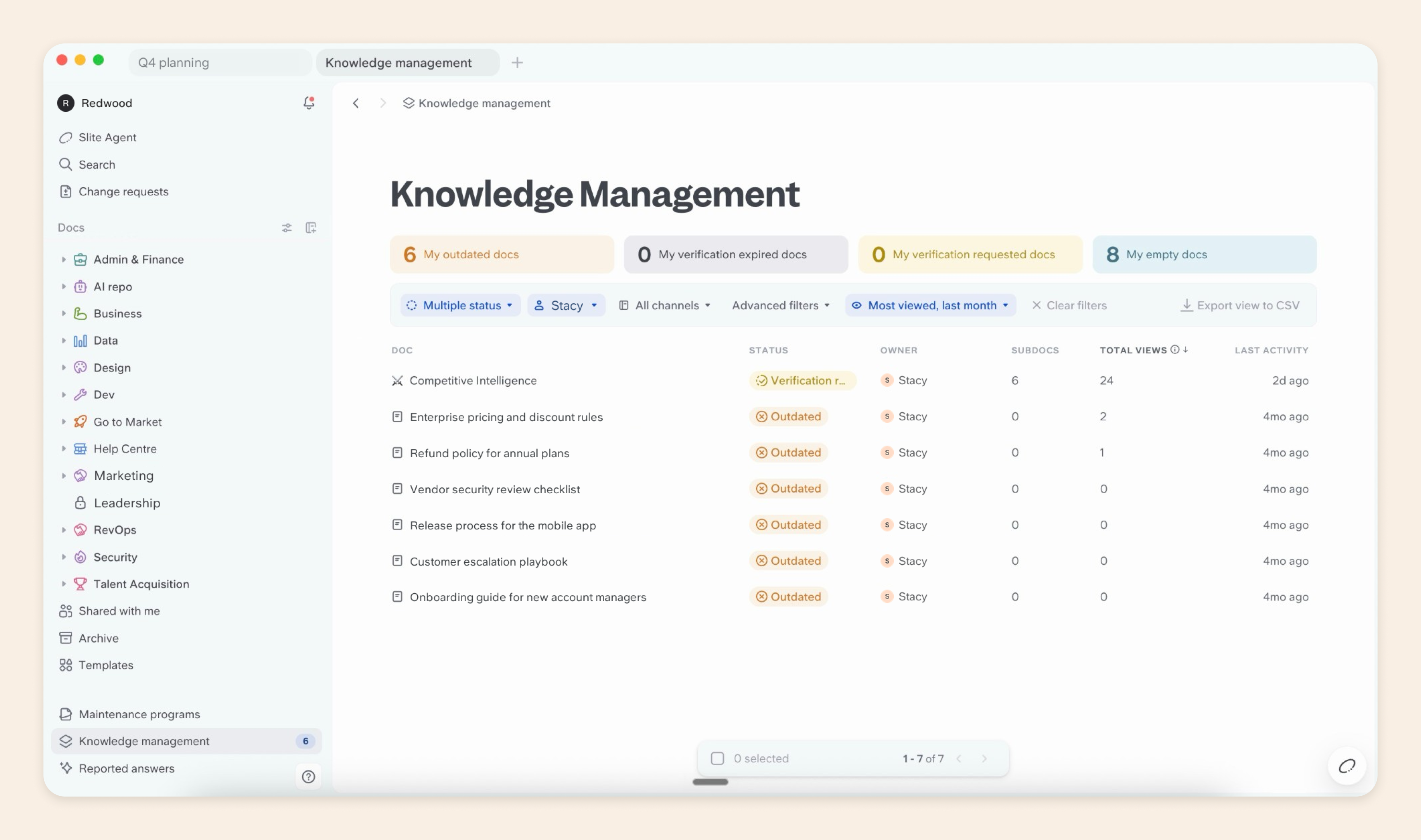
Once a document is checked, its owner can mark it as verified, and readers can see whether to trust it before they act on it. Ask and Slite Agent answer with sources and rank verified documents higher, so people get the checked version first. Tools like Claude, ChatGPT and Cursor can read the same documents through MCP.
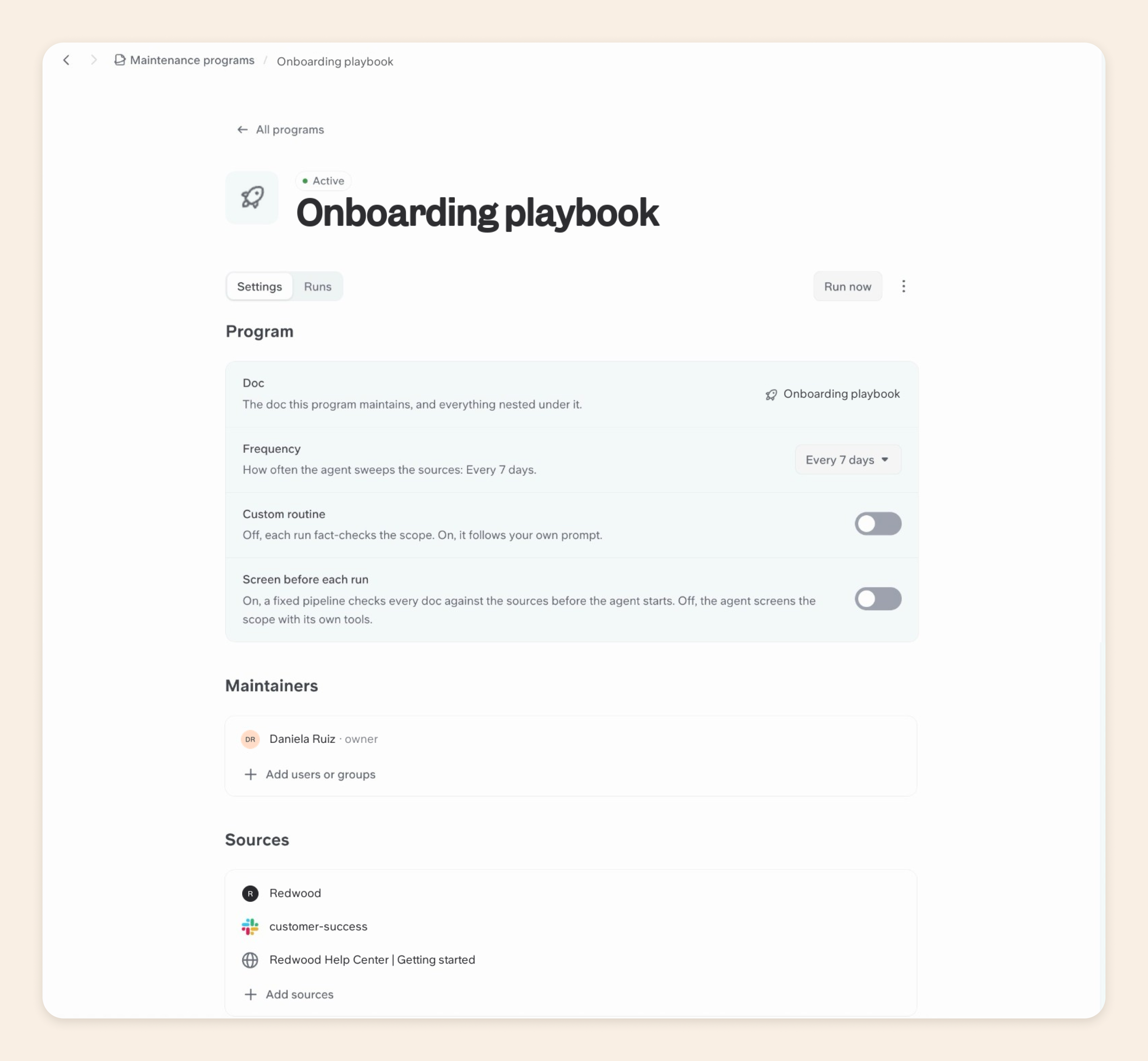
Keeping those documents true is the stage teams struggle to keep up with, because it's rarely anyone's main job. With a maintenance program, you choose a document, how often to check it, which sources to check it against, such as Slack, GitHub or Google Drive, and who reviews the result.
On each run, Slite Agent compares the document with those sources and drafts a correction wherever they no longer match. It can also verify a document that's still accurate, suggest a new owner or suggest archiving one that's no longer needed. For other jobs, you can write your own instructions, such as keeping an org chart document up to date.
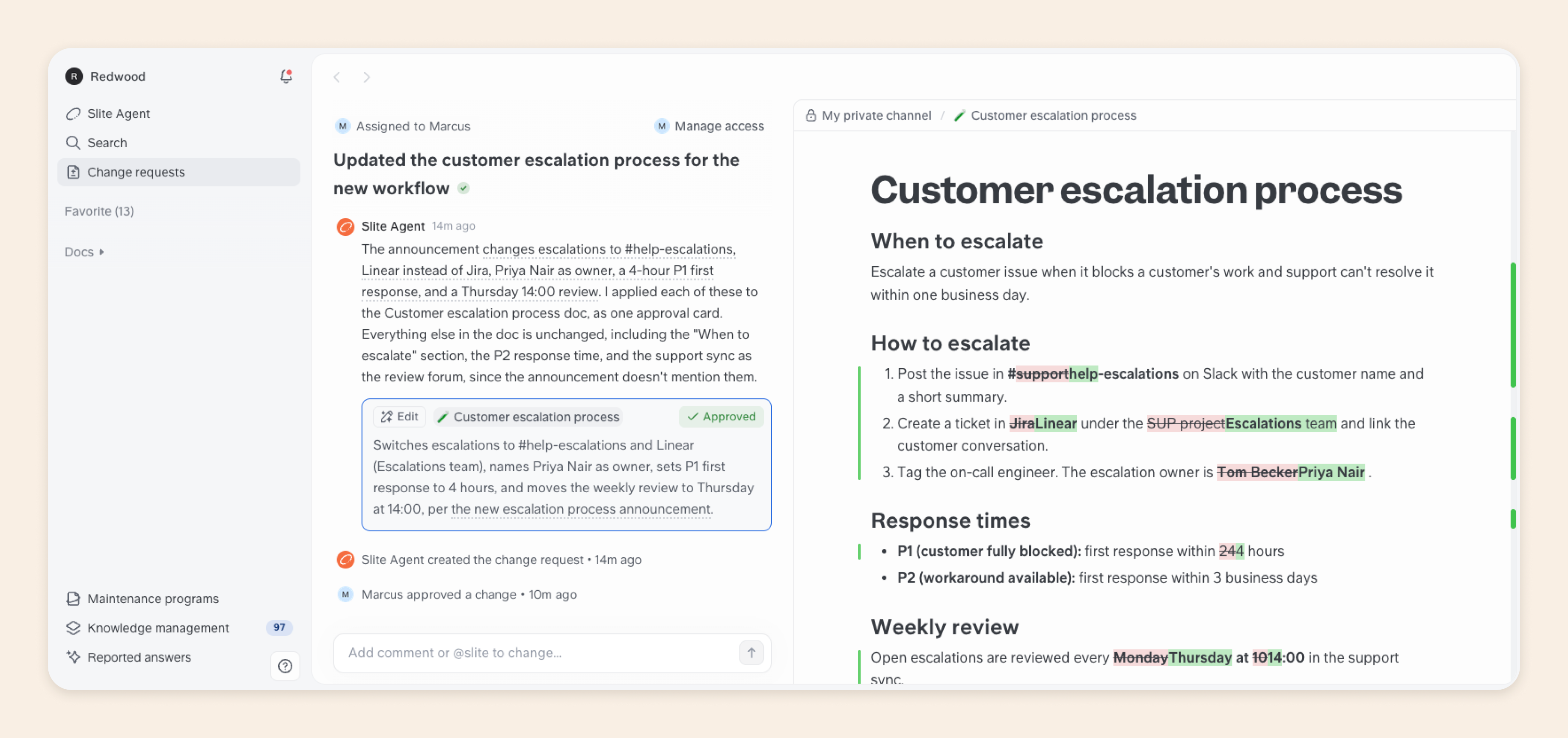
Your team stays in control of every change. Each correction arrives as a change request, assigned to the person responsible and showing exactly what would change. They can approve it or ask Slite Agent a follow-up question, and nothing changes until someone approves it, so maintenance takes minutes instead of hours.
When a document has run its course, you can archive it. It stays out of search and AI answers by default, so nobody gets an old answer, and you can restore it if you need it later. Documents you no longer need at all can be permanently deleted from the Archive.
If you'd like to see how this works on your own documentation, book a demo and we'll walk you through it.
Final thoughts
Knowledge stays reliable as a company grows when every stage has someone responsible for it, including the last one.
The smallest useful habit is a one-line note on any replaced document, saying what replaced it and when it stopped applying. People and agents can both use that note the same day.
FAQ
What are the 5 C's and 5 pillars of knowledge management?
Lists under these names vary, and neither is a settled standard. Map whichever list you come across to the stages your team actually runs.
Who owns the knowledge management process overall?
One person keeps the whole loop running, often in operations, IT or a dedicated knowledge role. Document owners handle each stage for their own documents, and a knowledge management strategy sets out how those roles fit together.
How often should you review a document?
Base it on how quickly the subject changes, with three, six or twelve months as common periods. A change to what the document describes should also trigger a review, whatever the date.
What happens to a document when its owner leaves?
The team lead takes it over and reassigns it. Add document ownership to the handover, and cover it in the exit interview so nothing is left without an owner.