An approved document is only useful if you can prove its history.
An auditor may start with the current policy, but they rarely stop there. They ask which version was approved and when the process happened. They ask what changed after approval, who made the change, who reviewed it, and whether the previous version is still available.
That stage is where the cracks in many document-control systems begin to show. The current file may be correct, but the proof behind it is scattered across a version table, a shared drive, an approval email, a downloaded PDF, and someone’s memory of what was in force at the time.
For regulated teams, that is not enough. Compliance depends on proof. If a QMS document, security control, legal template, or clinical workflow changes, the team needs a defensible record of the change: what the document said before, who changed it, when it changed, and which version was approved at a specific point in time.
Document version control for compliance is the system that preserves that proof. It shows what changed, who changed it, when it changed, and which version was approved at the time.
In this article, we’ll break down what audit-ready version history needs to prove, how it differs from access logs and verification status, what to include in a version control table, and how Slite helps teams keep document history traceable, reviewable, and easier to defend.
Key takeaways
- Document version control for compliance is about keeping a defensible history of every important revision.
- Audit-ready revision history should show what changed, who changed it, when it changed, and which version was approved.
- Content version history, access audit logs, and verification status prove different things. Teams need all three, but they should not collapse them into one idea.
- Regulated teams need point-in-time reconstruction: the ability to show what a policy, SOP, QMS document, or controlled process said when a process, incident, review, or audit happened.
- Frameworks such as FDA 21 CFR Part 11, HIPAA, SOC 2, ISO, SOX/PCAOB, and GxP all push teams toward traceable, time-stamped, attributable documentation practices.
- Slite supports the practical side with Document History, word-level diff, attribution, restore, verification states, and human/agent edit traceability.
What is document version control for compliance?
Document version control for compliance is the practice of tracking and preserving important document revisions so a team can prove what changed, who changed it, when it changed, and which version was approved.
General version history tells you that a document changed. Audit-ready version history goes further. It helps you reconstruct the document’s lifecycle across authoring, review, approval, publishing, expiry, and later revisions.
That difference matters because controlled documents are rarely just reference material.
A refund policy may define what Support can promise. A security procedure may define how an incident is handled. A QMS document may define how a regulated process is performed. A legal template may define which terms were approved at the time of a contract review.
In those cases, the document is part of the control environment. The team does not only need a clean current version. It needs a history that can explain how the current version became current.
This is also why document version control is related to, but not the same as, a single source of truth. A source of truth tells people which answer to trust now. Version control shows how that answer changed over time.
What auditors expect from document revision history
Auditors usually care less about the label on the tool and more about the evidence it can produce.
- Can the team show the approved version?
- Can it show who changed it?
- Can it show when the change happened?
- Can it show that prior information was not silently overwritten?
Software-as-a-medical-device teams and other regulated teams often need to prove the same things during audits: the latest approved version, the moment of verification, and every change made after approval. Some teams try to keep that record in a manual table at the beginning of each document, but the table itself can go stale.
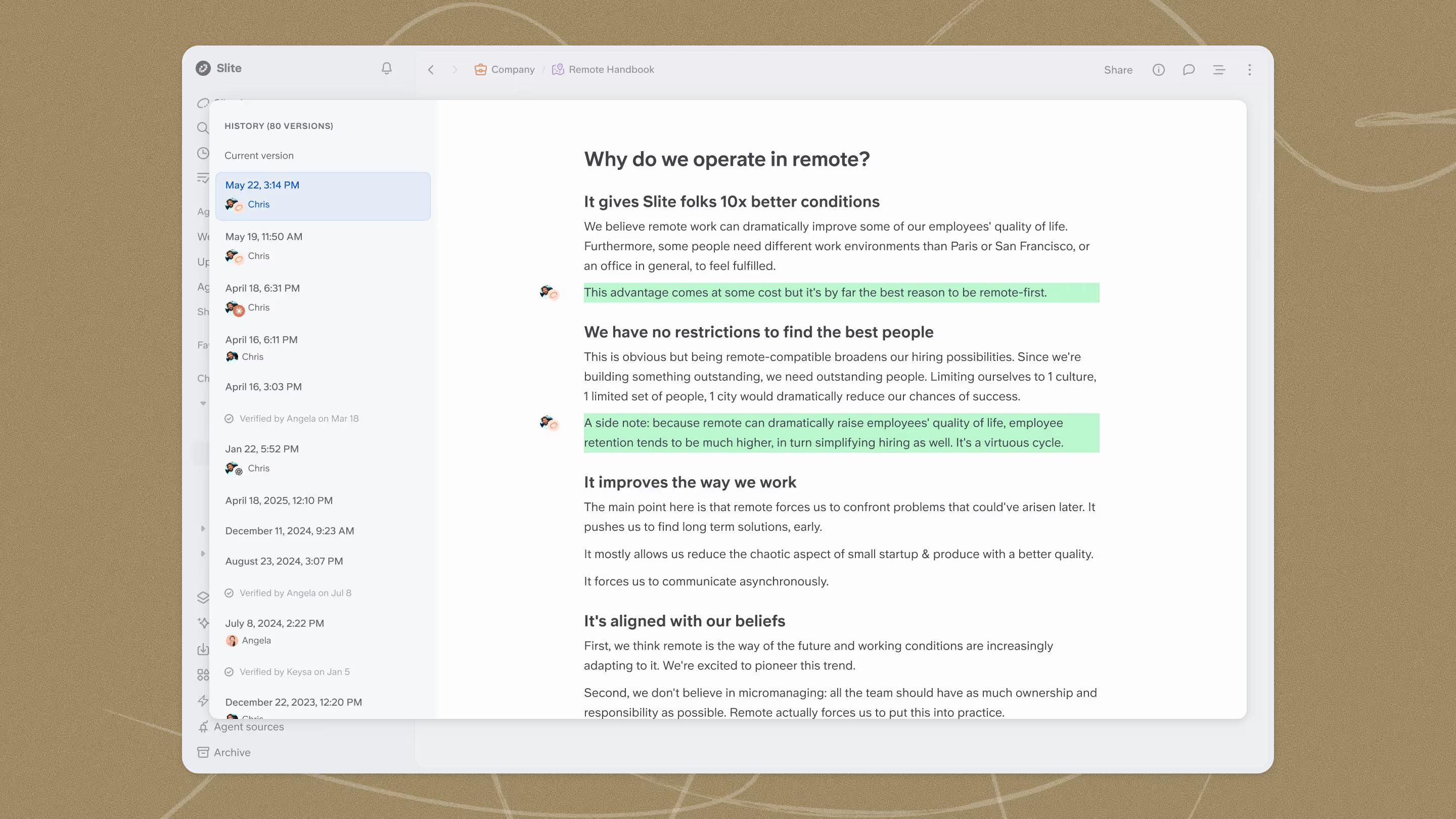
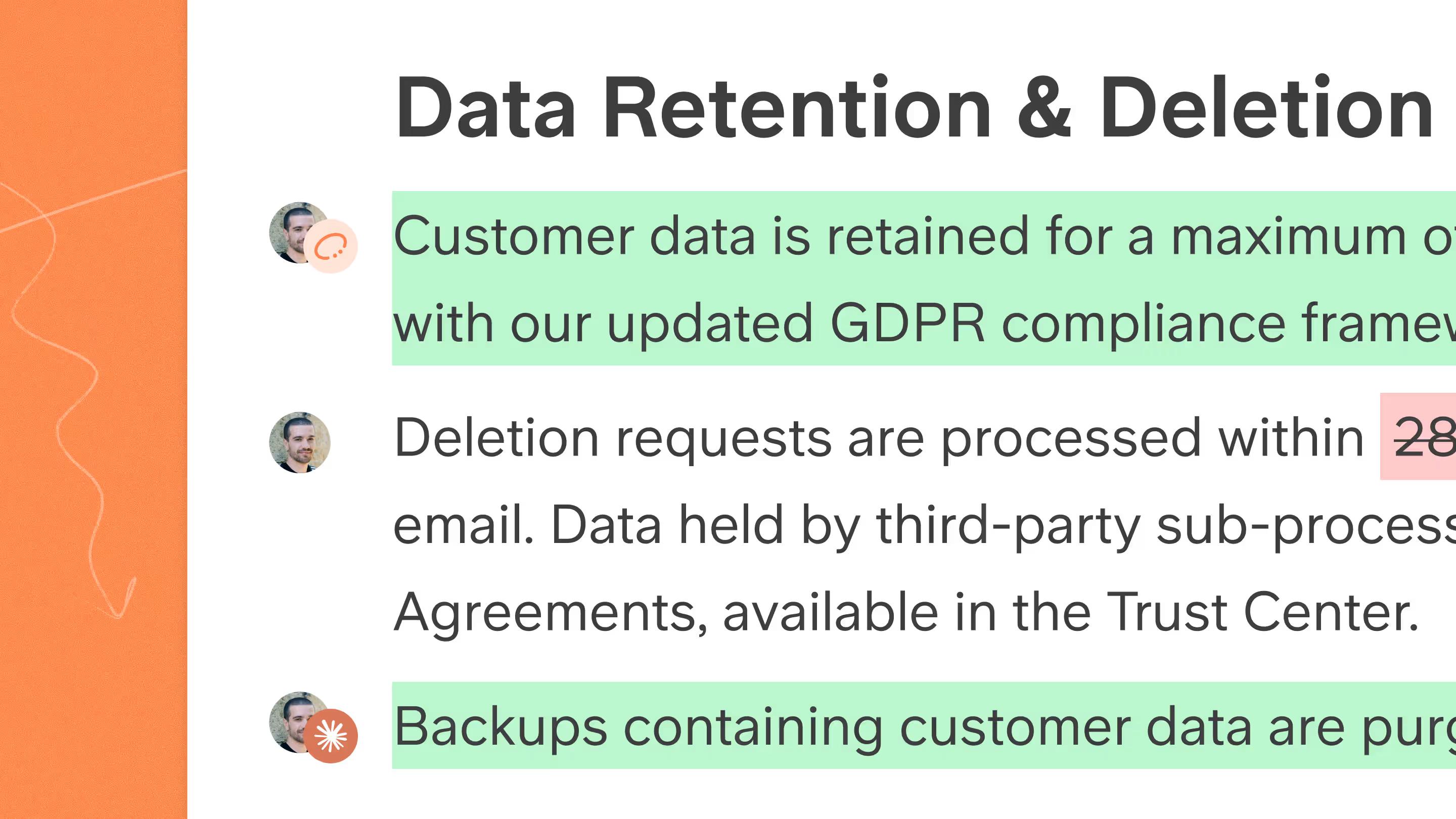
Slite handles that record inside Document History. When a document owner verifies a page, Slite records the verification event directly in the document timeline, along with the verifier, timestamp, and post-approval changes at word-level precision.
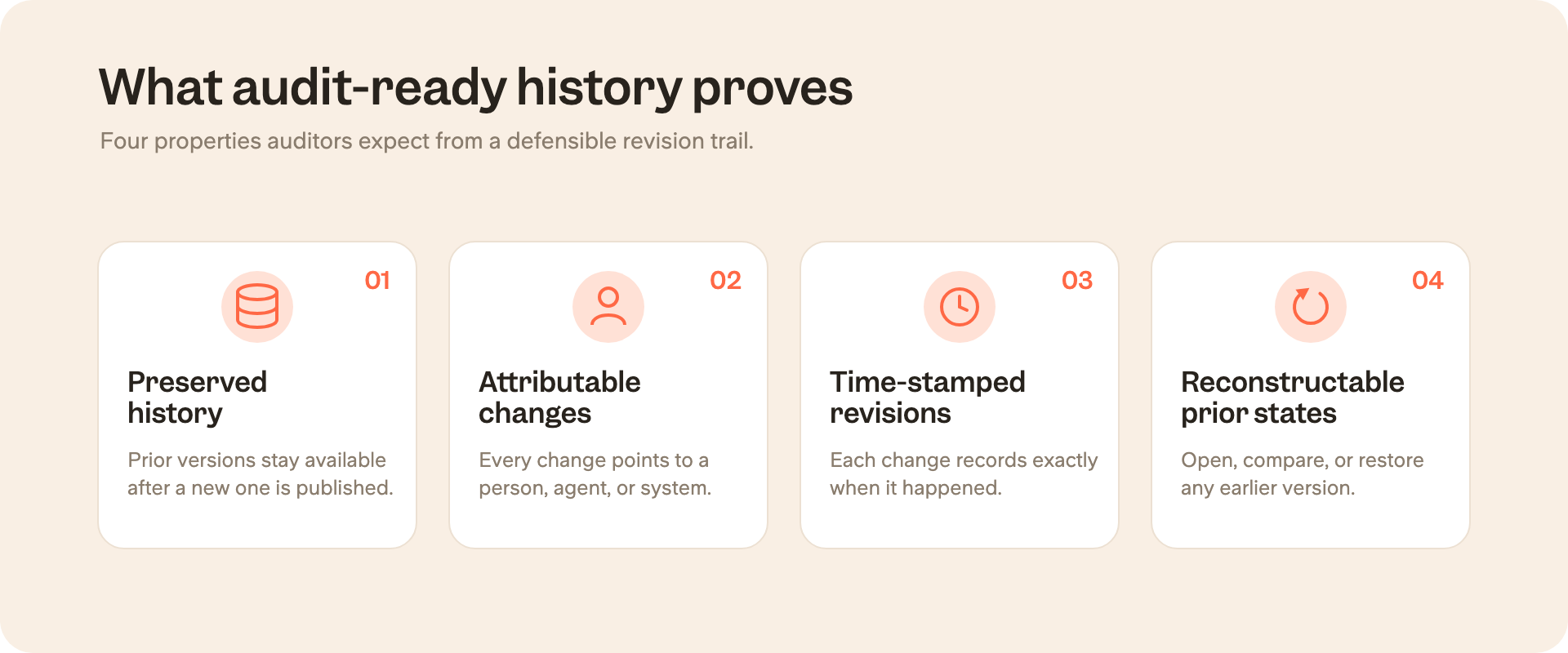
Preserved history
Prior versions should remain available after a new version is published. A revision history that overwrites old information may be useful for collaboration, but it is weak as audit evidence.
Attributable changes
Every important change should point to an actor: an author, reviewer, approver, admin, API action, or agent. If a document changed, the team should not have to guess who changed it.
Time-stamped revisions
The change history should show when each meaningful change happened. This is especially important when a team needs to defend what was in force during an incident, review, customer dispute, or regulatory audit.
Reconstructable prior states
The team should be able to open or restore a previous version and compare it to the current one. A summary table helps, but the source of truth should be the actual system history.
Regulatory language varies, but the direction is consistent:
- FDA 21 CFR Part 11 calls for secure, computer-generated, time-stamped audit trails that record actions creating, modifying, or deleting electronic records without obscuring prior information.
- PCAOB AS 1215 treats audit documentation as evidence that supports conclusions.
For documentation owners, the expectation is: the revision history has to survive scrutiny.
Content version history vs. access audit logs vs. verification status
Content version history, access audit logs, and verification status are related, but they answer different audit questions.
| Concept | What it proves | Example question it answers |
|---|---|---|
| Content version history | What the document said at a point in time and what changed between versions. | What did this policy say on March 3? |
| Access audit logs | Who did what in the system, such as logins, exports, shares, permission changes, or admin actions. | Who accessed or exported this record? |
| Verification status | Whether the current version has been reviewed, approved, expired, or marked outdated. | Is this the latest approved version? |
These distinctions help during audits because a document can have a clean access log and still contain outdated content. It can have a verified current version and still need a previous version for a past audit period. It can have a manual version table and still fail to show the actual word-level change that created the risk.
Point-in-time reconstruction for audits
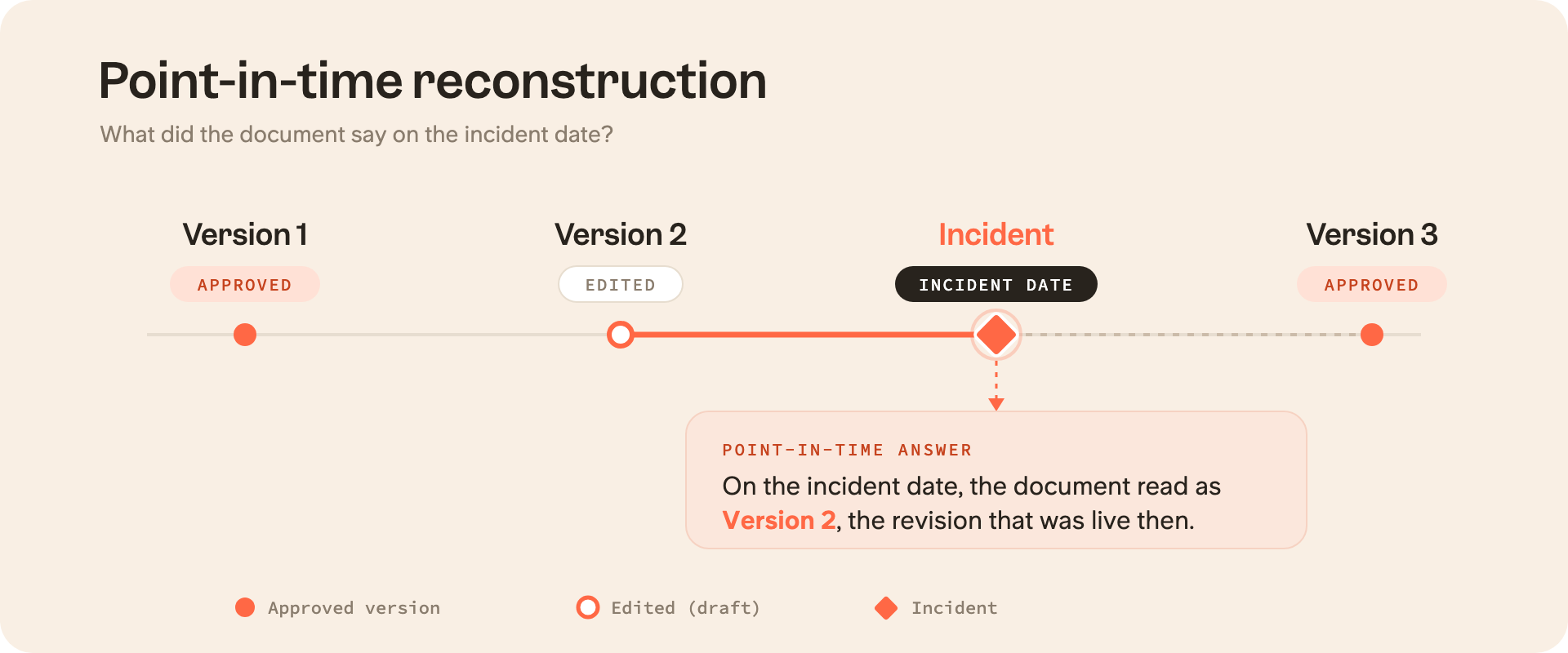
The stress test of document version control is point-in-time reconstruction.
An auditor, reviewer, legal team, or incident lead may ask: what did this document say when the event happened? Not what it says today. Not what the owner remembers approving. What did the controlled version say on that date?
A defensible workflow would be something similar to this:
- Choose the relevant date, event, audit period, incident, dispute, or review.
- Find the version that was active or approved at that time.
- Review the changes before and after that version.
- Confirm who authored, reviewed, approved, or restored the relevant document.
- Use that history to explain why the team relied on that version.
This workflow exposes the weakness of manual version tables. They summarize the lifecycle, but they are not the lifecycle. If someone forgets to update the table, the table becomes another stale document.
Document version control requirements by framework
Different frameworks use different language. Some talk about electronic records, some about documented information, some about audit documentation, and some about data integrity. The common thread is traceability.
For example:
- The HIPAA audit protocol asks entities to show policies, procedures, documentation availability, periodic reviews, updates, and retention.
- ISO guidance on documented information frames documented information as evidence that planned work has actually been done.
- The FDA’s CGMP data integrity guidance connects data integrity to attributes such as attributable, legible, contemporaneous, original, and accurate records.
| Framework | What it pushes teams to prove | Version control capability to show |
|---|---|---|
| FDA 21 CFR Part 11 | Secure, time-stamped records of changes that do not hide prior information. | Time-stamped revision history with previous versions preserved. |
| HIPAA | Policies, procedures, documentation availability, periodic review, updates, and retention. | Activity records, protected document history, and reviewable policy changes. |
| SOC 2 | Controlled change management and evidence that changes were authorized and documented. | Attribution, timestamps, approval/review trail, and change history. |
| ISO 9001 / ISO 27001 | Controlled documented information, current revision status, and evidence that processes are operating as planned. | Version status, verification, owner/reviewer trail, and obsolete-version control. |
| SOX / PCAOB | Audit documentation that supports conclusions and records later additions or changes clearly. | Preserved history of additions and changes with clear attribution. |
| GxP / ALCOA+ | Attributable, legible, contemporaneous, original, accurate, complete, consistent, enduring, and available records. | Traceable lifecycle record from creation to approval to later changes. |
What to include in a document version control table
For audit-heavy teams, the table should make the document lifecycle easy to scan: authoring, review, approval, publishing, and later revisions.
For example:
| Field | What to record |
|---|---|
| Version number | Major/minor version or another consistent naming convention. |
| Date | When the version was created, reviewed, approved, published, expired, or restored. |
| Author/editor | The person or agent responsible for the change. |
| Reviewer/approver | The person who reviewed or approved the version. |
| Change summary | What changed and why. |
| Status | Draft, reviewed, approved, published, expired, outdated, or archived. |
| Effective date | When the version became active, if different from the approval or publishing date. |
| Linked evidence | Ticket, incident, control, policy review, approval request, or related audit artifact. |
Manual version tables are useful as summaries, but they are fragile as the only source of evidence. A document management system or controlled knowledge base should preserve the underlying history automatically, so the table reflects the lifecycle instead of becoming the lifecycle.
Document version control best practices for compliance teams
For compliance teams, keeping document history audit-ready comes down to five habits:
- clear labels,
- visible approvals,
- controlled access,
- preserved history,
- and traceable human or agent edits.
Use clear version names and status labels
Pick a versioning convention people can understand during a review. Major versions can mark approved policy changes. Minor versions can capture smaller edits. Status labels should separate draft, reviewed, approved, published, expired, outdated, and archived states.
The end goal is to make the document’s lifecycle obvious to someone who did not participate in the edit.
Record authoring, review, approval, and publishing
The lifecycle matters as much as the content. A document that moved from draft to reviewed to approved to published should leave a trail across those steps.
Declan McGrane’s auditor-friendly table idea captures this well: authoring, review, approval, and publishing are different activities. The record should make those handoffs visible.
Control access and reduce stale copies
Version control becomes weaker when old PDFs, private downloads, duplicated pages, and shared-drive copies keep circulating outside the controlled path. Those copies may be convenient, but they can also become the version someone relies on at a critical moment.
Version control only works if people can find and use the controlled version. Strong knowledge base security keeps the current version easier to find and harder to bypass. It also gives teams the permissions, audit logs, and AI access controls they need to protect sensitive documents without letting old copies become the easiest answer.
Retain the history itself
Teams also need to preserve the revision history, approval context, and metadata needed to explain the document later.
HIPAA, Part 11, and GxP contexts all show the same pattern: evidence loses value when the metadata around it disappears. The document, its history, and the context around important changes should remain available for the required period.
Note: Retention is also separate from legal hold. A system may preserve document history from creation, but that does not automatically mean it provides a formal legal-hold workflow or service-level agreement. Compliance teams should be clear about what their tool preserves and what their legal or regulatory process still needs to govern.
Track human and AI-agent edits
AI makes attribution more important, not less. As agents draft, update, summarize, or restructure documents, teams need to know whether a change came from a teammate, an agent, the API, MCP, or another workflow.
The compliance question stays the same: who changed this? In the AI era, “who” may include a person, a system, and the human who approved the final edit.
How Slite supports audit-ready document version control
It's important to note that Slite does not replace a compliance program. Rather, it gives documentation owners a clearer evidence layer for controlled knowledge: what changed, who changed it, when it changed, and whether the current version is still trusted.
Document history
Review previous versions, inspect word-level differences, see who changed what and when, move through the timeline slider, and restore an earlier version when needed. Slite saves a new version after five minutes of inactivity following an edit, so the history reflects meaningful editing sessions rather than every keystroke.
Verification status
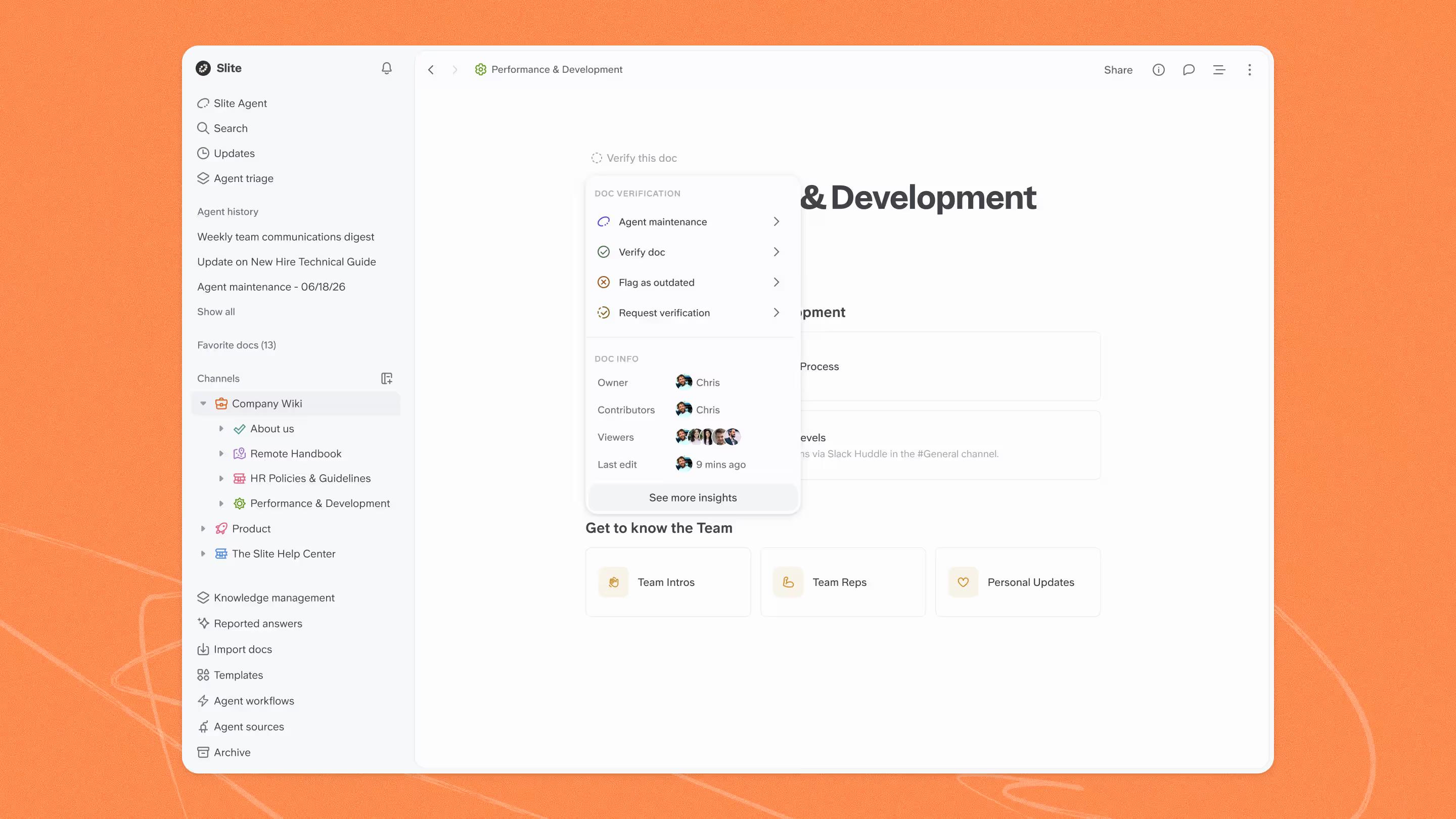
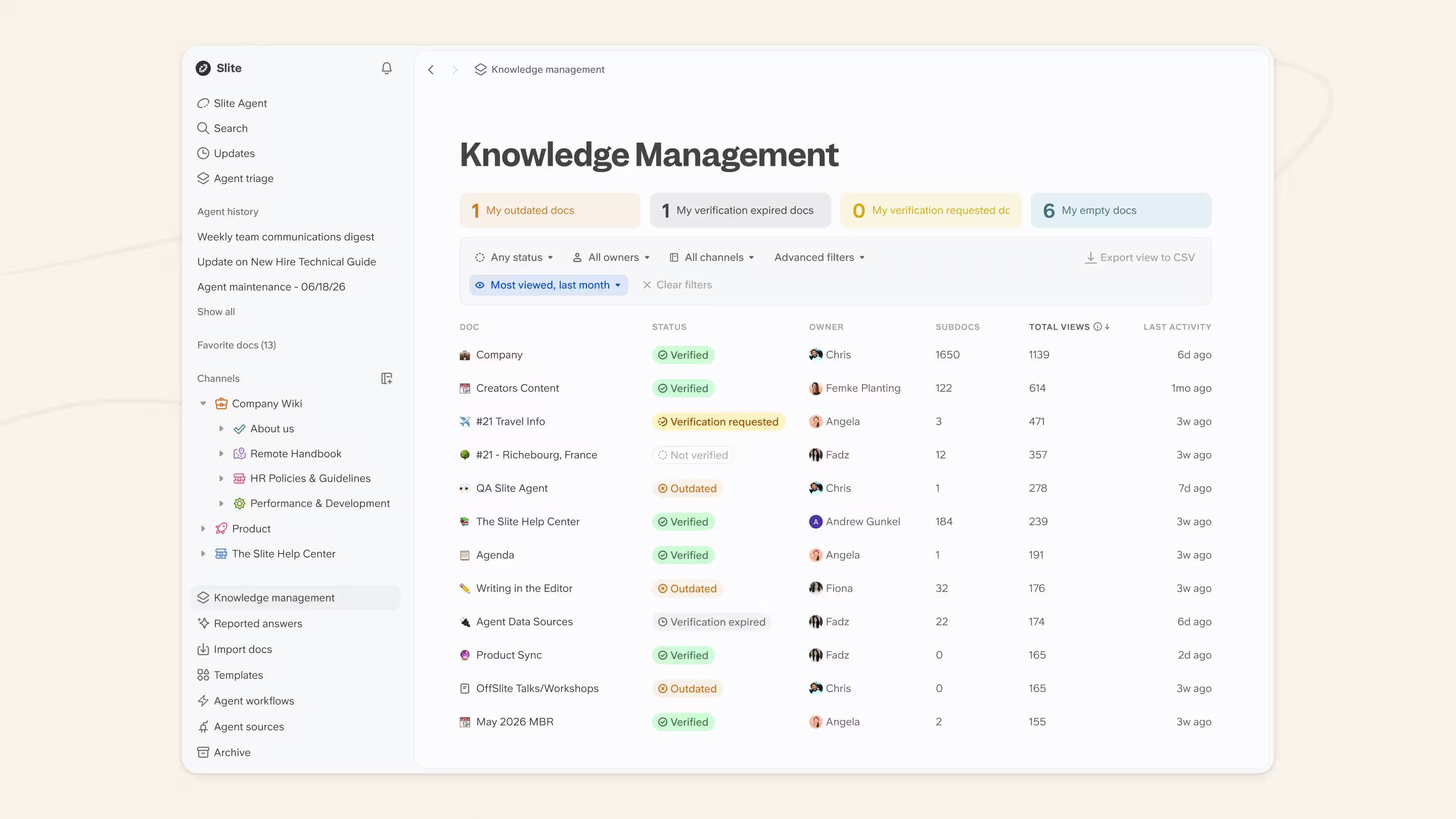
Verification states show whether a document is verified, expired, outdated, or awaiting verification, so people know whether the current version is safe to rely on. Verification events can also appear in the document history timeline, making it easier to see when a document was verified and what changed after that point.
Human and agent attribution
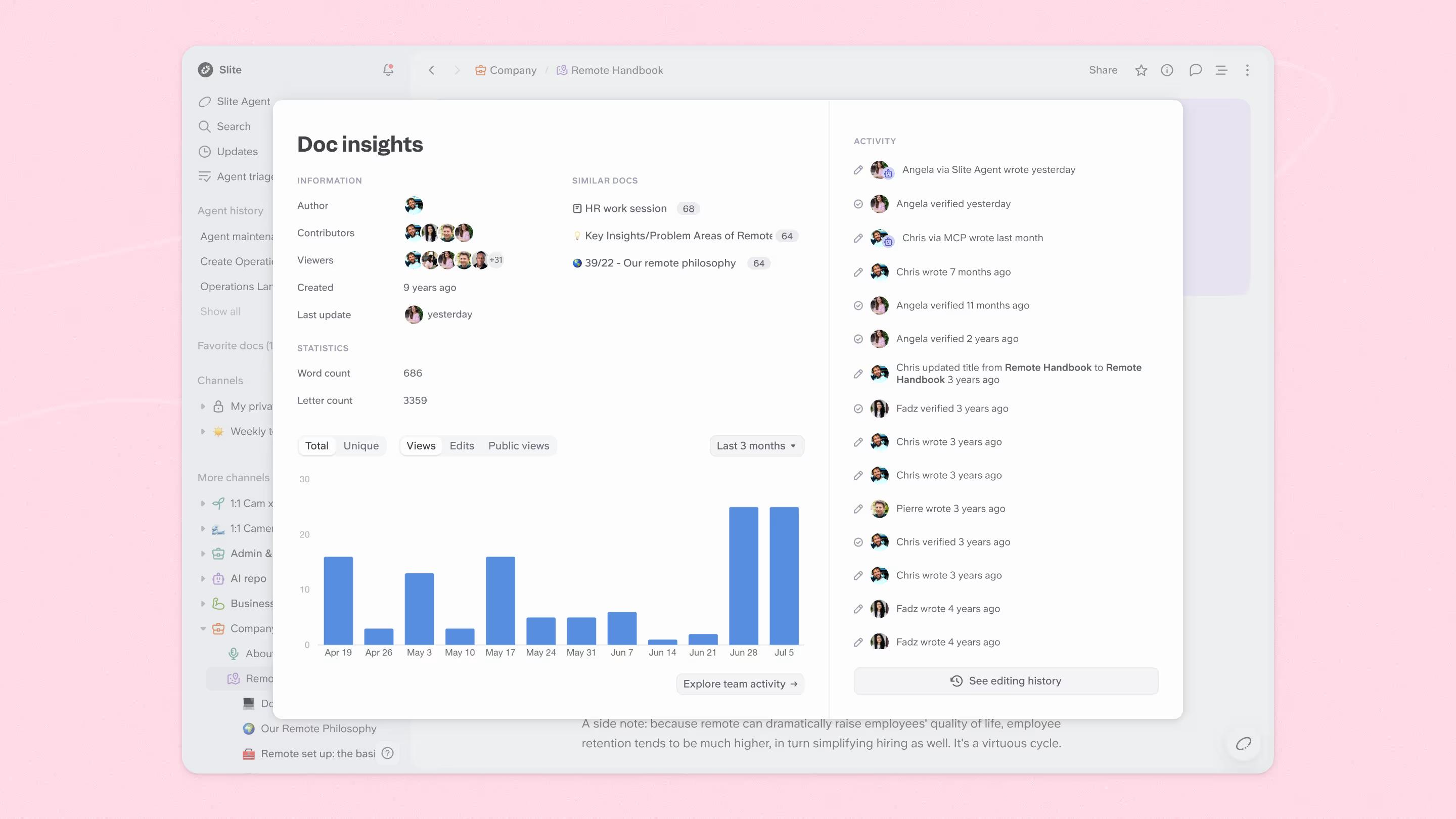
Track whether edits came from a teammate, Slite Agent, MCP, the API, or another source. In Slite’s history, agent edits are attributed like human edits, so teams can see what actually changed. This is especially important as more teams allow AI to participate in documentation workflows and move toward a self-maintaining knowledge base.
Knowledge Management Panel
A practical view of freshness, verification, and documents that need attention. It gives teams one place to monitor review work, instead of chasing document status page by page.
Activity Log and audit logs
Use activity records as a related control layer. Document History shows how the content changed, while activity and audit logs help teams understand what happened around the content, such as edits, comments, verification activity, admin actions, sharing, exports, or other workspace-level events.
Final thoughts
Compliance teams need documents with a history they can defend.
Can the team prove what the document said at the time?
Can it show who changed it?
Can it show when the change happened?
Can it explain which version was approved and why the current version should be trusted?
With Slite, teams get to keep that history visible. Every important document can stay connected to its revisions, contributors, verification state, and human or agent-assisted edits, so teams are not rebuilding the evidence trail when the audit starts.
Book a demo to see how Slite helps teams keep an audit-ready history of document changes.
FAQ
How does document control ensure compliance?
Document control supports compliance by making important documents owned, reviewed, approved, accessible to the right people, and traceable over time. It gives teams evidence of what changed, who changed it, when it changed, and which version was approved.
How do you implement version control in documentation?
The first step is deciding which documents are controlled, assigning owners, defining version names and statuses, preserving revision history, recording review and approval steps, controlling access, and making previous versions easy to reconstruct when needed.
What are examples of compliance documentation?
Examples include SOPs, quality management documents, security policies, incident response procedures, financial controls, legal templates, clinical documentation, HR policies, risk assessments, and audit evidence records.
What are the three types of version control?
In documentation, teams usually need content version history, approval or verification status, and system-level activity logs.
Can AI-edited documents still have audit-ready version history?
Yes, but only if AI-assisted changes are attributed, reviewed, and preserved like any other important change. Teams should be able to see whether a human, agent, API, or MCP workflow made the edit, and who approved the final version.