Docs as code has been part of modern technical documentation for more than a decade. In 2015, Riona MacNamara spoke at Write the Docs about how adopting docs as code had transformed documentation at Google.
And we get why it became popular.
If you run an engineering team, docs as code lets you keep documentation close to the code it describes.
Your engineers can work in tools they already know, and documentation changes can go through the same pull request review, continuous integration (CI) checks, and publishing workflow as the code changes they describe.
However, there are two assumptions underneath that setup: the people maintaining the docs already work in Git, and most of the changes that make those docs outdated happen close to the repo.
As the team grows, product and support hold more context, releases touch more systems, and some of the reasoning behind the code never gets written down anywhere.
In this piece, we'll look at what changes as that setup expands beyond your engineers and the repo, and why those changes matter for growing teams maintaining technical knowledge.
Key takeaways
- Docs as code fits code-adjacent documentation when the people maintaining it already work in Git.
- A Git-based workflow gives you commit history, diffs, pull-request review, and CI checks for the documentation changes people make. But it cannot flag an untouched page that should have changed too.
- As product, support, writers, and other teams start contributing technical context, a Git-only contribution path leaves more useful information in Slack, tickets, and people's heads.
- Your repo preserves the engineering knowledge people record there. Decisions, tradeoffs, workarounds, and historical context remain tacit until somebody writes them down.
- You can keep docs as code for documentation that belongs close to the code while giving the rest of the team a maintained place for knowledge that depends on other systems and human context.
What is docs as code?
Docs as code is an approach to technical documentation that uses software development tools and workflows to write, review, version, test, and publish docs.
Write the Docs, a global community of documentarians, defines docs as code as using the same tools and processes developers use for software, including issue trackers, Git, plain-text markup, code review, and automated tests.
A typical docs-as-code setup includes:
| Workflow step | What happens | Typical tools |
|---|---|---|
| Authoring | Documentation is written as plain-text source files. | Markdown, reStructuredText, AsciiDoc |
| Version control and peer review | Changes are committed to a branch, reviewed as diffs, and merged through a pull request. | Git, GitHub, GitLab, Bitbucket |
| CI checks | Automated checks validate links, style, syntax, and the documentation build. | GitHub Actions, GitLab CI, Vale, markdownlint |
| Build and publishing | A static site generator turns the source files into the documentation site readers use. | MkDocs, Docusaurus, Sphinx, Hugo, Jekyll |
For example, an engineer documenting a new feature updates the Markdown source, commits the change to a branch, and opens a pull request. Reviewers inspect the diff alongside the related code change, CI checks run, and once the pull request is merged, the docs build can publish the updated page.
Why engineering teams use docs as code
Engineering teams use docs as code for much the same reason they use Git for code: it gives documentation a version-controlled, reviewable change history.
For engineering teams, there are four practical advantages:
- The feature and its documentation can ship in the same pull request. Reviewers see the code change and the documentation update in the same review context.
- Every documentation change has a commit history. Diffs, commits, authorship, and previous revisions make it easy to see what changed and when.
- Release-linked docs can follow the release. API references, migration notes, and integration docs can move on the same cadence as the code they describe.
- CI handles the mechanical checks. Linters, link checks, status checks, and docs builds catch formatting and build failures before the documentation is published.
Beyond those practical advantages, docs as code is also often expected to solve two bigger documentation problems:
- Freshness. Keep documentation close to the code, and teams should be more likely to update it as the product changes.
- Fewer information silos. Give contributors one shared workflow, and technical knowledge should be less likely to disappear into separate tools or individual people.
For either promise to hold, somebody still has to notice which docs need attention, and the people holding the missing context need a contribution path they will actually use. As you'll discover in subsequent sections, both promises can fail.
When docs as code is the right approach
There are cases where docs as code is exactly the setup you need:
- For a small, engineering-heavy team. Everyone already watches the same repo, so documentation can join the pull-request workflow without creating another process for the team to maintain.
- For API and reference documentation. When an endpoint, parameter, or SDK changes, the reference often needs to change with it. The same reviewers usually understand both sides of the change.
- For release-linked technical documentation. Migration notes, integration docs, and similar material benefit from sharing the release's versioning and review cycle.
Tom Johnson, an API technical writer at Google who previously worked at Amazon, still prefers docs as code overall, but openly acknowledges the Git-related friction it creates for contributors with different technical skill levels.
In a 2024 post, he argues that Git can become difficult for teams of writers with varying technical backgrounds even when the rest of the docs-as-code workflow still works well.
His point makes sense: docs as code can still be valuable while Git becomes harder for some of the people expected to maintain it.
So ask yourself two questions:
- Who actually maintains these docs?
- Where do the changes that make them outdated happen?
If both answers still point to engineers and the repo, docs as code is doing exactly what you need it to. However, once the answers start naming support, product, Slack, Linear, Jira, customer conversations, and people outside engineering, you have a problem: your documentation system has grown beyond the repo.
Why docs as code stops scaling for growing teams
There is no specific headcount at which a team outgrows docs as code. What eventually changes is the workload around the repo: more people need to contribute, more systems can change what the docs should say, and more engineering knowledge is created outside Git.
Here's what the progression to that point looks like:
| Stage | What starts to strain |
|---|---|
| Stage 1: Five engineers, one repo | Very little. The same people already live in Git and usually own both the code and the explanation. |
| Stage 2: The same team starts shipping faster | More releases create more chances for existing pages to fall behind, including pages nobody touched in the pull request that changed the product. |
| Stage 3: Other contributors need to get involved | Technical writers, support, product, and other teams have useful context, but getting it into the docs now means working through an engineering contribution workflow. |
| Stage 4: The company relies on Git for wider documentation | Permissions, ownership, repo sprawl, different workflows, and knowledge created outside Git turn a documentation workflow into a wider knowledge-maintenance problem. |
By the time you've reached stage four, keeping documentation current has gone well beyond updating Markdown when code changes. Someone now has to connect changes across multiple systems to the right docs and pull in context from people who may never open the repo.
Version control does not keep documentation fresh
Interestingly enough, Git can be doing everything right while the documentation is wrong.
During a feature release, for example, the engineer updates the code, the tests pass, CI stays green, the pull request merges, and the docs build passes.
But the release also changes an existing setup step mentioned in an older Markdown source file, and nobody touches that file.
The pipeline is green while the documentation is already stale.
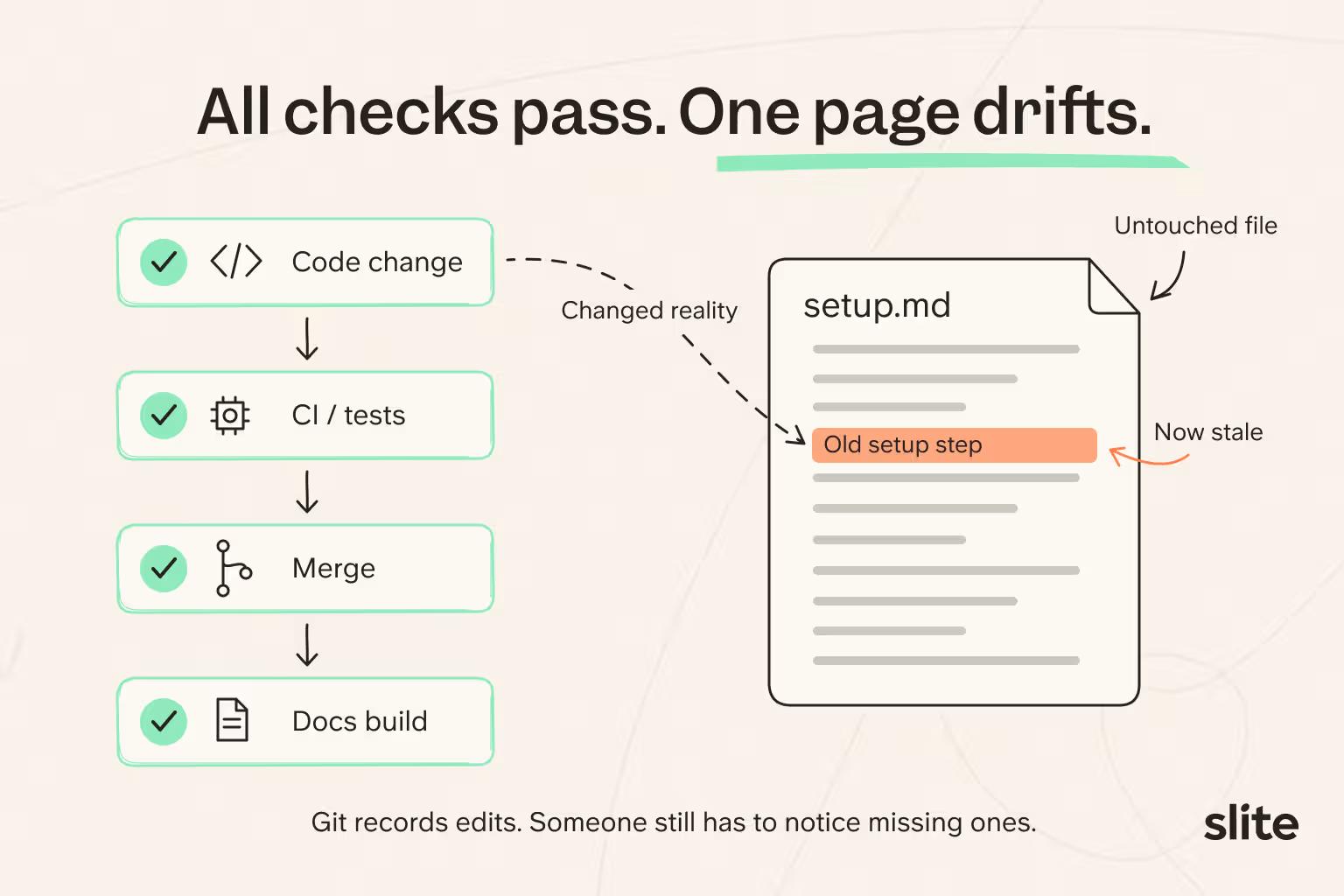
And guess what? Git did exactly what it was supposed to do. It recorded the commits and diffs for the files people changed. But it could not tell you which untouched documentation should have changed too.
We hear the same thing from teams maintaining documentation across several GitHub repositories. One team we spoke with said their docs kept falling behind the release cadence:
"Always out of date. Always. Every week we ship."
And when you look at last-modified timestamps, it gets more deceptive. A page can be edited on Monday, a product change can ship on Tuesday, and by Wednesday you have a recent timestamp sitting right on top of stale documentation.
At that point, knowledge is drifting inside a well-run docs-as-code workflow. The stale page still looks normal to everyone, which unfortunately makes it even easier to miss.
When a teammate eventually hits one wrong answer, they start wondering what else might be stale. Repeat that pattern a few times and teammates start preferring to ask the engineer who "actually knows" because they no longer trust the docs as a reliable source of truth.
Git-based contribution can reinforce information silos
Git-based contribution works smoothly when the people holding the knowledge already live in Git. Once useful context starts sitting with product, support, operations, or other teams, the contribution workflow itself can become the reason that information never reaches the docs.
For an engineer, opening a pull request, working in Markdown, and following repository conventions is ordinary. For someone in support, product, or operations, fixing one wrong sentence may mean dealing with branches, permissions, Markdown conventions, and code review before the correction reaches the docs.
Johnson experienced this at Amazon. According to him, one team tightened its Git branching workflow after unreleased content was merged into a production branch, and the process became complex enough that a new writer was afraid to make even a small change.
According to Johnson:
"The workflow made you think twice about fixing a simple typo."
He still says he prefers docs as code overall. The workflow has real advantages. The friction comes from asking everyone who holds useful context to adopt an engineering workflow just to fix the documentation.
We've heard similar concerns in conversations with engineering teams. At one company, nontechnical contributors found GitHub hard to update, so the docs went stale and people defaulted to Slack for questions.
Imagine a support rep spots an incorrect setup step while helping a customer.
Fixing the page means going through a pull request; sending "hey, this step changed" in Slack takes ten seconds. Of course the message wins.
The correction exists, but never reaches the documentation. You end up with a shared repo while useful context stays split across Slack, tickets, and the people who know the answer.
The repo does not contain everything your engineers know
Even if every contributor is comfortable in Git, the repo still only contains what people have actually recorded.
With code, you get the implementation. READMEs, architecture decision records (ADRs), and other repo docs give you additional explanation. But a lot of engineering context sits in the reasoning behind the work:
- Architectural reasoning: why the team chose this approach and what it was optimizing for.
- Tradeoffs: which alternatives were considered and why they lost.
- Workarounds: the practical things experienced engineers know to do when the documented path falls short.
- Historical context: old decisions that explain why an unusual part of the system still exists.
- Incident and customer context: lessons from support cases, incidents, and internal conversations that changed how the system is handled.
Some of that context reaches an ADR, ticket, or README. Plenty of it stays in Slack threads, meetings, and individual engineers' heads as tribal knowledge.
A team we spoke to estimated that around 80% of its operational knowledge was still tacit, living inside people's heads.
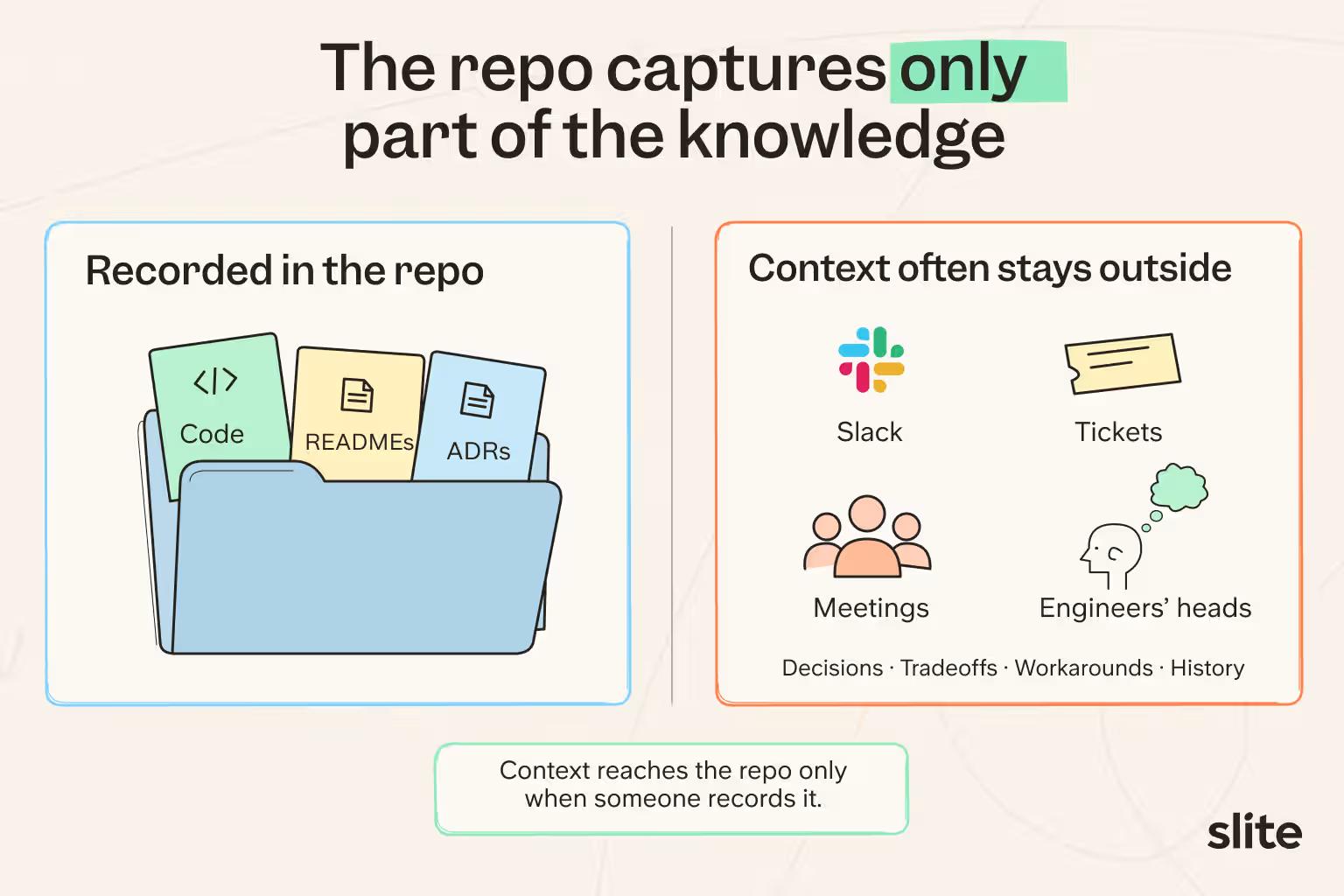
So a growing team ends up doing two jobs in parallel:
- Keep the knowledge already documented accurate as the product changes.
- Capture the decisions, workarounds, and context that never made it into the repo in the first place.
Once you need to handle both, Git is no longer enough. You also need a layer that can watch for changes across the tools your team uses and give people somewhere to capture context that would otherwise stay outside Git.
Give everyone a way to contribute to documentation
With Slite, people across the organization can contribute to documentation without having to work through the same Git workflow.
- Someone in support or product can open the document and make changes directly in its WYSIWYG editor.
- Developers can stay in their preferred AI tool or harness, such as Claude, ChatGPT, or Cursor, and contribute through Slite's MCP. The MCP also includes tool calls for comments, so they can start, read, reply to, and resolve discussions without leaving that environment.
- Teams can also use Slite's API to create and update documentation programmatically.
Plaid, for example, had nearly 3,000 internal Markdown documents in Git when it decided to rebuild its internal documentation system.
One of its goals was to replace the GitHub pull-request workflow for documentation edits with WYSIWYG editing.
After evaluating three platforms, Plaid chose Slite, and all of its pilot users preferred it, citing its intuitive WYSIWYG experience among the reasons.
Six months after the migration, the number of monthly active documentation authors had increased by 63%, from 65 authors to 107.
Growing teams need a self-maintaining knowledge layer on top of the repo
Once your documentation depends on code changes, tickets, support conversations, and people across the company, you need more than Git.
You need a system that can notice when reality changes, connect those changes to the right documentation, and keep people in control of trusted knowledge.
Here's how:
1. Give contributors one place to work.
With Slite's WYSIWYG editor, engineers, product, support, writers, and other subject matter experts get one place to add explanations, decisions, and context from their own work alongside the rest of the documentation.
2. Connect documentation to where the work changes.
Engineering teams can connect sources such as GitHub, GitLab, Jira, and Linear. Slite Agent can cross-reference the knowledge base against activity in those tools and use those changes as signals that an existing document may need another look.
3. Turn those signals into something the team can act on.
When Slite Agent detects likely drift, it can identify the affected documentation and draft a proposed update instead of waiting for someone to discover the stale page and then fix it.
4. Keep people in control of the source of truth.
Every proposed update goes to Triage for human review, so someone who understands the context gets to accept, refine, or dismiss the change before it becomes part of the source of truth.
Your Git-based docs workflow can stay in place for documentation that belongs in the repo. Slite sits on top of that workflow as a self-maintaining knowledge layer for information that depends on changes in other systems and context from people across the company.
So in essence, docs as code can remain part of your documentation system. It just shouldn't have to be the whole system.
If you'd like to see how Slite keeps technical knowledge connected to the engineering tools your team already uses, book a demo for a walkthrough.
FAQ
What are docs-as-code best practices?
Keep code-adjacent docs close to the code, update directly affected docs in the same pull request, automate useful checks, and assign clear owners. If important changes happen outside the repo, make sure your maintenance process can catch those too.
What are some examples of docs as code?
Common examples include API documentation, developer guides, integration docs, migration notes, and technical reference material written in Markdown or another plain-text format and managed through Git.
What tools are used for docs as code?
Common tools include GitHub, GitLab, or Bitbucket for repository hosting and pull-request review, Markdown or AsciiDoc for authoring, Vale or markdownlint for CI checks, and Docusaurus, MkDocs, or Sphinx for static-site builds. Slite can sit alongside that stack as the maintained knowledge layer for internal documentation that depends on changes and context outside Git.
How does AI fit into docs as code?
AI can help draft documentation, detect likely drift, and flag pages for review after the underlying product changes. Human review still matters before AI-proposed updates become trusted documentation.
Is docs like code the same as docs as code?
Yes. "Docs like code" and "docs as code" generally refer to the same approach: managing documentation with Git, plain-text markup, peer review, automated checks, and continuous integration.