A customer success manager needs to answer what should be a simple customer question: Can we approve this refund?
Support has a macro. Finance owns the approval rule. Sales promised a customer-specific exception. Product recently changed the workflow. There is also an old policy doc somewhere in the knowledge base, but nobody is sure whether it still applies.
So the answer exists. Technically.
The hard part is figuring out which team owns the current version, whether the latest change made it back into the doc, and whether anyone would be comfortable sending that answer to a customer.
This is what an information silo looks like in practice.
In this guide, I will walk through what information silos are, why they happen, how to spot them, and how to break them down with connected, verified, permission-aware knowledge.
Key takeaways
- An information silo is a pocket of company information that is hard for other teams to find, access, verify, or use.
- Information silos can exist even when a company documents things. The real issue with information silos is often fragmented, duplicated, outdated, or unverified information.
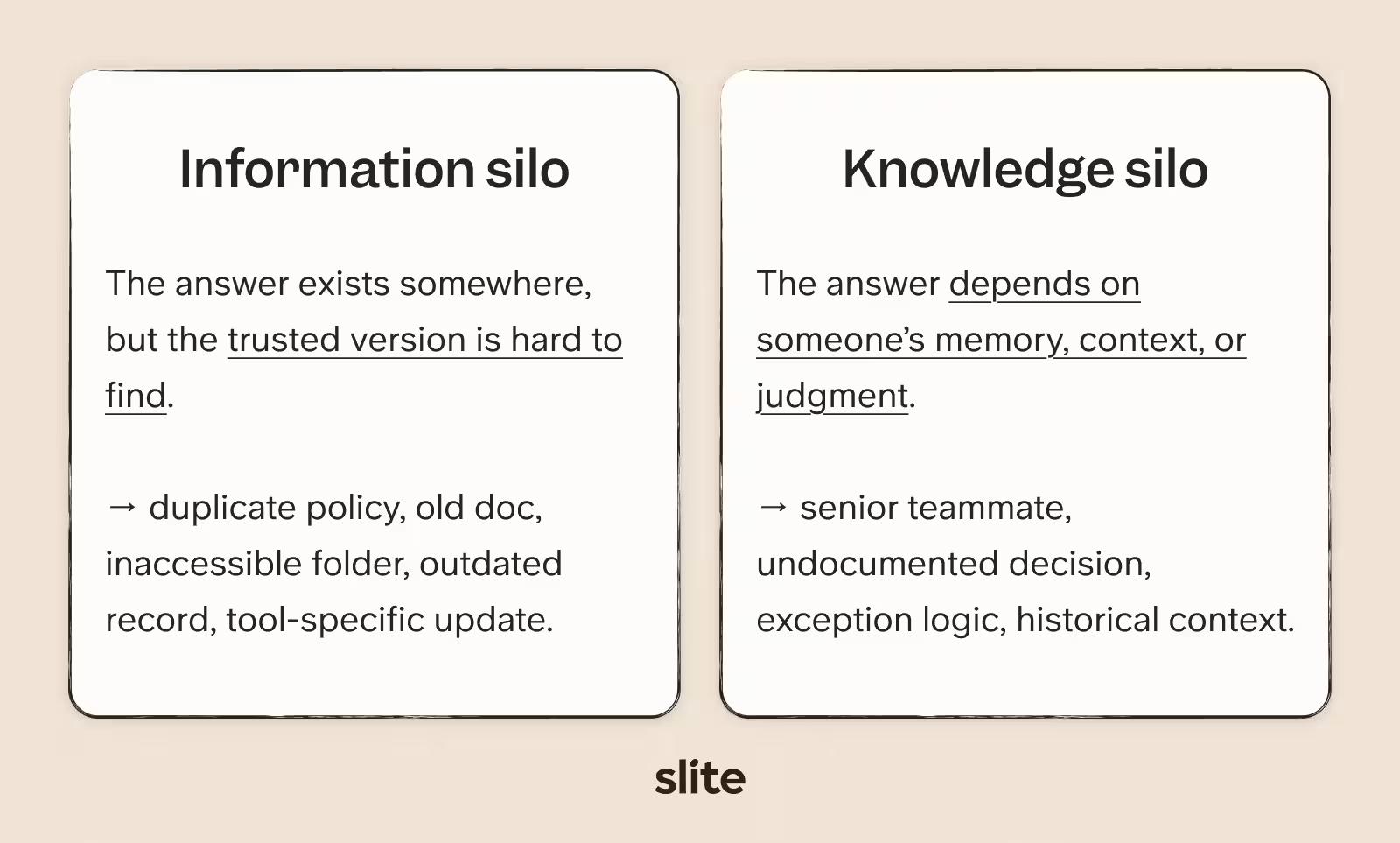
- Information silos and knowledge silos overlap, but they are different. Information silos involve documents, data, systems, records, and updates. Knowledge silos involve expertise, context, and judgment trapped with people or teams.
- Silos cause cross-team friction: people cannot tell which team owns the answer, which version is current, or whether it is safe to act on.
- If your AI tools pull from scattered, stale, or conflicting sources, they can give confident answers your team should not trust.
- Breaking silos requires connected tools, clear ownership, and a knowledge base that keeps itself in sync with reality.
Slite is the self-maintaining knowledge base that keeps verified knowledge in sync with reality, so your team and agents can act on answers they can trust. Book a demo to see it in action.
What is an information silo?
An information silo is a pocket of company information that is disconnected from the people, teams, or systems that need it.
The word silo originally refers to a storage structure used to keep grain separate. In companies, the metaphor fits because teams often separate information in the same way.
Each source can make sense on its own, but the limitations become obvious when someone needs to see the full picture.
Information silo vs. knowledge silo
Information silos and knowledge silos create similar bottlenecks, but they come from different problems: one is access to trusted information, the other is dependence on individual expertise.
- Information silo: "The answer exists somewhere, but I cannot find the right version."
- Knowledge silo: "The answer exists in someone's head, and I need that person to explain it."
They often overlap.
Fragmented information pushes people to ask the same experts. Those experts gradually become the real system of record, so the information silo creates a knowledge silo.
I make this distinction early because information silos include both undocumented expertise and documented information that is scattered, private, duplicated, stale, or impossible to trust.
For the people-side version of this problem, read Slite's guide to tribal knowledge.
Common examples of information silos
Information silos show up when each team maintains its own version of an answer.
Some examples include:
- Team silos: Support, Sales, Product, Finance, Legal, People, and Operations each work from different docs, workflows, or assumptions.
- Tool silos: company knowledge gets scattered across Slack, Google Drive, Asana, ClickUp, HubSpot, GitHub, GitLab, Zendesk, Intercom, Linear, Confluence, and email.
- Version silos: the same policy, process, or customer-facing answer exists in multiple places, but nobody can tell which version is current.
- Access silos: the information exists, but the people who need the approved version cannot retrieve it because of permissions, private folders, private channels, or team-specific tools.
- Decision silos: a decision happens in a meeting, ticket, pull request, or Slack thread, but the reasoning never makes it back to the main doc.
With knowledge base security, the right people should be able to reach the right version without giving every employee access to every document. It makes approved information easier to find and use, while keeping sensitive content protected.
We spoke with a team with ops, customer success, and technical documentation split across different tools, and they described the everyday version of this problem plainly:
Different departments use different tools: ops uses Slack Canvas, customer success uses Google Docs, tech uses Confluence. Information is scattered across multiple silos.
This is the pattern we see most often.
Every team chooses the tool that helps it do its own work. The silo appears later, when the company needs one answer across all of them.
Why information silos happen
Information silos are formed when seemingly reasonable decisions compound over time.
For example, a team chooses the tool that helps it move faster, or a manager answers a question in Slack because updating a doc would take longer.
None of those choices feels costly in that moment.
Then the company grows, the tool stack expands, people leave, and the context behind those decisions becomes harder to find.
Teams choose tools for local workflows
Every department chooses tools for the work it has to do. Sales needs a CRM. Engineering needs GitHub. Support needs a help desk.
That local setup helps each team move faster.
However, it also creates a company-wide retrieval problem when work cuts across departments. The customer's answer or technical context may exist, but it is split across the tools each team uses to do its own work.
Knowledge starts where work happens
Most company knowledge starts in the middle of work. A customer complaint becomes a support thread. A product change starts in a ticket. A policy decision comes out of a meeting.
The gap appears when those updates never make it back into the place people check for the official answer. A doc may have been accurate when someone wrote it, while the actual work continued to change around it.
One prospect described the habit:
People just have to keep asking others for stuff, and they don't document anything. It's all on Slack, like massive long threads with key decisions, specs, etc.
Teams duplicate instead of consolidating
When people cannot find the answer, they often create another version:
- A support lead rewrites a customer-facing answer in a macro.
- A knowledge manager turns an old process into a team checklist.
- A project owner creates a temporary explainer that becomes the version everyone uses.
Over time, this creates more places for the same answer to age differently.
Ownership fades as teams scale
In small teams, people often know who owns what. In larger teams, that memory thins out.
A doc may still exist, but the person who wrote it may have moved teams. Or a process may still be active, but nobody knows who should update it.
Search weakens as tools multiply
A search result may surface an old Confluence page, miss the Slack thread where the decision changed, or ignore the customer note that explains the exception.
A company we spoke with described a similar pattern: official knowledge lived in Confluence, but finance documents were scattered across Google Drive and often required asking someone for the right link.
In their words:
We have a mixture of Confluence, but the finance team has some Google Drive documents where you need to ask someone to find the link. So it's a pretty mess, in terms of finding stuff and knowing what's out there.
Why are information silos a problem?
Information silos make it harder for teams to find, trust, use, and govern the information they need to work well.
At first, the friction looks small: one extra Slack message, one duplicated doc, one delayed approval, or one new hire asking a question someone has already answered.
Then it compounds.
Slite's enterprise search survey puts numbers behind that drag. The average worker spends 3.2 hours a week searching for information. Across a year, that is 166.4 hours per person. For a 50-person team, that becomes 8,320 hours a year spent looking for answers instead of acting on them.
In our customer research, the same symptoms show up across different industries. Information silos can:
- Waste time and create repeated questions
- Make teams recreate existing work
- Weaken trust in the knowledge base
- Dilute policies and processes
- Slow onboarding
- Increase compliance and audit risk
- Fragment distributed teams
A customer described the policy problem as playing telephone: each person passes along their own version, and eventually, the company is training people on interpretations instead of the approved process.
Why information silos matter more in the AI era
Before AI, fragmented information usually slowed one person down at a time. A stale doc might waste someone's afternoon while they compare a support macro with an old policy doc, ask Finance for the latest rule, or check with Product before giving a customer an answer.
With AI, that same fragmented information can feed an internal search assistant, a support workflow, an onboarding answer, or an agent that acts downstream.
Christophe, our CEO, explains this problem well:
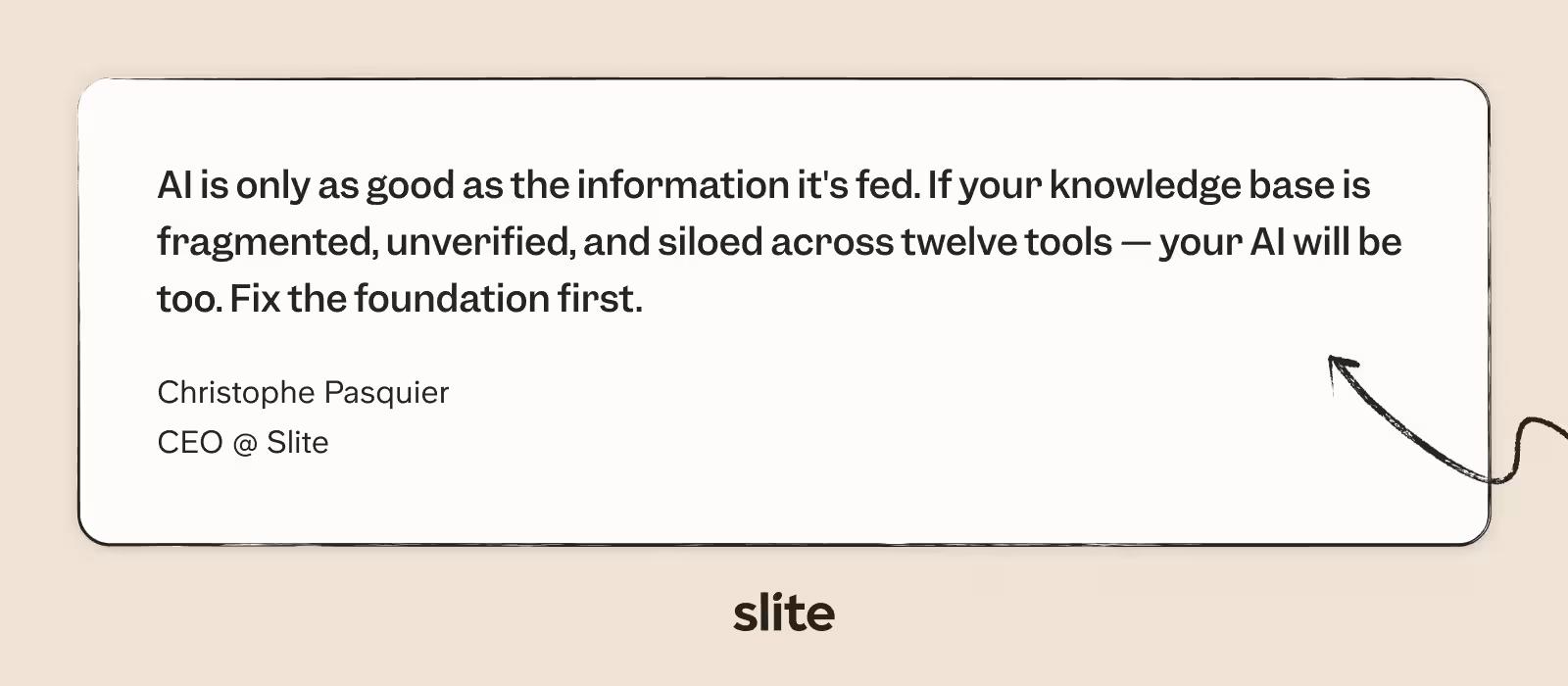
That is what makes information silos more costly in the AI era.
When answers are scattered across tools, teams, and versions, AI has more places to pull from and fewer signals for knowing which source is current. A stale doc is still a problem, but the bigger issue is the fragmented system around it.
According to our knowledge base usage data, fewer than one in 20 docs gets updated in a month, and over 94% of active knowledge base content sits untouched.
For teams using AI to search, summarize, or act on company knowledge, that creates a clear risk: the system may be pulling from information that is scattered, stale, or unverified.
How to spot an information silo problem
The easiest way to find information silos is to start asking whether people trust the route to the answer.
The five-minute test
Pick one recurring cross-departmental question. Something like:
- Can we approve this refund?
- How do we handle this security request?
- What is the current onboarding process?
- Which customers are eligible for this exception?
Now give yourself five minutes to answer it using only your systems. No Slack pings. No asking the person who "usually knows." No memory. Just the tools and docs.
If you cannot find the answer, cannot tell which version is current, or need a human to confirm whether it is safe to use, you have an information silo problem.
Other signs to watch out for
- New hires need a person to explain what the docs should have explained.
- Teams give different answers to the same policy or process question.
- The same process exists in multiple docs, folders, or tools.
- Nobody knows who owns important pages.
- Search returns too many results, but not the trusted one.
- Important decisions happen in meetings, tickets, or Slack threads and never make it back to the source of truth.
- AI search returns incomplete, outdated, or conflicting answers.
Quick scoring framework
Assign one point for every sign you recognize. Then sum for a total.
- 1-2 points: early friction.
- 3-5 points: silos are already active.
- 6+ points: silos are likely affecting onboarding, execution, compliance, and AI readiness.
Are information silos always bad?
No. In fact, some degree of separation is necessary, depending on the type of knowledge.
A healthy knowledge system needs boundaries, especially when teams handle sensitive or regulated information like payroll details, legal documents, and security policies.
It only becomes a problem when approved knowledge becomes hard for the right people to retrieve.
A private finance folder may be necessary. But if a customer-facing teammate needs the public refund rule and cannot find it without pinging Finance, the boundary is blocking useful work.
How Slite helps teams break down information silos
The current way we describe Slite is simple: the self-maintaining knowledge base.
Slite pairs a structured, verified wiki with an AI agent that detects when documentation has drifted from reality, proposes the fix, and routes every change through human approval before it becomes truth.
Create a trusted source of truth
With Slite, your team can have a structured home for the knowledge that should be stable and authoritative, alongside AI search.
Knowledge includes:
- Policies and procedures
- Onboarding documentation
- Product knowledge
- Customer guidance
- Internal documentation
- Team processes
Each document can have:
- An owner
- A verification status
- A review cycle
- Version history
Employees can immediately see whether a page is verified, outdated, expired, or awaiting verification before acting on it.
Help people find answers they can trust
With Slite Ask, employees can ask questions in natural language and receive answers backed by citations from the knowledge they already have access to.
Slite Ask includes these key safeguards:
- Source citations are included on every answer
- Verified documents rank above unverified ones
- Permission-aware search
- No-answer responses when the evidence is insufficient
Instead of opening five tabs and comparing conflicting documents, people get a single, verifiable answer.
Connect knowledge across tools
Slite Agent searches across more than 20 connected tools and brings those sources together when answering questions. It can also identify situations where the documented process no longer matches the work happening elsewhere.
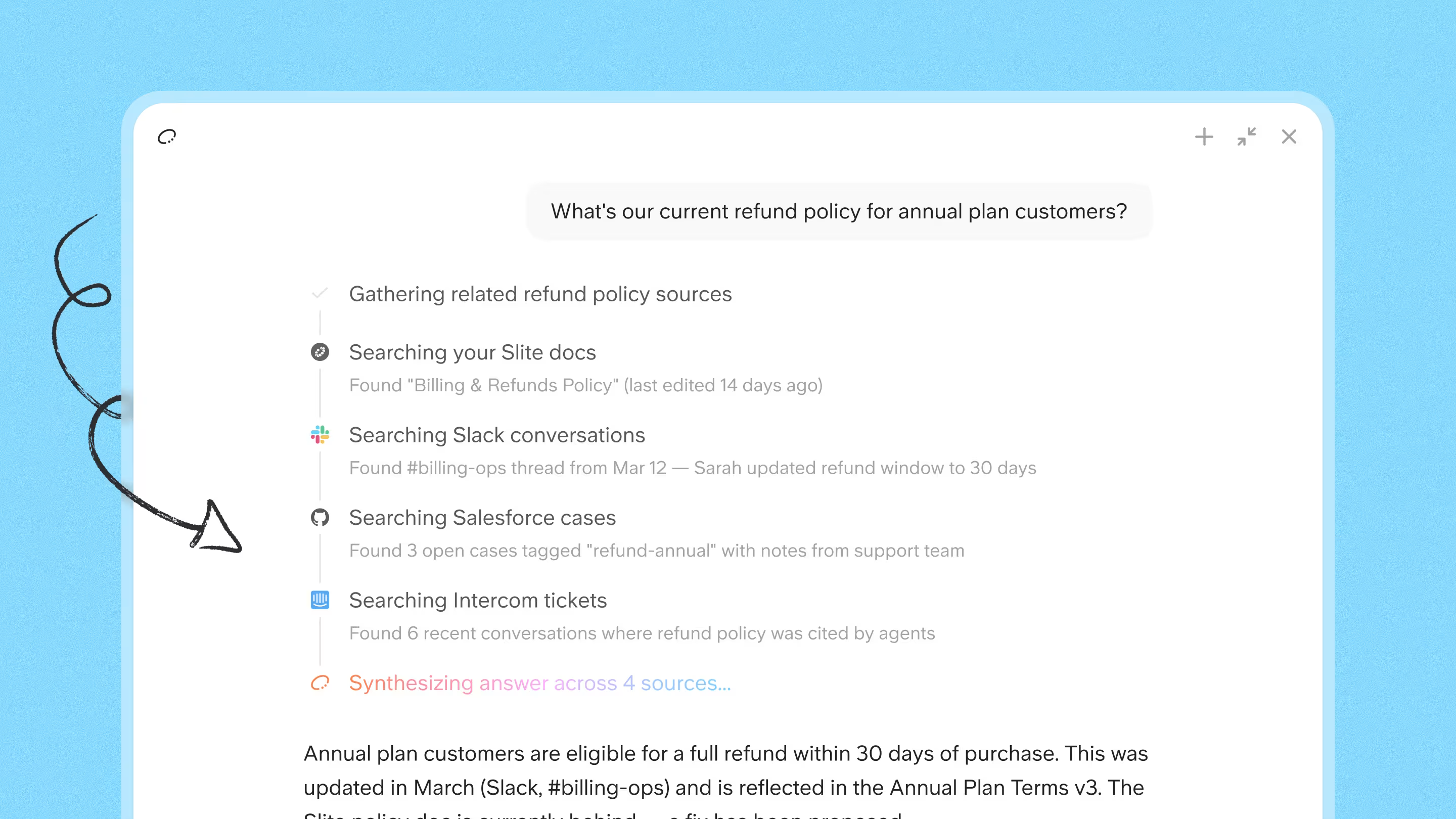
One founder we spoke with described the desired end goal:
I need something that people can just ask in Slack to get back product questions and answers that I have answered thousands of times.
Keep knowledge in sync as the work changes
Information silos are commonly caused by the knowledge drift in the knowledge base.
A doc can be accurate the day someone writes it and quietly wrong a month later, because the work it describes keeps moving in Slack threads, pull requests, and support tickets.
This is the decision silo from earlier: the change happens, but the reasoning never makes it back to the source of truth.
The Slite Agent closes that gap with a maintenance loop that runs in the background:
- Detect: Slite cross-references each doc against the connected tools where work actually happens, comparing what the page claims against what changed in Slack, GitHub, Linear, Intercom, and 20+ other sources.
- Propose: When the agent finds drift, it drafts the fix and explains its reasoning in one line: this said X, but the source says Y, so it was updated to Z.
- Approve: Nothing is applied automatically. Every proposed change waits in a review queue, routed to the right owner, so engineering edits never land in the sales queue. The reviewer sees a side-by-side diff and can accept, edit, or dismiss each change.
- Reverify: Once approved, the doc gets a self-maintained status that puts it on a recurring re-check against its original sources, so the same comparison runs again the next time the work moves.
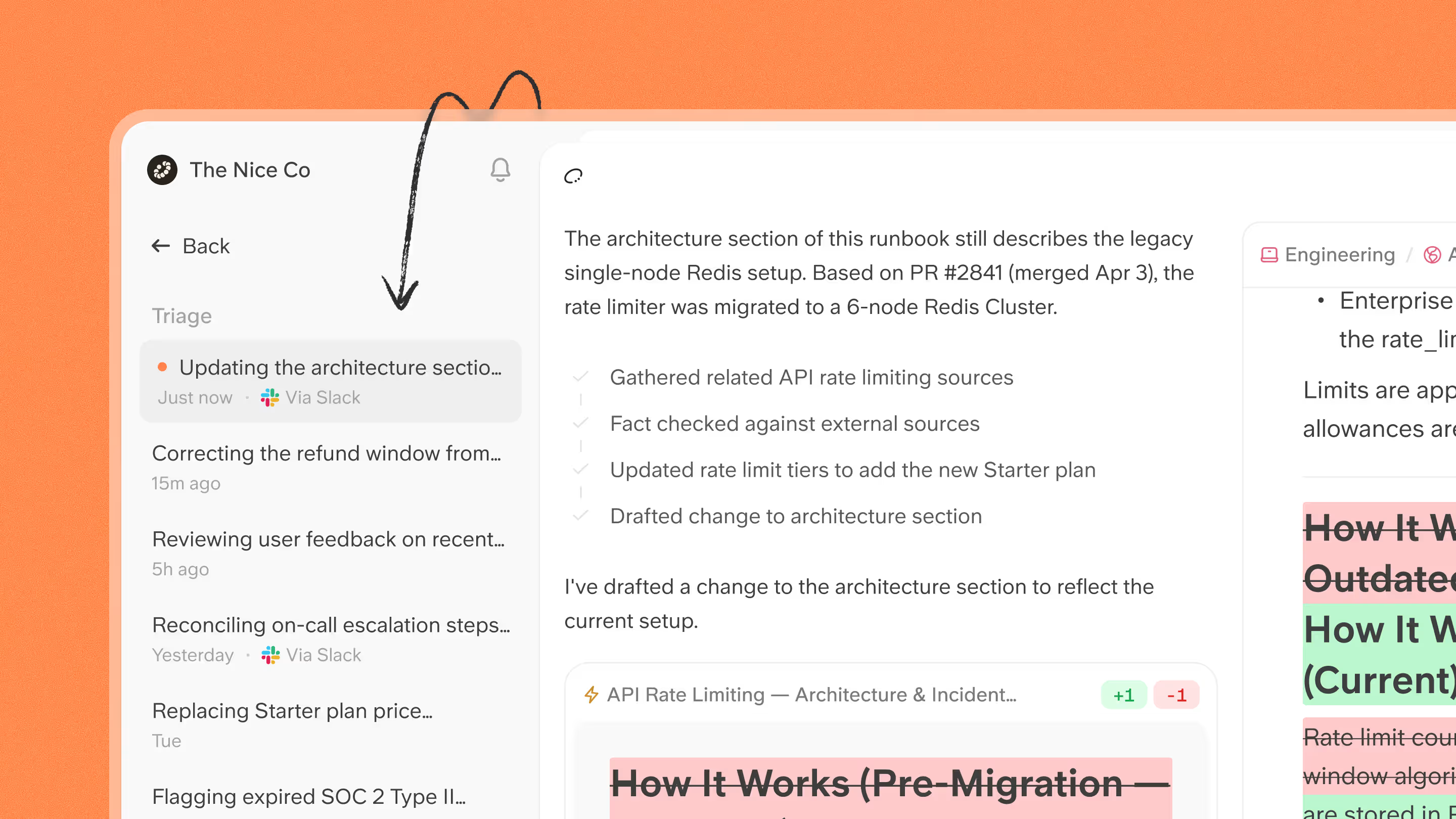
This shifts the human role from author and maintainer to reviewer. You no longer have to notice the gap, work out the right change, and write it. The agent handles those steps. You own the one that matters: deciding whether the change is correct before it becomes truth.
It is the same discipline codebases have always had, review and sign-off before anything merges, applied to company knowledge.
The result is a knowledge base that keeps pace with reality instead of aging behind it.
Keep high-level overview with Knowledge Management Panel
The hard part of knowledge management is knowing what needs attention next.
Slite's Knowledge Management Panel turns maintenance into a visible high-level overview of your knowledge base by highlighting:
- Outdated docs
- Verification-expired docs
- Empty docs
- Inactive docs
- Missing owners
- Review status
Slite's Ask insights adds another layer by showing the questions employees ask most often, including questions the knowledge base cannot answer yet.
Practical next step
If you only do one thing this quarter, pick one repeated cross-departmental question and trace it end-to-end.
- Find every place the answer appears.
- Identify which source should be trusted.
- Name one owner.
- Set a review cycle.
- Connect the tools where the answer changes.
Then watch whether people keep asking the same question.
Final thoughts
The way out is a knowledge system people can trust.
It should connect to where work happens, show who owns important information, make trusted answers easy to find, respect permissions, and keep knowledge current as the company changes.
If your company is working across too many tools and too many versions of the truth, Slite gives you a verified knowledge base and AI layer for bringing those answers back into one trusted system. Book a demo to see how it works.
Frequently asked questions about information silos
What is another name for an information silo?
Another name for an information silo is a data silo, knowledge silo, departmental silo, or organizational silo. These terms overlap, but they do not always mean the same thing. In this article, an information silo refers mainly to documents, data, records, updates, and systems that are hard for other teams to find, access, verify, or use.
What does silo mean in IT?
In IT, a silo usually means a system, database, application, or repository that stores information separately from other systems. It becomes a problem when people cannot retrieve, connect, or verify the information they need across systems.
What are the three types of silos?
The three common types are team silos, tool silos, and data or information silos. Team silos happen when departments work from different assumptions. Tool silos happen when knowledge gets trapped in separate apps. Data or information silos happen when records, docs, or updates cannot move easily across the company.
What are the four pillars of knowledge management?
The four common pillars of knowledge management are people, process, technology, and content. People create and use knowledge. Processes define how knowledge is captured and maintained. Technology supports storage, search, verification, and retrieval. Content is the documented knowledge itself.