Only about 30% of a sales rep's week goes to actually selling, according to Salesforce's State of Sales report. The other 70% goes to admin, internal meetings, manual data entry, and hunting for the current deck, the latest battlecard, or the pricing that changed last week. Every minute a rep spends chasing down the right document is a minute they are not in front of a prospect.
Sales documentation is the set of documents, collateral, training materials, and processes that equip a sales team to sell your product consistently. It turns the tribal knowledge your best reps carry into playbooks, guidelines, and frameworks any new hire can follow, and it is one department's slice of the broader internal documentation a company maintains. For most SaaS companies the sales team is the largest department, and in the early days founders run sales themselves before handing off to dedicated reps. That handoff is where undocumented selling knowledge quietly breaks. This guide covers what to document, when you need it, how to build it step by step, and the templates and examples to start from.
Key takeaways
- Sales documentation is the playbooks, collateral, FAQs, and training that let any rep sell your product consistently.
- It matters because reps lose most of the week to non-selling work; good docs cut ramp time, steady win rates, and keep messaging on-brand.
- You need structured docs once you hire dedicated reps, cycles get inconsistent, or founders are stuck hand-holding.
- Building it is an 11-step loop: assign an owner, map the process, define metrics, profile the customer, codify tasks, and iterate on rep feedback.
- Start from templates and examples (playbooks, one-pagers, battlecards, pricing sheets, email templates) and keep them current in a searchable home.
What is Sales Documentation?
Sales documentation covers everything that equips reps to sell: the documents, collateral, training, and processes that codify how your team wins deals. It splits cleanly into two groups, and organizing it this way makes each piece easier to own and keep current.
Internal (rep-facing) documents
These are the documents reps use to prepare and execute, not the ones a prospect ever sees.
Sales playbooks. Step-by-step guides that walk reps through the entire sales process, from qualifying leads to delivering demos to handling objections and closing deals. Playbooks turn your sales methodology into a structured process every rep can follow. A sales SOP template is the fastest way to standardize those steps.
Key elements of sales playbooks include:
- Lead qualification frameworks to identify and prioritize high-potential leads
- Call scripts and email templates to engage prospects
- Discovery questions to understand prospect needs during first meetings
- Demo guidelines on how to customize and deliver impactful product demos
- Proposal templates to create consistent, compelling proposals
- Objection-handling frameworks to address concerns with confidence
- Closing scripts and best practices to progress opportunities and win deals
Training materials. Onboarding docs that teach new reps your product, ideal customer profile, buyer personas, competitive positioning, value propositions, and the common objections and how to overcome them. They shorten the learning curve for new hires.
FAQs. A document answering the questions prospects ask most often, on features, implementation, security, support, and integrations. It lets reps address common concerns with confidence.
Competitive comparisons (battlecards). Concise, rep-facing breakdowns of how you stack up against each competitor on features, pricing, and positioning, so reps can win competitive deals.
Customer-facing (buyer-facing) documents
These are the assets reps put in front of prospects.
- Presentations: Customizable pitch decks that walk prospects through key products, value propositions, differentiators, and customer stories.
- Product one-pagers: Crisp single-page documents summarizing product benefits, top features, and customer quotes, so prospects grasp the value fast.
- Case studies: Stories of how specific customers succeeded with your product, to build credibility and trust.
- Explainer videos: Short videos that demonstrate your product's value in a visual, engaging way.
Pricing sheets. A pricing sheet lays out your plans, tiers, and what each includes on a single view, so prospects can compare options without a back-and-forth. Because pricing changes often, this is one of the documents reps most need to be current; a stale pricing sheet is how a rep quotes a number that no longer exists. Keep one source of truth and have reps pull from it rather than from an old copy.
Documentation that covers these elements helps reps represent your brand and product consistently, from marketing-generated lead to closed deal, and it helps the team scale faster.
The Benefits of Sales Documentation
Investing in sales documentation and enablement returns time across the sales organization in a few concrete ways.
Streamlined Sales Process
Detailed playbooks and standard operating procedures for reps bring consistency to the whole process, from how leads are qualified and prioritized to how demos are delivered to the steps for closing.
With documentation, you institutionalize what works: lead follow-up cadences, objection-handling frameworks, and closing methods proven for your solution. That takes the guesswork out of day-to-day selling and makes reps more productive.
Consistency in Brand Messaging
Sales documentation synchronizes your brand story, messaging frameworks, product positioning, and external communications across every customer-facing team: sales, marketing, customer success, and support.
From the first sales call to product demos to renewal conversations, prospects hear a consistent narrative about your brand and value. That builds trust and confidence.
Clear messaging frameworks ensure reps convey your value props, whether “AI-powered,” “customer-centric,” or “transparent pricing,” the same way every time. Documentation gives them the tools and training to stay on message.
Faster Response to Prospects
Give reps ready access to approved information and messaging, and they answer prospect questions on the spot instead of checking with management first.
Carefully crafted FAQ documents are a good example. They let reps clarify concerns about data security, privacy, or integrations right there on the call, rather than telling prospects “I'll get back to you.”
More Effective Sales Pitches
Document proven pitch frameworks, case studies, competitor profiles, ROI calculators, and objection-handling techniques, and reps can customize and deliver pitches that resonate with each prospect.
Instead of generic, ad-hoc presentations, they tailor stories and use cases to each prospect's role, industry, and objectives. That produces better conversations and stronger engagement.
Improved Prospect Experience
Well-designed sales collateral, from presentations to product videos to ROI calculators to case studies, helps reps deliver an engaging, consistent story to prospects and customers.
A better experience during sales conversations, demos, and onboarding leaves prospects more satisfied.
Shorter Sales Cycles and Improved Win Rates
Streamlined processes, effective messaging, and higher-quality engagement add up to faster sales cycles and higher win rates.
Boosts Morale of Sales Teams
Documentation and training help new reps ramp faster and become productive sooner. That gives them the confidence and the tools to succeed in the role.
When You Need Proper Sales Documentation
As an early-stage SaaS startup, you can get by without structured sales documentation. There comes a tipping point when ad hoc processes start slowing you down. Two questions usually surface it: how long does a new rep take to become productive, and how much selling knowledge walks out the door when someone leaves? If the answers make you wince, it is time.
Go for structured sales documentation if:
- You are hiring dedicated reps who know how to sell but not your product, positioning, or customers, and you need them productive in weeks, not quarters.
- Your sales-cycle length and conversion rates swing widely from rep to rep on the same product, a sign there is no shared process. A cycle that runs one month for one rep and six for another is chaos, not style.
- Founders are still hand-holding reps through pitches, demos, proposals, and objections instead of working on the business.
- Deals are slipping through the cracks, stuck at inactive pipeline stages or missing follow-ups, because the next step lives in someone's head rather than in a playbook.
- Reps cannot clearly explain your product's value or field tough questions on differentiation, pricing, or security without stumbling.
How to Create Sales Documentation
Follow these steps to build sales documentation reps actually use.
Sales process documentation
Sales process documentation is the written record of how a deal moves from first touch to closed won: the stages, the entry and exit criteria for each, and the actions a rep takes at every step. A simple layout runs stage by stage, prospecting, qualification, discovery, demo, proposal, negotiation, and close, naming the owner, the trigger to advance, and the collateral used at each. Two of the steps below build it directly: step 2 maps your current workflow, and step 8 codifies the tasks and plays for each stage. For a deeper how-to, see our guide to process documentation.
1. Assign a Project Leader
First, name an internal lead to own the initiative, usually the sales operations leader or a sales enablement specialist. This person interviews stakeholders, writes the documentation, and keeps refining it.
If no internal resource is available, consider an external sales enablement consultant or training firm. Long-term, though, keep an internal owner to sustain it.
2. Map Out Your Current Sales Workflow
In a dedicated workshop with sales leaders, document the current process end to end, from generating and qualifying leads to delivering demos to closing.
Outline each step, flag gaps or inconsistencies, and highlight friction points for reps. This mapping is the context for everything you document next.
3. Define Your Sales Metrics and KPIs
Next, list the sales metrics and KPIs your organization tracks: conversion rates, sales-cycle length, expansion rates, LTV, and the rest. These set expectations for what reps optimize toward. Document a target for each, based on your history.
4. Determine Sales Effectiveness Metrics
Alongside lagging KPIs, identify leading indicators of effectiveness: demos scheduled per rep, sales-qualified leads, product pilots started, proposals created. Tracking these keeps reps focused on the activities that drive revenue later. Document ideal targets.
5. Profile Your Ideal Customer
Create a detailed document outlining your ideal customer profile: their size, industry, tech stack, tools, and the functional roles that use your product.
6. Analyze Your Competitors
Compile competitor profiles with an objective SWOT view of their products, positioning, messaging, and targeting relative to yours. This helps reps differentiate you when a prospect asks “Why not competitor X?” on a call. Spell out your strengths and their weaknesses.
7. Document Your Technology Ecosystem
Create an overview of the core technologies across your product, integrations, and the stacks you support. This helps reps understand your tech and how you fit the tools prospects already run, which speeds time to value.
8. Codify Your Sales Tasks and Workflows
This is the core of your playbooks. Document step-by-step guidance and best practices for the essential tasks:
- Lead qualification
- Lead follow-up cadences
- Crafting cold emails
- Discovery calls
- Demo preparation
- Proposal creation
- Objection handling
- Deal closing
Checklists, email, and call scripts give reps guidance they can apply immediately.
9. Produce Sales Collateral
Create brochures, presentations, flyers, videos, ROI calculators, case studies, and other collateral to engage prospects and educate them on your value.
Make decks customizable while keeping them on brand. Produce short educational videos reps can send prospects.
10. Prepare Pitches and Demo Scripts
Craft flexible pitch templates, discovery-call guides, demo scripts, and objection-handling frameworks reps can adapt per prospect.
Help them tailor the message to each audience while covering the key points, and give them email templates to save time.
11. Listen to Feedback and Iterate
Once documentation is live, gather regular feedback from reps on what is working, where the gaps are, and what new challenges need addressing.
Continuous improvement keeps your documentation in step with a changing business.
Best Practices for Sales Documentation
To get the most from your sales documentation, follow these practices.
Collaborate Extensively
Do not let one person or a small team write documentation in a silo. Interview reps across the org and at different tenures so their perspectives show up in the docs. A few ways to gather that input:
- Hold focus groups on day-to-day challenges
- Send short surveys on current pain points
- Interview reps one-on-one to map their typical workflows
- Ask for anonymized notes reps take during sales calls
Beyond reps, talk to sales leadership, customer success, services, marketing, and product about the collateral, messaging, and training they need reps to have. Sales leaders often name weak cross-functional collaboration as one of their biggest enablement gaps, so break those silos early.
Consider a few customer interviews too, to find the gaps between how you think the sales process works and how buyers actually experience it. Their unfiltered feedback will sharpen your methods and your collateral.
Invest in a sales documentation tool
Do not rely on shared drives and spreadsheets to manage sales documentation. The volume of content and the pace of updates make that unworkable fast, and buyers tell us the same thing: reps abandon enablement portals they cannot search or navigate, so the documentation never gets used. When that happens the cost is concrete: reps send wrong pricing, work from old playbooks, and answer objections from stale notes.
When you evaluate a sales documentation tool, look for:
- Fast, reliable search, so reps find the right answer in seconds, not minutes
- Role-based permissions, so sensitive pricing and strategy stay with the right people
- Always-current, self-maintaining content, so docs do not silently go stale
- A single source of truth, instead of four versions of the same battlecard
- Answers in the flow of work (Slack, the CRM, a live call), rather than one more portal to log into
- Room to scale as your team and content grow
A purpose-built knowledge base such as Slite keeps playbooks, battlecards, and FAQs in one verified, searchable home, which is exactly the gap the next section addresses. For a vendor-neutral look at the category, see our roundup of AI sales assistant tools.
Prioritize Ruthlessly
Do not try to document every possible thing about your sales process upfront. That produces complex, hard-to-navigate “encyclopedias” reps rarely open. Prioritize the two or three biggest pain points facing your reps right now, and address those thoroughly first. Once those are adopted, expand to cover other scenarios.
Think minimum viable documentation. Your frontline reps need to know the biggest bets you are making, why a new feature is a differentiator, and anything else that moves the needle for them.
Schedule Regular Reviews & Updates
Do not create sales documentation once and leave it untouched for years. Sales trends, the competitive landscape, product updates, and buyer needs all change constantly in SaaS.
Build a habit of reviewing and updating documentation on a quarterly or bi-annual cadence. Sales kickoffs are a natural moment to refresh content and retrain the team. Industry best practice is to review and refresh a meaningful share of your sales training content each year to keep pace with product and market changes.
Accept Imperfection
Sales documentation will never be 100% complete or perfect. New scenarios and exceptions come up constantly.
Do not over-engineer frameworks that try to predict every case. Focus on covering the core 80% of scenarios reasonably well, and accept that adoption will be gradual as reps build new habits. Manage leadership expectations accordingly.
Focus on Utility
Sales documentation has to help frontline reps in their day-to-day work, or it goes unused. The best documentation behaves like a live tool your team works inside every day rather than a reference library they visit once. It covers the roughly 80% of situations reps hit most often, updates when the market, the product, or rep feedback changes, and lives where reps already work, in the CRM, in Slack, in onboarding, rather than in a separate portal.
Spend time sitting with reps and watching their workflows instead of designing an ideal process from the boardroom. Ask them often what is working and what is not, and iterate on their real needs.
Good sales documentation balances collaboration, the right tool, and a habit of updating. That tooling question is worth its own look.
The hidden challenge: sales knowledge scattered across tools
Even with the right playbooks written, modern sales teams hit a problem documentation alone does not solve: the knowledge reps need is scattered across too many tools. Your playbooks might live in your knowledge base. The latest product updates sit in Linear. Competitive intelligence is buried in Slack threads. Customer feedback lives in support tickets, pricing decisions in email, and deal context across CRM notes and meeting recordings.
We have seen how this plays out. At one consumer-tech sales org, reps routinely pulled and sent last quarter's collateral because nothing flagged that a document was out of date. The fragmentation recreates the exact problem documentation is supposed to fix: reps burn selling time hunting for information instead of talking to prospects. They give an incomplete answer on a call, or say “I'll get back to you” while they track down the current pricing or positioning.
What reps actually want is simpler. They want the answer delivered where they already work, in Slack, in the CRM, or mid-call, with a citation to the verified doc, rather than another portal to search.
This is why we built Slite Agent, the AI agent inside Slite that makes your sales information discoverable across your connected tools and keeps it current. Instead of remembering whether a competitive analysis is in a Slack thread or a Google Doc, reps ask plain-language questions like “What's our positioning against Competitor X on security?” or “What pricing objections came up in recent deals?” They get cited answers from across their connected tools. When a playbook drifts out of date, Slite Agent detects it, drafts the proposed fix, and routes it to the doc's owner for review, so the source material stays accurate.
Because Slite Agent proposes changes rather than applying them, every suggested update is reviewed and approved by a person before it becomes the source of truth, so reps can trust what they surface on a call.
Slite Agent adds three things on top of your existing playbooks: search across the tools your team already uses, content that stays current, and answers reps can cite in front of a prospect. Your playbooks get more useful when they are searchable alongside real-time competitive intelligence, customer feedback, and deal context.
Slite Agent keeps critical sales information from getting lost in tool silos, turning your sales knowledge into a searchable, current resource. Book a demo to see how it helps your team sell more effectively.
Bottom Line: when your sales knowledge is scattered and stale, the fix is a single, searchable home that keeps itself current, so reps spend their time selling instead of hunting.
Examples of Great Sales Documentation
Here are examples of sales documentation done well.
Sales Playbooks
An ideal sales playbook blends structure and flexibility. Proven discovery questions, for instance, help reps run effective first meetings while still leaving room to phrase things conversationally.
Check out Livementor's sales playbook, from the guidelines their reps work by to the tools they use daily.
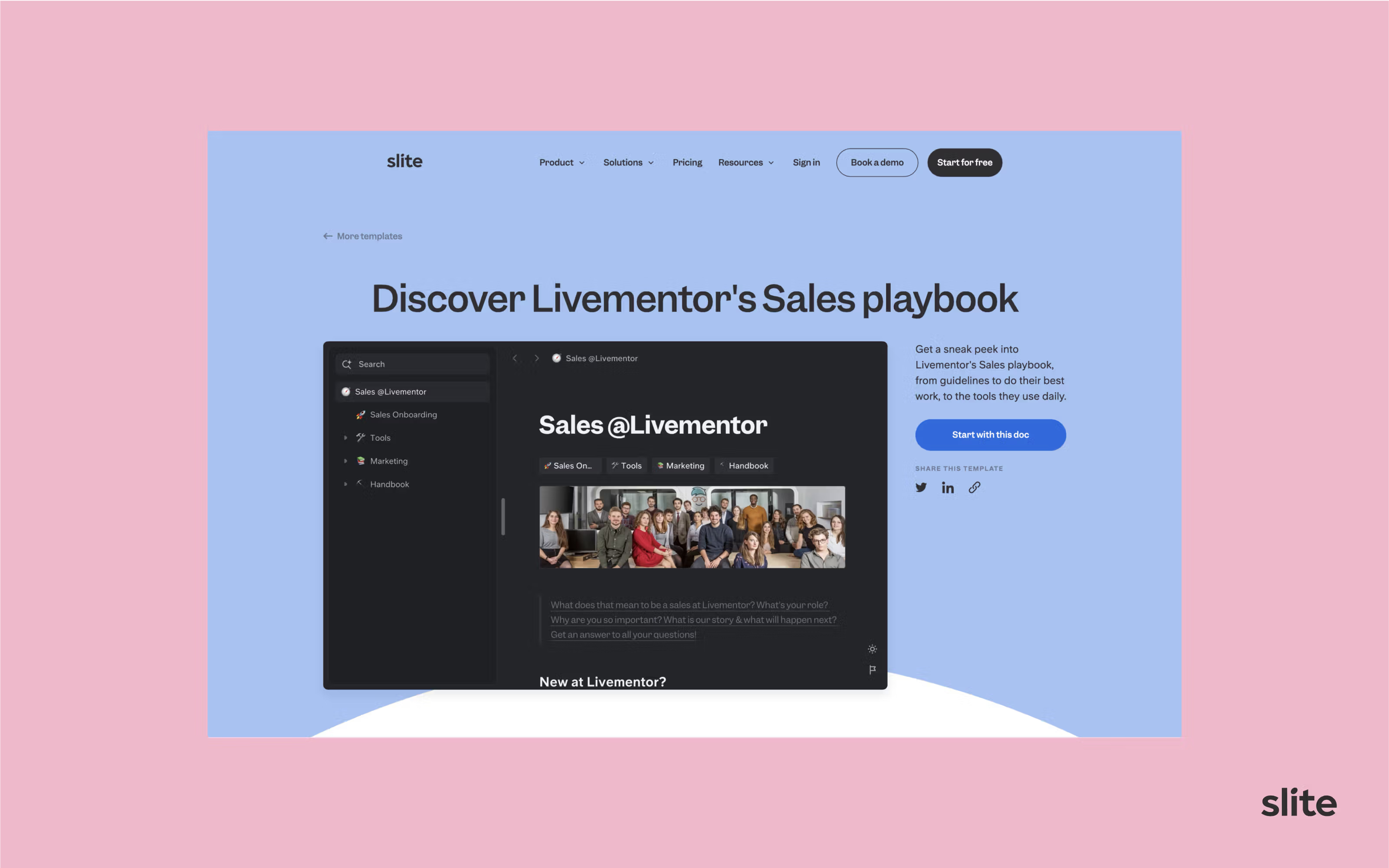
Live Mentor's Sales Playbook
Want to download it for yourself? Get it here for free
Sales Presentations
Interactive presentations help reps engage prospects and get them excited about your solution. If you care about design and want a fast start, check out Pitch's sales-presentation template gallery.
Battlecards
Battlecards are visual one-pagers that give a concise competitor analysis, helping reps differentiate you in a sales conversation. They are also the fastest-changing sales knowledge you own. A VP at an infrastructure-software company told us their objection-handling and competitive Q&A went stale within two to three months, after which reps stopped trusting the wiki and scattered answers back into Slack. That is exactly the content worth keeping current.
For example, here is a visual competitive analysis from our Notion comparison, with a fuller writeup in Notion vs Slite, to give prospects a high-level view of the most valuable features.
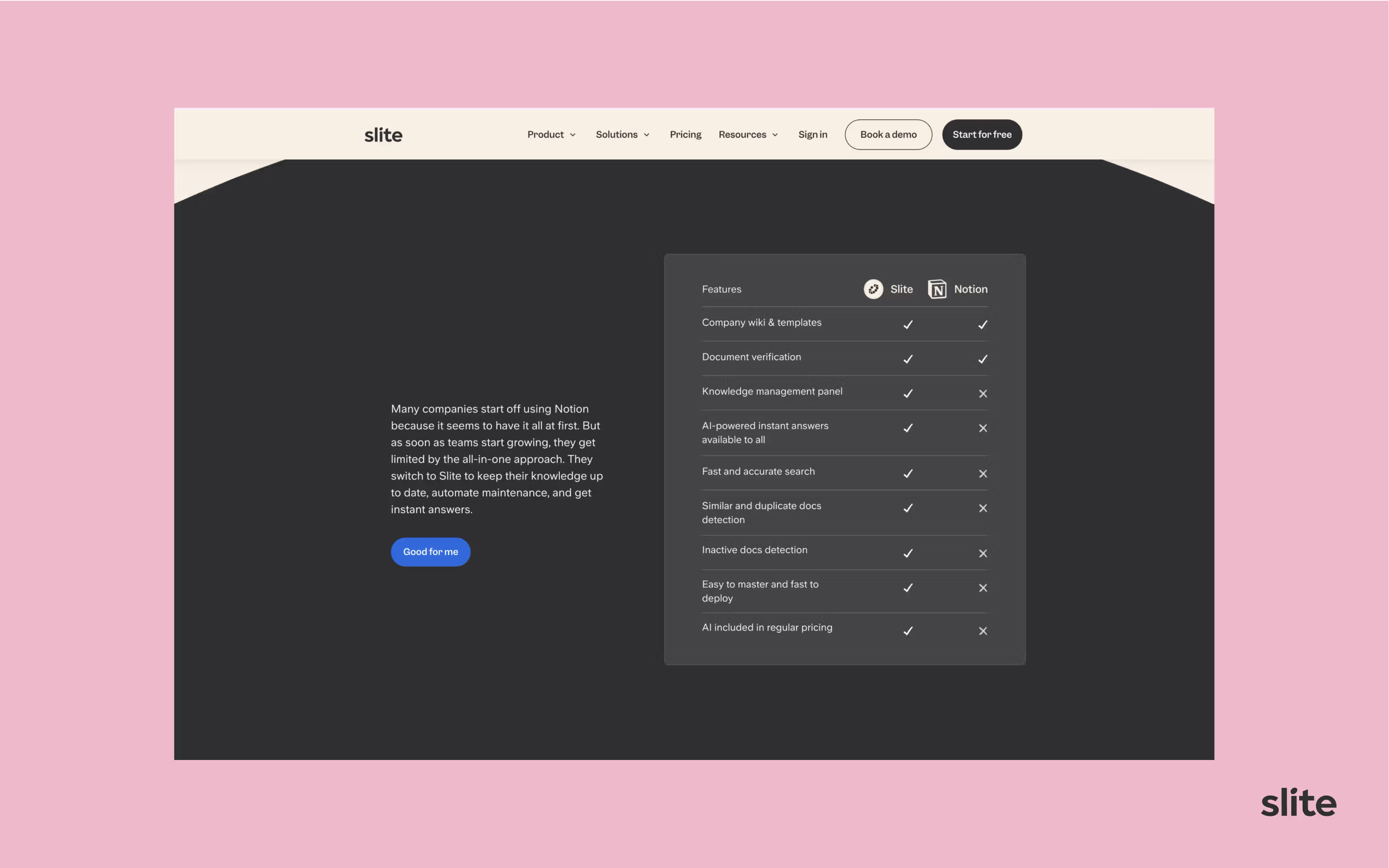
Slite's side-by-side comparison to Notion
Email Templates
Well-crafted email templates help reps communicate effectively while saving time. And if you want to start with good old cold outreach, here are two resources to begin with:
- Sahil Bloom's cold email guide
- The basics of a good cold email by Sriram Krishnan
Keep iterating and expanding your library of sales documents, presentations, videos, frameworks, and scripts.
Free sales documentation templates
Templates cut the blank-page problem and keep new docs consistent. Start from a reusable version of each core document, then adapt it to your product and process.
- Sales playbook template: the stage-by-stage structure, discovery questions, and objection frameworks reps follow on every deal.
- Sales SOP template: standardize the repeatable steps of your process. Start from our sales SOP template.
- Product one-pager template: benefits, top features, and a customer quote on a single page.
- Battlecard template: a side-by-side competitive view reps can scan mid-call.
- Pricing sheet template: your plans and tiers laid out so prospects grasp the options fast.
- Discovery-call guide: the questions that surface a prospect's real needs.
- Objection-handling sheet: the top objections and the approved responses.
- Email templates: outreach, follow-up, and proposal messages reps can adapt in seconds.
We link the templates we host as they go live. Where a template is not published yet, build your own from the structure above and keep it in a searchable home so the whole team works from the same version.
Where to start
You do not need to document everything before you start. Pick the two or three places where deals actually stall, write those plays first, and give reps one searchable home to find them. From there the pattern is steady: map the process, codify the tasks, keep the content current, and let rep feedback drive what you write next.
Do that and the work compounds. Reps ramp faster because they can learn before their first call, founders stop hand-holding and get back to strategy, and messaging stays consistent from first touch to renewal. If you want to see how a self-maintaining knowledge base keeps all of that current for a growing sales team, book a demo.
FAQs on Sales Documentation
What is the sales documentation process?
The sales documentation process is the repeatable way you build and maintain your sales docs. In practice it looks like this:
- Mapping current sales workflows
- Interviewing reps to identify what they actually need
- Creating playbooks, email templates, and presentations
- Producing training guides and videos
- Launching the documentation and gathering feedback
- Reviewing and updating it on a regular schedule
What are the different types of sales documents?
Sales documents split into internal, rep-facing docs and customer-facing, buyer-facing docs. Common ones include:
- Sales playbooks
- Pitch presentations
- Product and solution one-pagers
- Battlecards on competitors
- ROI calculators
- Case studies
- Explainer videos
- Proposal templates
- Objection-handling guides
- Email templates
What is sales process documentation?
Sales process documentation is the written record of how a deal moves through each stage, from prospecting to close, with the entry and exit criteria and rep actions at every step. It is the backbone the rest of your sales docs hang off, which is why mapping and codifying the process are two of the eleven steps above.
What makes for great sales documentation?
Great sales documentation behaves like a live tool reps work inside every day rather than a library they visit once. The traits that matter most:
- Directly helps reps in their day-to-day job
- Easy to navigate and quick to digest
- Covers the roughly 80% of situations reps hit most often
- Balances structure with flexibility
- Stays current on product, market, and rep-feedback triggers, so it never goes woefully out of date
- Lives in the flow of work (CRM, Slack, onboarding), not a separate portal
- Blends tools, templates, and training
What are the key benefits of sales documentation?
The payoff shows up across the whole sales org. The main benefits:
- Shorter sales cycles
- Higher conversion rates
- More consistent branding
- Faster rep ramp-up
- Tighter cross-functional alignment
- Less reliance on founders
How long does it take to create documentation?
For a mid-sized SaaS startup, plan at least a 3-6 month timeline involving sales operations, reps, and optionally external specialists. Treat it as an iterative, evolving initiative rather than a one-time project.