For years, teams could get away with mediocre SOPs. If a step was missing, you asked the person who knew. If the document was outdated, somebody in Slack usually knew what had changed. Important context could live in people's heads because people were there to fill in the gaps.
However, AI has changed how company knowledge gets used, including the SOPs teams rely on to carry out routine work. Teams now use AI to find answers, make decisions, draft procedures, and even to carry out parts of a procedure.
If you're evaluating tools for this, we compared the best SOP software separately.
Chris, our CEO, explains the shift in terms of scale.
A 50-person company running 100 agents still has 50 employees, but far more work now depends on systems that need explicit instructions. Procedures that once worked partly because humans could fill in the gaps now have to be documented clearly enough to stand on their own.
What he's driving at is that SOPs need to be explicit enough for both people and AI agents to follow correctly.
Humans can often fill in missing context or ask someone what a vague instruction means. Agents cannot rely on that same informal fallback.
So the parts that affect the outcome of a procedure need to be clear to both: the steps, decision rules, limits, exceptions, and points where a person needs to take over.
But writing the SOP is only half of it. Once the procedure changes, the document has to change with it. Otherwise, people and agents are following instructions for work that no longer happens that way.
This guide covers how to write, test, approve, and maintain SOPs that both people and AI agents can actually follow.
Key takeaways
- SOP stands for standard operating procedure.
- A standard operating procedure documents a repeatable activity for someone with basic context to reproduce without relying on the original author.
- The right level of detail for an SOP depends on the risk, complexity, frequency, and judgment involved in the work.
- The person who performs the work should shape the procedure. Someone else should test it, and one named owner should remain accountable after publication.
- Agents raise the bar for explicit inputs, decision rules, constraints, and approval points because they cannot fill context gaps the way experienced teammates do.
- Review dates are useful, but a change in the work should trigger another review. A new ticket, policy, pull request, support decision, or tool change can make the SOP outdated before its next scheduled review.
- Old SOPs need to be retired from normal search and AI answers. A wrong procedure that still looks official is worse than a missing one.
What is a standard operating procedure (SOP)?
A standard operating procedure (SOP) is a written set of instructions for carrying out a routine or repeatable activity consistently. It explains the steps, decisions, and responsibilities someone needs to complete the procedure correctly without relying on the person who wrote it.
SOP vs. policy, process docs, and work instructions
SOPs often become bloated because teams put everything related to a process into one document.
Policies, process overviews, detailed work instructions, and the SOP itself serve different purposes.
| Document | What it answers | Example |
|---|---|---|
| SOP | How do we perform this repeatable procedure? | Approve an enterprise discount |
| Process documentation | How does work move across people, stages, and systems? | Customer onboarding from signature to go-live |
| Policy | What rule or boundary must we follow? | Discounts above 20% require finance approval |
| Work instruction | How do I perform this narrow task in detail? | Update the discount field in the CRM |
What should an SOP include?
It can include many things, or little. But I would recommend starting with the information someone actually needs to carry out the procedure correctly:
- Purpose: why the procedure exists
- Scope: where the procedure applies, and where it stops
- Prerequisites: the tools, inputs, permissions, or knowledge needed before starting
- Roles and responsibilities: who performs, approves, or escalates each part of the work
- Procedure: the steps in the order they happen
- Decision rules: the conditions that change what happens next
- Success criteria: what a correct result looks like
- Exceptions: what to do when the normal process breaks
- Ownership and review: who owns the SOP, which version is approved, and when it should be reviewed
A five-step refund does not need a twelve-page SOP. A production rollback probably does.
But let the complexity, risk, and number of decisions in the process determine how much you include. Resist the instinct to add detail just because you can.
Standard operating procedure template
Slite's standard operating procedure template gives you a starting structure for documenting the procedure, including the information people need to understand what the SOP covers, who is responsible, and how the work should be carried out.
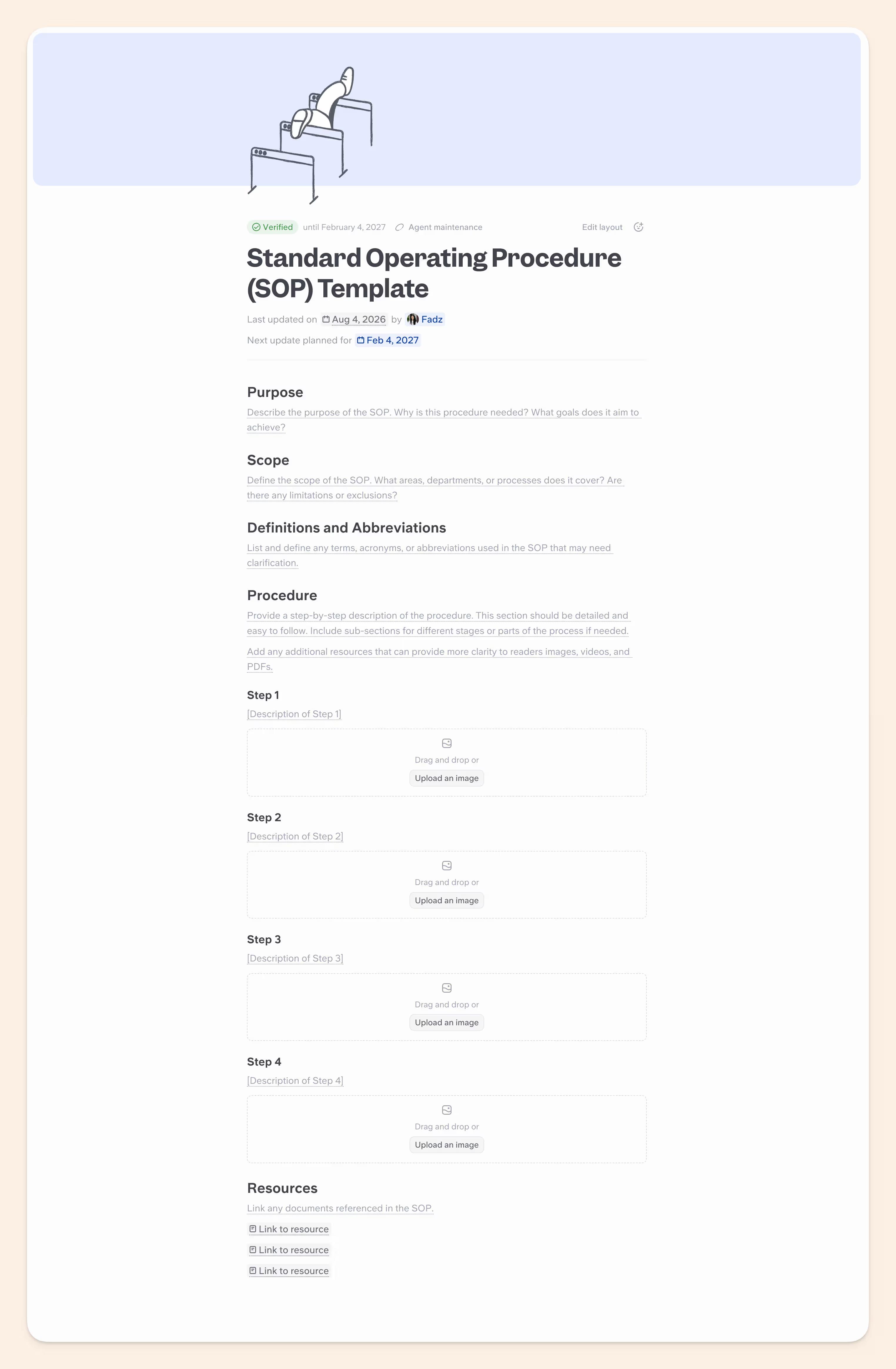
I've already covered the individual parts of an SOP above, so I won't make you read the same list twice. You can open Slite's template, copy it into your workspace, and adapt it to the procedure you are documenting.
Which SOP format should you use?
Choose the SOP format based on how the procedure works: how linear it is, how many sub-steps it contains, and how many decisions the person following it has to make.
| Format | Best fit | Example |
|---|---|---|
| Simple step list | One clear sequence of steps | Issue a standard refund |
| Hierarchical | Main steps contain sub-steps, role-specific detail, or a few conditions | Onboard a new employee |
| Checklist | Familiar, repeatable work where the user mainly needs to confirm every critical step | Run a pre-launch QA check |
| Flowchart | The next action depends on several decisions or exceptions | Escalate a support incident |
How to write an SOP people can actually follow
Onto the interesting part. I'll start with the traditional way to write or improve an SOP, then show you how AI can take over some of the work in the next section.
Nailing the order from the onset is important because most weak SOPs start by writing too early, before anyone has checked what the team actually does.
Here are the seven steps I would recommend you follow, especially if your existing SOPs are scattered across tools like Google Docs, Jira, and Slack:
1. Pick a process worth standardizing
Start with recurring work where inconsistency already causes problems, such as approval workflows, team handoffs, compliance processes, or incident response.
2. Map the real process
Work with the people who do the job to map the process from start to finish, including the main steps, handoffs, and decisions. In Slite, you can create the SOP draft and tag the people responsible for different parts of the process to fill in or verify their sections asynchronously.
Then compare that with what the company currently has documented. Use tickets, Slack threads, recordings, or system history to find steps people actually follow, but the documentation leaves out.
3. Write for the executor
Define the role first: what they already know, which systems they can access, what decisions they can make, and when they need to escalate.
Match the level of detail to the person doing the work.
Do not explain how to open the CRM to someone who uses it every day. Do explain the customer tier that changes the approval path, because that detail changes what they should do next.
4. Make decision rules explicit
This is one place where I would be almost annoyingly specific.
Write the exact rule into the SOP, including any threshold or approval condition that changes what happens next. If a step says "review and approve if appropriate," define what "appropriate" means.
For example, a sales SOP might tell the team: "Approve the request only if the customer is on an Enterprise plan and the discount is below 15%."
5. Test it with someone else
My favorite test: give the draft to someone who understands the work but did not write the SOP. Then stop talking. Ask them to complete the procedure without your help.
Every time they stop, make the wrong decision, or ask what a step means, you have found context that is still living outside the document. Fix those gaps before the procedure is approved.
6. Approve one version
Before I talk about approval, I want to digress for a second.
Before the SOP can be approved, decide who actually needs to sign off on it. For a routine internal procedure, that may only be the owner and a manager.
Security, finance, healthcare, or regulated procedures may need review from the relevant specialist or compliance team.
Once it is approved, publish one authoritative version as the single source of truth and retire the rest. Be deliberate about this.
Two SOPs that both look current are worse than one obviously outdated page because people have to guess which one is actually authoritative.
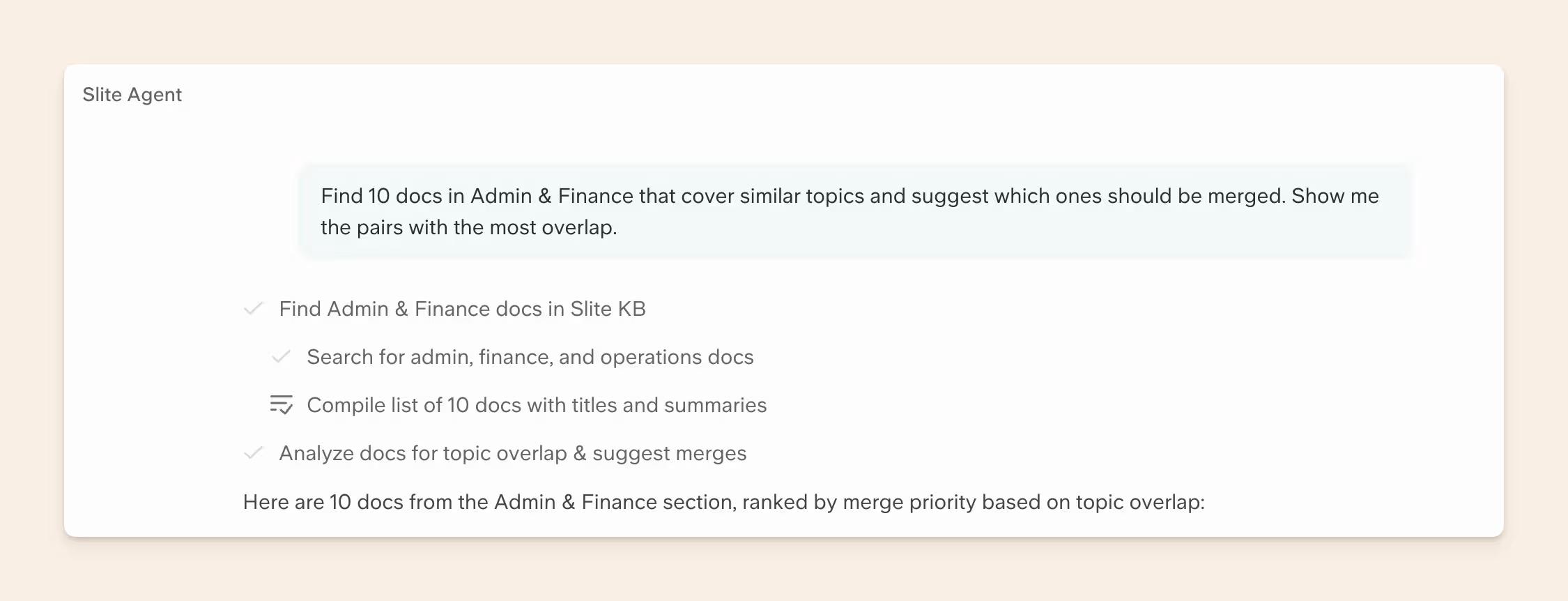
Slite can surface potential duplicate SOPs so you can review and retire the extras, keep one authoritative version, and avoid giving people or AI workflows conflicting instructions.
You can prompt Slite Agent to find and group duplicates across your workspace. Some ready-to-use prompts:
- "Find 10 docs in {channel name} that cover similar topics and suggest which ones should be merged. Show me the pairs with the most overlap."
- "Look at our top-viewed docs and flag any that seem to be duplicates or near-duplicates of each other."
- "Are there any docs across our workspace that cover the same topic? Group them and recommend a consolidation plan."
7. Assign an owner
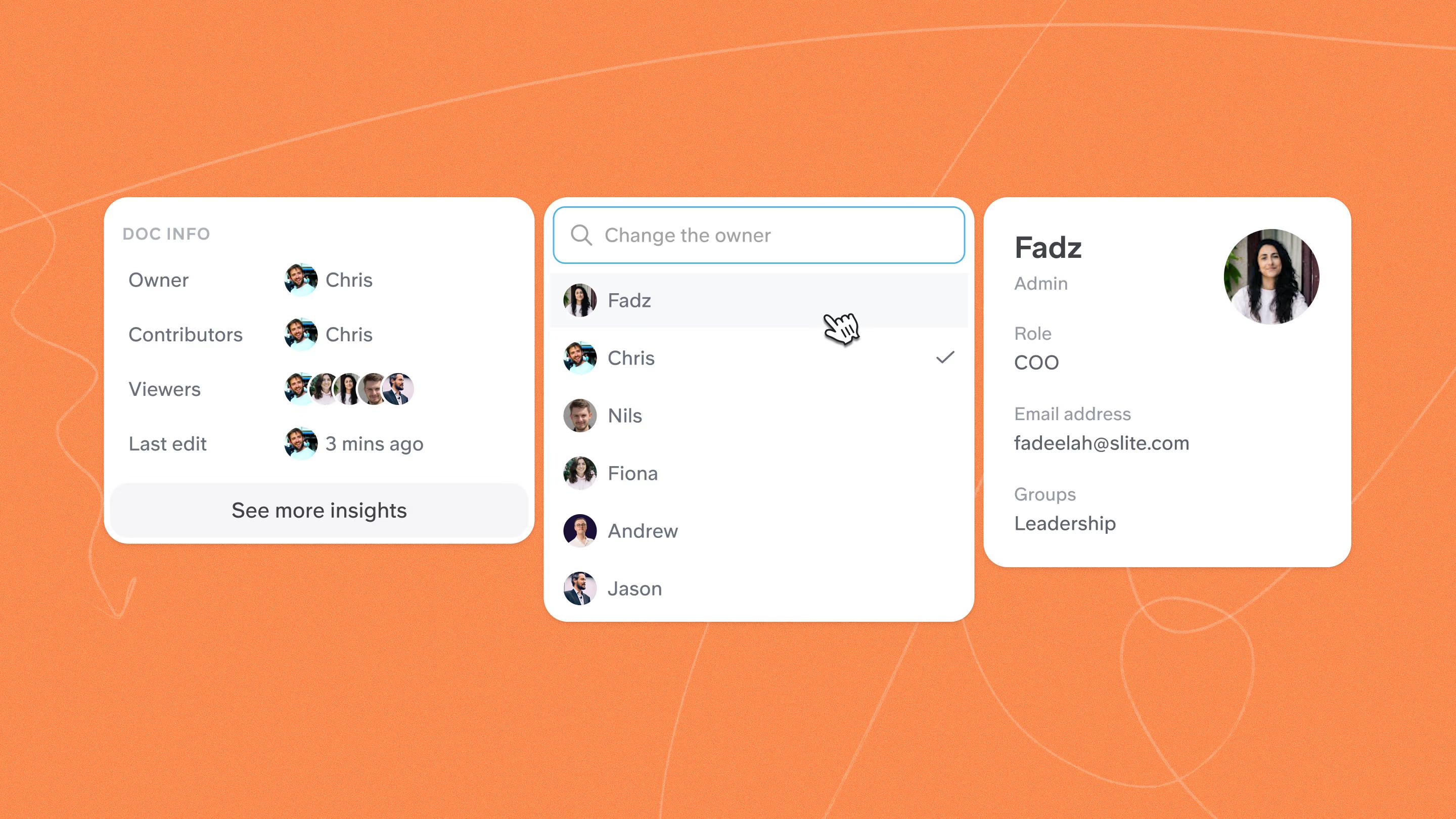
Give the SOP one owner before it goes live. I am deliberately saying one. Other people can contribute, but somebody has to be the person who notices when the process and the page stop matching.
That owner is accountable for reviewing changes, updating the SOP (either manually or by approving suggested edits surfaced by the Slite agent as a part of the self-maintaining routine), and deciding when it should be retired. Shared responsibility sounds collaborative until everybody assumes somebody else is handling the update.
How to create SOPs with AI
Creating SOPs with AI is especially useful when you need to document procedures that are still missing from your existing SOP library, or when you're migrating or consolidating your tool stack and need to build your SOPs again in one place.
Here's how to approach it:
- Gather the source material. AI is very good at this. Use it to find and pull together the latest documents, tickets, conversations, and system records that show how the procedure actually works.
- Ask AI to map the process. Have it identify the main steps, decisions, and exceptions from those sources.
- Ask AI to find conflicts. Be careful at this step. AI is very good at turning conflicting source material into one clean answer. If one source says refunds above $500 need approval and another says $1,000, tell the model to flag the disagreement and show you both versions instead of deciding which threshold is correct.
- Verify the process. Have the person who knows the work correct mistakes, fill gaps, and decide which rule is current.
- Generate the SOP. Once the procedure is accurate, AI can handle the formatting and first draft. But the SOP still needs the same human checks as one written from scratch: test it with someone who did not write it, get the right approval, and assign an owner.
[Designer note: Flow diagram: source material to AI maps the procedure and flags conflicts to SME verifies to AI drafts the SOP to human test to approval to owner.]
Standard operating procedure examples
SOPs are useful for recurring work that needs to be done consistently. A few examples include:
| Team/use case | SOP Examples |
|---|---|
| Product and engineering | Release process, incident response, architecture change review |
| Security and compliance | Access reviews, vendor assessments, SOC 2 evidence collection |
| Customer operations | Escalation procedures, enterprise onboarding, support handoffs |
| Partnerships and integrations | Partner onboarding, API credential setup, integration troubleshooting |
| Revenue operations | Deal approval, CRM hygiene, enterprise handoff |
| Internal operations | Employee onboarding, procurement, recurring approval workflows |
How to automate SOP tasks with AI agents
Start with one task, make sure the agent can handle it reliably, then expand from there.
I'd approach it like this:
- Choose the task to automate. Pick a repeatable part of the procedure with a clear start and result. For an access review, that could be checking current user access against each person's role. Don't hand the agent the entire access-management process on day one.
- Define what the agent needs. Specify what starts the task and what information the agent needs to complete it. For an access review, the trigger could be a scheduled review date, with access and role data as the inputs.
- Set its permissions. Decide which systems the agent can use and what it can do in them with a dedicated service account. That way you give it only the authority it needs to complete the task, and keep higher-risk actions behind human approval.
- Write the decision rules. Tell the agent how to choose the next action, when it should stop, and when a person needs to take over. An access-review agent might identify accounts with incorrect permissions but require human approval before removing anyone's access.
- Define what happens when something goes wrong. Tell the agent what to do when information is missing, sources disagree, or it cannot complete a step. In those cases, it should stop and send the task to a person instead of guessing.
- Test the workflow before expanding it. Run the agent through normal cases and exceptions, then check whether it followed the SOP and stopped at the right approval points.
Slite Agent has a self-maintenance setup built on Slite's enterprise search layer.
It compares your SOPs with what's happening in connected tools and identifies sections that have become outdated.
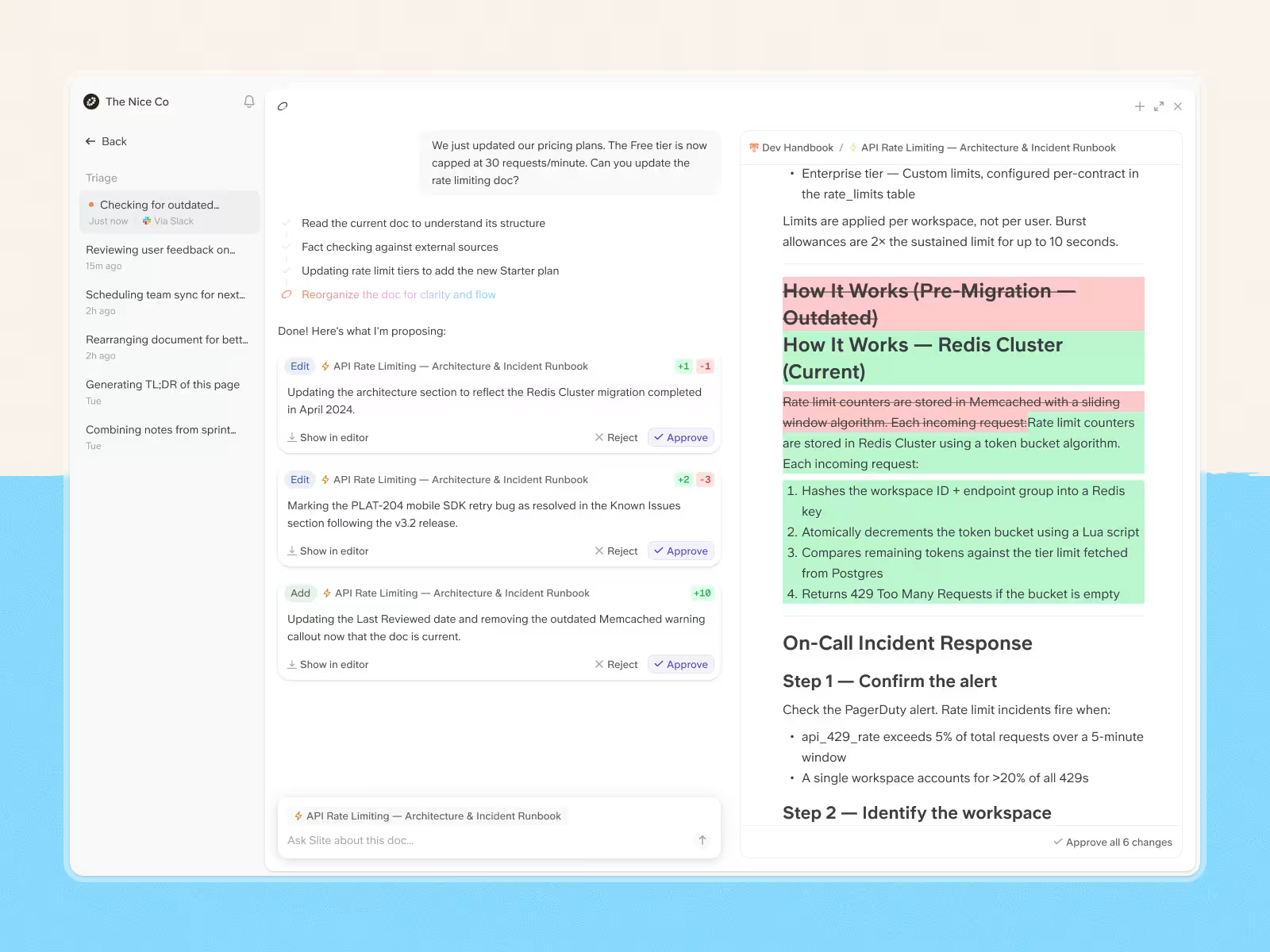
When it finds one, it drafts an update based on the latest context and sends it to the document owner for review before anything becomes authoritative.
Why SOPs become outdated
The explanation I hear most often is some version of: somebody forgot to update the SOP.
True, but that is usually just the final step in how the SOP became outdated.
And honestly, SOPs becoming outdated is normal. Companies change. Tools change. Responsibilities move around. Procedures get tweaked because somebody found a better way to do the work.
The reasons an SOP goes stale usually start earlier:
The process changes somewhere else first. Teams often change how work is done in the tools they use every day, while the SOP stays untouched. One CTO we spoke with described this happening during troubleshooting. Someone would solve a Kubernetes issue and document the fix in a ticket, but updating the matching Confluence page was a separate task. Sometimes it happens. Sometimes people move on.
Updating the SOP becomes a second task. Once the immediate problem is solved, going back to find the right page, make the change, and get it approved falls behind the work that still feels urgent. The team starts using the new process immediately, while the document waits for someone to go back and catch it up.
Nobody is responsible for keeping it current. In our June 2026 survey of 143 founders, operators, and engineers, one in four said they relied on someone noticing that documentation had become outdated rather than having a system to flag stale content.
Old versions stay in circulation. One company we spoke with had an outdated document still available beside the newer version because nobody had archived it. People could still find and use the old instructions even though the process had changed.
How to keep SOPs current and followed
Publishing the SOP is only the first half of the job. The other half is keeping it aligned with the procedure as the work changes.
We hear that problem in customer conversations all the time.
At this point, you might be wondering: do we really need an elaborate maintenance system for every SOP?
My answer? No. The loop can stay simple. How often you run it should depend on how quickly the procedure changes.
Follow these steps:
- Assign an owner. Make one person or team responsible for keeping the SOP accurate.
- Define review triggers. A scheduled review still helps, but if the process changed in February, a December review date does not help you for the ten months in between.
- Check it against the current process. Confirm that the steps, decision rules, and approvals still match how the work is done.
- Approve any changes. If an update changes risk, responsibility, or a decision path, send it through the same approval route as the original SOP.
- Retire outdated instructions. Archive or clearly mark old versions as outdated so people and AI tools do not make use of them.
That last step is easy to skip and expensive to skip. An SOP can be perfectly written and still be wrong. Once the process changes, the document has to change with it.
How to manage SOPs in Slite
We've covered how to keep SOPs current and followed. Slite lets you put that into practice across all your SOPs.
In Slite, you can:
- create and publish the approved SOP
- assign an owner and verification status
- see which SOPs need attention
- catch changes that make an SOP outdated
- review proposed updates
- retire old versions
Create the SOP
Start with Slite's SOP template and edit it to match the procedure your team actually follows. Once the SOP has been reviewed and approved, keep that version in Slite as the one everyone should use.
Assign ownership and verification
Give every SOP a named owner.
And set a review date. When verification expires, or Slite detects contradictions, it changes the status and notifies the owner. Teammates can also request verification or flag a document as outdated.
See which SOPs need review or are outdated
Once the number of SOPs starts growing, you should not have to open them one by one to figure out what needs work.
Slite's Knowledge Management Panel lets you filter documents by owner, verification status, and activity, then reassign, verify, or archive them in bulk.
Catch changes upstream
Slite Agent can compare an SOP with the tools where the work is actually changing, including Slack, GitHub, Jira, Google Drive, and Linear.
When it finds a mismatch, it drafts an update and sends it to Triage for review.
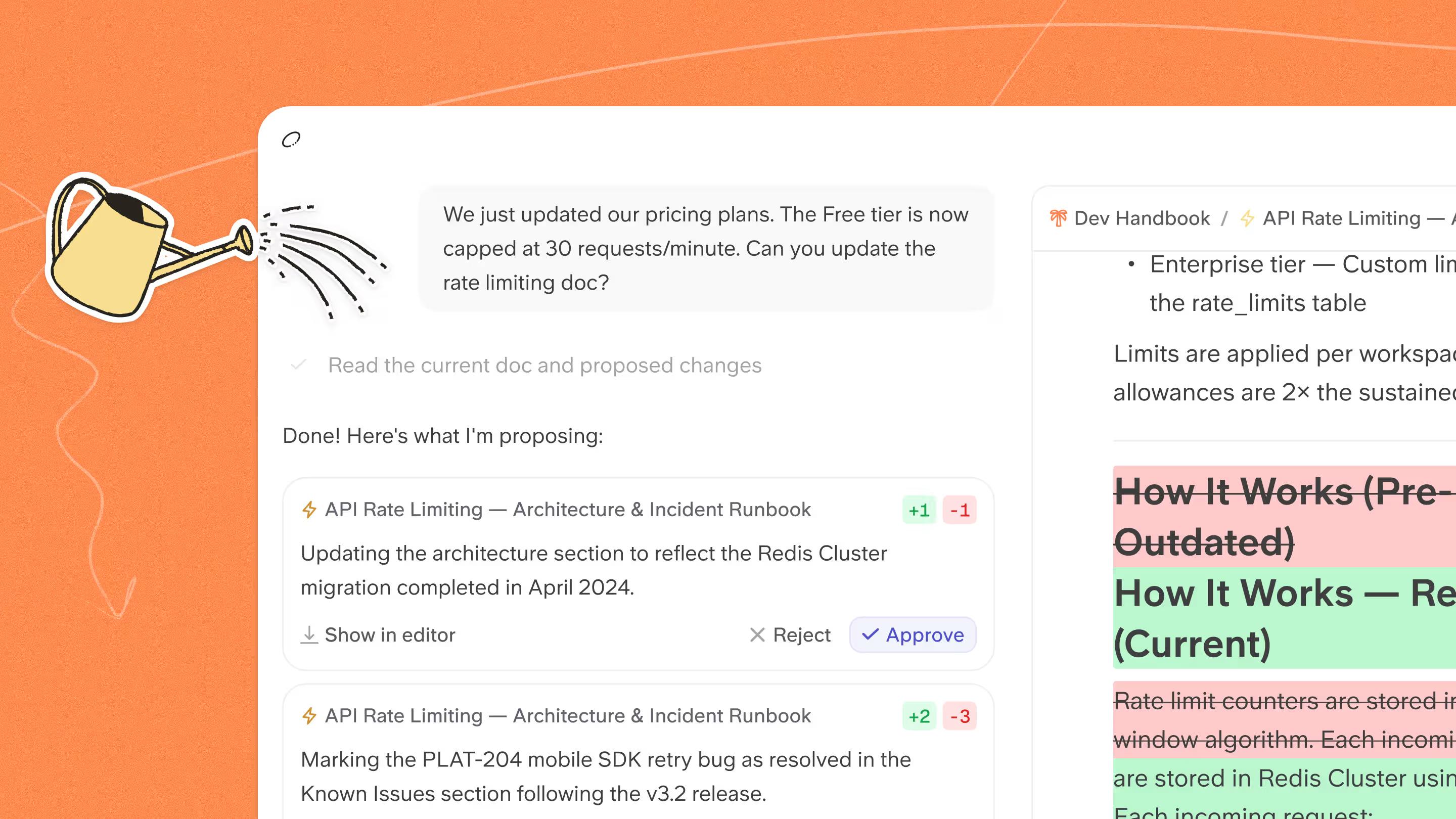
Slite Agent never applies those edits automatically. The proposed edit lands in Triage for you or whoever's in charge to accept or dismiss.
Retire outdated SOPs
When a procedure is no longer valid, mark the document as Outdated or archive it so the old instructions stop competing with the current procedure.
Slite Agent can also propose actions such as archiving a document or changing its owner. Those actions go through the same approval workflow before anything is applied.
Ready to put your SOP system together?
- Start with the SOP template. Slite has a ready-made SOP template you can use as the structure for your first procedure, then adapt it to the way your team actually works.
- Already have SOPs? Bring them with you. Slite lets you import existing documentation from tools like Notion, Confluence, and Google Drive, so moving to a more structured system does not have to mean rewriting everything from zero.
- Then let Slite help with the hard parts. Assign owners, verify documents, keep track of what needs attention, and use Slite Agent to catch changes that could make an SOP outdated.
Still piecing together what this would look like for your team? Book a demo for a walkthrough.
FAQ
What are the three types of SOP?
The three types of SOP are Standard SOPs, Instructional SOPs, and Administrative SOPs. Standard SOPs cover tasks performed in a consistent way across a business, Instructional SOPs provide detailed directions for completing a specific task, and Administrative SOPs cover internal procedures such as HR, accounting, and other administrative work.
What is an SOP checklist?
An SOP checklist is a condensed list of the critical steps someone needs to complete during a procedure. It can support an SOP, but it usually leaves out the context, roles, decision rules, exceptions, and troubleshooting guidance contained in the full procedure.
What are the five parts of an SOP?
The five core parts of an SOP are purpose and scope, roles and responsibilities, procedure steps, success criteria, and review or approval information. Higher-risk procedures may also need prerequisites, decision rules, exceptions, troubleshooting guidance, and stronger document control.
Can AI plan my daily tasks from an SOP?
Yes. AI can plan daily tasks from an SOP when the procedure clearly defines the work, priorities, triggers, conditions, and completion criteria. If the AI will also take actions in company systems or affect other people, the SOP should define what the agent is allowed to do and where human approval is required.