Earlier this year, six people on our team paid $800 a month in Max subscriptions to OpenAI and Anthropic for $7,800 worth of AI usage a month.
That's a discount of roughly 90%, and the AI labs cover the difference. It's reminiscent of the time we were all getting $4 Uber rides. Big labs are burning investor money to win users, and a whole generation of knowledge workers has learned that AI should feel close to free.
However, software vendors like us know that's not the case. Every answer Slite Agent gives costs us real money at our model provider, and that cost grows with the amount of work behind the answer.
So in 2026 we kept seat pricing and added a monthly AI allowance, measured in credits, to every Pro seat. If you're renewing with us or comparing Slite with another tool, you'll want to know what that means for your bill.
Key takeaways
- Slite is still priced per seat. Each Pro seat ($20 a month, billed annually) includes 50 AI credits a month, pooled across the team.
- You only spend credits when Slite Agent runs. Writing, editing, doc verification, and inline AI help are free.
- A credit tracks the work behind an answer. A quick lookup costs about 0.7 credits, a thorough investigation 2.7 to 5.3.
- Credits don't compare across vendors. Compare what a typical task costs and what each tool gets done for your team.
- Admins can track spend in AI Usage, and digests are usually the first place to trim when the pool runs low.
Why is every AI tool moving to credits?
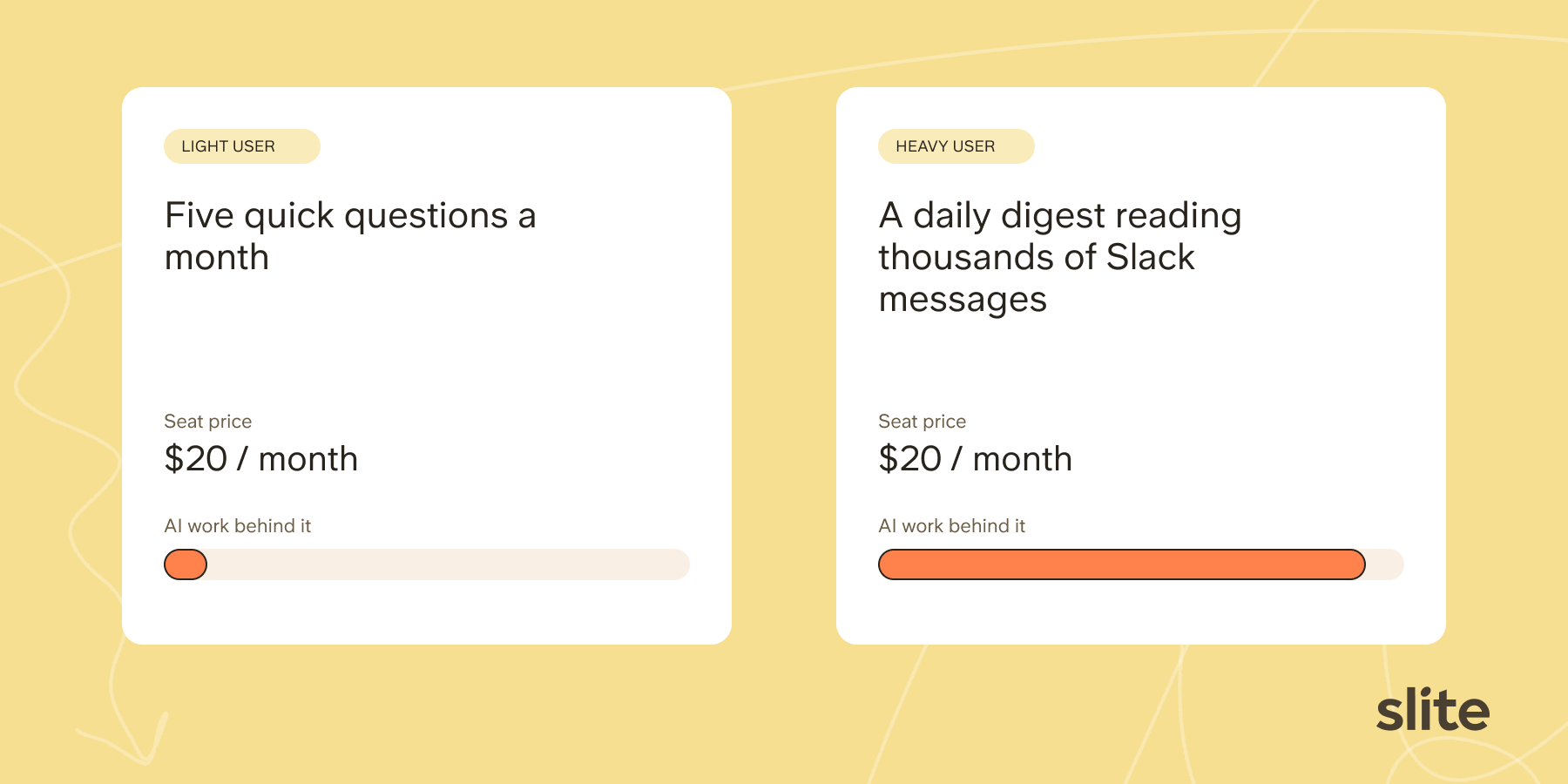
Seat pricing assumes every user costs the vendor about the same. AI breaks that assumption. One person asks five quick questions a month. Another sets up a daily digest that reads thousands of Slack messages.
Under a flat seat price, the light user pays for the heavy one, or the vendor caps everyone without saying so.
"Paying per seat for AI is like paying for electricity by the bulb." Han Wang, co-founder of Mintlify
That's why you're seeing AI credits and usage caps in more and more of your SaaS subscriptions. Many of our competitors, including Notion and Glean, now price AI usage separately in some form.
And they're right to do so.
A subsidized price lasts until the vendor takes it away, usually once your team has built its work around the tool and switching is no longer realistic.
Credits set a price you can plan around from the start.
They also hold every vendor you pay, us included, to a number you can forecast, so you can build real workflows on AI without bracing for a surprise bill.
Is Slite switching to usage-based pricing?
No. Slite is still priced per seat, and each Pro seat comes with 50 AI credits a month. You only pay more if your team goes past that allowance and chooses to top up. Pure usage-based pricing would bill you for every question, and we don't do that.
- Pro costs $20 per seat per month, billed annually, and includes 50 credits per seat.
- Basic doesn't include Slite Agent or AI credits.
- Credits are pooled. A 20-seat Pro workspace gets 1,000 credits a month to share, and nobody has a personal cap.
- Your included allowance resets each month on your billing date.
- Extra credits last 12 months, and you only use them once the monthly pool is empty.
- Enterprise allowances are set per contract.
Your workspace spends credits whenever Slite Agent runs on your behalf, whether a person asks it a question or an automation runs on a schedule. Features that don't call Slite Agent don't spend credits.
The table lists the AI features in Slite and shows which ones draw from your credit pool.
| Feature | Costs AI credits? |
|---|---|
| Writing and editing docs | ✗ No |
| Doc verification | ✗ No |
| Inline AI writing help and translation | ✗ No |
| Slite Agent questions | ✓ Yes |
| Search across your connected tools | ✓ Yes |
| Assistants and workflows | ✓ Yes |
| Digests | ✓ Yes |
| AI maintenance of your docs | ✓ Yes |
| Slite Agent through the API or MCP | ✓ Yes |
What does one Slite credit actually buy?
A credit tracks the work behind an answer, so the cost depends on what you ask Slite Agent to do. Here are the typical costs we publish in our Help Center.
| Task | Average credits | Example |
|---|---|---|
| Edit a document | 0.4 | "Reorganise this section, preserving its commitments" |
| Find specific information | 0.7 | "What happens if we run out of credits mid-task?" |
| Search across many tools | 1.4 | "Summarise last week's customer conversations across Attio and Zendesk" |
| Research and edit | 1.5 to 3.2 | "Find all related support questions and improve this help page" |
| Digests | 3.8 | Daily highlights to weekly multi-source recap |
| Thorough investigation | 2.7 to 5.3 | "Find the most recurring customer issues with fixes planned, and give me a brief on each" |
Why do some questions cost fewer credits than others?
Two questions that look alike can cost very different amounts.
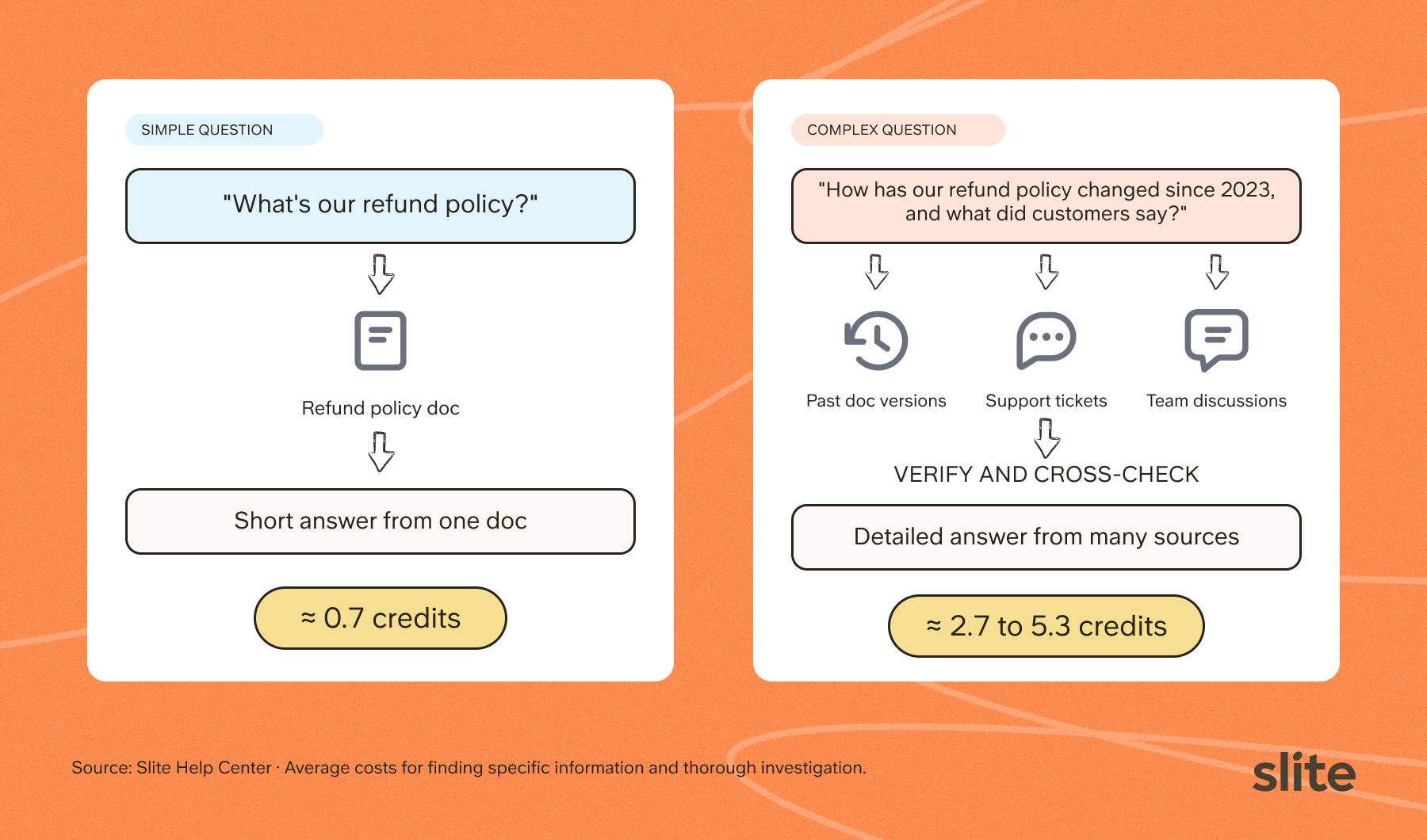
Most of the cost comes from how much the agent has to comb through and how many steps it takes to get there.
For complex reasoning questions, it also has to verify what it found and cross-check sources that disagree.
That's also why we don't charge per question.
A flat price per question would bill a quick lookup the same as a deep investigation, and you'd overpay for most of what you ask.
What a month of Slite Agent looks like
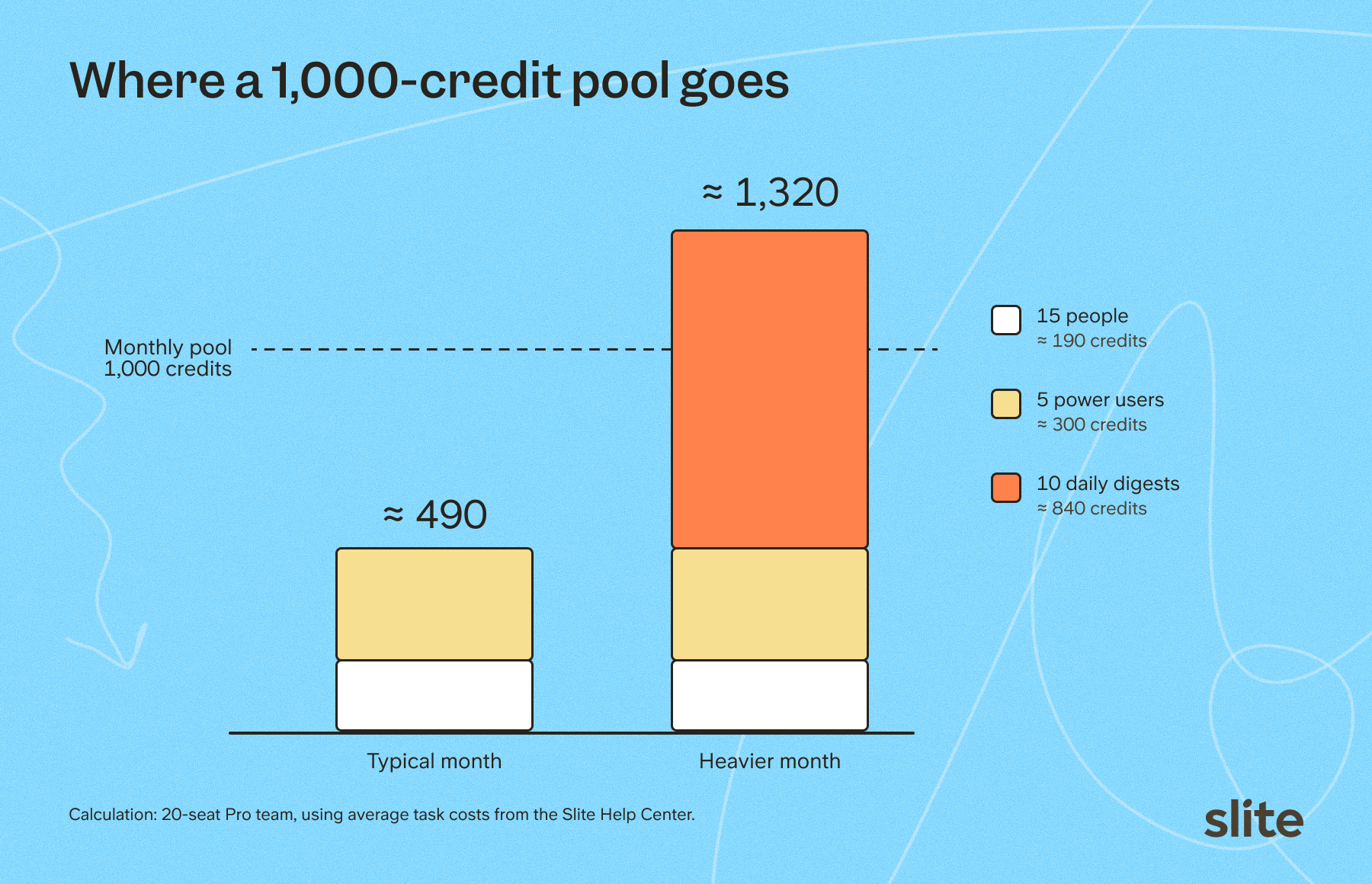
Take a 20-seat Pro team with 1,000 shared credits.
In a typical month,
- 15 people ask about 10 simple questions and 4 cross-tool questions each, around 13 credits per person.
- 5 power users each ask 20 cross-tool questions and run 4 thorough investigations at about 4 credits each. Each of them also runs a weekly digest at about 3.8 credits, which brings a power user to around 60 credits.
- The team uses about 490 credits, less than half its pool.
In a heavier month,
- The same team also sets up ten daily digests at the average of 3.8 credits a run.
- Over 22 working days, those digests use about 840 credits on their own.
- The team lands near 1,320 credits. It needs four top-up packs of 100 credits, or four fewer daily digests.
Not every month looks like this.
Usage often rises while a team is onboarding or setting up new automations, then settles once habits form.
We keep improving the engine behind Slite Agent too, so the same credit covers more work as the months go by.
To see what this means for your own team, we run white-glove pilot projects. We'll help you get a feel for your team's real usage and work alongside you to make the most of every credit. Book a demo with us to talk it through.
If you're already a customer, raise a ticket and our customer success team will gladly help you manage and monitor your AI usage.
Can you compare a Slite credit with a Notion or Rovo credit?
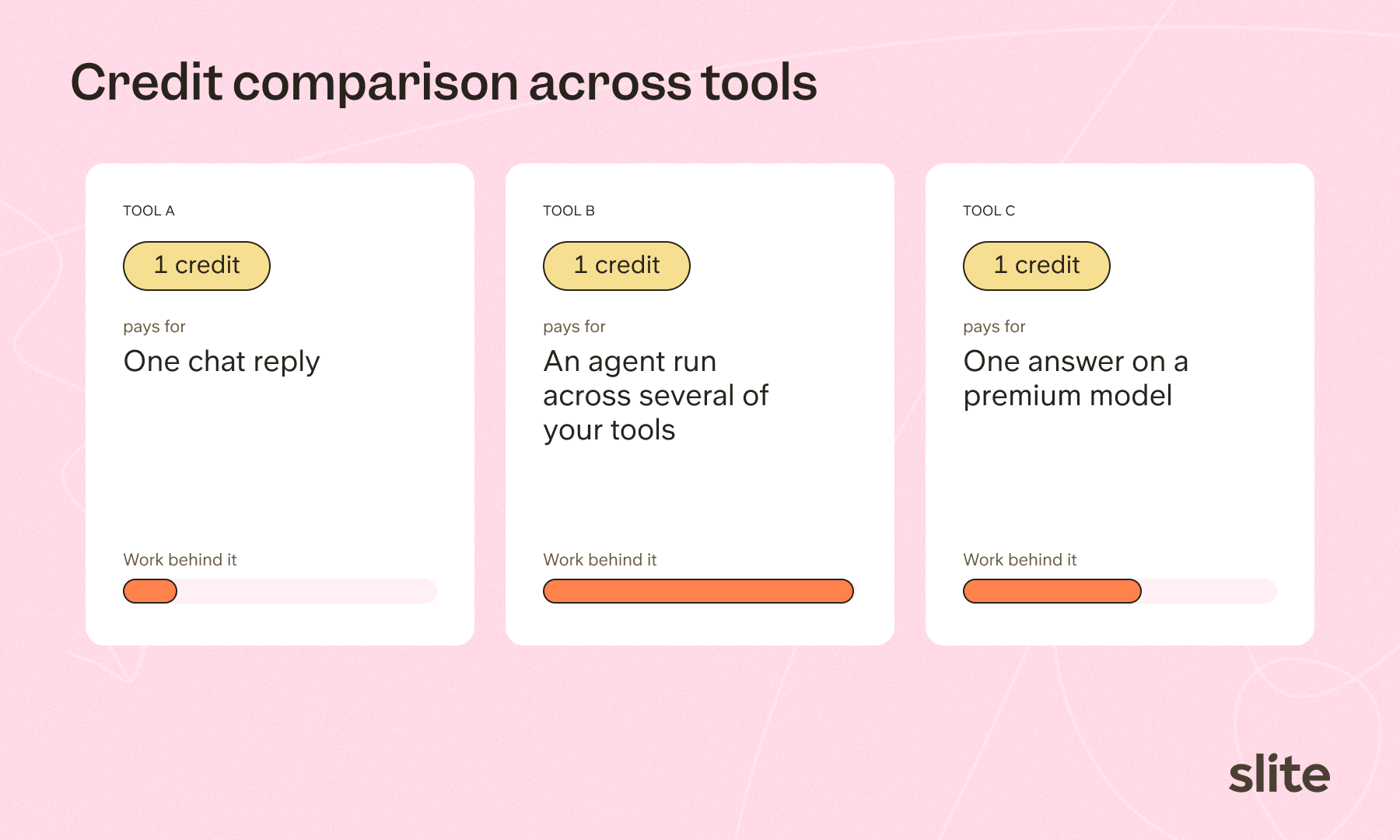
No. Every vendor defines its own credit, and each one pays for different work.
In one tool, a credit might pay for a single chat reply.
In another, it covers an agent run that searches across your tools and drafts an update to a doc.
Vendors also draw the line between free and metered features in different places. The models they run and the way they find context differ too, so the same question can take very different amounts of work from one product to the next.
Credits don't map cleanly even within a single tool.
Some tools, Notion among them, let each person pick the model behind their answer. That means two teammates can ask the same question, one on a frontier model and one on a cheaper workhorse model, and spend very different amounts of credits.
So the useful comparison is the work each tool gets done for your team.
If you're in the market and actively evaluating us alongside other tools, these are the questions worth asking every vendor, us included.
- What does a typical task cost in credits, and what's the price of one credit?
- Which features are free and which are metered? Some vendors keep basic search unmetered (Glean does).
- What happens at zero? Some tools can switch on extra usage billing up to an admin-set cap (Atlassian's Rovo does). We pause agent tasks until you top up or your allowance resets.
- If there's a fair-use clause, what's the number behind it?
- Do credits pool across the team or sit with each user, and do they roll over?
What happens when you run out, and what can admins control?
When your pool hits zero, new Slite Agent tasks pause until you add credits or your allowance resets on your billing date. A task that has already started finishes, and we cover the difference. The rest of Slite keeps working as usual.
How to monitor your credit consumption
To help you monitor and forecast how your team is using AI, admins can open AI Usage from Settings (click your workspace logo first).
It shows you:
- Total credits used by your workspace, with a breakdown by person and bars showing which features their credits went to.
- A custom date range, so you can see how quickly you're moving through the current cycle.
- A CSV export of every credit debit event, the quickest way to spot a digest or API key doing more than you expected.
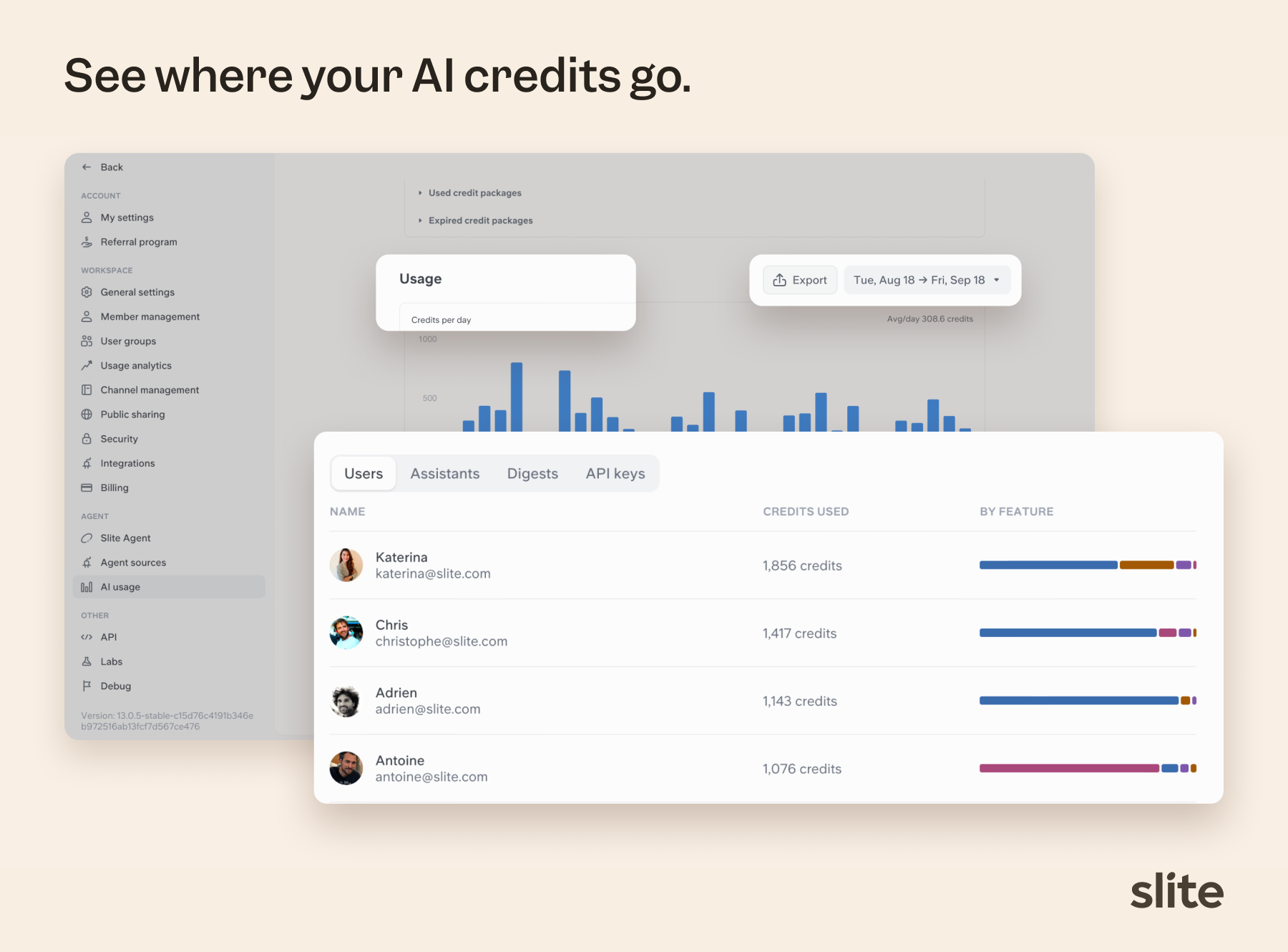
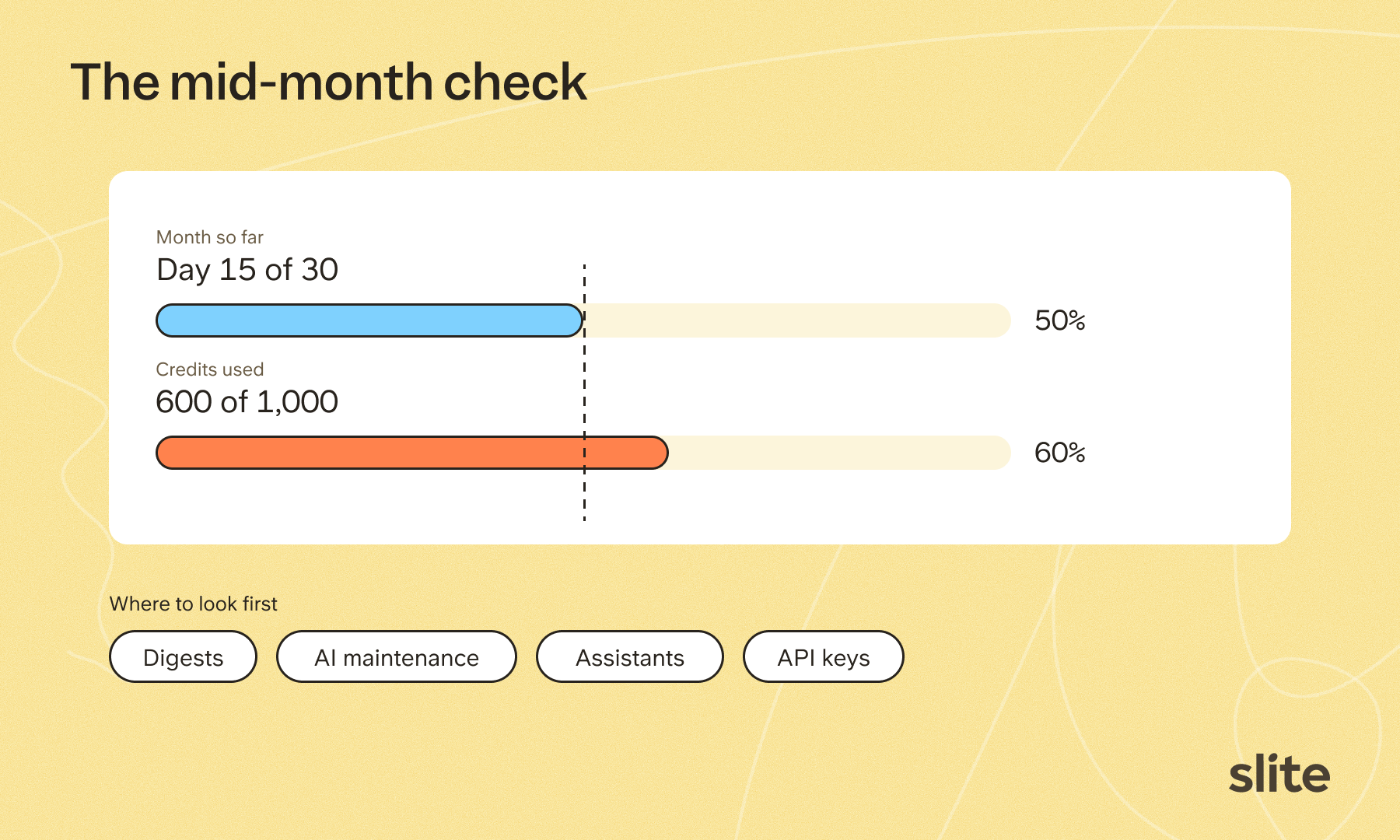
Check it once a week and compare how much of the pool you've used with how far you are into the month.
How to optimise where your credits go
Two weeks into the month and already past half your pool? Don't cut everyone off. In our experience the spend almost always traces back to one or two automations, so work through these in order.
1. Digests
A digest runs whether or not anyone reads it, so this is where a quiet leak usually hides.
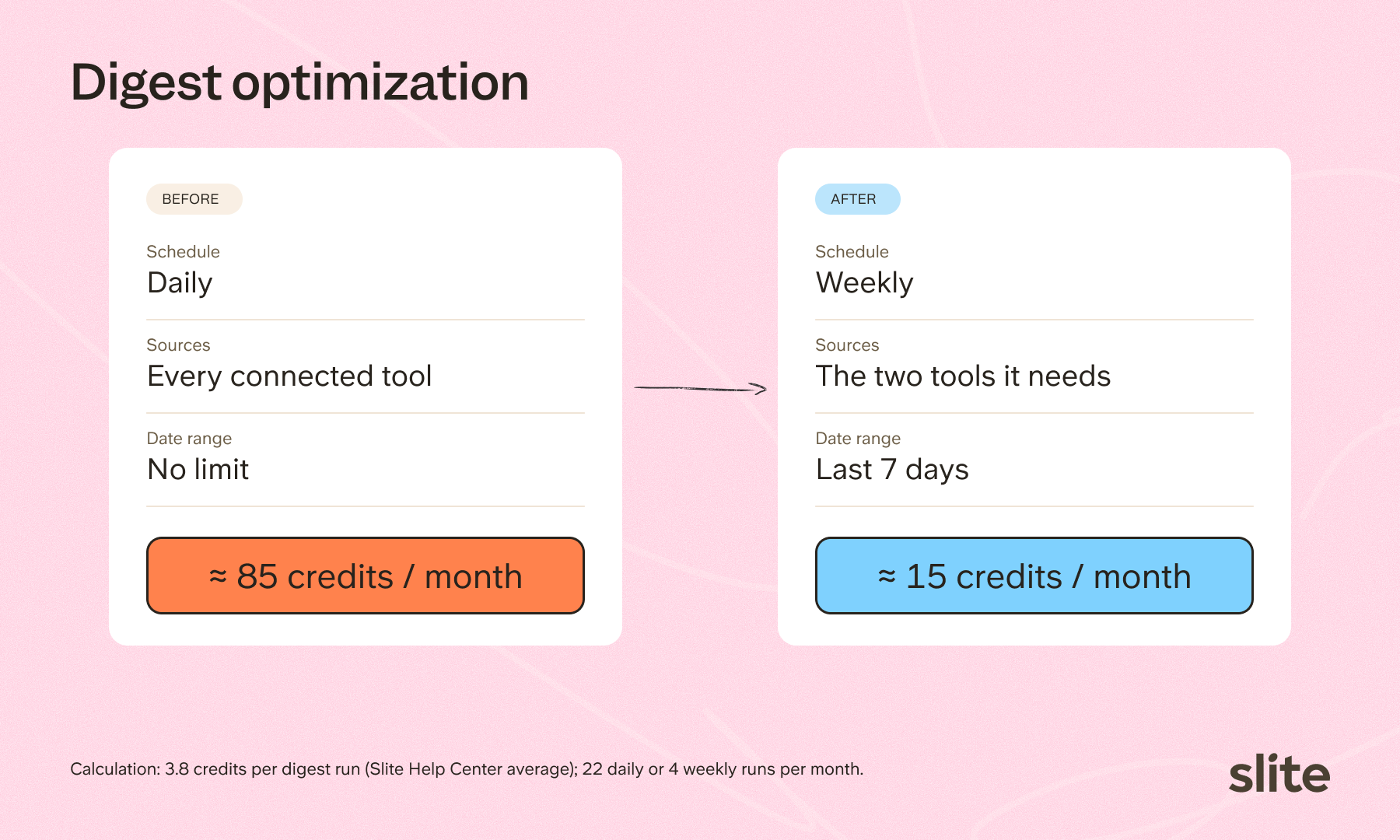
- Change the cadence. Move daily digests to weekly, or weekly to monthly, wherever the team doesn't need the update every day.
- Reduce sources. In Filters, pick only the integrations the digest needs, and set the date range to the last 24 hours or last week.
- Trim the audience. Remove recipients who have left the team or never open it.
- Pause or delete the ones nobody opens. It happens to every team.
2. AI-maintained docs
Maintenance is worth paying for on the docs people actually open.
- Focus maintenance on the docs your team relies on most, such as onboarding guides and policies.
- Turn it off where suggestions stall. If a doc's suggestions keep getting reviewed but never applied, the credits aren't buying anything.
- Turn it off on archived or rarely read docs.
3. Assistants for the jobs you repeat
If the same question comes up every Monday, an assistant answers it for fewer credits than a fresh open-ended chat.
- Build an assistant per recurring task instead of asking the agent open-ended questions each time.
- Pin your sources. Use Specify sources on each step so the agent only searches the tools that matter.
- Add guardrails in General context, for example "Only include changes from the last 7 days."
- Set an Answer format so the output stays short and structured.
4. Small habits that add up
- Add a time range to questions ("in the last 7 days") when older history doesn't matter.
- Review API keys and integrations. Agent requests from the API and MCP use credits too, so retire test scripts and stale keys.
And if you'd rather not change anything, that's fine too. Top up from the Billing page. Top-ups last a year and work the moment you buy them. If your team simply needs more every month, talk to Sales and we'll raise the cap for good.
What is Slite doing to improve your credit ROI?
Our job is to make each credit do more over time, and to make it obvious where your credits go. Every credit pays for work the agent does, so the cheapest credit is the one the agent never has to spend. That's where most of our engineering effort on Slite Agent goes.
Doing less work per answer
Before it starts reading, the agent narrows each question to the sources and time range it actually needs. It skips the tools that can't help, and less reading means fewer credits.
Matching the effort to the question
A quick lookup shouldn't run like a research project. Simple requests take a short, direct path, and deeper reasoning is saved for the questions that need it.
Passing the savings on
The price of a credit doesn't change when our engine gets cheaper. The same task simply costs fewer credits, so your allowance stretches further every time we ship an improvement, with no new contract or price change.
Showing you where it goes
The AI Usage tab breaks spend down by person and by feature, and the CSV export lists every single credit debit, so nothing hides inside an average. Spending caps and automatic top-ups aren't available yet, and giving admins more control over spend is next on our list.
What comes next?
AI pricing will keep shifting as the labs stop subsidizing their plans and the real cost of compute shows up in every tool. We'd rather price it in the open now, and share the savings as our engine improves.
If you want help sizing your plan, book a call with us and bring your trial or usage data. We'll work out the numbers together.