Every tool in the productivity space, be it a knowledge base tool, docs tool, or project management is destined to be compared to Notion – and Slite is no exception.
In our main comparison page we put Notion VS Slite head to head to go over the main features and concerns.
But I decided to write a super honest detailed comparison with longer context, as I have been using and following both of the tools' journeys for years intensively.
And to give you a well-rounded perspective, we asked a Notion consultant, a Notion power-user creator (100k+ followers), and a common SF builder.
The one thought that sums it up if you should choose Slite over Notion? A prospect who tested both side by side said:
If mainly knowledge base and sharing is key, Slite is probably the best option.
But, let’s see for ourselves - shall we?
Why do Notion users look for an alternative like Slite?
Notion has been the reigning champion for personal and professional knowledge management.
As a productivity tool, it has achieved the cult status of SaaS startups one can only hope to achieve, right along the ranks of Arc by The Browser Company, Figma, Slack, Miro, etc.
Notion is, in fact, so popular that you cannot escape its ecosystem of Notion consultants, monetized Notion templates, and so much more. It’s created unimaginable wealth for individuals that jumped on the Notion hype-train which has only been going up.
But when the time comes to renew the Notion yearly license, the price of using a one-for-all-tool starts to be questioned.
We get asked:
- Notion tries to do everything — project management, databases, wiki. We just need a focused knowledge base. Is Slite more focused?
- How does Slite pricing compare to Notion AI, especially now that Notion is bundling AI into plans and raising prices?
- Notion is champion-driven — only a few people actually use it. How does Slite drive company-wide adoption?
- Our search in Notion is slow and unreliable after years of use — does Slite maintain search performance at scale?
- Notion is getting expensive — is Slite meaningfully cheaper, especially for large teams with mixed usage (some daily, some occasional)?
- We don't want to pay for readers — what are the reader pricing options?
So, what ends up happening?
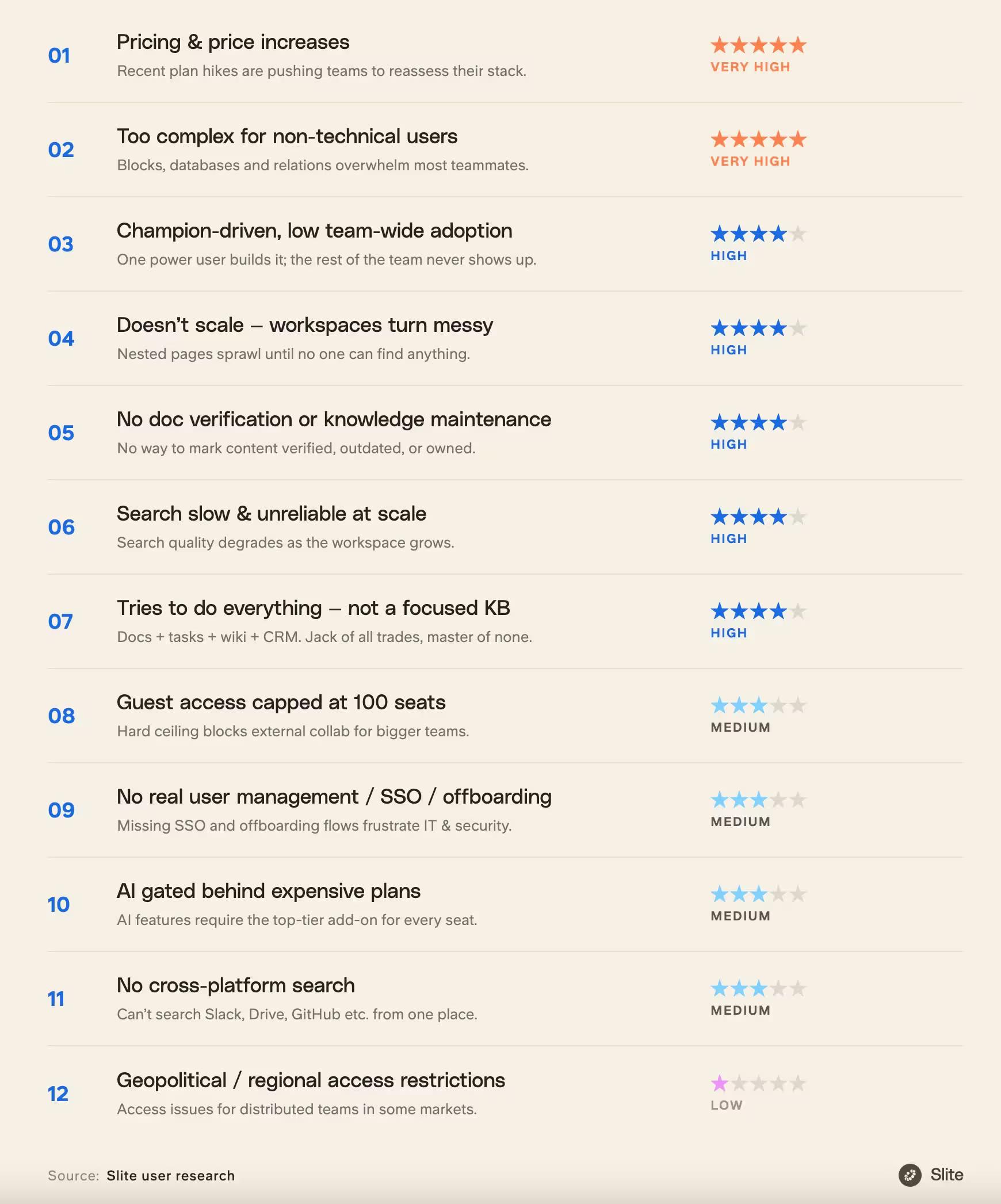
Customers leave Notion for Slite primarily because pricing is the #1 trigger, with Notion's rising costs and AI cost pushing teams to benchmark alternatives.
Beyond cost, Notion overwhelms non-technical users, remains champion-driven with low company-wide adoption, and becomes a disorganized mess at scale due to its project management and knowledge base hybrid approach.
Teams also cite missing document verification, unreliable search at scale, a 100-guest cap, no automated user management, and the lack of cross-platform AI search as key reasons they choose Slite instead.
That said, the most common reasons people switch from Notion to Slite are as following:
So let’s go through these points and see how Notion VS Slite compare.
Notion has been shipping like crazy, and it’s starting to catch up
After going through many Reddit threads that complain about Notion being slow, one stood out. The title “Does anyone else find Notion painfully slow, or is it just me?” goes through recurring reasons of why Notion is slow:
- Addition of features like projects and advanced databases make the application memory-intensive. One commenter says it eats RAM regardless of what you're doing, and it's "only a document app."
- Nested documents create search complexity leading to unreliable results. You could go with a flat structure and categorize them all in a database but… that’ll make the database laggy.
- It gets worse over time as your workspace grows — one user says the more data, blocks, and connections you accumulate, the slower it gets. Another mentions that even with a small number of databases it still bogs down.
I also wanted to speak to a long-term user who loves tinkering with SaaS.
Alex Bass is a founder who does exactly that at Efficient App. He’s been a Slite user for many years and he’s built Efficient - a software comparison site where they actually test every tool they write about.
They rate Slite as the #1 Best Knowledge Base over Notion, who’s been the common choice for startup wikis.
“They have this templates marketplace and they have people pitching, ‘I've solved this business case, use my template and you can do everything in your business in Notion,’ but the sheer number of people that we've met that are using Notion for everything and they're like, I'm struggling to scale this to our team. And it's because, well, they don't really know what to do in it. Well, yeah, because you've essentially built a product, you're not a Product Manager and there's no reason around this.”
If you’re building a small project with 2-3 buddies, Notion will work just fine for you.
If you’re using Notion to organize your life with dashboards and client management, Notion will work fine for you too. But if you’re a team of 10 planning to scale up your documentation and the knowledge management systems behind it, Slite is your best bet.
What about the Notion ecosystem? What about Notion AI?
I hear you. Notion’s ecosystem is great.
But if you’re a company using the standard tools like Linear, Asana, Slack, Miro, Figma, etc., you’ll be fine with any other alternative. Since these apps integrate with pretty much every day-to-day tool.
Notion AI's features work well. It can brainstorm ideas, create content, summarize docs, translate them, and generate AI answers from your company’s information.
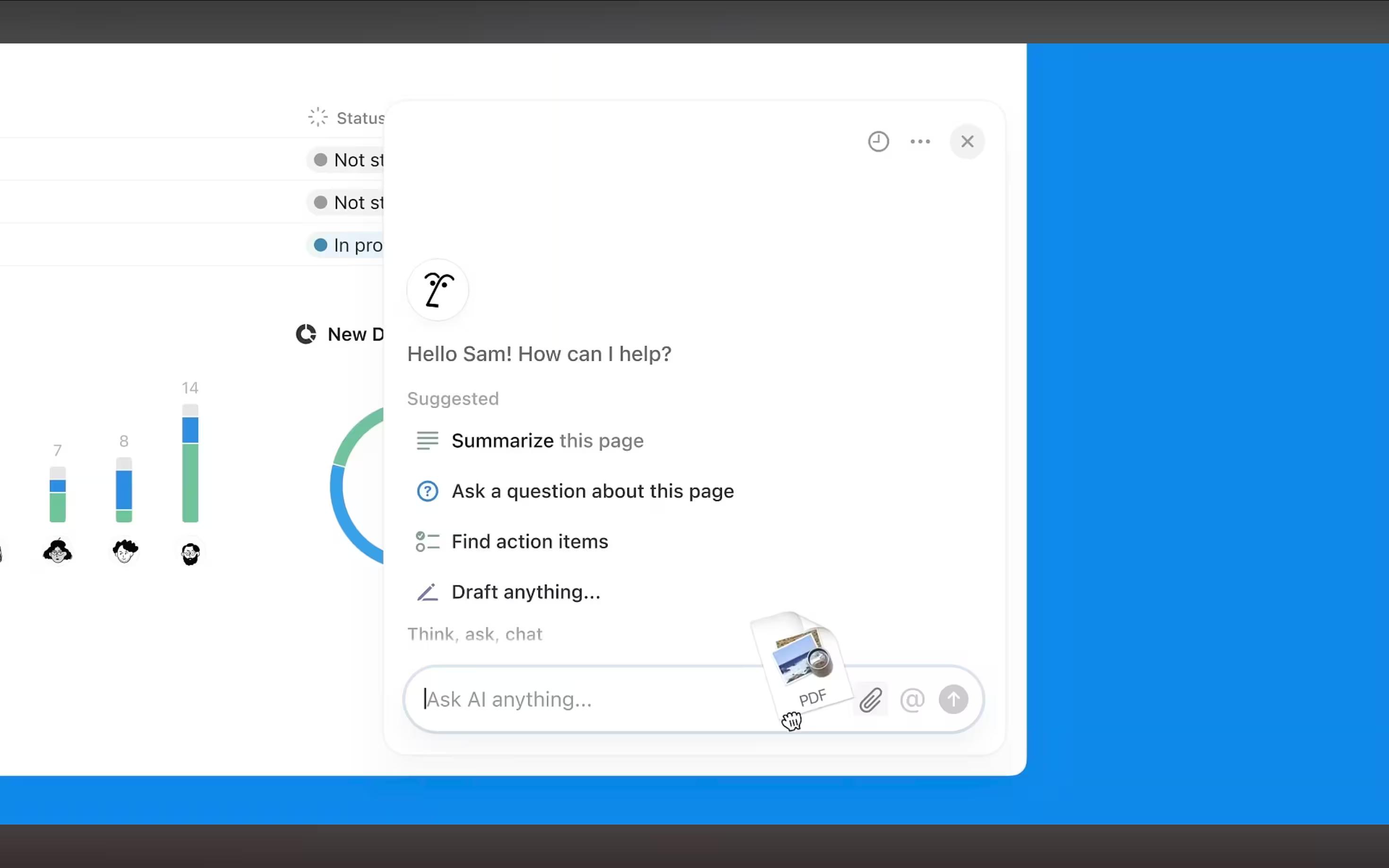
Since September 2025 they’ve also added Notion AI agents, AI meeting notes and enterprise search, and gated (what they call) premium integrations under their top two paid tiers to important apps such as Github and Zendesk.
You can have a trial of Notion AI in the free or Plus plan, but it’s fully included in the Business and Enterprise plans only. The two latter start at 18 USD/per/month. It’s affordable for personal users but grows really uneconomical for large teams. If you’re a team of 100 in need of their business plan, you’ll pay an upwards of $24,000/year just on your Notion subscription.
Notion has grown hostile to B2B teams in the 2020’s. It started as a B2B solution, initially. When it went viral for its B2C use cases, Notion tried to build for everyone. Which explains some of the decisions and unfriendly pricing for big companies now.
A lot of them have shifted to Notion alternatives. And many of them prefer Slite.
As a Notion user and now Slite fan/employee, I’ll do a 1-on-1 detailed comparison of Notion and Slite.
How does user adoption compare between Notion and Slite?
I am going to cover main areas that drive user adoption - the look, the learning curve, the editing experience, integrations and search.
Look
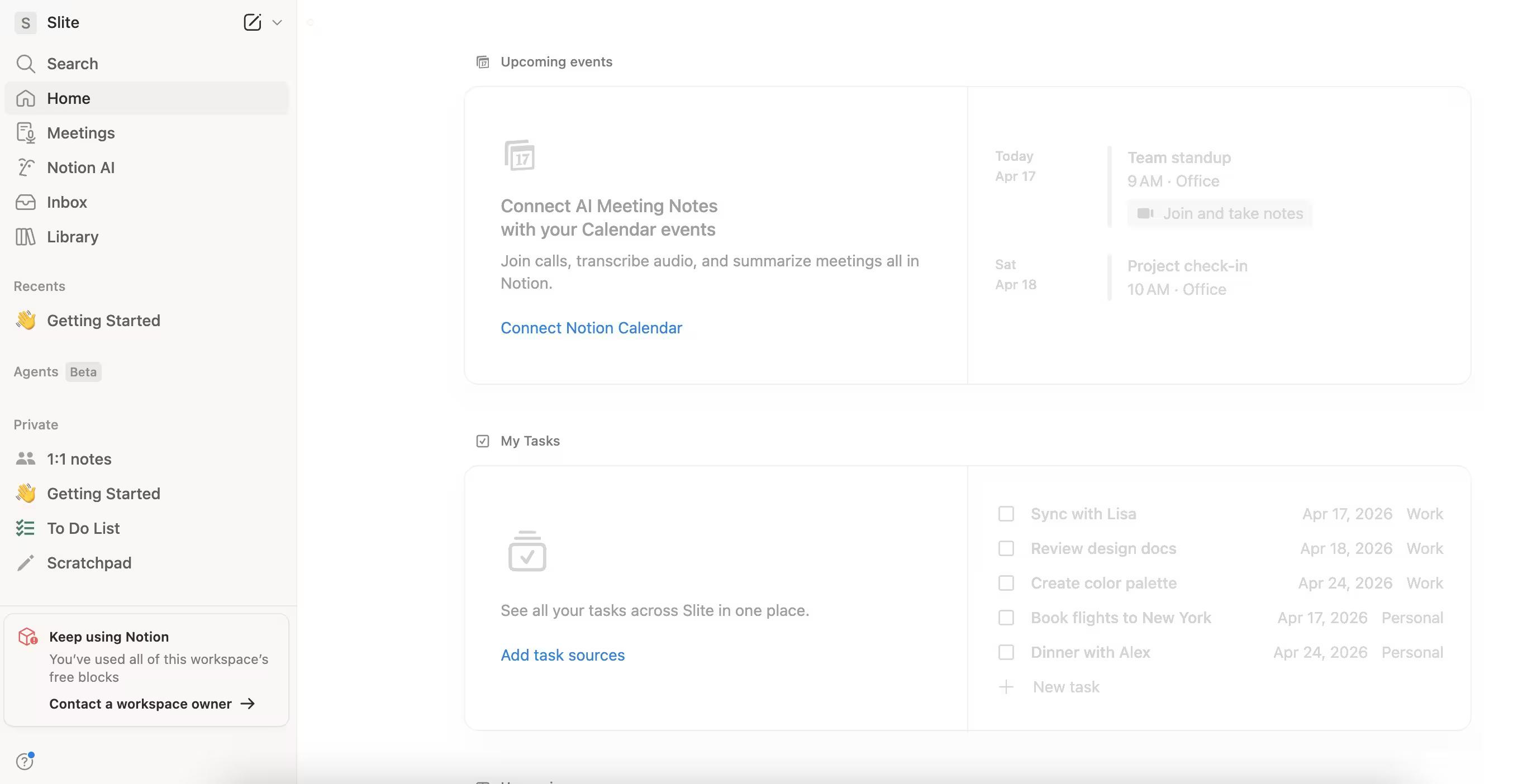
Notion and Slite both offer a minimalist, clean look at first glance, but there are some key differences when it comes to customization and overall feel.
Notion allows for extensive customization, with a wide variety of templates, cover images, icons, and even the ability to set custom colors and fonts. This flexibility lets you create a workspace that feels uniquely yours, reflecting your personal style or brand identity.
On the other hand, Slite prioritizes a more streamlined, consistent aesthetic across the platform. While you can still customize certain elements like cover images and icons, the overall design remains clean and minimal.
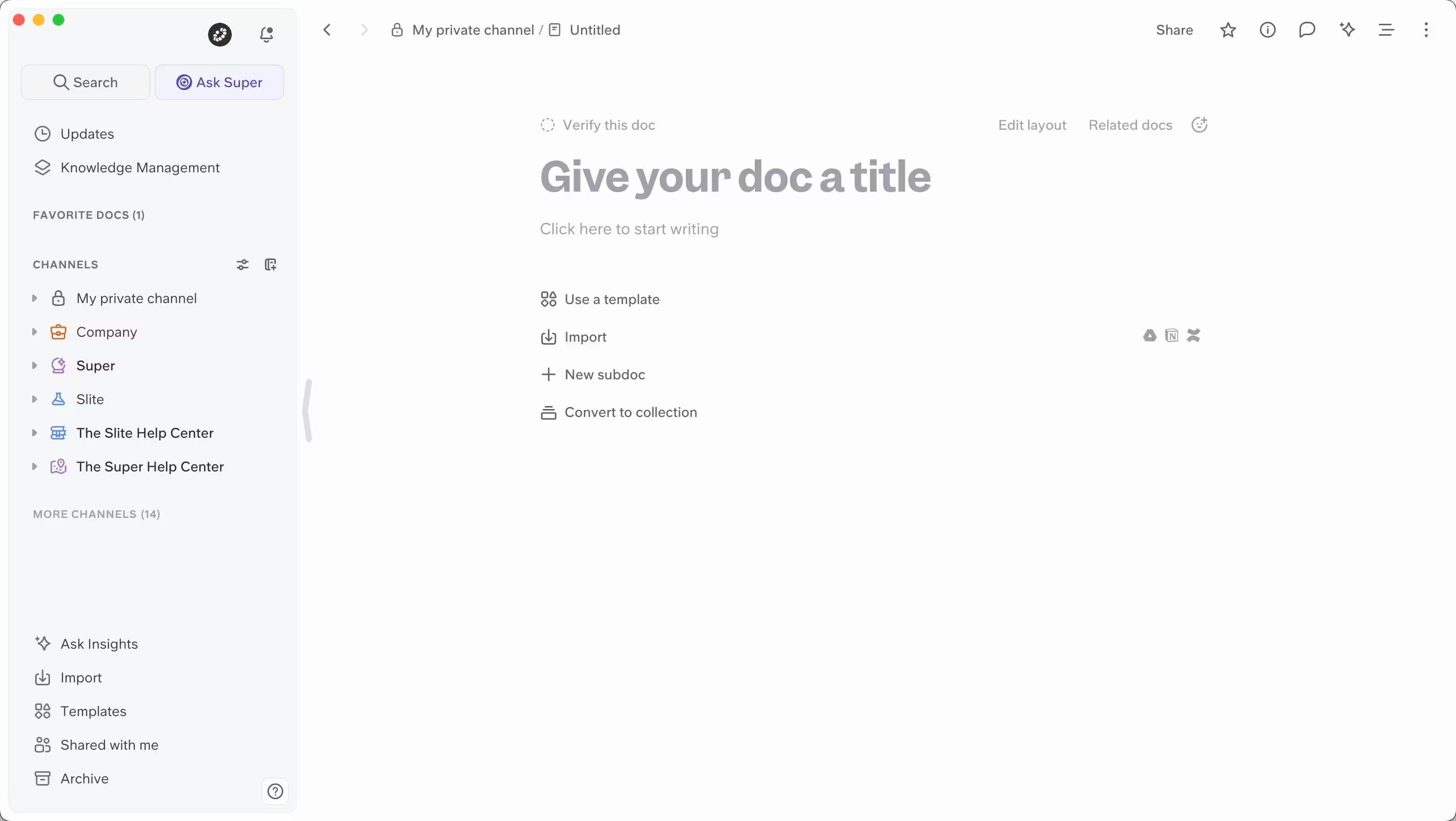
This creates a fresh, modern feel that's easy on the eyes and helps you focus on your content without distractions.
For example, take a look at this screenshot from Slite:
The interface is sleek and uncluttered, with plenty of white space and a clear hierarchy of information. The use of subtle colors and simple icons adds visual interest without overwhelming the user.
To keep it uncluttered, Slite also gives the option to auto-hide inactive docs from your sidebar. This promises an uncluttered sidebar that’s actually usable.
So, if you're someone who appreciates a polished, cohesive look and wants to dive right into your work without spending too much time on customization, Slite could be the perfect fit. Its fresh, minimal design helps you stay organized and focused, while still looking great.
Learning Curve
Both Slite and Notion offer a fast learning curve, thanks to their intuitive WYSIWYG (What You See Is What You Get) editors. This means you can start creating and formatting content right away, without the need for extensive training or technical know-how.
However, if document verification is a key part of your workflow, Slite has the edge. With Slite, you can verify any individual document, regardless of its location within your workspace - on any plan.
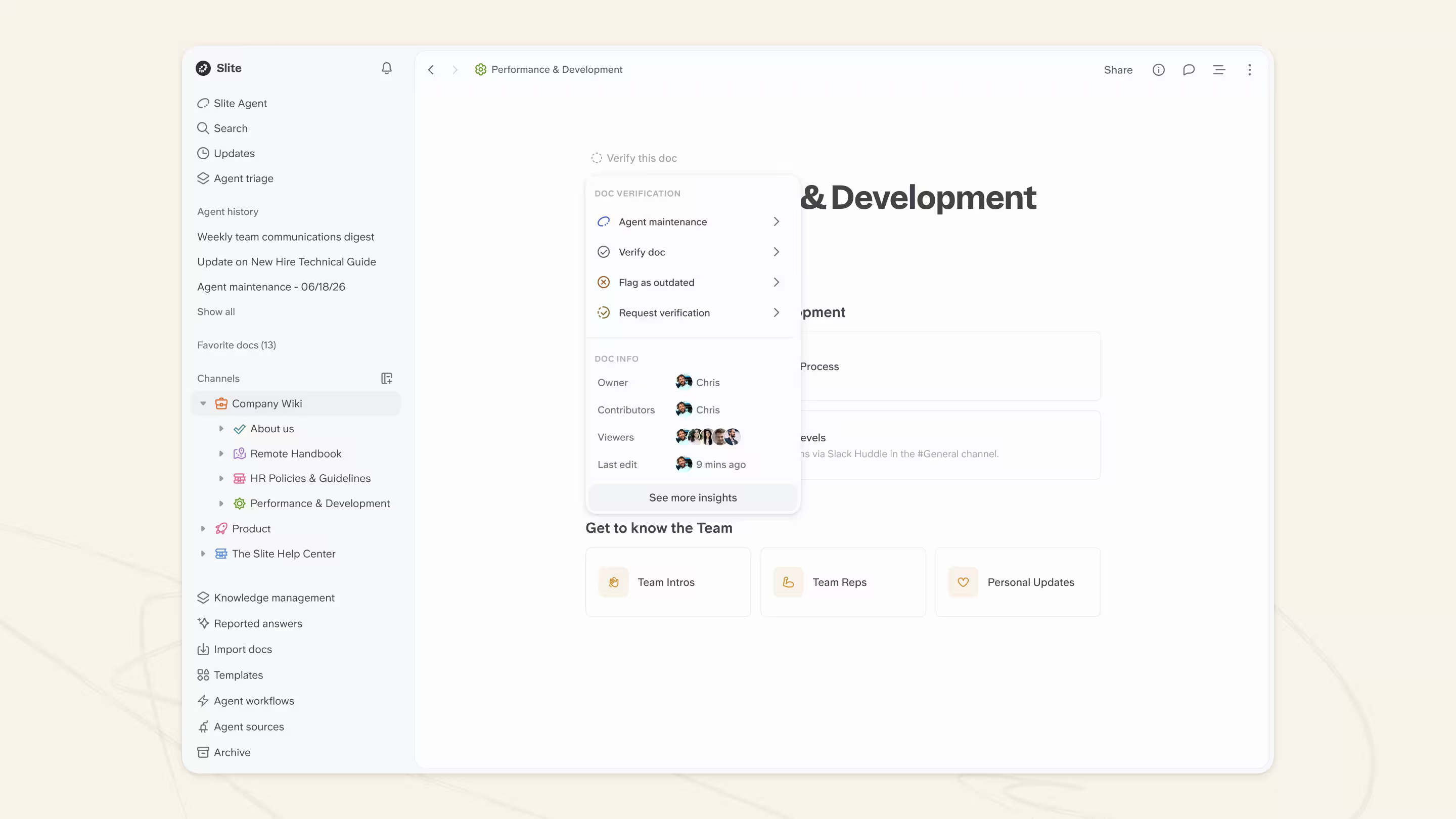
In contrast, Notion only allows document verification only for Business and Enterprise clients.
Moreover, if you’re planning to share verified information with frontline workers or other team members, Slite’s dedicated knowledge management panel makes the process much simpler and more powerful for bulk operations (more on that in the section about Knowledge management and analytics below).
This feature allows you to organize, categorize, and share verified documents effortlessly, ensuring that everyone has access to the most up-to-date and reliable information.
Slite's AI-powered natural language filter for finding outdated docs (e.g., "show me all unverified docs by me") doesn't have a direct equivalent in Notion.
Notion's AI Q&A is decent for simple questions like "what's our refund policy" but still struggles with precise property-level database filtering.
One of Slite’s standout features is the ability to create recurring sub-documents based on templates.
You can choose from Slite’s template library or create your own, you can set up a database of meeting documents that automatically generate at a specified time before each meeting. This not only saves time but also ensures that all participants are reminded to contribute to the agenda beforehand.
For example, let’s say you have a weekly team meeting every Monday at 10 AM.
With Slite, you can create a template for your meeting notes, including sections for agenda items, action points, and decisions made. Then, you can set up a recurring sub-document that automatically creates a new meeting document based on this template, say, every Friday at 3 PM. Slite will notify all meeting participants, reminding them to add their discussion points before the meeting begins.
Tech-savvy users may find the learning curve of both tools to be more manageable, especially when dealing with advanced features.
Editing experience
When it comes to the editing experience, both Slite and Notion offer user-friendly WYSIWYG editors that allow you to create and format content easily.
However, there’s one significant difference: Slite has native AI capabilities built directly into its editor, while Notion keeps Notion AI gated to higher tiers for access to similar features.
If you’re working with complex databases and tables, Notion shines. Its editor allows you to create and manage intricate data structures seamlessly.
Both Slite and Notion enables you to arrange text blocks in parallel, creating a m-column layout effortlessly.
On the other hand, Slite excels in collaborative writing, as its editor is specifically designed with teamwork in mind. Slite’s AI-powered features are geared towards helping you create business documentation faster and more efficiently.
Content creation
One standout feature in Slite is the ‘Improve with AI’ function (currently beta).
This handy tool takes your rough notes, thoughts, and paragraphs and transforms them into a well-structured, readable, and skimmable document with just one click, providing instant answers to your formatting and structuring needs. This is particularly useful when you need to quickly dump your ideas into a doc and then convert it into a polished, well-formatted plan that your team can easily digest.
For example, let’s say you’ve just finished a brainstorming session and have a bunch of scattered notes and ideas. With Slite, you can simply paste your raw content into the editor and then click ‘Improve with AI.’ Slite’s AI will analyze your text, break it down into logical sections, add headings and subheadings, and even improve the overall formatting. The result is a professional-looking document that’s ready to share with your team, offering instant answers to how your scattered thoughts can be best organized.
But Slite’s AI capabilities don’t stop there. You can also change the tone or language of your entire document with a single click.
Whether you need to switch from a casual to a more formal tone, or translate your content into another language, Slite makes it a breeze. This is especially handy when you’re collaborating with team members from different departments or regions, as you can easily adapt your writing style to suit your audience.
The one big difference between their AI capabilities is this - Notion’s AI features natively help you create content, Slite’s features don’t.
What is the reason for that? Our success manager Fiona explains:
Slite intentionally wants users to focus on using AI as a copilot for presenting their thoughts better. AI content creation, especially in a knowledge base, runs the risk of populating your knowledge base with regurgitated, lower-quality information with time.
Integrations
Slite and Notion offer integrations to enhance workflow and connect with other tools.
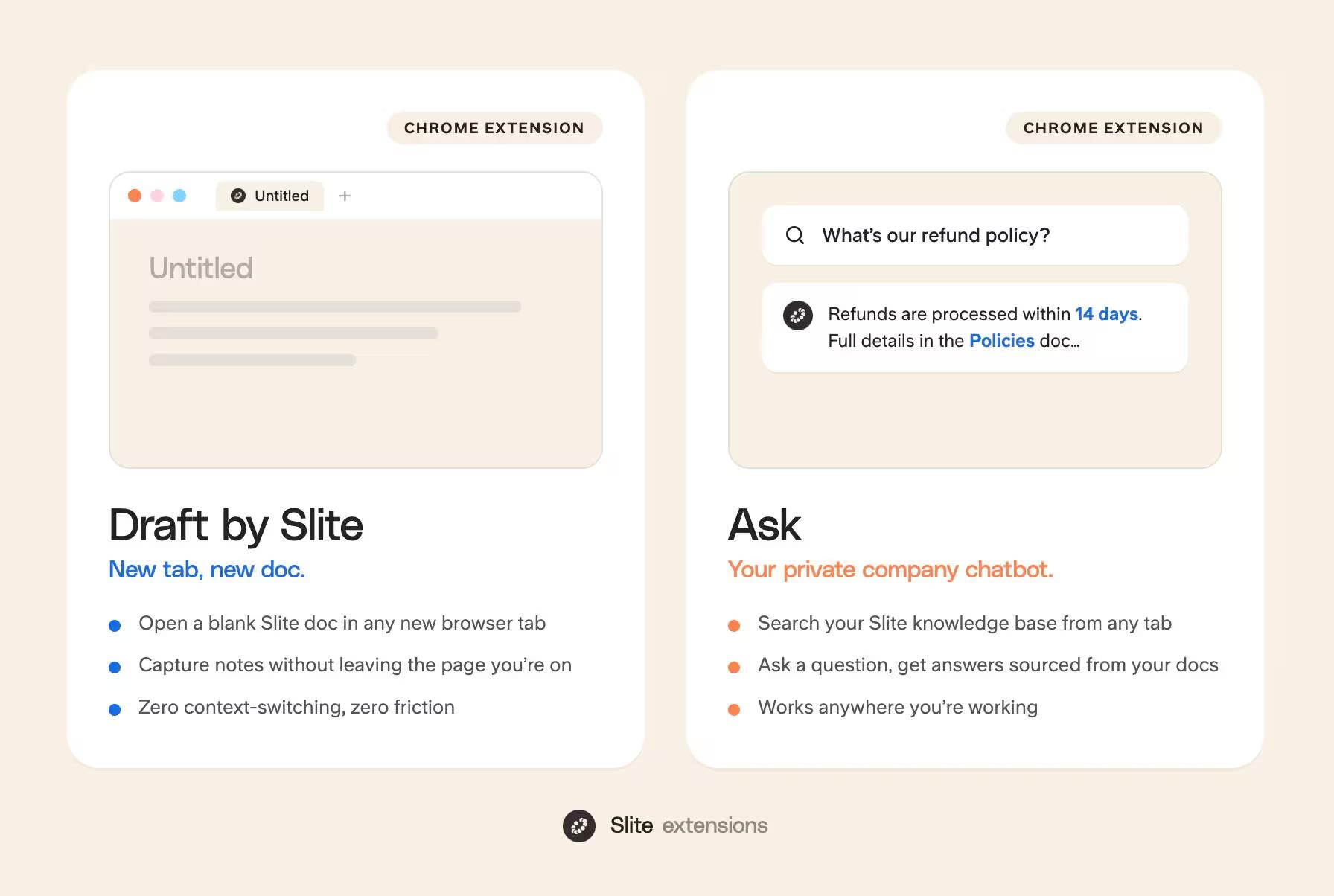
Slite offers two browser extensions:
- Draft by Slite: This addon allows you to open a new Slite document in a new browser tab, making it convenient to take notes or start working on a project without navigating away from your current page.
- Ask: This addon turns your Slite workspace into a private company chatbot. With Ask, you can search your Slite knowledge base directly from your browser. Type in your question, and Ask will scan your Slite docs to provide relevant answers.
Slite also integrates with automation platforms, project and task management tools, and collaboration software. These integrations allow you to streamline processes, sync data between apps, and keep everyone on the same page.
Currently, Slite has over 60 active integrations with other tools, with 7 deep native integrations, 3 automation/developer tools, and 50+ embed integrations.
For comparison sake, Notion also has a web clipper browser extension, that I personally use a lot.
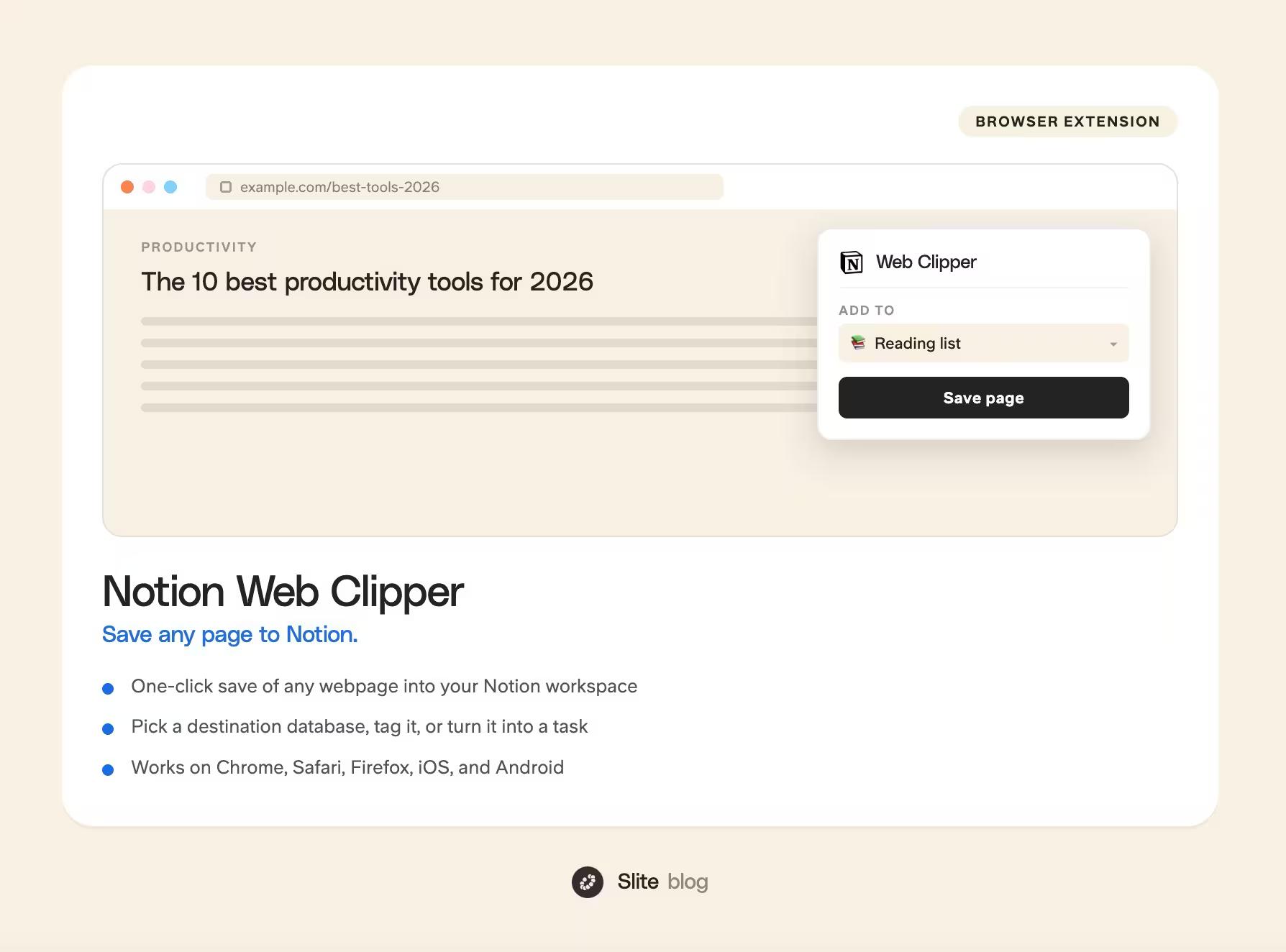
More importantly, Notion gives you a wide variety with an extensive ecosystem of native and third-party integrations/widgets.
If you can think of a use case, there’s probably an existing Notion integration/extension for it.
For example, if you’re a team that primarily uses tools like Google Drive, Slack, and Asana, Slite’s integrations will likely cover your needs. You can sync your Slite docs with Google Drive, share updates via Slack, and manage tasks in Asana without leaving your Slite workspace.
In contrast, if you enjoy experimenting with various apps and creating workflows, Notion’s third-party support will be much more appealing.
If you value simplicity and want a focused set of integrations that work with your existing tools, Slite is a good choice.
But if you thrive on flexibility and enjoy exploring new apps and widgets, Notion will be perfect for you.
Search
When it comes to finding information quickly, both Slite and Notion offer powerful search capabilities.
Slite's AI-powered search, called Ask, included at every tier allows you to connect and index data from external sources.
It is natively built into the platform and leverages AI to provide more accurate and relevant search results.
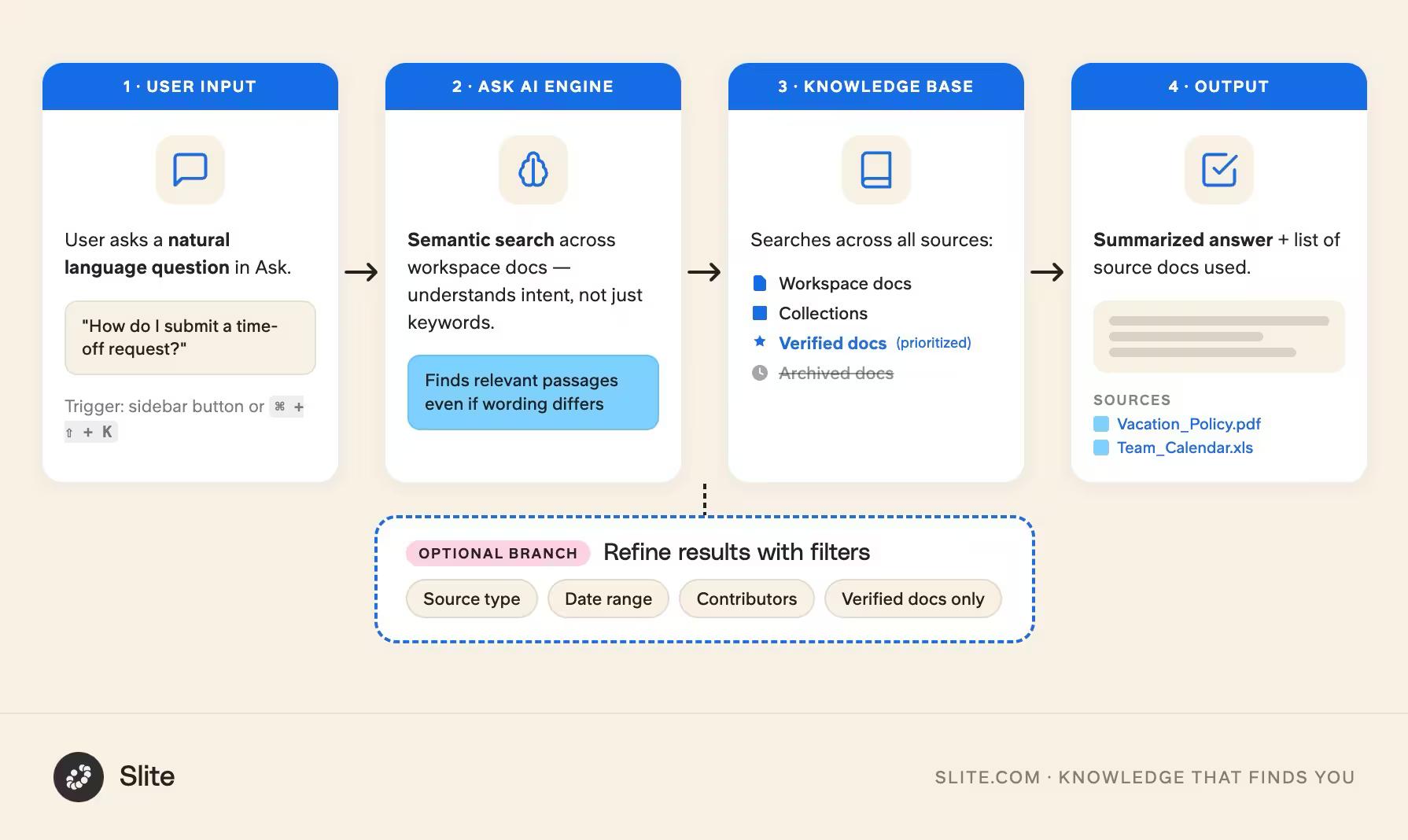
When you type a query into Ask, it not only searches through your Slite workspace but also scans connected external sources like Google Drive and Slack. This means you can find the information you need, even if it's not directly stored in Slite.
The engine behind Ask has since been developed intensively, sharpening the LLM models behind it, and evolved into Slite Agent. Slite Agent is the next step beyond Ask: an AI agent that researches across your connected tools, surfaces cited answers, and keeps your docs in sync by detecting drift and proposing updates.
Notion has come later to the game of enterprise search, launching in September 2025, and so far is failing to deliver what its users need most - reliable search results.
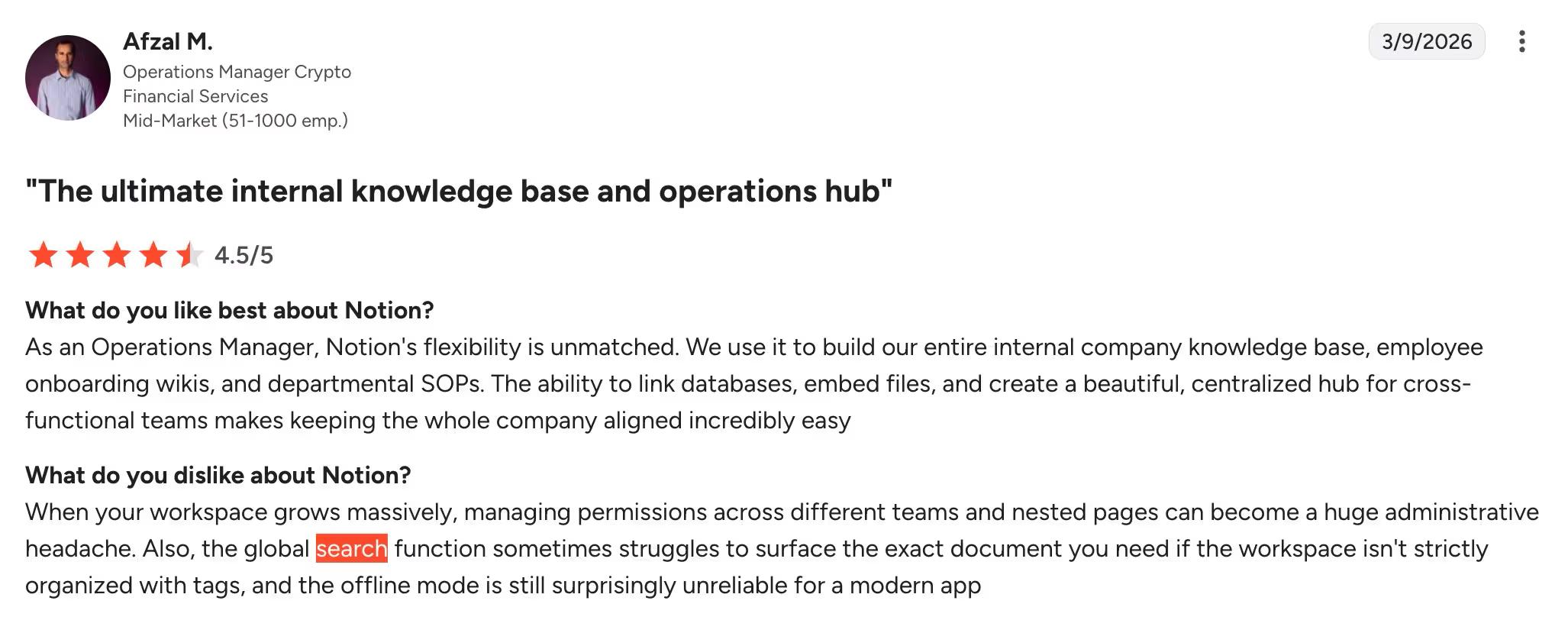
If your team frequently communicates via Slack, shares files on Google Drive, and collaborates on designs in Figma, having a search tool that can index and surface information from all these sources is a game-changer.
Notion enterprise search makes a similar promise, but keeping it gated to its most upmarket tier and keeps it mostly to its ecosystem.
Slite introduced Slite Agent in 2026, its AI agent and enterprise search, which outperformed Notion AI's search in the benchmark we ran to compare the two.
How do Notion AI and Slite Agent compare?
Notion AI and Slite Agent have been made with distinct intentions, but surface-level they appear the same.
At quick glance, here are the results of our benchmark comparing the two:
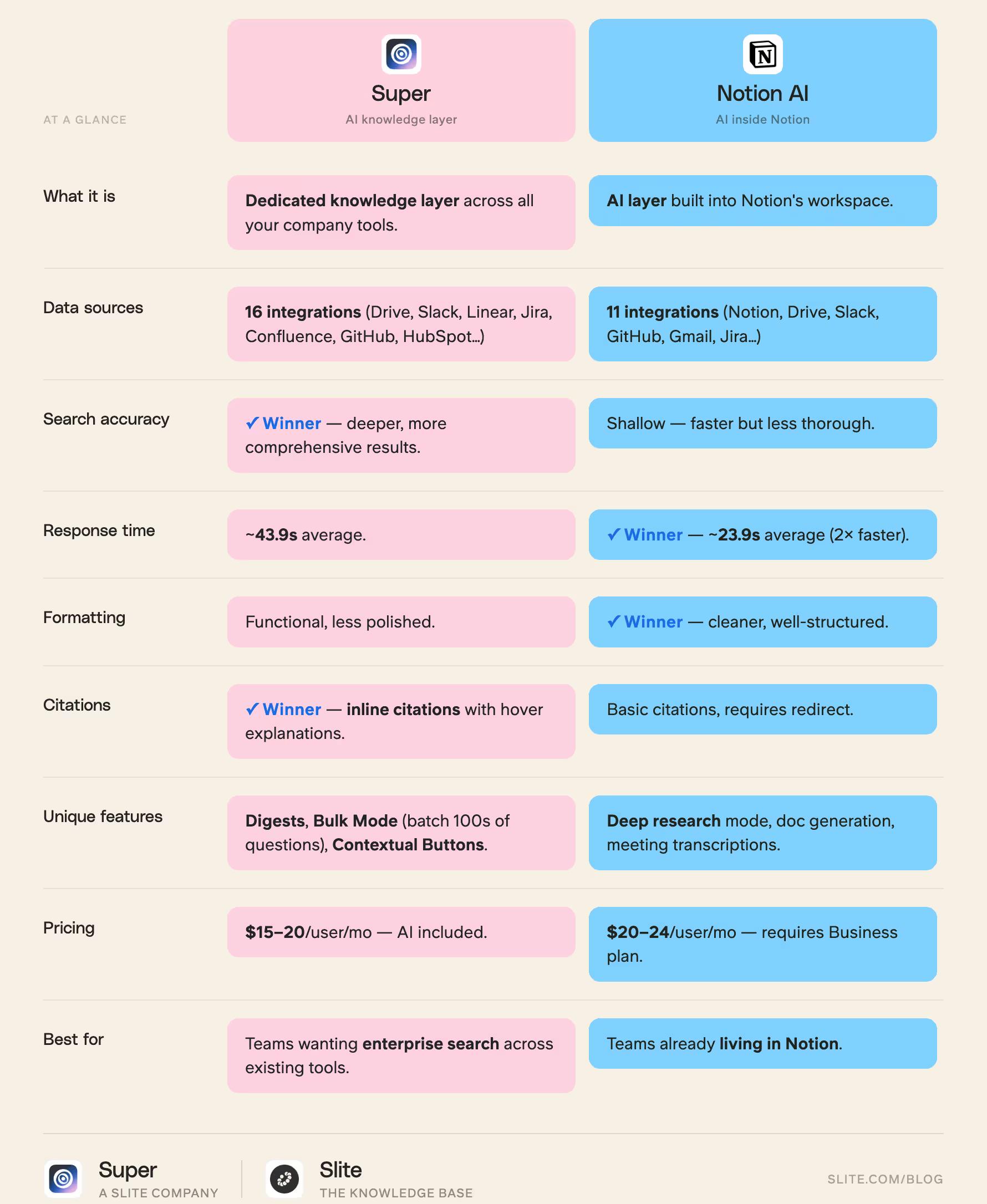
Notion AI is a powerful AI layer built into Notion, and adds AI capabilities mainly to your Notion workspace.
It does offer certain integrations, as of today with only 10 connectors that represent your typical mainstream work tool stack (Jira, Google Drive, Microsoft Teams, Github, etc).
You can use it for multiple tasks, such as generating content, summarizing pages, enterprise search.
On the other side, Slite Agent is a dedicated knowledge layer designed to work across all your company's tools and workflows — company memory that connects to your existing stack and lets you ask everyday questions like "What's our time off policy?" to complex ones like "How have our customers been responding to the new feature in the last 9 months?"
What matters most in an enterprise search tool? Reliability and accuracy.
And Slite Agent wins on both fronts.
Both tools are great at finding answers, but Slite Agent really shines with its in-depth search across a wider range of documents, consistently providing more thorough and trustworthy information.
On the other hand, Notion AI's quicker, surface-level search often overlooks important context that could really shift your perspective on a situation.
When it comes to speed of delivering answers, Notion wins, being about 2x faster.
Although, the speed has a price, and it’s the content reliability. Notion AI doesn’t scan as many documents as Slite Agent does, which makes it faster but the results have less depth.
If you’re wondering about their formatting, Notion AI has better structured responses with cleaner presentation. Slite Agent's answers are more functional than beautiful.
But when it comes to sources to your answers, Slite Agent wins on citations.
Whatever answer Slite Agent surfaces for you, you can click on it and it will cite you all the documents it used to extract the answer. Just hover over the inline citation and it’ll explain why the source was cites.
In this case, your decision comes down to other factors like ease of use, pricing, team adoption, etc.
What about MCP? We benchmarked both connectors
There's one more layer worth comparing, and it's fast becoming the way a lot of teams actually touch their docs: MCP.
Both Notion and Slite ship an MCP connector that lets an AI agent (Claude, ChatGPT, Cursor, or Codex) create, edit, and restructure your documents directly, no clicking required.
In June 2026 we ran both connectors head-to-head through Codex across three test sets:
- one basic single edit,
- a complex multi-document suite,
- and an intense suite of broader replacements and structured edits
We measured wall-clock connector time and token cost for each.
Slite came out materially faster in every set:
| Test set | Slite (total time) | Notion (total time) | Slite speed | Notion failures |
|---|---|---|---|---|
| Basic single edit (1 call) | 269ms | 1.82s | 6.7× faster | 0 |
| Complex doc (9 cases, 20 calls) | 8.90s | 46.10s | 5.5× faster | 0 |
| Intense doc (5 cases, 8 calls) | 5.17s | 81.26s | 5.1× faster | 1 |
Token usage was close between the two, so the real gap was speed and reliability.
And on reliability, Notion failed one of the heavy operations outright, with a large content-replacement call returning an HTTP 500 error after about a minute.
Two honest caveats: this was a single internal run rather than a months-long study, and it measures something different from the search comparison above.
There, Notion returns answers faster because it scans fewer docs.
Here, we're timing how quickly and reliably the connector executes document edits.
If you're planning to let AI agents do real work on your docs, Slite's connector was quicker across the board and didn't drop a task.
Comprehensive Knowledge Management and Analytics
Notion and Slite stand out great products in their own lanes, and both offer comprehensive solutions for knowledge management.
Notion provides limited page analytics and advanced workspace analytics, which are only available in their Enterprise plans. This means that users on lower-tier plans may not have access to the insights they need to effectively manage their knowledge base.
On the other hand, Slite offers a dedicated Knowledge Management Panel, which serves as a powerful, centralized hub for managing your company’s knowledge base.
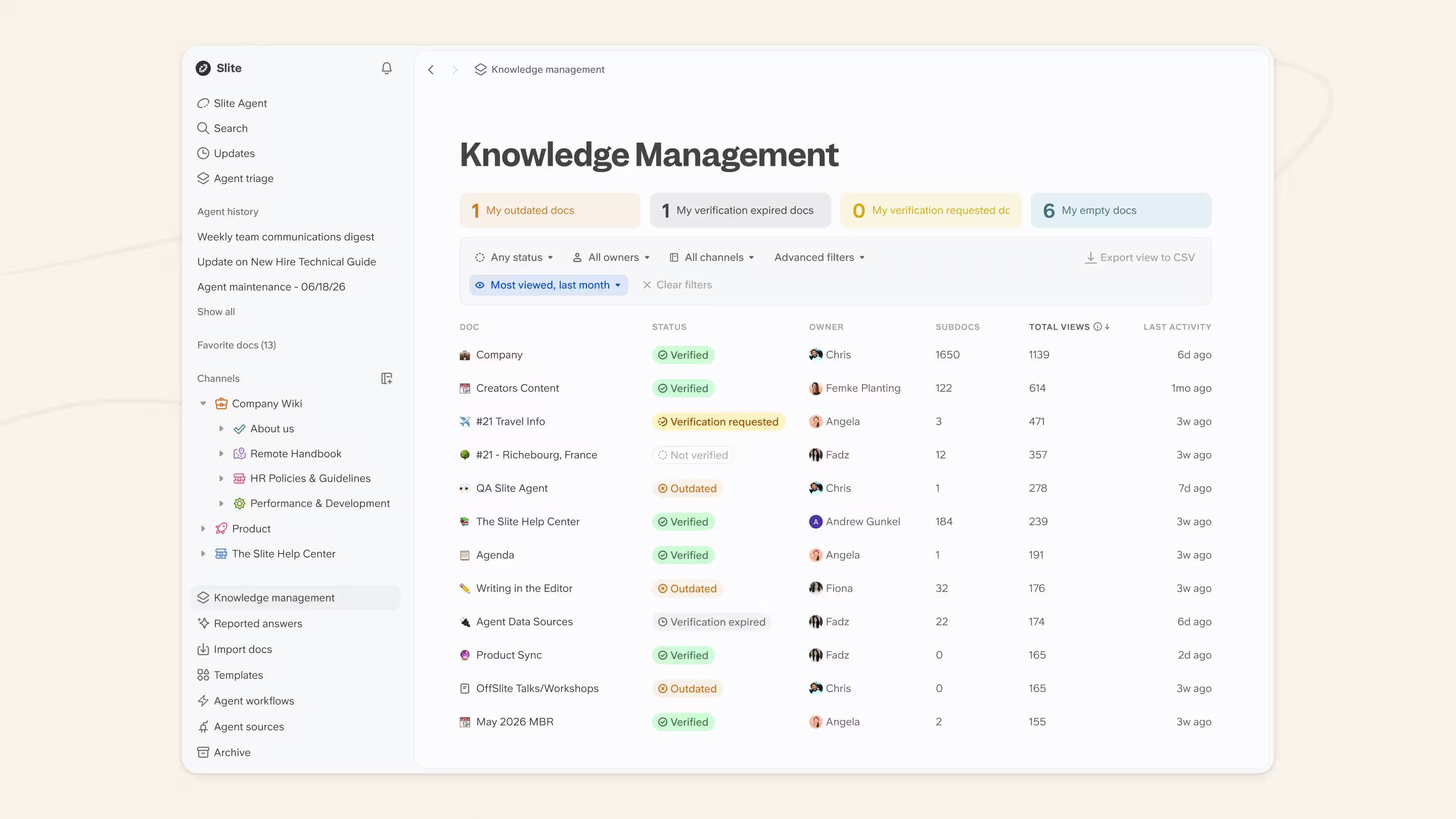
This panel allows you to slice and dice your content, showing just what you need, whether it’s HR docs filtered by department or identifying outdated documents for archiving. The panel also provides workplace insights, highlighting documents that require attention and enabling you to act on them in bulk.
One of the standout features of Slite’s Knowledge Management Panel is the smart AI-powered filter. This feature allows you to ask questions in natural language, making it even easier to keep your knowledge base fresh and relevant.
By leveraging AI, Slite streamlines the process of finding and managing the information you need, saving you time and effort.
In addition to the Knowledge Management Panel, Slite offers workspace analytics in every plan, providing valuable insights into the usage and effectiveness of its advanced features.

With workspace analytics, you can:
- track document readers and writers,
- access them regardless of your role,
- monitor Ask feature usage,
- evaluate the percentage of searches that lead to finding the right documents,
- easily filter data by time and channel, giving you a deeper understanding of user engagement and information accessibility
This comprehensive set of metrics empowers you to optimize your workspace’s efficiency and enhance collaborative knowledge sharing.
Unlike Notion, which limits advanced analytics to Enterprise plans, Slite makes
And the inclusive approach ensures that all team members can benefit from the insights provided by the analytics, fostering a more collaborative and data-driven work environment.
Team Collaboration
Slite and Notion have got you covered, but they approach it in different ways. Slite is all about knowledge management and documentation, while Notion tries to be the Swiss Army knife of productivity, handling everything from notes to project management.
For a remote team looking for a streamlined solution without unnecessary features, Slite stands out as the better choice, offering simplicity and efficiency in creating a private wiki.
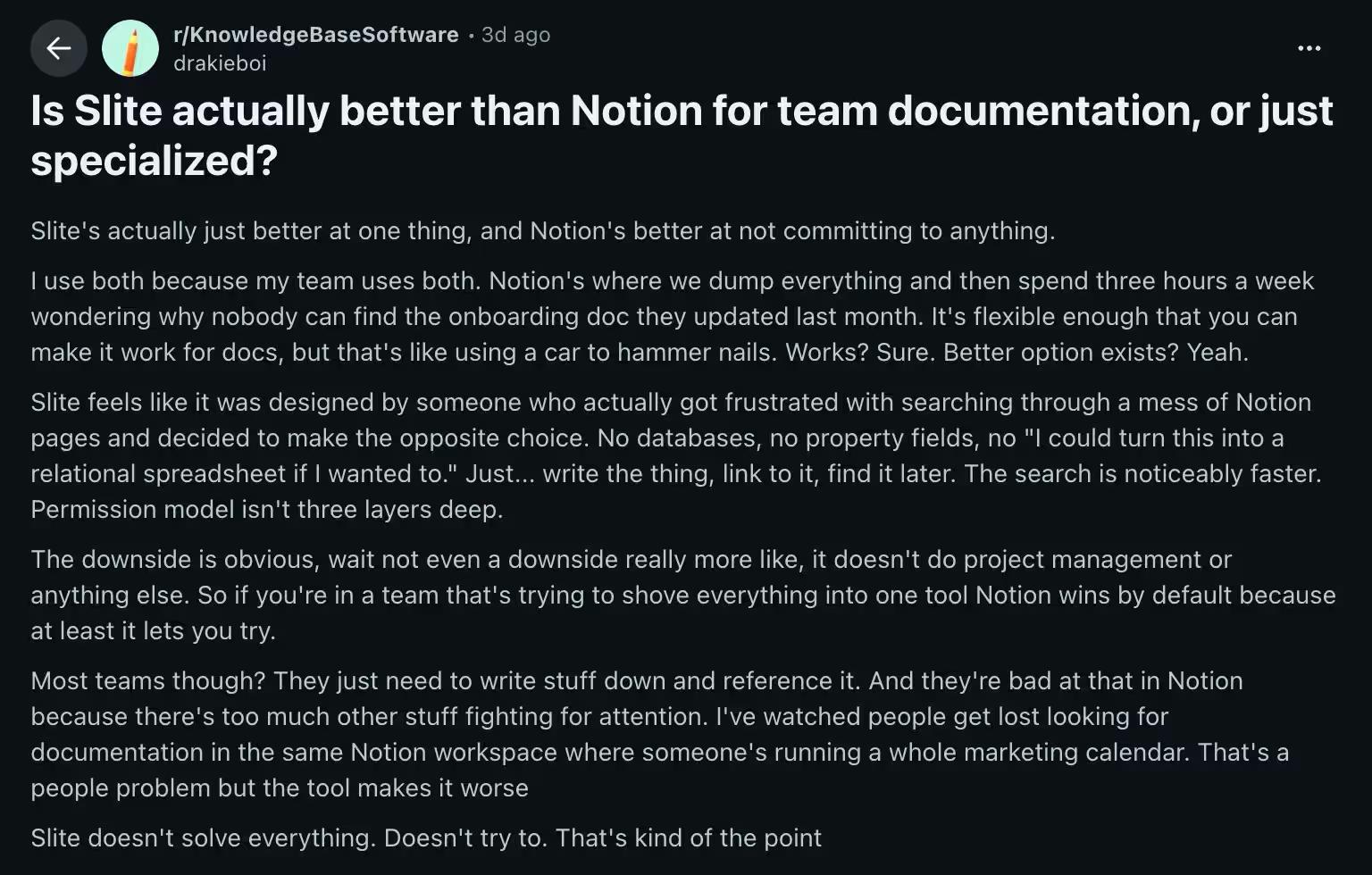
One user on Reddit explains it succinctly:
If you’re a team that’s already rocking a dedicated project management tool like Linear or Asana, Slite is your best bet - and it already integrates natively with both!
It’s designed specifically for managing and sharing knowledge, so you can focus on creating killer docs without getting bogged down in task management.
Slite’s collaboration features are top-notch, too.
You can:
- co-edit documents in real-time,
- leave inline comments,
- mention teammates,
- and even chat directly within the app.
It’s like having a virtual war room for your docs, without the stale coffee and flickering fluorescent lights.
On the flip side, Notion takes a more holistic approach.
It’s got all the collaboration features you’d expect, like real-time editing and comments, but it also packs in project management tools like:
- task lists,
- timelines, calendars
- and databases.
If you’re looking for a one-stop-shop for all your team’s needs, Notion might be the way to go.
However, trying to do everything in one tool can be a bit like juggling chainsaws – impressive, but not always practical.
If you’ve already got a project management system that works for you, forcing your team to switch to Notion’s all-in-one approach might not be the best idea.
Pricing
Slite and Notion offer different pricing structures to cater to various team sizes and budgets.
Slite provides three pricing plans, and all plans include AI features, so you don’t need to pay extra:
| Plan and Pricing | What it includes |
|---|---|
| Basic ($10/user/month billed annually) | Suitable for small teams getting started with knowledge management |
| Pro ($20/user/month billed annually) | Unlocks advanced features like unlimited connection to external sources, custom domain for public docs, user provisioning, and Open ID SSO. It also includes Slite Agent for enterprise search across your connected tools. |
| Enterprise (custom pricing) | Adds the features from the Pro plan plus: read-only role, audit logs, priority support, dedicated account manager, personalized onboarding, service level agreement |
Slite offers a 14-day free trial instead of a free plan, no credit card required.
Notion offers a four-tiered pricing structure:
| Plan and Pricing | What it includes |
|---|---|
| Free | Designed for individuals or small teams to explore Notion’s features, as this plan limits you to 10 guest collaborators and 5MB file uploads |
| Plus ($10 per user per month billed annually) | Ideal for individuals or small teams needing additional storage, 30 day page history, unlimited blocks/files. |
| Business ($20/user/month billed annually) | Tailored for larger teams requiring private spaces, advanced doc analytics, 90 day page history and SAML SSO. It also allows for full AI access, including AI Agents and Ask Notion. |
| Enterprise (custom pricing) | Includes user provisioning (SCIM), advanced security & controls, audit log, customer success manager, workspace analytics, unlimited page history, security & compliance integrations. Enterprise has custom pricing for large organizations with dedicated support. |
When choosing between Slite and Notion, consider your team’s specific needs, size, and budget.
Slite offers AI features included in all plans, while Notion provides a more flexible pricing structure.
Notion offers a free plan option that will include the option to buy tokens for AI features such as custom agents.
But the full AI access (including AI Agents, Ask Notion, and multi-model support) is bundled into the Business and Enterprise plans only.
How to choose between an all-in-one tool or dedicated KB?
When you have Legos, it’s on you to make something beautiful out of them.
And with Notion that creative freedom slowly turns into decision overload pretty fast.
Slite has never tried to be an all-in-one. It’s an intentional knowledge management solution for teams who like getting work done.
Slite’s future product roadmap doesn’t include adding calendars/complicated fluff, it only focuses on making Slite a better knowledge base for teams.
So the decision boils down to what you’re looking for.
Go for Notion if:
- You are looking for a software that can take everything you throw
- You just want to build personal systems and organize your life
Notion’s flexibility will be perfect for you. Especially if you’re a bit of a builder with a time to tweak things.
Go for Slite if:
- You are looking for a documentation tool for your team
- You are looking for highly accurate enterprise search results
- Agentic workflows that allow your knowledge to be self-maintained
When it comes to knowledge management, Slite will give you a better experience today, and even more so with time.
To make the best decision, evaluate your priorities and budget, and consider booking a demo with us and let us take you for a walk around Slite.
Conclusion: Notion’s perfect for individuals, Slite’s great for scaling teams.
Notion, with every update, tries to expand its ecosystem to fulfill its promise of being the Lego of Productivity Tools. But it comes with the tradeoff of scale. You can either go horizontal or go vertical.
Notion is like a drag-and-drop block-based coding/documentation environment. Because the possibilities are endless, it creates a pressure on teams to figure out the best way to use Notion for everything.
That said, Notion is a great standard for starting as an individual or a small team, but a dedicated knowledge base tool like Slite is the natural progression you graduate to once you hit 50+ employees and 1,000+ documents.
FAQ
Notion is getting expensive. How does Slite's pricing compare?
Pricing is the #1 trigger for companies to get actively shopping and migrate from Notion. Notion is increasing their pricing and changing their terms, which is pushing teams to benchmark alternatives and Slite offers a more cost-effective model with a flexible licensing structure: writer licenses for content creators and reader licenses at significantly reduced pricing. Talk to our sales team for a custom quote!
What about guest access and permissions? Notion limits us to 100 guests.
Guest access limits are a recurring blocker in Notion. Notion limits teams to 100 guests and has no automated offboarding — one customer had 3,000 guests and was stuck. Slite solves this with free guest access (5 per paid seat), robust user management with automatic onboarding/offboarding, and SSO/SCIM support for enterprise provisioning. For teams with thousands of external stakeholders (advisors, contractors, clients), this is often the deciding factor.
Does Slite have AI? We use Notion AI today.
If you go with Slite, you won't be downgrading on AI. Slite's AI search (Ask) is natively built into the platform and included in the subscription (not an add-on) and it searches not just Slite docs but also connected external sources like Google Drive and Slack. Notion AI is more versatile (more "ChatGPT-like"), but Slite Agent delivers deeper, more comprehensive search across more documents and data sources (16 integrations vs. Notion AI's 11), making it more reliable for finding accurate information. The key difference: Notion AI searches inside Notion; Slite Agent searches across your entire company.
How does Slite handle document verification? Notion doesn't have this.
Verification is a consistent gap companies discover when they outgrow Notion. Notion only allows document verification if the document is part of a Notion wiki, whereas Slite lets you verify any individual document regardless of its location, with customizable verification cycles and expiration notifications. Slite's Knowledge Management Panel gives admins a centralized hub to see document health by owner and channel, flag outdated content, and act on it in bulk — something Notion simply doesn't offer. Notion is primarily designed as an all-in-one workspace rather than a dedicated knowledge base, and its search and knowledge management features have deteriorated over time according to user feedback.