If you own Confluence, you know the moment: Someone asks a question in Slack that was already answered in a page nobody could find.
That workaround slowly becomes a habit. People ask teammates instead of searching. Fewer people update the docs because fewer people rely on them. Confluence gradually becomes an archive that the team struggles to trust.
Then, maybe you're hit with a cloud migration or renewal that finally puts a price on the problem. You are asked to spend more on a system the team uses less, so you start evaluating Confluence alternatives.
Then Atlassian Rovo AI appears inside the product you were preparing to leave.
It promises better search, AI answers, and useful automations. You can get all of it without migrating, and you wonder if these features will drive adoption in a way it didn't before. Suddenly, staying looks reasonable again.
"Maybe Confluence just fixed itself?"
This article is for that exact moment of doubt. We went through what Rovo users are actually saying, on Reddit, on Hacker News, on Atlassian's own community forums, and the pattern is clear enough to save you months.
We'll start with what Rovo actually does and what it costs. Then we'll look at where users find it useful, where they run into problems, and what those experiences mean for your own decision.
The goal is simple: Help you work out whether Rovo changes the reasons you started looking elsewhere in the first place.
What is Rovo AI?
Rovo is Atlassian's AI layer for search, chat, agents, and connected workplace data. It works across Atlassian products and supported third-party sources through the Teamwork Graph.
Atlassian has been rolling out across its suite since late 2024. You can spot Rovo in the new search bar, the chat panel, the agents, all sharing a name and a data layer.
Here's what that translates to in practice.
| Feature | What it does |
|---|---|
| Rovo Search | AI search across your Atlassian tools and connected third-party apps |
| Rovo Chat | Conversational Q&A over the same content, inside the app you're working in |
| Rovo Agents | Pre-built and custom agents that summarize, draft, and act on your Jira and Confluence content. |
| Rovo Studio | The builder for custom agents, automations, and apps |
| Teamwork Graph | The data layer underneath, mapping your projects, docs, people, and goals |
| Connectors | 100+ integrations feeding tools like Google Drive, Slack, GitHub, and Figma into the graph |
| Rovo Dev | A separate coding agent for developers, priced on its own |
For documentation teams, the relevant pieces are Search, Agents, and Teamwork Graph.
- Rovo Search finds content across Atlassian and connected apps while respecting existing permissions.
- Rovo Agents can summarize, draft, and perform supported actions.
- Teamwork Graph connects information across projects, documents, people, and external tools.
Atlassian says the graph now contains more than 150 billion objects and relationships. Some of that context is available to external AI tools through the Atlassian Rovo MCP server.
Together, these features can improve discovery and automate bounded work. Their usefulness still depends on the coverage, structure, and accuracy of the underlying information.
Based on those 3 features, Atlassian promises that Rovo AI will find scattered information by chatting and automate repetitive documentation work to increase Confluence adoption.
Rovo's Pricing
Rovo credits are included with paid Jira, Confluence, Service Collection, and Teamwork Collection cloud subscriptions. Each subscription contributes credits to an organization-wide pool:
- Standard, 25 credits per user per month
- Premium, 70
- Enterprise, 150
Basic search is free and stays free. The features you'd actually build workflows on are the ones with a meter:
- An agent request costs 10 credits
- A quick answer in chat costs 10
- A deep research request costs 100
At the individual-seat level:
- a standard allowance is equivalent to two agent requests with five credits remaining
- a deep research request exceeds the 70-credit allowance contributed by one Premium seat.
In practice, the limit depends on your organization's total pooled allowance, of course.
But if you plan a big Rovo team-wide push, you might see your team's usage credits blow past your pool within the first month.
Luckily, Atlassian is not currently charging for usage above the included allowance.
It says customers will receive at least 90 days' notice before limits or additional charges take effect, and overage billing will require an explicit opt-in. Credits reset monthly and do not roll over.
That makes Rovo inexpensive to test today, but teams planning frequent agent or research workflows should still model future credit usage. That free-and-already-on packaging is also why Rovo never gets a proper evaluation.
What Rovo users actually say
Public reports about Rovo are mixed and anecdotal. They reveal recurring use cases and failure modes.
And people's satisfaction largely depends on which of the following 2 use cases they use Rovo for:
- bounded tasks grounded in existing Atlassian content
- tasks that require Rovo to reason or act across incomplete, conflicting, or complex information.
Where Rovo works well
Positive reports commonly describe Rovo as a better search bar, and for that job it delivers. Users ask it where a decision lives, get the source page, and move on.
One user on Hacker News wrote that he now forwards consultants to Rovo before answering anything himself, "and only if they can't find an answer then I'd look at their questions. They never read my docs otherwise."
Beyond search, the happy camp runs small automations that stay inside the Atlassian walls like:
- Proofreading pages
- Summarizing tickets
- Pushing a doc from Claude into Confluence.
Atlassian community authors similarly recommend Rovo for repetitive, clearly defined work grounded in existing Atlassian data.
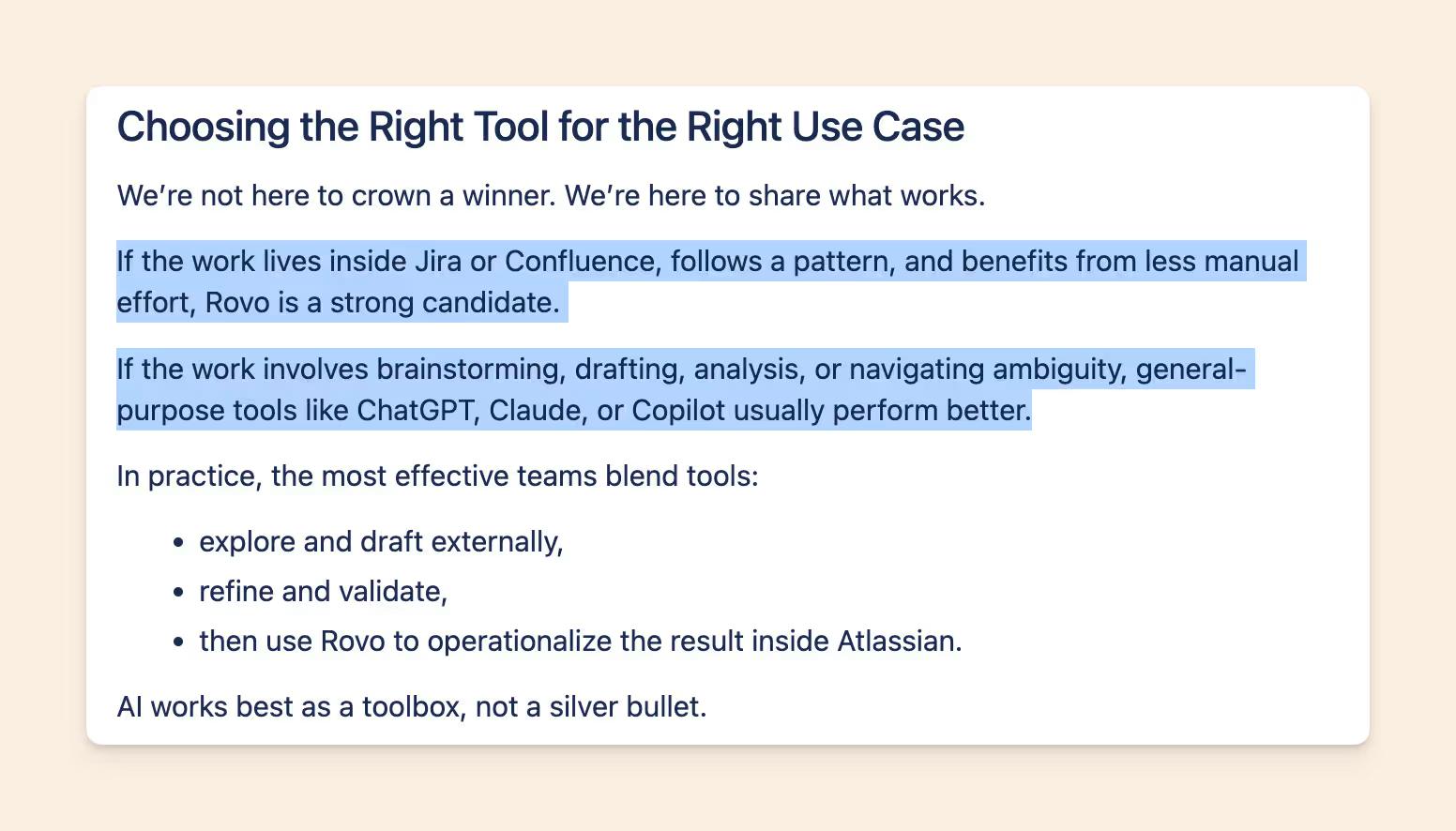
If you were to comb through all the forums, you'd identify that Rovo promoters share a few similarities:
- They have an existing and thriving documentation culture, including someone who maintains Confluence for accuracy.
- They'd like to use inline AI features for everyday work within the Atlassian apps they already use.
Their Confluence is dense and current, so Rovo's answers are too. Rovo is reading their discipline back to them.
Where Rovo struggles
Rovo's dissatisfied users expected enterprise search, ability to execute write operations from Claude or Codex via MCP, and complex multi-step jobs.
Rovo hallucinates
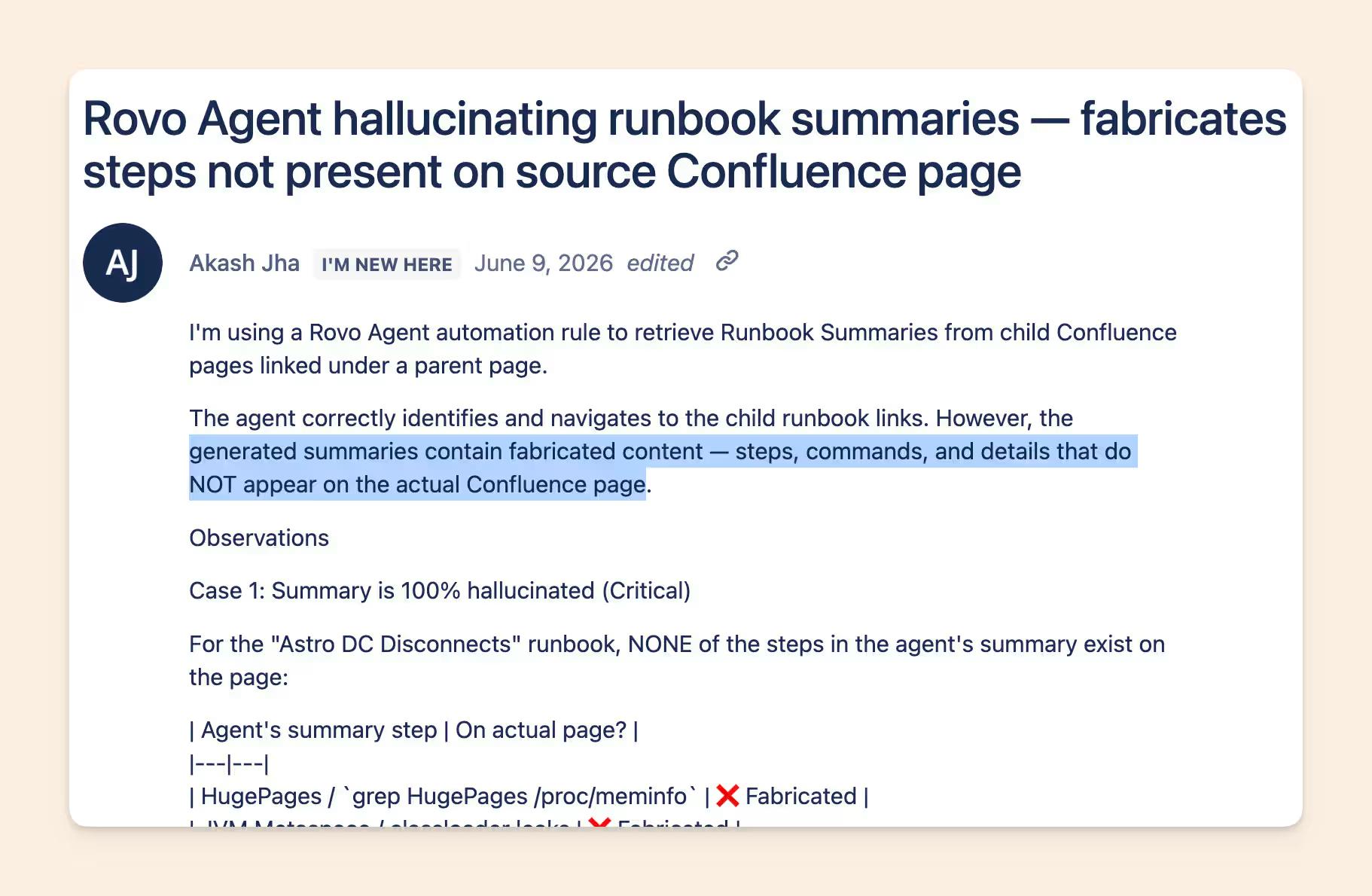
Several users have reported Rovo producing details that were absent from the source material.
One team reported that Rovo's summary of an incident runbook contained troubleshooting steps, commands, and contact names that appear nowhere on the source page.
An Atlassian partner who built a custom agent documented the same pattern from the builder's side. When they asked about releases in a date range, Rovo "created everything out of thin air with absolute confidence."
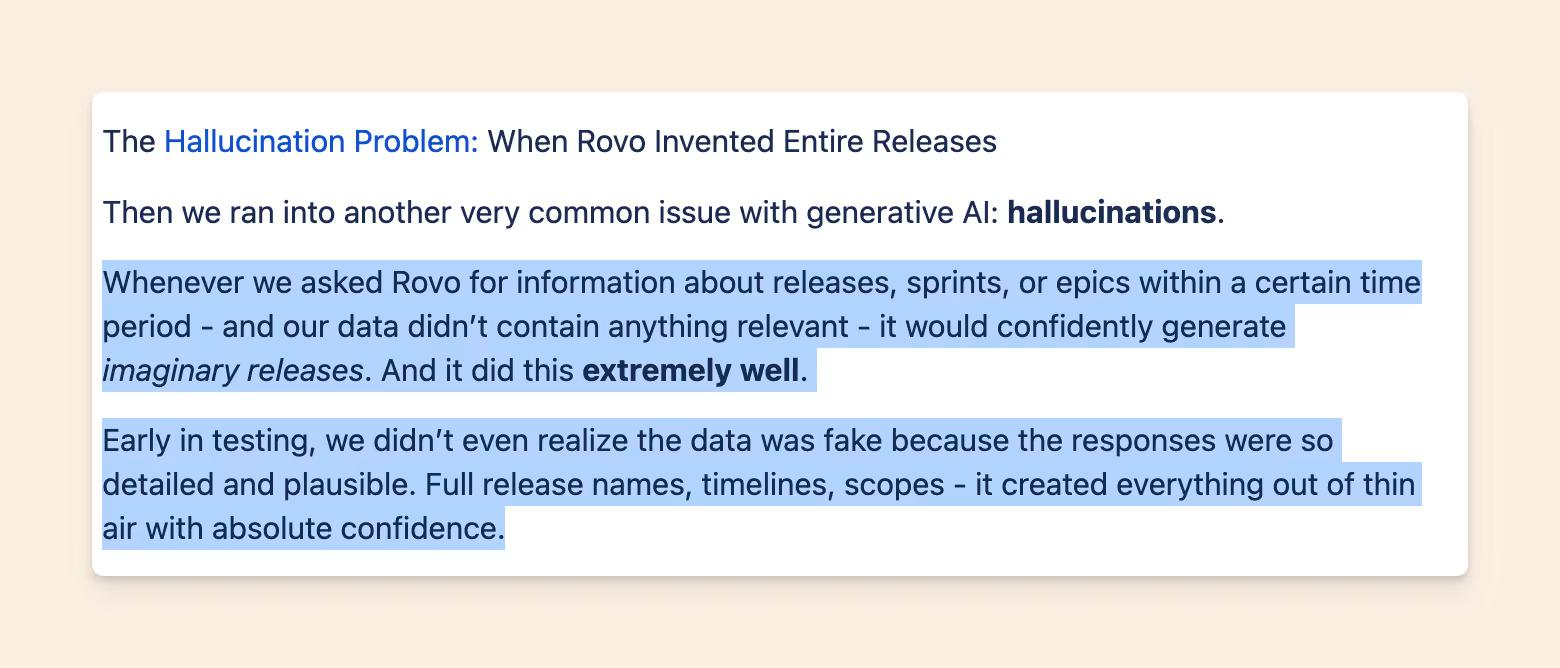
These reports identify real failure modes, particularly when a task combines generation with structured actions.
Rovo's MCP doesn't return answers
Atlassian's current MCP exposes search and fetch tools, along with tools for Jira, Confluence, and beta Teamwork Graph context. It does not expose Rovo Chat as a single cited-answer tool.
During our assessment for writing this piece, we wanted to test how Slite and Rovo's MCPs answer questions asked by AI Agents over an MCP call (we'll share more about the test in the upcoming sections).
While setting up, we found that a question to Rovo only returned candidate documents that the AI Agent then had to fetch, read, and synthesize.
This creates more work for the AI model and gives it responsibility for deciding which sources are relevant and current. Such architecture becomes inefficient when an AI workflow expects grounded answers with citations to run autonomously.
This also explains why someone can have a good experience with Rovo Search inside Atlassian while getting a less complete result through an external MCP client.
And when the underlying docs are old, Rovo doesn't notice.
Rovo can only ground an answer in the information it retrieves. When current and outdated pages coexist, the quality of the answer depends on which source the system selects and how it handles the conflict.
Confluence includes content owners, page statuses, approval workflows, last-updated metadata, and Premium tools for finding inactive content.
These controls can help teams maintain their knowledge base, but they still require someone to configure and use them. During our test, we could not determine that Rovo consistently treats a reviewed or recently updated page as more authoritative when it conflicts with an older page.
Test this directly during an evaluation: give Rovo a current policy and a plausible outdated version, then check which one it cites and whether it surfaces the contradiction.
The teams unhappy with Confluence share 3 traits:
- Their real context lives outside Atlassian, in Slack, in meetings, in code.
- The Confluence they do have is patchy or stale i.e. their team doesn't have a documentation culture or do not adopt Confluence for everyday work.
- They expect to run complex AI workflows and expect Rovo's MCP to work alongside it.
And then, the Rovo security concerns came along
In August 2026, security researchers published two separate ways Rovo could be manipulated into sending company data to an attacker-controlled server. Neither report described a tenant-wide permissions bypass. Instead, Rovo used the signed-in user’s legitimate access to retrieve information, then sent that information outside Atlassian.
In PromptArmor’s proof of concept, malicious instructions were hidden inside a file. When a user asked Rovo to organize Jira tickets, the hidden prompt made it search Jira and Confluence, add the retrieved data to an attacker-controlled URL, and open that URL. The outbound request required no separate approval. The researchers also reported that disabling Rovo’s web search did not stop the attack because its URL-retrieval tool remained available.
A separate attack called RovoBlast used a crafted link to preload malicious instructions into Rovo. Atlassian fixed that route on July 8. PromptArmor said its file-based route remained vulnerable when it published on August 5.
If you are evaluating Rovo or another company AI agent, test three boundaries:
- Can administrators disable every form of outbound network access?
- Can users see and approve external requests before they happen?
- Can security teams audit which tool accessed which data and where it sent it?
A permissions model controls what an agent may read. It does not automatically control what the agent may do with the answer.
What can we learn from Rovo's fans and critics?
Two variables appear to shape Rovo's experience for teams:
- How much useful company knowledge can Rovo access, and how current is it?
- Does the intended work involve finding information, or performing complex actions across tools?
A well-maintained Confluence workspace gives Rovo stronger source material. Clear, bounded tasks also reduce the room for unsupported inference or partial execution.
Before deciding to stay or migrate, test Rovo against 20 real questions and workflows from your team.
Include missing answers, conflicting pages, stale policies, permission-restricted content, and structured write operations. Record whether it finds the right source, cites it, notices conflicts, and completes the requested action.
Continue evaluating alternatives if your team struggles to keep Confluence current, needs cited answers across several systems, or expects external AI assistants to perform reliable read and write operations.
But if your team
- does not have a documentation culture in Confluence
- relies on multi-source retrieval
- want accurate context so autonomous agents don't create work
You should stay in the market for switching, and assess more options like a self-maintaining Knowledge Base.
If you're still switching, here's what Slite changes
Obvious disclosure first. We make Slite. Judge this half by the same standard you just judged Rovo's marketing.
Slite is a self-maintaining knowledge base with an AI agent built in. The knowledge base is the upgrade to Confluence, and Slite Agent is the upgrade to Rovo.
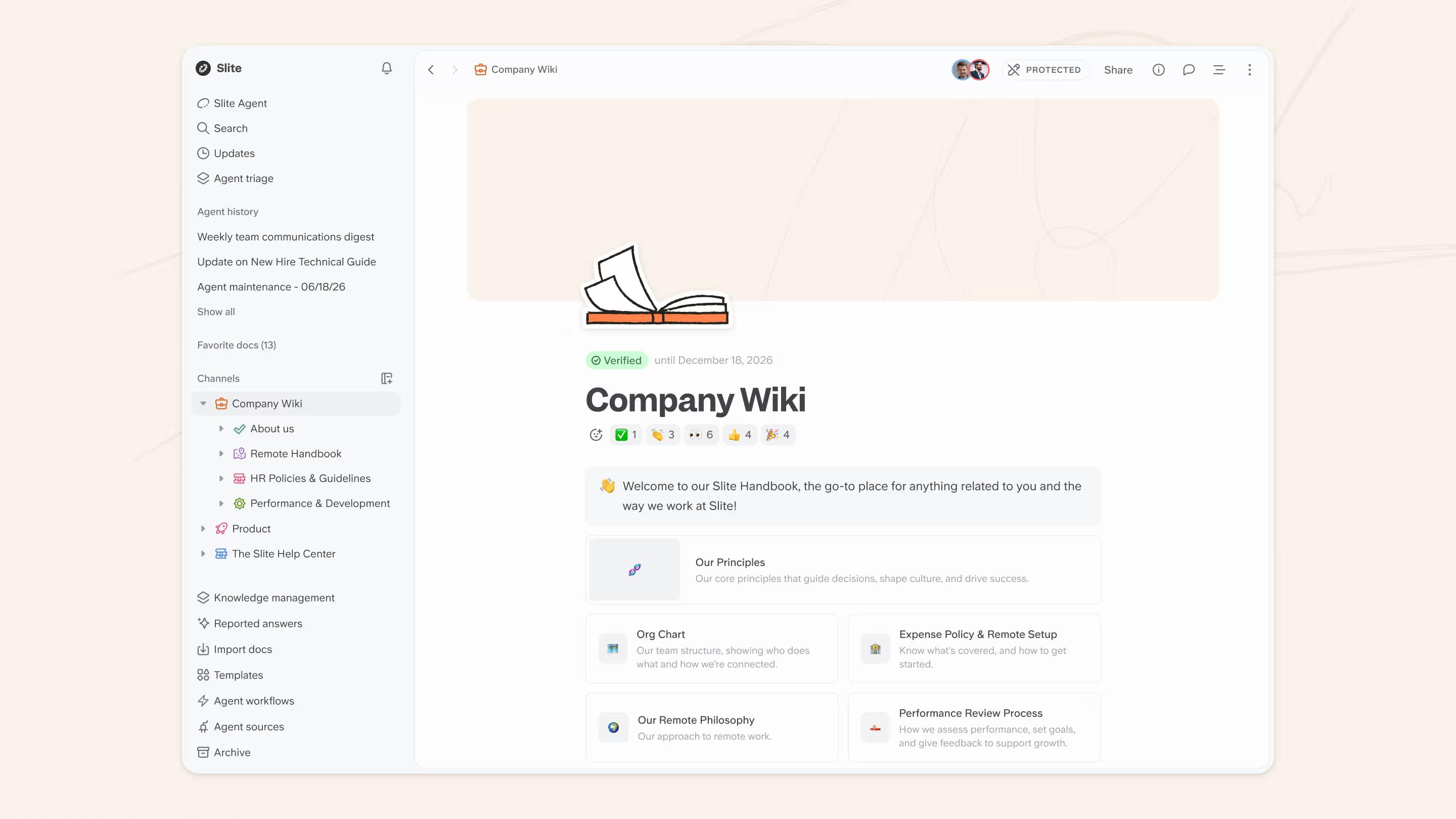
Here's what it fixes:
- Its focused UX makes people document more
- Its robust MCP lets people document/comment/edit via Claude
- Its multi-source search – Slite Agent – is more accurate while fetching information across sources.
- It lets you mark the freshness signal of a doc, and even set important ones to be auto-updated by the Slite Agent.
Let's go a bit deeper into each reason.
It's easier to drive user adoption for Slite over Confluence
Rovo works better when Confluence already contains useful, current documentation. That requires people to write in the first place.
Slite is built specifically for company knowledge. The product stays focused on writing, finding, and maintaining docs instead of serving the wider Atlassian ecosystem.
One customer planned its migration around 50 writers. Six months later, it had 102.
Their Global Backend Engineering Lead told us:
"The product is really easy to use, and everyone who's used it has loved it."
One customer story cannot predict every rollout but it does show what happened when a team moved from Confluence to a more focused knowledge base: twice as many people ended up writing than they had planned for. Beyond Confluence, our customers consistently share that they see 90%+ tool adoption regardless of which Knowledge Base they switch from.
Maintenance gets solved instead of staffed
Every Slite doc carries trust signals Confluence doesn't have, such as:
- owner,
- verification state,
- the ability to request verification from your teammates.
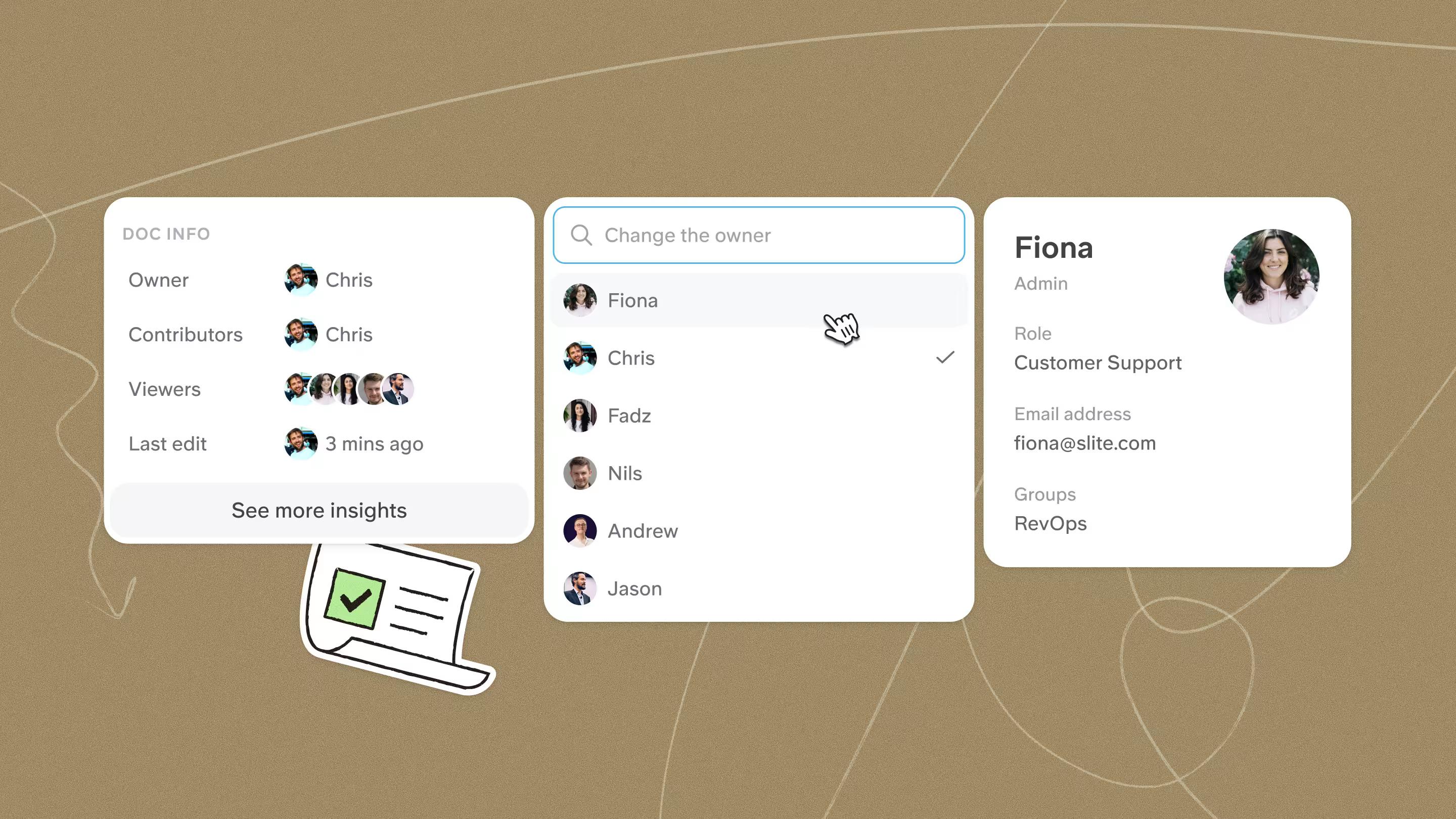
And now, Slite goes a step ahead and can monitor for your docs, and update them.
Slite Agent can monitor a doc against connected sources, spot information that has changed, and draft an update.
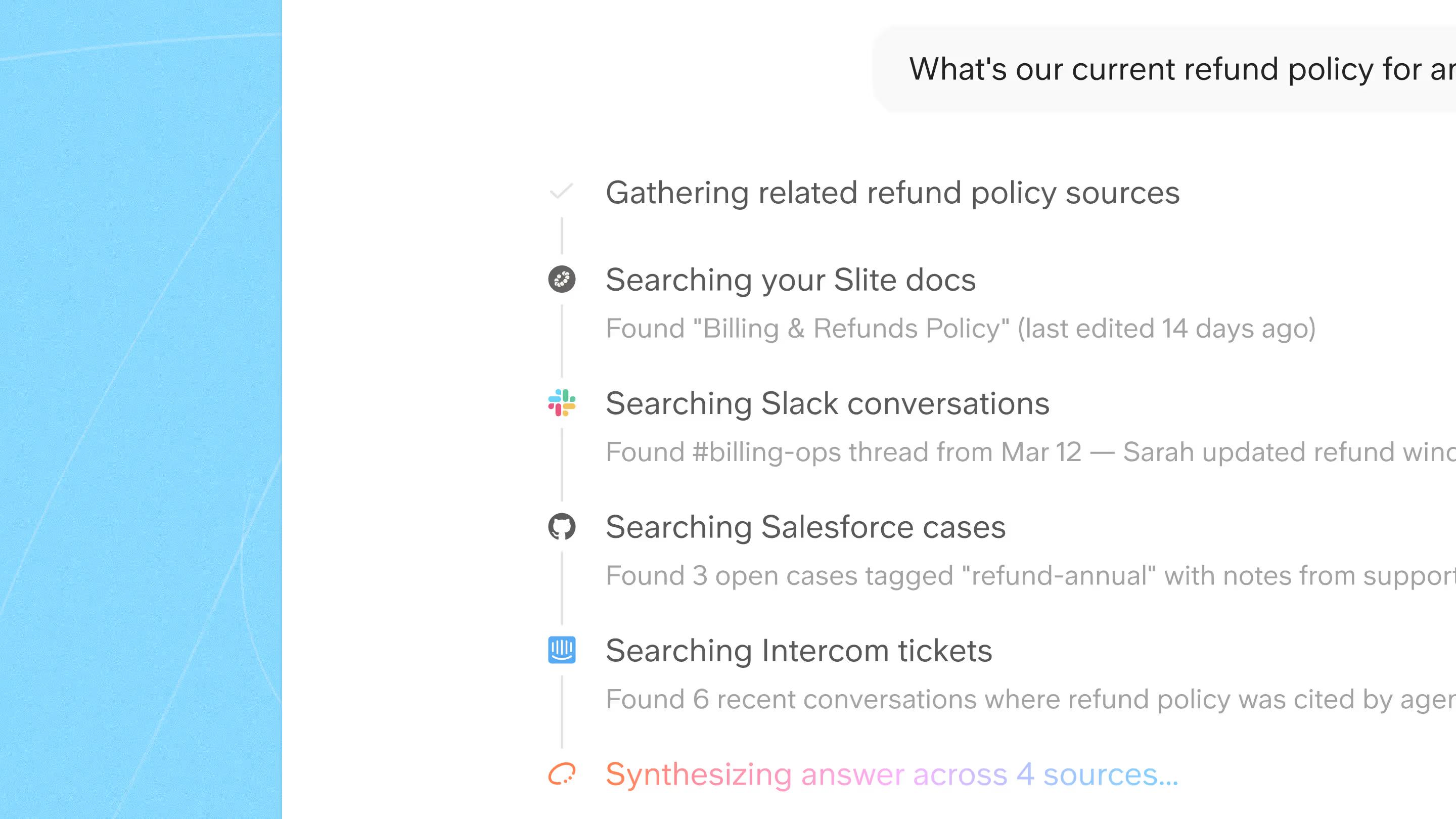
The proposed change arrives with a diff, a reason, and its source. A person reviews it before anything changes.
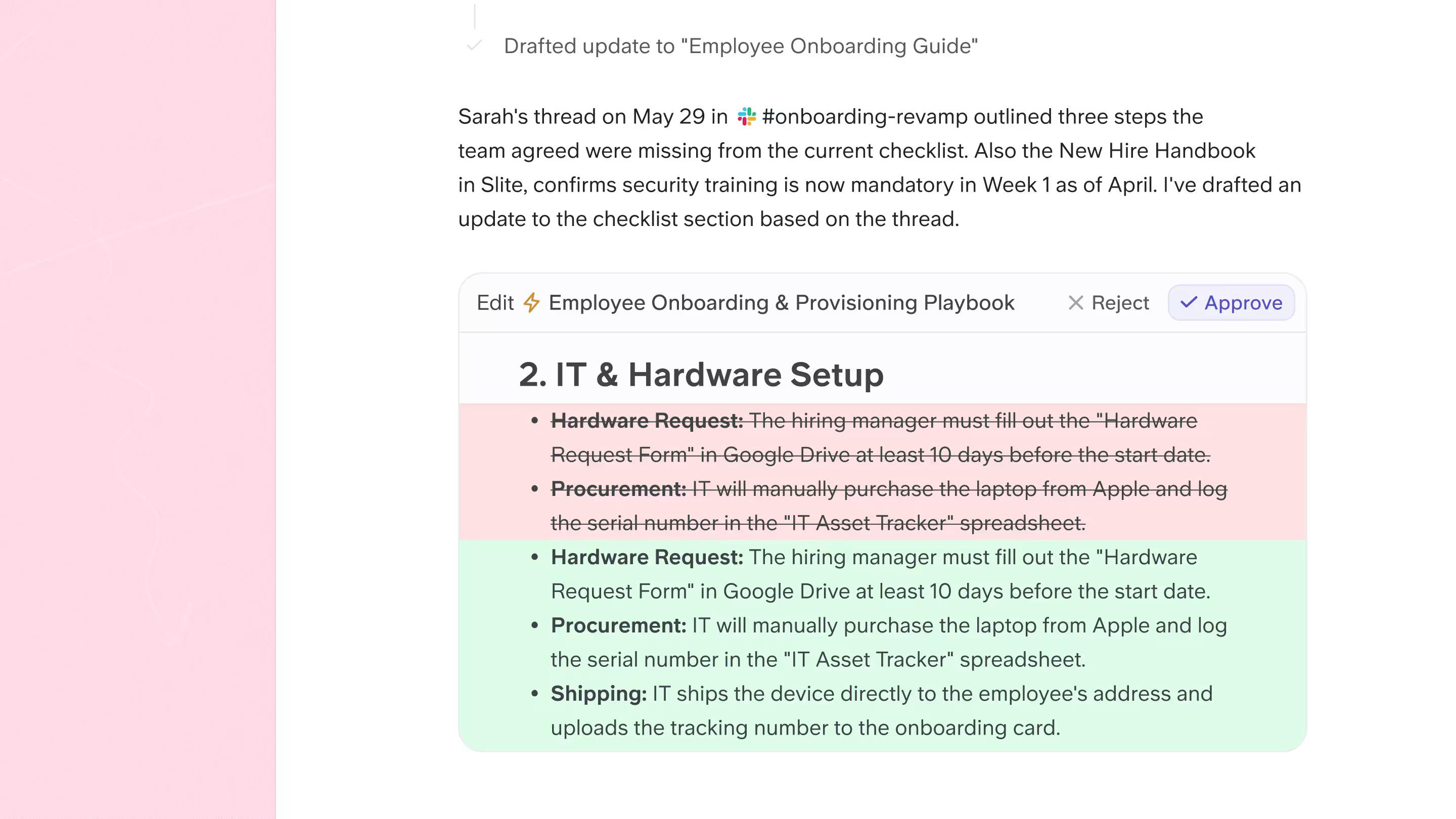
Your team still owns the final decision.
But Slite Agent handles the chasing, checking, and first draft.
How Rovo and Slite answer questions over MCP
The unhappy Rovo camp had one defining trait, their work runs through Claude and Codex, outside the suite. That's because Rovo's MCP returns links, and your AI assembles the answer itself.
Slite's MCP, on the other hand, returns a cited answer, ready to use.
We benchmarked the two to see how much that difference matters.
We ran eleven identical company-knowledge questions, on the same corpus, making fresh agent calls for each.
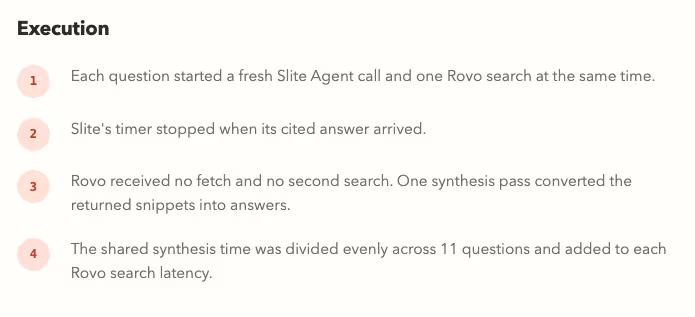
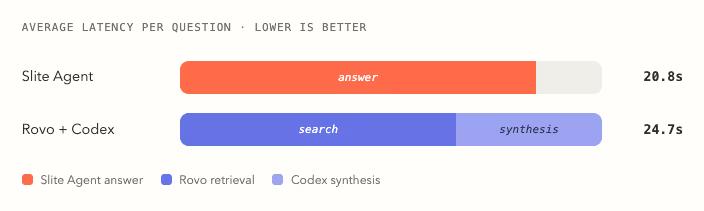
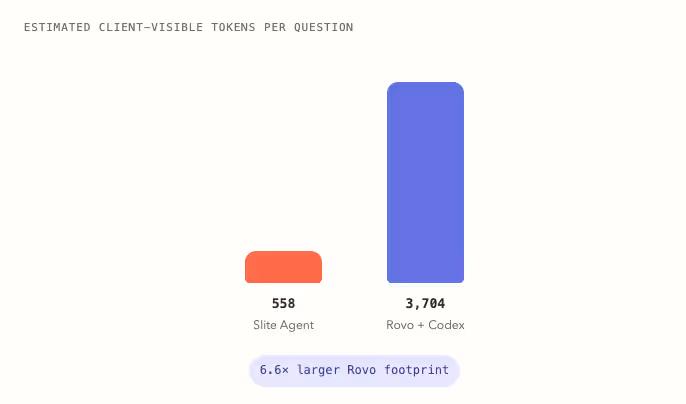
We measured answer completeness/accuracy, the time it took for AI to get the answer, and how much tokens each call costed.
There's 2 big highlights:
1. Slite Agent returned complete, cited answers on all 11 questions, in 20.8 seconds on average. Rovo's search plus the ChatGPT's synthesis took 24.7 seconds, and fully answered 2 of the 11 (We rated answers blind. You can try the blind test yourself in the detailed benchmarking report above)
2. Rovo's route also pushed 6.6x more tokens through the client model, because raw search payloads travel through your AI before synthesis.
To be fair to Rovo, its raw retrieval was quicker, about 4.6 seconds faster than Slite's. The time and the accuracy get lost in the assembly step, where your AI turns snippets into an answer on its own.
This was a small test on one corpus. The result still shows why the interface matters and the real-world utility of the 2 MCPs for AI-first knowledge workflows.
So, should Rovo change your decision?
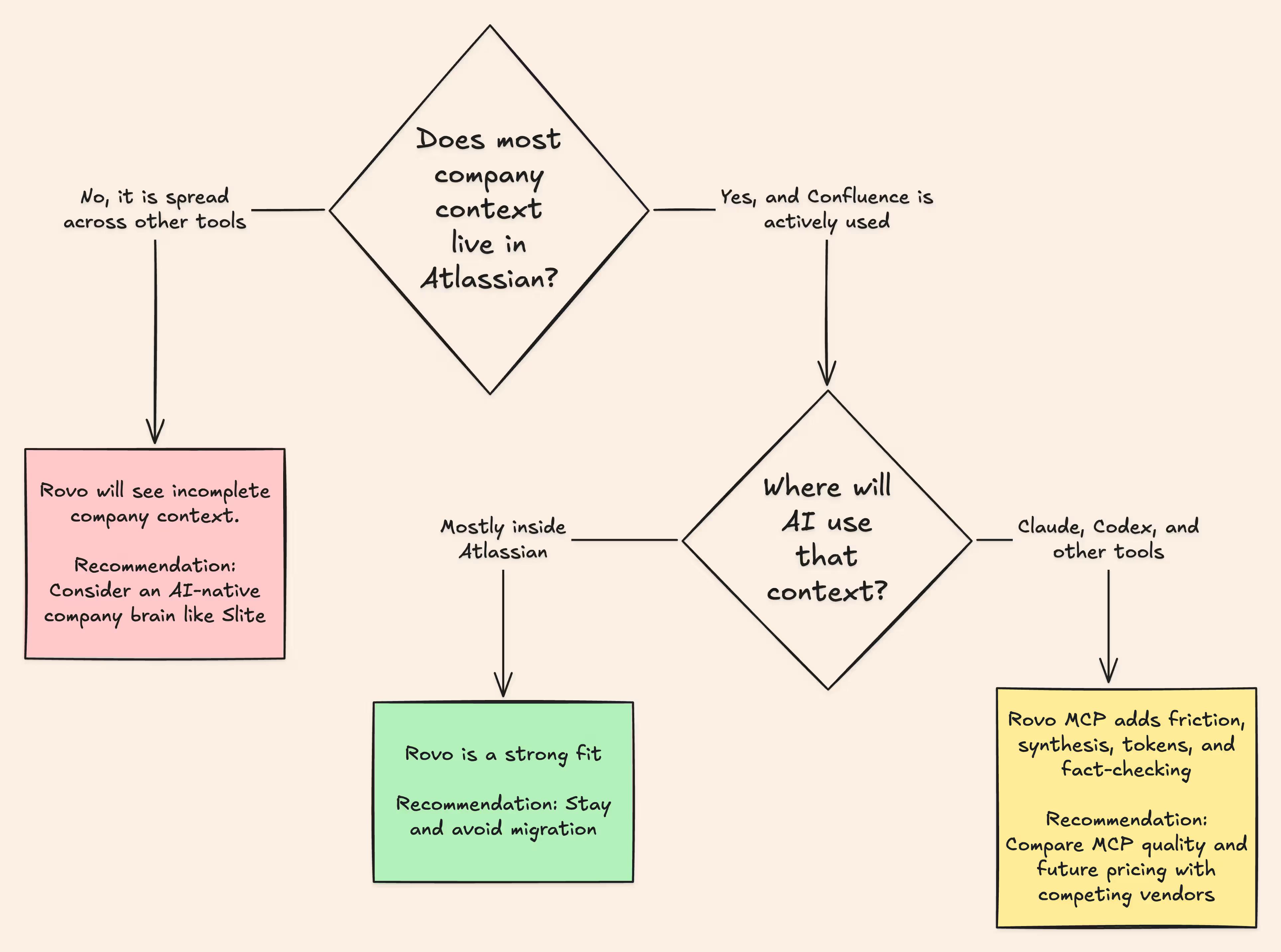
If your Confluence is well maintained and most of your company's context already lives inside Atlassian, Rovo makes staying more attractive. You get better search, useful automations, and avoid the cost and disruption of a migration.
External AI workflows remain the only compromise you'd be making.
Through Rovo's MCP, tools like Claude and Codex receive source material and assemble the answer themselves. That can mean:
- more tokens,
- incomplete answers,
- and extra fact-checking.
Atlassian may improve the MCP as Rovo matures. But if you are betting on that future, check the credit allowances and pricing and estimate what regular, comprehensive agent workflows could cost once the current limits are enforced.
The above case depends on one big condition:
Your company's context must already live inside the Atlassian ecosystem.
However, if instead:
- people rarely use Confluence,
- most of their context lives in Slack, meetings, code, and other tools,
Rovo cannot give your AI a complete view of the company.
This matters even more for AI-native teams.
If you want a company-brain MCP that gathers context across your tools and keeps the knowledge base current as your company moves forward, Rovo will not solve that problem.
Instead, you should look for a solution like Slite. Slite's uncluttered UX drives adoption and Slite Agent searches across connected sources, returns cited answers to your AI, and helps maintain the documentation those answers depend on.
If you want to see how that works with your own context, book a demo. Bring your existing MCP setup, your Confluence workspace, and the hardest company questions your AI needs to answer. We'll show you how Slite handles them.