You know the feeling: a project kicks off, and within a few weeks its paperwork is scattered across drives, chat threads and inboxes with no single source of truth. The status report says one thing, the plan says another, and nobody's quite sure which version is current.
So the same questions get re-asked week after week, stale copies keep circulating, and the documentation that was supposed to keep everyone aligned quietly becomes the thing slowing them down. It doesn't have to work that way.
This guide walks through project documentation end to end: what it is, the core documents that make up a project, and how they map to the five phases of a project's life cycle, from initiation to conclusion.
We've included a free template and the practices that keep your docs accurate long after kickoff, so your team always has one place to trust.
Key takeaways
- Project documentation spans five lifecycle phases: initiation, planning, execution, control and conclusion.
- Each phase has its own core documents, from the project proposal and charter to the schedule, budget, risk log and closure report.
- Use a project documentation template to start fast and keep every document in one place.
- Documentation only works if it stays current: give each key doc a single owner and a review cycle so it doesn't go stale.
What is project documentation?
Project documentation is the set of documents that define, plan, run and close a project: the proposal, charter, plan, schedule, budget, risk log, status reports and closure record that together tell everyone what the project is, how it will be delivered and where it stands.
The hard part is keeping them in one place and up to date. On most projects the paperwork ends up scattered across systems with no single source of truth, so the same questions get re-asked week after week and no one is sure which version is current.
Combine that volume with poor organization and a project gets difficult to run and almost impossible to keep on track.
That's where a structured knowledge base comes in. A project documentation template reminds you which key project management documents to collect and keeps them organized and keeps those docs verified and current instead of letting them drift as the project moves.
What is a project documentation template?
A project documentation template is a pre-built structure that lays out the documents a project needs and where each one lives, so you're not starting from a blank page.
It reminds the team which documents to create in each phase, gives them a consistent format, and keeps them together as a single source of truth.
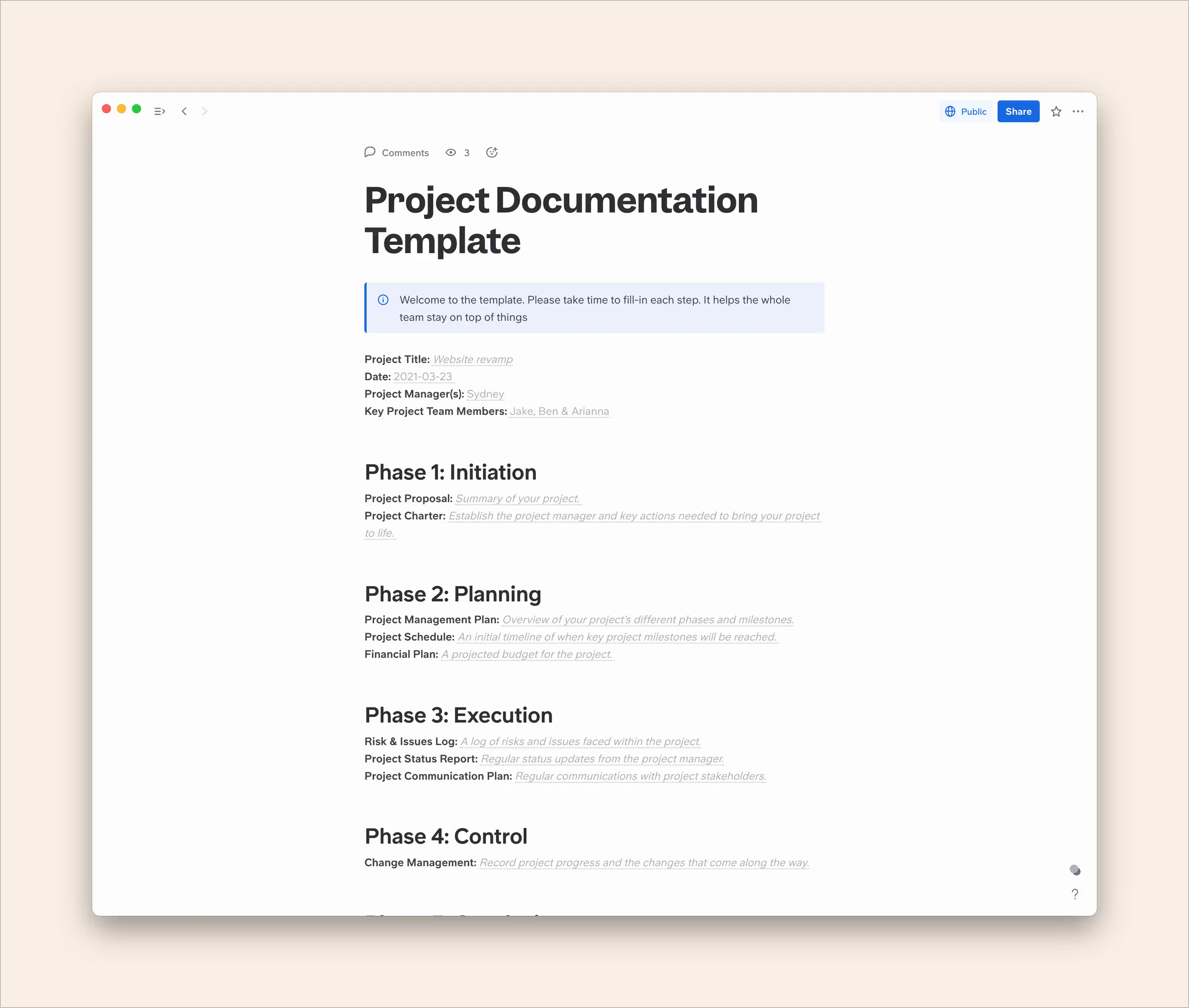
If your projects tend to reinvent their paperwork every time or if documents scatter across drives, chats and inboxes, a template is the fastest way to bring order to it.
You can grab Slite's free project documentation template and adapt it to your own process.
Who puts together project documentation?
Project documentation is best developed collaboratively, but project managers have the final say on signing it off. They own the project's management system, process (and process documentation), deliverables and results.
So effective project documentation is usually put together by project managers or other PMPs (project management professionals) and their teams, often working with human resources, key stakeholders and other interested parties across the relevant phases.
What makes project documentation so important?
Project documentation keeps a project transparent and coordinated: it gives stakeholders the updates they need, breaks a complex project into manageable pieces, keeps the paperwork organized, and lets the whole team work from the same source. Skipping it rarely saves time: it just moves the cost downstream.
When project docs end up scattered across systems with no single source of truth, front-line teams re-ask the tech team the same questions week after week, and stale copies with the wrong information keep circulating.
The upfront investment in documentation is what prevents that. It helps you and your team in a few concrete ways:
- Keeping everyone informed: Documentation increases transparency and keeps the key people on a project in the loop. That matters most for stakeholders who want regular updates on timelines, budget, deliverables and milestones, but it also helps teams work together. Try our project budget template.
- Breaking it down: Whole projects are complex. Documentation lets you split a project into its planning phases, each represented by a key document, and work through them in manageable pieces.
- Staying organized: Good documentation helps you keep the paperwork you need and cut what you don't, so you stop losing track of important documents, especially with a well-built template.
- Making collaboration easy: When the whole team works from the same documentation, it's easier to assign tasks, work efficiently, track progress and stay ahead of challenges as they come up.
The catch with project documentation is that it goes stale the moment a project moves: schedules slip, owners change, plans get revised.
This is the gap Slite is built to close: it's a knowledge base that keeps itself current, with Slite Agent detecting when a document has drifted from reality and proposing the fix for a human to approve before it's published.
What are the key elements of project documentation?
Project documentation varies by industry, company and project, but most of it falls into the same core documents, grouped into five lifecycle phases: initiation, planning, execution, control and conclusion.
Here's the full set at a glance before we walk through each phase.
| Document | Purpose | Phase | Typical owner |
|---|---|---|---|
| Project Proposal (business case) | States the concept and the problem it solves | Initiation | PM / sponsor |
| Project Charter | Authorizes the project and names the team | Initiation | PM / sponsor |
| Statement of Work | A more detailed alternative to the charter for larger projects | Initiation | PM |
| Project Management Plan | How the project will actually be delivered | Planning | PM |
| Work Breakdown Structure (WBS) | Breaks the work into manageable tasks | Planning | PM |
| Project Scope Statement | Defines what is in and out of scope | Planning | PM |
| Project Schedule | Timeline for deliverables, milestones and phases | Planning | PM |
| Financial Plan | Projected budget, funding and ROI | Planning | PM / finance |
| Stakeholder Register | Lists stakeholders, their interests and influence | Execution | PM |
| Risk & Issues Log (RAID) | Tracks risks, assumptions, issues and dependencies | Execution | PM / risk owner |
| Project Status Report | Regular progress updates to stakeholders | Execution | PM |
| Project Communication Plan | How and how often the team communicates | Execution | PM |
| Change Request & Log | Records changes to the original plan | Control | PM / change owner |
| Project Review (closure) Document | Summarizes outcomes and lessons learned | Conclusion | PM / sponsor |
Phase 1: Initiation
The initiation phase is the first phase in a project's life cycle. This is when a project is formally approved and brought to life.
Key milestones in Phase 1 include establishing the project manager and team, addressing feasibility and justification, determining the key objectives and outlining a project scope statement. These are often fleshed out further in Phase 2.
Project proposal
The project proposal, also known as a business case, is usually the document that kicks off project development. Keep it short: explain what the project concept is and what problem it will address.
Project proposal templates are usually written by the project manager and/or the project sponsor.
Project charter
The project charter is sometimes called the anchor or blueprint of a project. It's the first document compiled after your proposal receives formal approval. It establishes the project team and the key actions needed to bring the project to life, and often covers initial funding allocation and authorization.
Your project charter tells you where you're starting from. View our project charter template. For bigger projects, you can create a Statement of Work (SoW), which is more detailed than a project charter.
Phase 2: Planning
You've secured formal approval, meaning you've entered the second phase of your project's life cycle. The planning phase is critical to a successful project: the more detail you collect here, the easier the eventual execution. For larger initiatives, teams often formalize this in a business requirements document.
In this phase you outline all the requirements and actions needed to bring the project to life, as comprehensively as possible while keeping things succinct.
Project management plan
With your project management plan, you get down to how the project will actually come to life. It can be as short or as long as you want, but it's likely one of your longest documents.
The core question is: what are all the steps we'll take to complete this project, from beginning to end?
Several documents are sometimes folded into project plans but can also stand alone, such as work breakdown structures (WBS), human resources management plans and quality assurance plans among them.
A project management plan usually addresses:
- deliverables
- time frame and budget
- quality and version control
- stakeholders and personnel
- communication policies and risk management
Project schedule
This document outlines an initial schedule for the deliverables, milestones and phases of your project. Your timeline will likely change over the project's life cycle, so think of this schedule as your starting point.
Pro tip: Make sure the schedule is realistic. Don't commit to deadlines your team can't hit.
Project scope statement
The project scope statement defines what is, and isn't, part of the project. A clear scope statement is what protects a project from scope creep later, so it's worth writing down in the planning phase and getting stakeholders to sign off.
Financial plan
The financial plan is essentially the anticipated budget for your project. It often covers fund procurement and allocation, contracts, financial processes and projected return on investment (ROI).
Because it sits in the planning phase, it's usually the initial or projected budget. There's sometimes a second financial document in the execution or control phase, in the form of a budget tracker.
Phase 3: Execution
Sometimes called the implementation phase, Phase 3 is when your planning gets put into action. The team moves from preparation to putting concrete actions into force.
Execution is often the longest phase and carries the loftiest goals: your finished product, whatever it is, takes shape here.
Risk & issues log
A risk and issues log is a key risk management tool: a log that tracks project issues as they come up and potential future risks on the horizon. It usually includes:
- ID number
- Event type (risk or issue)
- Event date
- Description
- Action required
- Owner
- Status
- Priority (optional)
Some risk registers are built in Excel; others are simple lists. RAID logs are sometimes used in place of Risk & Issues Logs. RAID stands for Risks, Assumptions, Issues and Dependencies.
Stakeholder register
A stakeholder register lists everyone with an interest in the project, along with their role, influence and what they need from it. It's what your communication plan draws on to make sure the right people get the right updates.
Project status report
Depending on your communication plan, you'll provide regular status reports to various people on your project: stakeholder updates, weekly updates or department updates.
Whatever the purpose, this is a collection of documents that report on your project's progress. It keeps everyone on the same page throughout the life cycle, and status reports can even be used to allocate tasks and next steps. We've also covered how to write a clear project report in a separate guide, templates included.
Project communication plan
Your communication plan establishes how you and your team will communicate while working together. Effective communication is vital in project management.
This differs from status reports: instead of reporting progress, the communication plan lays out exactly how communication will happen: the methods, the frequency and the contact details. It often focuses on stakeholders, but it matters for the team too.
If your team works out of a Slite knowledge base, the communication plan lives right alongside the docs it governs and questions get answered from your connected sources rather than by interrupting a colleague.
Phase 4: Control
The control phase is sometimes considered part of execution, but the two can be separated.
The key difference: execution focuses on putting project processes into action, while control focuses on observing those processes and making changes as they come up. Both phases benefit from good documentation.
Change requests & management
This is the most important document in the control phase, and it usually takes the form of a log. Whenever a change needs to be made to the original project plan, it should be requested and recorded in the change management section.
It usually captures:
- ID number
- Proposed change
- Reason for the change
- Timeline
- Owner
Phase 5: Conclusion
You've reached the final phase of your project's life cycle. This phase focuses on closing the current project while looking toward future ones.
You present all deliverables and the finished product and it's a good opportunity to hold final meetings with your team and stakeholders and reflect on what went well and what could improve next time.
Good reflection here streamlines your documentation and management processes and feeds into more successful future projects.
Project review document
Also known as a project closure document, a project review document formally concludes your project. Like the project proposal, it needs review and approval by the project manager, sponsor and relevant stakeholders.
This type of technical documentation summarizes what the project accomplished, any notable wins or difficulties, and post-project issues or tasks still to be addressed.
How to create documentation for a project (step by step)
Knowing which documents to create is half the job. Here's how to actually put project documentation together and keep it useful:
- Decide what's worth documenting. Start from the five phases and pick the documents your project actually needs, since not every project needs a full Statement of Work or a formal RAID log. Match the documentation to the project's size and risk.
- Set up the structure before you start. Create the folders or knowledge-base sections up front (one home per phase) so documents land in the right place from day one instead of scattering across drives and chats.
- Assign an owner to each document. Give every key document one named owner (the person closest to the work), not a committee. Ownership is what keeps a document from quietly going out of date.
- Keep it current as the project moves. Put the critical documents on a review cycle so owners revisit them when schedules, scope or people change. Stale documentation is worse than none, as it sends the team the wrong information with confidence.
- Store it where the team already works. Keep everything in a single source of truth people can search, so the answer to "where's the latest plan?" is always one place, not five.
Project documentation best practices
The documents matter less than the habits around them. A few practices keep project documentation trustworthy over a project's life:
- Keep a single source of truth. One place teams can come back to beats documents scattered across drives, chats and inboxes. That fragmentation is the number-one reason teams re-ask the same questions.
- Give each critical document one named owner. The owner is the person closest to the system or workstream the document describes, not a shared mailbox and not a committee.
- Put documents on a verification cycle. Set a monthly, quarterly or yearly review on the key documents. When a cycle lapses, the "verified" status should decay and prompt the owner to re-check it, the simplest defense against knowledge drift. (See more on the dangers of stale documentation and knowledge base maintenance.)
Documentation automation tools can own those reviews for you.
- Make it findable. If people can't search it, they'll skip it and file a support ticket or ping a colleague instead. Structure and search are what turn a document library into something a team actually uses.
Teams that switch tools usually do it for exactly this reason: they want one consistent structure and a single source of truth they can come back to, with clear ownership and regular review keeping it current.
How do you keep project documentation up to date?
Writing the documents is the easy part. Keeping them accurate once the project is moving, when schedules slip, owners change and plans get revised, is where most teams lose the thread.
A plan that's three revisions out of date is worse than no plan, because people trust it and act on the wrong information.
Two habits keep documentation honest:
- First, give every critical document a single named owner, the person closest to the work, not a committee.
- Second, put each document on a verification cycle so someone actually revisits it on a schedule instead of hoping it stays current.
This is the problem Slite is built to solve. It's a self-maintaining knowledge base: you set a verification cycle on the documents that matter, and when a cycle lapses the verified badge decays and prompts the owner to re-check it. Readers can flag anything that looks stale, so drift gets caught by the people who notice it first.
Slite Agent takes it a step further. It watches for documents that have drifted from reality, drafts the correction, and routes it to a human to approve before anything is published, so your project docs stay current without turning maintenance into a second job.
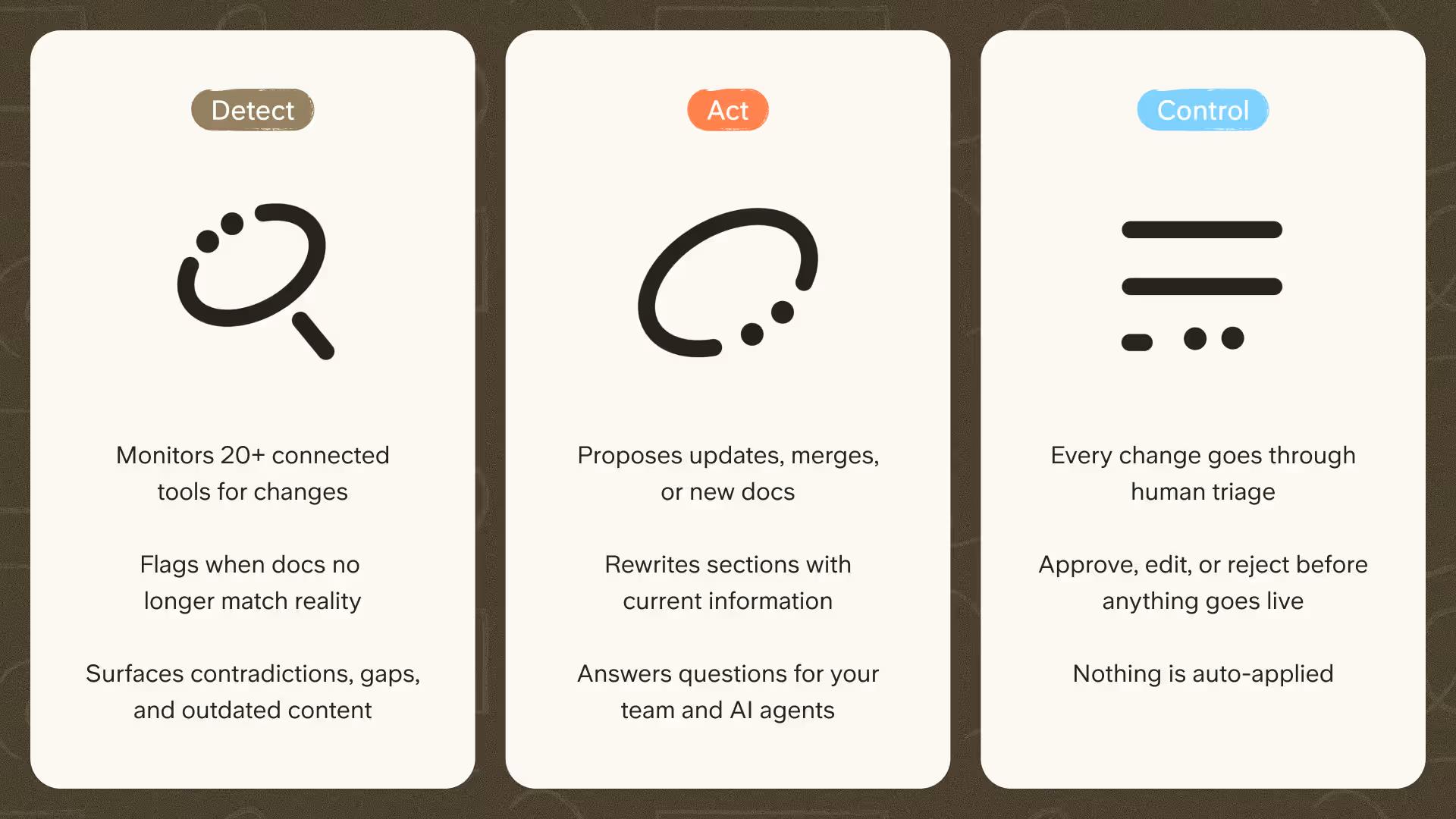
The result is a single source of truth your team can come back to and actually trust. If keeping documentation accurate is a recurring headache on your projects, book a demo and we'll walk you through how the self-maintaining side works.
Bringing it together
Project documentation is the spine that runs from initiation through planning, execution, control and conclusion, giving your team one clear account of what the project is and where it stands.
Get the five phases and their core documents in place with a project documentation template, then keep them in a single source of truth your team can trust and come back to.
A knowledge base like Slite that keeps documents verified and current is what stops all that work from quietly going out of date the moment the project moves.
FAQ
How do you document a project?
Work through the five lifecycle phases (initiation, planning, execution, control and conclusion) and create the core document for each (proposal and charter, plan and schedule, status and risk logs, change log, and a closure report). Decide what's worth documenting for your project's size, set up one home per phase, give each document an owner, and keep it in a single searchable place.
What should project documentation include?
At a minimum: a project proposal or business case, a project charter, a management plan, a schedule, a financial plan, a risk and issues log, status reports, a communication plan, a change log, and a closure or review document. Larger projects add a Statement of Work, a work breakdown structure, a scope statement and a stakeholder register.
What is a project documentation template?
A project documentation template is a ready-made structure that lays out which documents a project needs and where each one lives, so the team starts from a consistent format instead of a blank page, and keeps everything together as a single source of truth.
Who is responsible for project documentation?
The project manager (or a PMP) owns and signs off on project documentation, but it's built collaboratively with the team, human resources and key stakeholders. Best practice is to give each individual document a single named owner as well.