Your codebase knows when a feature ships.
GitHub knows the pull request was merged. CI knows the build passed. Jira knows the ticket moved to Done. Linear knows the cycle closed.
Your knowledge base usually finds out later. Sometimes much later.
One engineering team tried to solve this problem with a pull-request checklist. Every PR included a checkbox asking reviewers to confirm the documentation had been updated. Sensible enough.
However, according to the engineer who shared it, "it hasn't worked super well."
That's the problem with documentation drift. Once a page falls out of sync, nothing about it tells you. A stale API guide still has a title. A stale runbook still has steps. A stale help-center article can still rank in search. Nothing warns the next engineer, support rep, or AI agent that the product underneath it has moved on.
Keeping a knowledge base in sync with your codebase is a maintenance problem. We'll look at why documentation drifts in the first place, what AI should actually do to keep docs in sync, why human review matters, and how Slite Agent closes the loop by detecting changes, drafting updates, and routing them through review before they become part of your team's source of truth.
Key takeaways
- Software documentation drift starts when engineering work changes faster than the docs that explain it.
- PR checklists, doc owners, and review dates help, but they still rely on memory and manual follow-through.
- A knowledge base stays in sync by monitoring the systems where work changes, detecting drift, drafting the fix, and sending the proposal to a human reviewer.
- Slite Agent is read-only on connected engineering tools, and routes proposed KB changes through Triage. It can suggest documentation updates, but it does not push commits, edit tickets, or silently rewrite the source of truth.
- The human review step is an essential feature. Code has tests and compilers. A shared knowledge base needs approvals, diffs, rationale, and an audit trail.
What does it mean to keep documentation in sync with your codebase?
Documentation is in sync with your codebase when it reflects the current product, system, or workflow it describes.
That's the ideal scenario for engineering teams. It means your knowledge base pays attention to the places where work actually changes:
- GitHub and GitLab, where pull requests and issues move
- Jira, where specs and delivery tickets ship
- Linear, where issues, projects, and cycles close
- CI, where deployment and integration workflows change
- Git, where READMEs, ADRs, runbooks, and Markdown docs live
The problem is most teams still treat documentation updates as a social habit. They add a PR checkbox. Ask the reviewer to confirm docs were updated. Put a last-reviewed date on the page. Assign an owner. Then hope the person who shipped the change remembers the docs it affects.
Those habits help. But they also depend on human memory, which is the first thing to break when engineering teams are shipping quickly.
A self-maintaining knowledge base is the model we are building toward: a knowledge base that looks upstream of itself instead of waiting for someone to remember which page needs updating.
With Slite, that means watching connected development tools as read-only. When a PR merges, a ticket ships, or a source document changes, Slite Agent identifies the documents likely to drift, drafts the update, and sends the proposal to Triage for human review.
It proposes, but it never pushes.
Why docs drift the moment code ships
Docs drift because software teams move faster than what manual documentation can follow.
GitClear's 2025 analysis of more than 211 million changed lines found signs of rising churn and more code being revised, duplicated, or reworked shortly after it is written. Every one of those changes can leave a document behind, such that:
- a runbook still describes the old deploy process
- a README points to a command that changed
- a release note misses a behavior that shipped
- a help-center article explains a screen that no longer exists
- an ADR captures a decision, but not the implementation that followed
"Engineering docs get out-of-date pretty easily, and it's hard to stay in sync with the code."
— Matt Zeiler, CEO, Clarifai
Recently, one platform team described a more specific version of the problem. They wanted a way to detect docs that might already be stale, even if someone had updated them recently.
At first, that sounds counterintuitive. But if you look at how engineering work ships, it makes absolute sense: A doc can be edited on Monday. A pull request can merge on Tuesday. A deployment can change behavior on Wednesday. By Thursday, the page has a fresh timestamp and is still wrong.
What AI should actually do to keep docs in sync
An AI documentation tool should watch the systems where engineering work changes, identify the documents affected by those changes, draft the update, and give a human the final decision.
That means the tool has to answer three questions before it touches the knowledge base:
- Where did the change start?
- Which documents might be affected?
- Who should review the proposed update?
For Slite Agent, that starts with read-only source connections.
| Connected Source | What Slite Agent Watches |
|---|---|
| GitHub | Issues and pull request metadata |
| GitLab | Issues and pull request metadata |
| Jira | Tickets and project-management items |
| Linear | Projects, issues, comments, and updates |
| Git source | READMEs, ADRs, runbooks, and Markdown documentation |
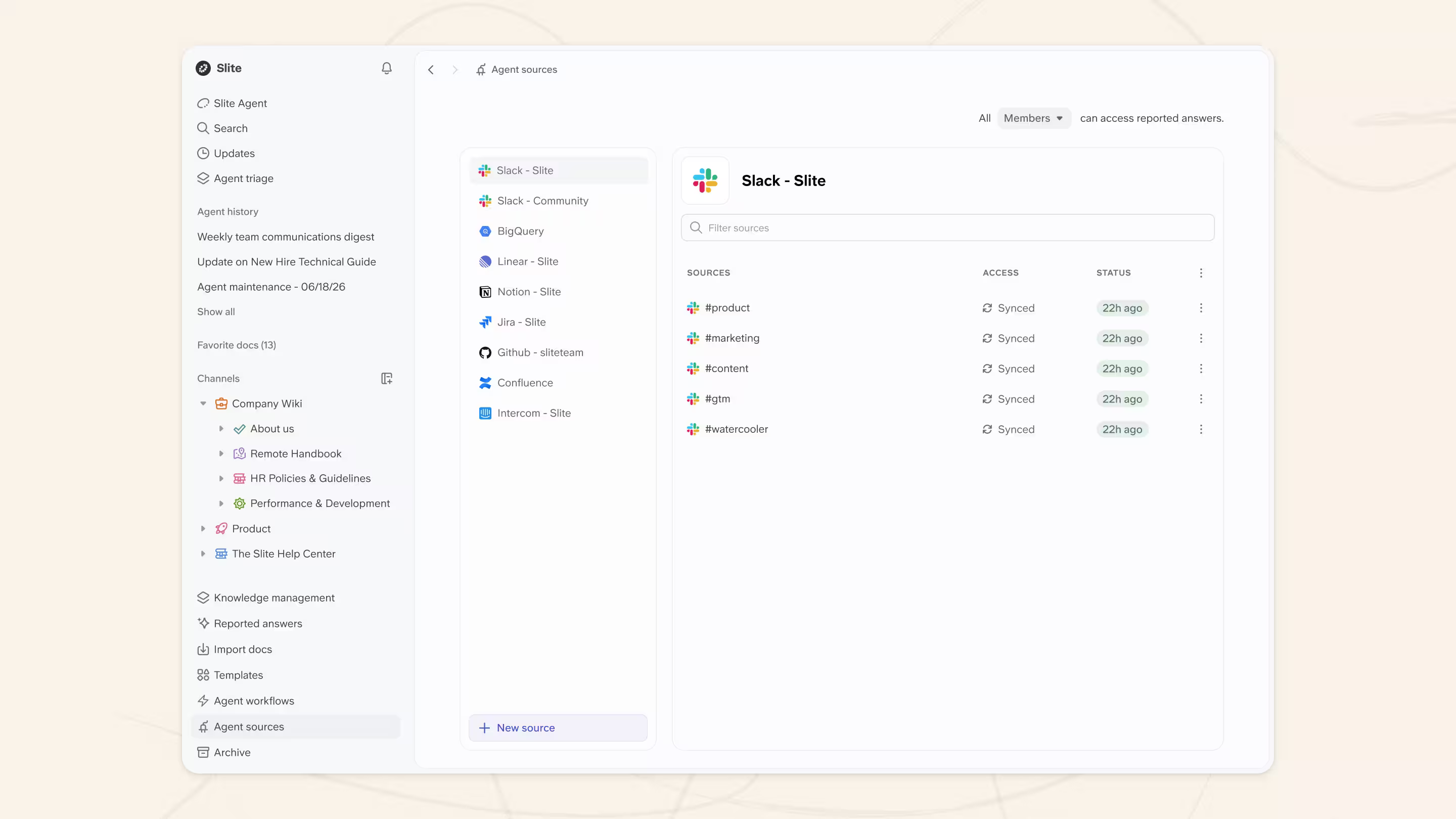
An important note: Slite's standard GitHub and GitLab integrations do not read your whole repository. They monitor issues and pull request metadata. If you want Slite Agent to monitor Markdown files, such as READMEs, ADRs, runbooks, or other .md docs, you connect the repository as a dedicated Git source. That source is still cloned read-only.
Slite Agent does not push commits, edit Jira tickets, comment on pull requests, or write back to GitHub, GitLab, Linear, Jira, or Git.
Connecting AI to your engineering stack should not create a shortcut around access controls either. Slite Agent mirrors permissions from connected tools, so people only retrieve information they already have access to. Accepted changes are also recorded in the Activity Log, so teams can see whether an update came from a teammate, the API, MCP, or Slite Agent.
Why automated doc updates still need human review
In tools like Cursor or Claude Code, it can make sense for an agent to apply code changes directly. Code has a safety net. It is local, testable, typed, and usually reversible. A compiler, CI pipeline, test suite, or pull request reviewer can catch the mistake before it spreads too far.
A shared knowledge base has no compiler. Documentation workflows have to diverge from the classic coding-agent UX because the wrong update does not fail a test. Rather, it becomes the answer someone trusts.
That answer can shape an incident response, a customer reply, an onboarding path, or an AI agent's next action.
We have also seen the other side of AI documentation: agents creating README files, migration notes, implementation plans, summaries, and diagrams that nobody asked for. Sometimes those files can be useful, but they can also become noise the next agent reads as context.
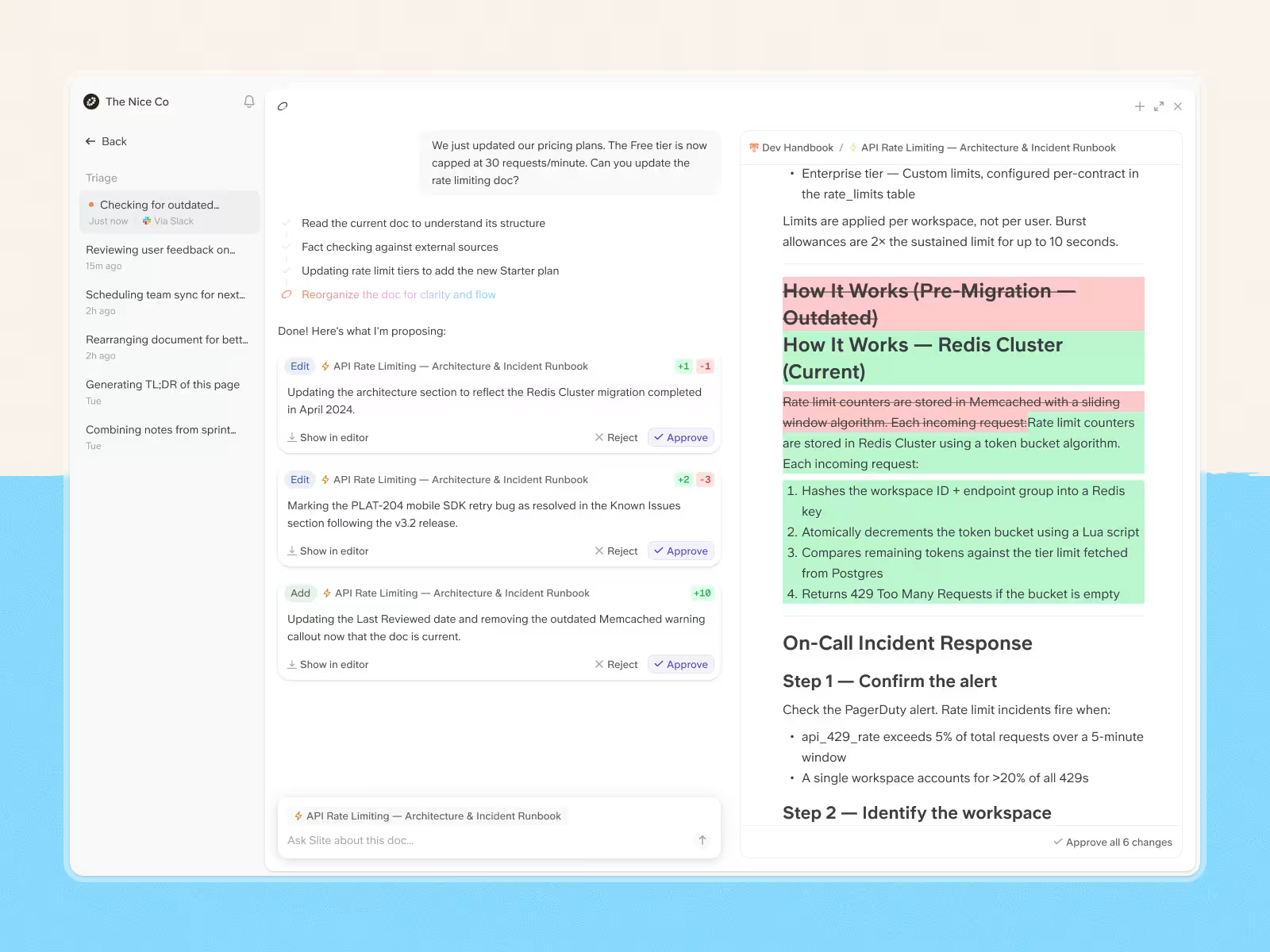
That is why every proposed change in Slite Agent appears in Triage with:
- a split-view diff
- additions and deletions
- a short rationale
- Accept and Dismiss actions
Customers pushed us in this direction. One team wanted a human in the loop because they were worried an AI agent might delete something important. Another described connecting AI to internal knowledge as handing over the keys to the kingdom.
One large engineering organization reached the same pattern on its own. Their internal agents could edit docs, but the team wanted proposals, diffs, approvals, and regeneration before anything touched the source of truth.
Generate automatically. Verify deliberately.
That need is not unique to Slite customers. Teams connecting AI to internal documentation still want a way to review changes before they become official.
How Slite Agent keeps documentation current
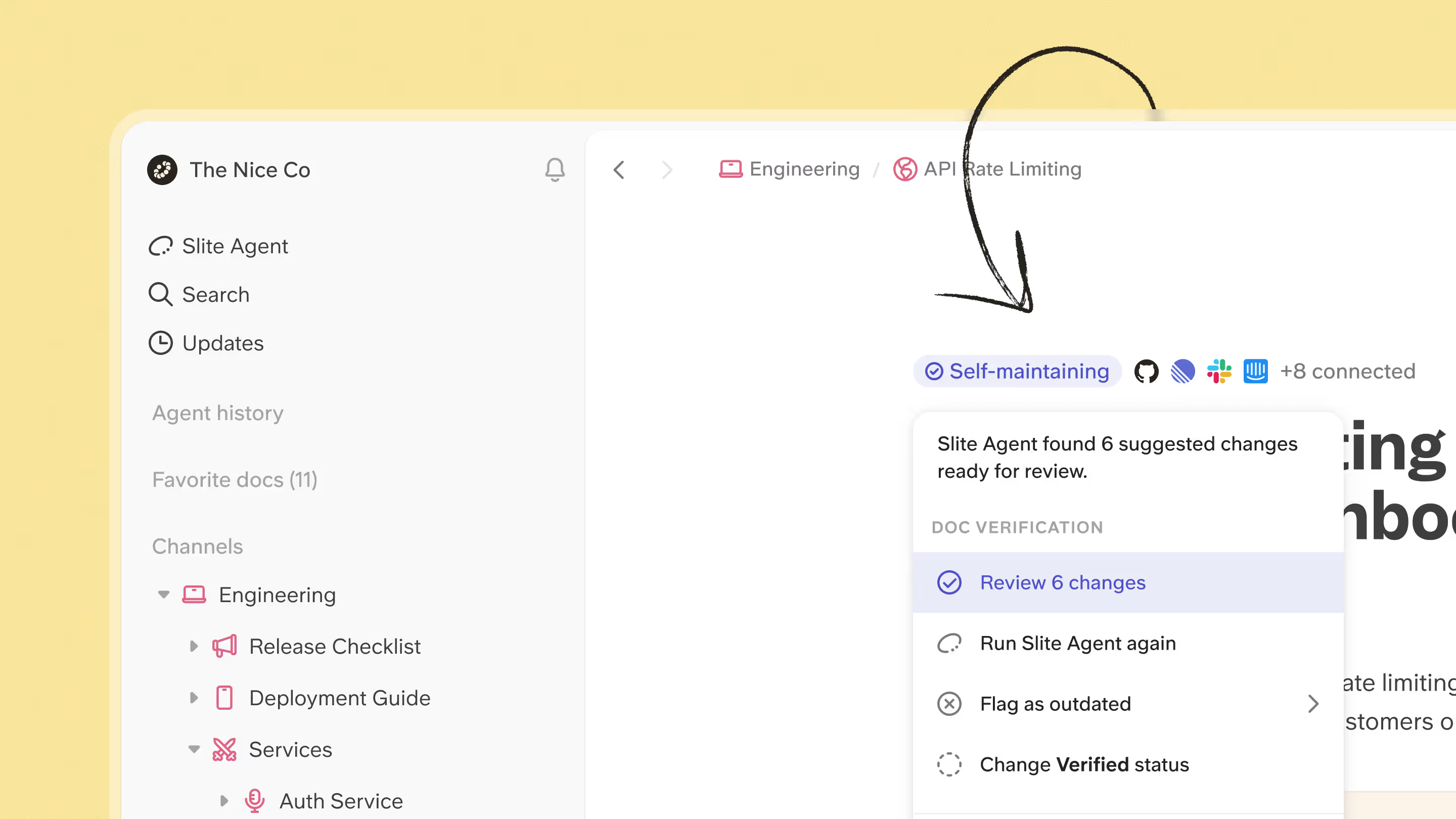
Once you set up a Self-maintaining status on your doc, you will be seeing suggested changes in your triage:
The changes will appear in your triage sidebar:
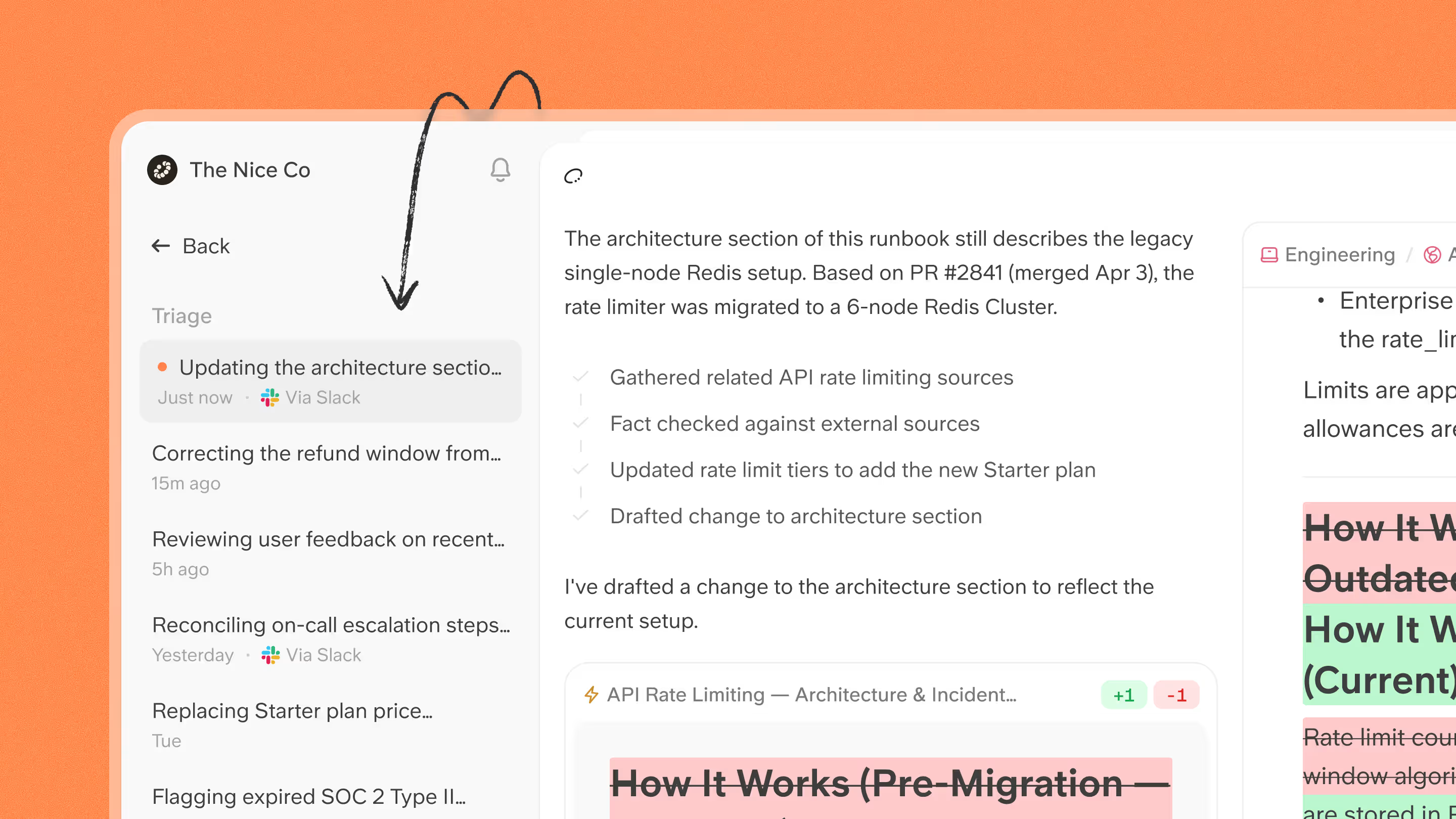
Every proposed update follows the same path:
- Trigger: a PR merges, a Jira ticket ships, a Linear issue closes, a CI run completes, or a Git doc changes.
- Detect drift: Slite Agent identifies which docs may no longer reflect the current state of the system.
- Draft update: it drafts a targeted edit while preserving the document's structure and tone.
- Triage: the proposed change appears in a review queue with a split-view diff and a rationale.
- Approve or dismiss: a human decides whether the change belongs in the knowledge base.
Workflow examples: AI workflows for keeping docs in sync
Slite Agent can support different documentation workflows, but the underlying pattern is the same: connect the system where engineering work changes, identify the docs that may be affected, draft the update, and send it to Triage for review.
The examples below show how that works for runbooks, release notes, changelogs, and help-center articles.
Auto-update runbooks when CI detects a change
Runbooks fail at the worst possible time: during incidents.
The update often lives somewhere else: a Slack thread, a postmortem note, a CI diff, or the memory of the person who fixed the issue. A completed CI run can change a deployment step, configuration value, or incident response process. Slite Agent starts from that engineering event and works backwards to the affected docs.
- Trigger: a CI run completes
- Agent checks: changed files, commit context, related runbooks, API docs, and integration guides
- Review: the drafted update goes to Triage
Generate release notes from Jira automatically
Release notes are often written after the real work is done. Someone reconstructs the release from completed tickets, merged PRs, and memory.
Jira already contains much of that context. Slite Agent can use completed tickets as the starting point for drafted release notes or changelog entries.
- Trigger: Jira tickets move to Done
- Agent checks: shipped work, ticket context, and related product changes
- Review: release-note drafts are queued for approval
Turn shipped Linear issues into a public changelog
Teams using Linear already organize product work into issues, projects, and cycles. The missing step is turning completed work into a changelog customers can read.
We heard this directly from teams using Linear: once a cycle ships, they want a clean path from shipped issues to a reviewed changelog update. With Slite Agent:
- Trigger: Linear issues or cycles are completed
- Agent checks: shipped issues, comments, updates, and project context
- Review: the changelog draft goes to Triage
Update help-center articles when a Jira ticket ships
Engineering changes do not stop at engineering docs.
A shipped ticket can make customer-facing docs wrong too. The product changes, but the help-center article keeps describing the old behavior until a customer notices. With Slite Agent:
- Trigger: a Jira ticket ships or product behavior changes
- Agent checks: help-center articles, public docs, internal playbooks, battlecards, or compliance docs affected by the change
- Review: the proposed update is sent to Triage before publishing
Each workflow starts from a different source, but the setup is similar across all of them. You connect the tools where work changes, choose the documents that should stay current, and route proposed updates to the right reviewers.
How to set up these workflows with Slite
Start with the systems where work changes first.
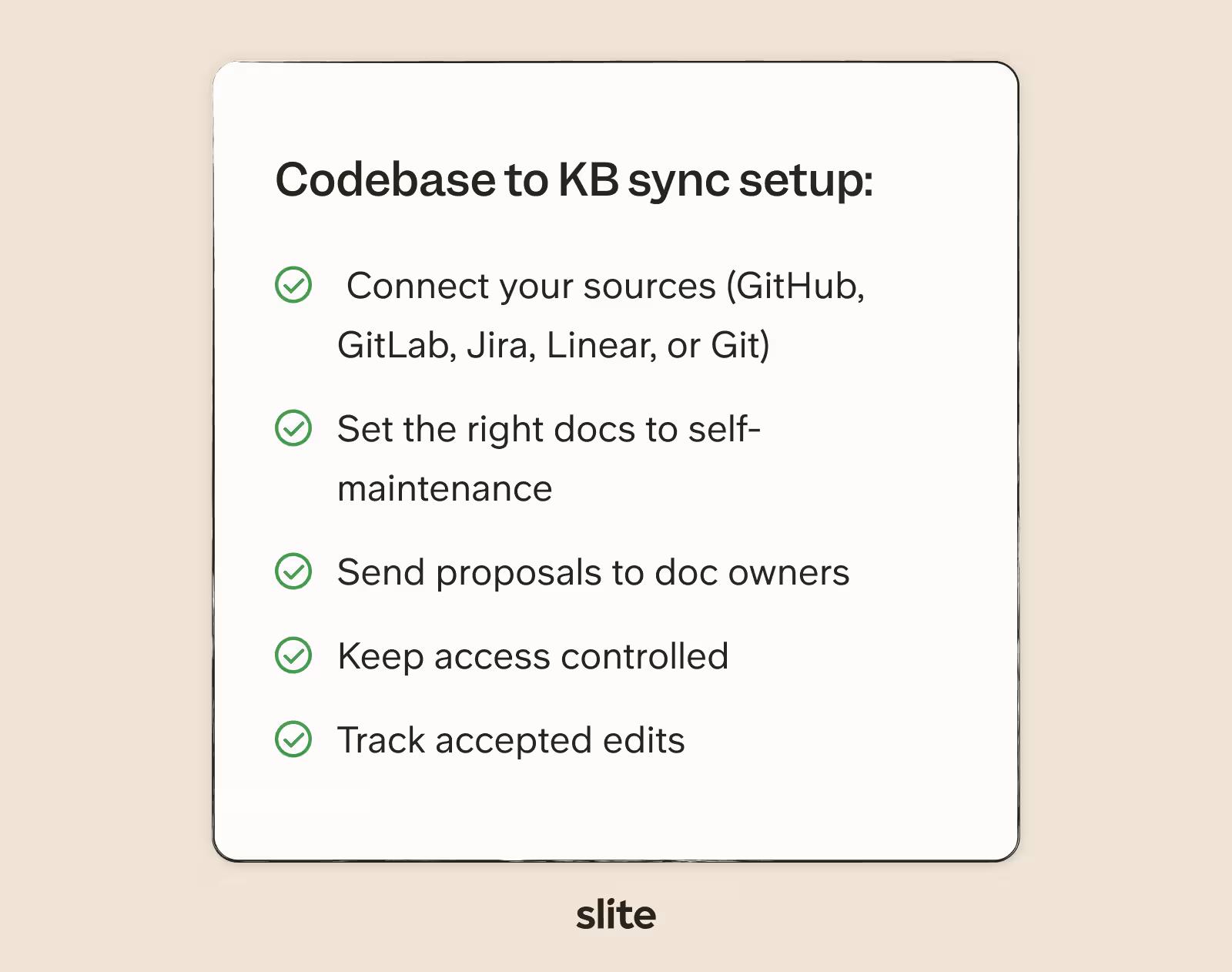
- Connect your sources: GitHub, GitLab, Jira, Linear, or a Git source for Markdown documentation.
- Set the right docs to self-maintenance: runbooks, READMEs, API references, release notes, changelogs, integration guides, or help-center articles.
- Route proposals to owners: send suggested updates to the people who can approve or dismiss them in Triage.
- Keep access controlled: mirror permissions from connected sources.
- Track accepted edits: use the Activity Log to see whether an update came from a teammate, the API, MCP, or Slite Agent.
Not every document should stay in sync. Design proposals, ADRs, and historical decision records often capture what was true at a specific point in time. Those pages should not automatically evolve every time implementation changes.
Keep your documentation in sync without chasing every change
Engineering tools already know when work changes. The missing piece is making sure your knowledge base learns about those changes before the next person relies on outdated information.
Slite Agent watches the tools where engineering work happens, detects when knowledge has drifted, drafts the proposed update, and puts a human at the point where trust matters most: the review. That workflow is Slite's self-maintaining documentation in practice.
With Slite, docs stay aligned with your codebase without asking engineers to remember one more thing after every release.
Book a demo to see how.
FAQ
How do you keep documentation in sync with code?
Connect your knowledge base to the systems where engineering work changes, such as GitHub, GitLab, Jira, Linear, CI, and Git-based documentation. When work ships, you can use Slite to identify affected docs, draft the update, and route it through review.
What is documentation drift?
Documentation drift happens when a document no longer reflects the current product, system, or workflow it describes.
Should AI update documentation automatically?
AI can draft documentation updates automatically, but shared knowledge should usually be reviewed before it changes. A human-reviewed workflow lets teams see what changed, understand why the update was proposed, and decide whether it belongs in the source of truth.
Can Slite Agent connect to GitHub, GitLab, Jira, and Linear?
Yes. Slite Agent connects to GitHub, GitLab, Jira, Linear, and Git as read-only sources. GitHub and GitLab monitor issues and pull request metadata. A dedicated Git source can monitor Markdown documentation such as READMEs, ADRs, runbooks, and other .md files.