Introduction
Notion was the default team wiki for years. Since then, it has added a calendar, AI and custom agents, and the wiki has had less of its attention.
"I use it[Notion] daily at a tech company of about 1000 people... The search functionality of Notion is terrible for a company of our size with a huge graveyard of docs that are out of date or are owned by people no longer at the company."
u/savingseas, Notion user, 1,000-person tech company
We hear this every week from teams leaving Notion. Their workspace has become a place where people can't find, search or trust what's written down.
This article is for teams of 100+ comparing Notion and Slite. It covers what each tool is today, who should pick which, and how they compare on features, price, and which one is the right solution for your team, even if that's Notion.
Key takeaways
- Notion isn't a wiki anymore. It's an AI agent platform and system of record, built to be where your team's agents work.
- Slite is a self-maintaining knowledge base. It takes messy, outdated knowledge and keeps it verified, fresh and easy to find.
- Slite and Notion's features are moving in opposite directions. Beyond a small feature overlap on doc-collaboration and AI search, Slite is developing more knowledge maintenance features while Notion is adding more AI creation features.
- Choose Slite if you're a large team that struggles to find docs, keep them current, or get people writing at all.
- Choose Notion if your team wants an all-in-one tool, AI agents inside the workspace, project management, or a personal second brain.
- Still need to keep Notion? Don't leave. Keep Notion for work in progress, and keep canonical knowledge in Slite.
Notion isn't a wiki anymore
Since 2023, Notion has grown in two directions at once.
- It's grown into one horizontal tool after another like Calendar, Sites, Forms and AI meeting notes.
- But it's grown, far more, into AI. They launched Notion AI, agents, Custom Agents, and a developer platform.
Today, Notion wants to be an enterprise AI platform, where your team uses AI, builds agents, and keeps its automations and memory.
It's an excellent solution to consolidate AI usage and bring governance and model picking built in. That said, the wiki is now a small part of what Notion offers and sells.
"I don't want anyone to ever say wiki or note-taking to me again."
Akshay Kothari, Co-founder, Notion
In April, Notion's co-founder went on record to disown the wiki category and announce that they're shifting focus to being the place where AI and people work together.
They think Notion is uniquely positioned to own the multi-player AI category because Ivan, Notion's CEO, thinks Notion is uniquely positioned to be your AI's knowledge layer for all company information.
"Notion's strategy is to excel in the context layer, which unlocks automation and paves the way to Level 3."
However, it's unclear why Notion thinks they can become the knowledge layer for AI without strong foundational Knowledge Management features. The modern company wiki struggles with issues of stale documentation and knowledge drift. And Notion's current approach makes it a suboptimal solution as a team wiki and as a knowledge layer.
1. Notion's knowledge management features are lacking
Notion's current Knowledge Management features allow you to:
- Tag docs with a verification status
- Get reminders when a doc nears verification expiry
While it's a step in the right direction, a company Knowledge Base struggles with a few more problems that require dedicated features, like:
- AI-assisted maintenance of docs to avoid knowledge drift
- Analytics on the health of your knowledge base, like how much of it is verified or out of date
- Ability to surface duplicate/stale documents that need archiving/merging
Duplicate documents, with poor knowledge management features, amplify knowledge drift and the risk of stale documentation. Notion's own enterprise search guide says stale content should stay under 15%, and that "quarterly IA reviews are mandatory." But it leaves you two options:
- Do it by hand, tediously.
- Or, more dangerously, automate it with AI without necessary reviewing guardrails.
Neither option is a practical way to keep knowledge verified. Big teams already create too many docs, and AI only makes that worse.
2. AI everywhere makes the mess grow faster
Exploring an idea with AI leaves a trail of drafts behind. In ChatGPT or Claude, that trail stays in your private chat history. In Notion, it lands in the shared workspace and gets indexed.
So AI search has more clutter to dig through, and the right answer gets harder to find.
In VentureBeat's survey of 101 companies with 100+ employees, 57% had traced a confident but wrong AI agent answer to missing or inconsistent business context in the past six months.
Notion's own customers feel the need for knowledge maintenance and currently try to invent their own workarounds. Jake Clarke, Product Marketing & Ops Lead, Equals tried to make a custom Notion Agent for self-maintaining their product documentation. However, the solution is suboptimal because:
- Agents like these have to be custom-built by users and require AI fluency to determine the right prompt, cadence, and AI model.
- Agents can still be wrong at finding the right information for updates.
- An AI agent rewriting docs without humans reviewing can multiply low-quality, unreviewed docs.
So going by its founder and its feature set, Notion today is an all-in-one AI tool more than a knowledge base. It's a great place to work with AI. But if your biggest problem is keeping company knowledge accurate and easy to find, you'll be working against what the product is built for.
Slite is purpose-built to solve the biggest enterprise documentation problems
Slite is a knowledge base built for keeping your team's knowledge accurate.
Teams bring their messy, outdated docs to Slite to clean them up.
Then Slite keeps them accurate as the business changes, so people and AI can trust what they find.
Slite is uniquely equipped for this because:
- Slite comes with best-in-class enterprise AI search on top of 20+ tools (like Linear, Jira, Slack, Sharepoint, etc.)
- Slite auto-monitors your documentation and creates a change request your team can approve in 1 click.
- Slite comes with advanced Knowledge Management analytics to help teams monitor how their knowledge is being used, what share of their docs are trustworthy, etc. to help teams accurately measure their documentation's ROI.
- Slite can be used with your AI Agents as an MCP/API. It gives AI Agents a single source to fetch trusted company context and gives your team an easy way to create/manage documentation within Slite via AI.
The teams happiest after switching from Notion to Slite have:
- 100+ people
- Years of unorganized, stale, unverified docs
- Trouble finding, citing, and navigating their Knowledge Base
If any of the problems below sound familiar, Slite is built for you.
Nobody knows which docs to trust
Teams using Notion often have unorganized, outdated docs and poor adoption of knowledge verification. Since Notion doesn't help with updating documentation to ease the re-verification process, people can procrastinate on updating documentation. Eventually, this turns Notion into a Knowledge Base which nobody trusts.
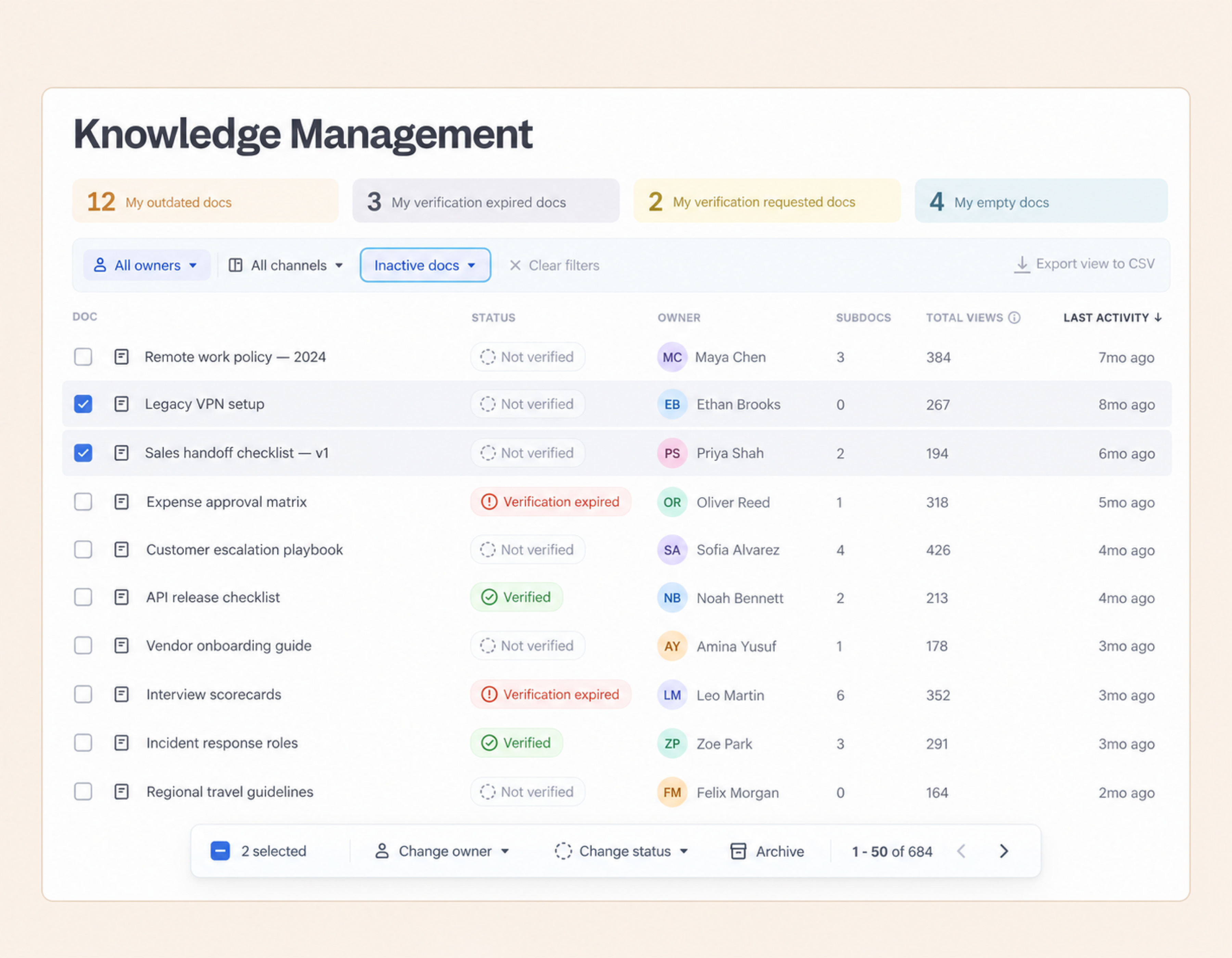
Slite gives every doc a status, and makes verification easier. A doc can be Verified, Outdated, Expired, or have a verification request open, so readers know at a glance what they can rely on. Like Notion, Slite also reminds doc owners ahead of expiry but goes a step further.
Slite has a Knowledge Management panel, which lists every doc that needs attention in one place.
You can filter the list in plain language, like "HR docs nobody has touched in a year". Then select what you need and archive it, hand it to a new owner, or ask someone to verify it, all in one go. No more clicking through hundreds of pages one by one.
"Every document marked as Verified can now be trusted by humans and agents alike."
Nikita Chepanov, Head of Developer Efficiency, Plaid
Your docs drift out of date
Docs are accurate the day they're written. Then the product changes, or the owner leaves, and it's nobody's job to go back and fix them. In Notion, there's no monitoring feature that intelligently checks your docs against others, but Slite catches that drift for you.
Slite Agent compares your docs with what's actually happening in Slack, GitHub, Linear and your other tools. If a process changed in Slack last week but the doc still describes the old one, Slite flags it and drafts the fix.
All suggested fixes can be triaged in a shared queue, and nothing goes live until an owner approves it. You always know what changed, who approved the change, and why.
"A doc that was accurate on Tuesday is dangerously wrong by Friday. And Notion gives you zero signal about that."
Runbo Li, CEO, Magic Hour AI
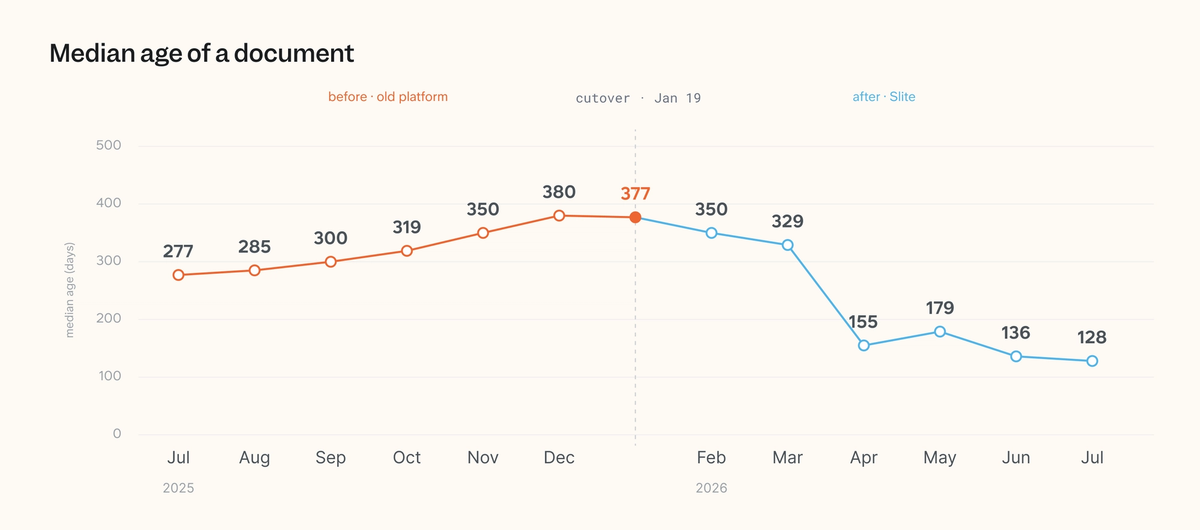
When Plaid moved its roughly 3,000 engineering docs to Slite, the median age of a doc fell from 380 days to 128 within six months.
People don't write docs and you see low product adoption
A Notion page can be a database, a board, a form or a website. Beyond a few power users, that choice overwhelms people, so they drift to Google Docs.
Slite is deliberately simpler. It's a clean, fast editor with everything you need to write good docs together, and nothing that turns a page into a project. G2 reviewers rate Slite 9.3 for ease of use against Notion's 8.4, and 9.1 against 8.4 for ease of setup.
Within 6 months of moving to Slite, Plaid's team saw:
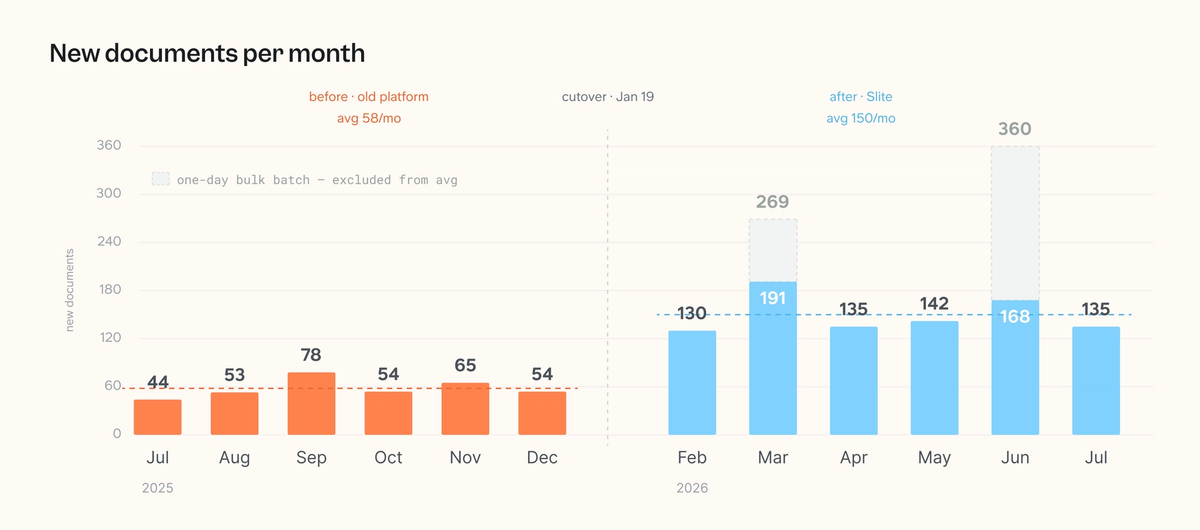
- monthly active authors go from 65 to 107, up 63%
- new docs published each month go up 159%
- about 35% of all docs Verified, up from zero
"Of the three tools evaluated, Slite was the clear favorite. All pilot users preferred it citing intuitive WYSIWYG, native diagramming, and fast clean interface."
Nikita Chepanov, Head of Developer Efficiency, Plaid
Your team can't find answers and needs a good search
"Once we passed a couple hundred pages, Notion's native search started returning too many loosely related results, so people gave up searching and just asked in Slack instead, which defeated the purpose of having a knowledge base at all."
Conrad Wang, Managing Director, EnableU
Past a few hundred pages in Notion, nobody remembers where things live. Search returns ten loosely related pages, so people give up and ask in Slack.
Slite Agent is an AI search built on top of all your tools to give you accurate answers from all sources. It searches your knowledge base and 20+ connected tools at once, including:
- Notion
- Slack
- Google Drive
- GitHub
- Linear
- HubSpot
- Confluence
Slite Agent is built to support accuracy, trust, and permissions needed by enterprise teams:
- It respects each person's access, so people only get answers from what they're allowed to see.
- Admins can also share a source with the team, so not everyone needs their own GitHub, GitLab or Notion account to get answers from it.
- It cites every source, so you can check an answer in one click.
- And if it can't find a solid answer, it just says it doesn't know.
We've seen teams trust it more because of this. If Slite Agent gives you an answer, you can be pretty sure there's a real source behind it.
"The biggest change was when it said 'I don't know.' Previous solutions always knew something. They were never right, but they were fully convinced."
Notion's search covers some sources more deeply. It reads Google Sheets and CSV files in Drive and Jira comments, and it can search Slack DMs and a person's own Gmail. Slite doesn't cover those today. Slite has more native connections for the tools large teams already run, including Confluence, GitLab and websites, plus custom sources.
Your AI answers are slow or incomplete
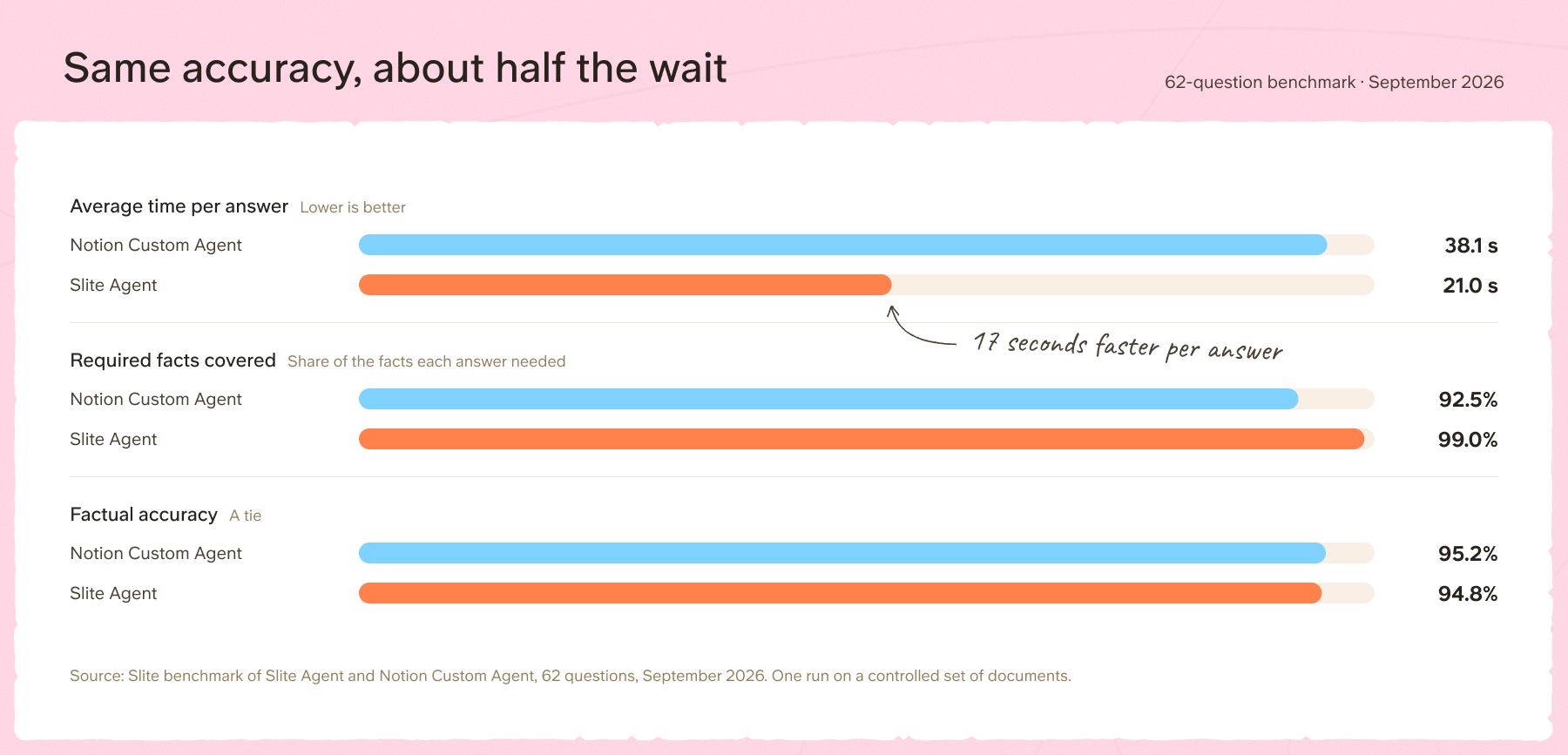
If you're already using an AI search, but unhappy with the results, Slite Agent matches Notion in accuracy while being 2x faster and 9% cheaper.
In September 2026, we put Slite Agent and Notion's Custom Agent through 62 questions. 50 came from Garry Tan's BrainBench. The other 12 came from a small product-launch corpus we built to test traps, like conflicting dates and questions the docs can't answer.
Both products got identical copies of the same documents, and answers were graded blind against a fixed answer key.
Simply put:
- Accuracy - Tie, but Slite covered 99% of the facts each answer needed, Notion 92.5%.
- Speed - Slite wins. Slite was faster on 60 of 62 questions and took 45% less time overall.
- Cost - Slite won by a small margin. Slite was about 9% cheaper when compared to Notion's credit-to-cost calculation.
Slite only does knowledge and documentation, and our roadmap is about the same thing: more knowledge governance and stronger maintenance workflows. So when you pick Slite, it keeps getting better at the documentation and knowledge upkeep your team would otherwise do by hand, or put off. Your people get a place they actually enjoy writing in, and your AI agents get one canonical source of company context to rely on.
That said, Slite isn't the right pick for every team. There are plenty of cases where Notion fits better, and here's when we'd point you there.
When you should choose Notion over Slite
Notion is the better pick in plenty of cases.
You're a small, fast-moving team that wants one tool
If you'd rather have docs, tasks, databases, forms and a website in one place than juggle a stack of subscriptions, Notion is hard to beat. It even offers startups up to six months of Business for free. At your size, everyone still knows where things live, so upkeep isn't your bottleneck yet.
You want your whole team working with AI in one place
Notion is excellent if you'd rather give everyone AI in one shared, governed workspace than pay for a pile of separate ChatGPT and Claude seats.
You can record meetings, manage your calendar, create docs, presentations and automations, and build custom agents, all inside Notion.
Building a custom agent there is simpler than in Claude or ChatGPT.
Admins get one place to see AI credit usage by member, group and agent. You can pick your model and keep it all under one set of controls.
You need project management
Notion's relational databases, boards, timelines and automations get pretty close to a proper project management tool. Plenty of teams run their sprints and roadmaps in Notion.
If projects are your main need, pick Notion or a dedicated tool like Linear (which we use alongside Slite internally).
You're building a personal second brain
Notion's templates, databases, custom views and huge community make it one of the best tools around for personal knowledge management.
Slite can be a second brain too. Within months of adopting Slite, individuals at Plaid started using Slite as a personal second brain for their thoughts and felt it struck the right balance of features with a clean editing experience. But, individuals are often happier with how far Notion lets them customize, when they don't have to keep it tidy for a whole team.
Still need to keep Notion? Keep it, and add Slite
Large teams rarely leave Notion overnight. Switching a thousand-person company off Notion is not a tool decision. It is a rewrite of muscle memory for a thousand people who started using it when the company was at 100 and never stopped.
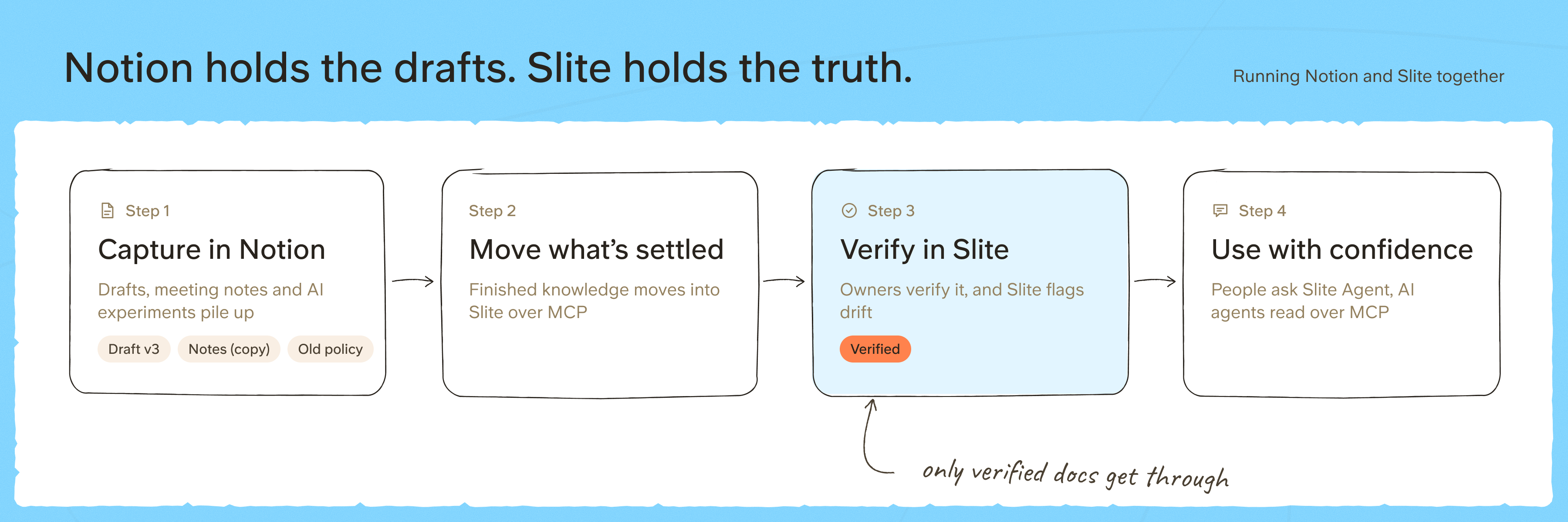
Many large teams accustomed to using Notion for daily workflows now adopt a dedicated knowledge base for canonical information.
It lets teams use Notion as their AI work studio, where drafts, notes and experiments can pile up without affecting what people rely on. Canonical documentation then lives in Slite.
This covers the high-stakes knowledge that needs to stay accurate, such as:
- HR policies
- Processes and guidelines
- Onboarding docs
- Your help center
They also play well together:
- Slite Agent also searches the Notion workspace and cites both sources.
- Notion agents read from and write to Slite over MCP, so settled knowledge moves into Slite, where maintenance routines keep it current.
Nedap runs this setup. Slack, GitHub, Confluence, Notion, Jira and SharePoint stay in place, with Slite as the maintained core and Slite Agent searching across all of them.
In this setup, Notion is where work begins and Slite is where knowledge is maintained, for both people and AI agents.
Feature comparison
Notion and Slite still have overlapping features and here's how they compare at a glance:
| Area | Notion | Slite | Edge |
|---|---|---|---|
| Editor and writing together | Very flexible blocks, embeds, synced blocks and databases on every page | Clean, fast, docs-first editor with less to configure | Slite for clarity, Notion for depth |
| AI search | Searches Notion plus connected apps such as Slack, Drive, Jira, Teams and Gmail on Business and up, using each member's monthly credits | Answers over your docs on every plan. Pro searches 20+ tools including Notion, skips Outdated docs and says when it doesn't know. Admins can share a source with the whole team | Slite is 2x faster and slightly cheaper in our test. Notion goes deeper on Drive Sheets, Jira comments and Slack DMs |
| Keeping docs accurate | Verify a page with an expiry date. | Verification states, Knowledge Management panel, drift detection and an owner approval queue | Slite for automated maintenance routines and robust review process. |
| MCP and API | MCP server and API, widely used with Claude and ChatGPT. Last edited by shows the agent or MCP client behind a change | MCP server and API on every plan. MCP edits are marked in doc history, and Slite Agent's own changes need owner approval | Both show agent edits. Notion for ecosystem, Slite for reviewing its agent's changes |
Price and AI credits
Below you can see the basic overview of different pricing plans Slite and Notion offer:
| Plan | Notion | Slite |
|---|---|---|
| Free plan | Yes | 14-day free trial |
| Entry tier | Plus, $10 per seat, AI available as a trial | Basic, $10 per seat, AI answers over Slite docs |
| Mid tier | Business, $20 per seat, Notion AI and Enterprise Search with monthly credits per member | Pro, $20 per seat, Slite Agent and cross-tool search with credits pooled across the workspace |
| Enterprise | Custom pricing | Custom pricing, reader-only seats available |
Slite and Notion also differ in how they price AI usage, what gets billed on top of seats, and how easy that bill is to predict.
| Item | Notion | Slite |
|---|---|---|
| How AI is included | Monthly credits per member on Business and up. Standard credits when Notion picks the model, Select credits when you pick it or run your own Custom Agent | 50 credits per seat per month on Pro. Enterprise allowances set per contract |
| How credits are shared | Per member. Can't be pooled or moved between members | Pooled across the workspace. A 20-seat Pro workspace shares 1,000 credits a month |
| What uses credits | Notion Agent, writing and translation, AI blocks and inline editing. AI Meeting Notes from December 1, 2026. Shared Custom Agents can use purchased workspace credits | Slite Agent questions, cross-tool search, digests, workflows, AI doc maintenance, and use over API or MCP. Writing, editing, verification and inline AI writing are free |
| When credits run out | That member's AI work pauses until the monthly reset, unless an owner allows purchased credits | The workspace's Agent pauses until the monthly reset or a top-up. Docs, editing and search keep working |
| Extra usage | Owners can buy Notion credits for the workspace | Top-up packs available for getting pooled credits |
| Usage tracking | AI settings with credit usage by member, group and agent | AI Usage page with a breakdown by person and feature |
| Read-only seats | Not offered, every member is a paid seat | Available on Enterprise |
Pooling is the difference most large teams will feel. In most teams, a small group of people uses most of the AI. In Notion, a heavy user can run out of credits while unused credits on other seats expire at the end of the month. In Slite, everyone draws from one shared balance, so unused credits go to whoever needs them.
The bottom line
Notion is becoming the place where your team and its agents do their work. It now competes with Atlassian, ClickUp and Monday. If we had to pick an all-in-one, even we'd consider Notion.
But if you're a team of 100+ and your biggest problem is that nobody can find or trust documentation, Slite is built for exactly that.
If you'd like to move off Notion, or see how Slite works alongside it, book a demo and we'll help you turn your messy documents into a canonical source of truth.
FAQs
Is Slite better than Notion for a company wiki?
For a team of 100+ that mainly needs a knowledge base people can trust, yes. Slite is built to keep docs accurate and easy to find, with verification, drift detection and AI answers that skip outdated docs. If you also need projects, databases and one all-in-one tool, Notion is the better fit, or you can run both.
Is Slite a Notion AI alternative?
For answering questions from company knowledge, yes. Slite answers with citations from your docs and 20+ connected tools, including Notion. It doesn't try to replace Notion AI's writing help, meeting notes or general-purpose agents.
Does Notion have page verification?
Yes. On Business and Enterprise, you can verify any page and set an expiry date, and verified pages rank higher in Notion AI answers.
How much does Notion AI cost for a large team?
Notion AI comes with the Business plan at $20 per seat per month, billed annually, with a monthly credit allowance for each member. Owners can buy more credits for the workspace at $10 per 1,000.
Can Slite search my Notion workspace?
Yes. Notion is one of the 20+ sources Slite Agent can search, so you can keep using Notion and still get cited answers that cover both tools.
How hard is it to move from Notion to Slite?
Slite's Notion importer brings your pages across and turns databases into Collections. Some things don't carry over perfectly, like @mentions, which become plain text. Big Notion workspaces can take a while to export, so plan for that. On Enterprise, our team handles the migration with you.
Is Slite secure enough for enterprise?
Slite is SOC 2 Type II certified, GDPR compliant, and HIPAA compliant on Pro and Enterprise. It's hosted in the EU, and AI model providers keep none of your data, on any plan. Pro adds SAML and OpenID Connect SSO, and Enterprise adds SCIM provisioning and audit logs. If your security review needs ISO 27001 or DLP tooling, Notion currently covers more of that list.