So, you're knee-deep in a project and it's time to let everyone know how things are going.
The progress report is your ticket to keeping the team aligned and stakeholders happy. A true gem in your project documentation.
Most teams don't struggle with the idea of a progress report. They struggle with the grind of assembling one: chasing status updates across Slack, tickets, and docs every week, and finding that half the numbers are already stale by the time the report is compiled.
But what exactly goes into a good progress report? And how can you make it less of a chore and more of a powerful tool?
That's what we're here to figure out.
Key takeaways
- A progress report keeps stakeholders aligned on the plan, the progress, and the problems, without a status meeting.
- The clearest reports follow the PPP structure: Plan, Progress, Problems.
- Structure matters as much as content: templates, headings, lists, and tables make a report scannable.
- Weekly is the default cadence for most projects; match frequency to project length, phase, and stakeholders.
- The best practices below turn a report people skim into one people actually read and act on.
What is a progress report?
A progress report is a short, recurring update that tells stakeholders where a project stands: what was planned, what's been done, and what problems have come up.
It's read by managers, sponsors, and cross-functional partners who need to track progress and catch risks without sitting in another meeting.
Why are progress reports important?
Progress reports keep a project accountable and give stakeholders a current view of where things stand, so managers can track what's on schedule and spot risks early without chasing people for updates.
A good one answers "are we on track, and what needs attention?" in the time it takes to skim it.
Here are three deeper reasons progress reports improve accountability:
- You're more likely to stay on top of your tasks when you know you'll need to report on your progress.
- Stakeholders love transparency, and progress reports give them a clear view of where things stand.
- They help catch problems early. By regularly reviewing progress reports, you can spot potential issues before they become major headaches.
At Slite, we lean on this differently: instead of a live status meeting, each person writes their update asynchronously ahead of time, answering "what did you achieve last week" and "what are your goals this week."
The live sync is then reserved only for the topics that actually need discussion. A written report replaces the meeting, and getting rid of recurring meetings is exactly the point.
Think of your progress report as a regular health check-up for your project.
It might not be the most exciting part of your job, but it can save you a lot of trouble down the line.
What goes into a comprehensive progress report?
A progress report should outline three things:
- Plan: what you set out to do this period.
- Progress: how far you've actually gotten.
- Problems: anything blocking you that needs help.
That's the PPP structure, and it's the backbone of every good report below.
Here's how to write all of them:
Progress report vs. status report
People often use "progress report" and "status report" interchangeably, but they answer slightly different questions.
A quick way to tell them apart:
| Dimension | Progress report | Status report |
|---|---|---|
| Main question | Are we moving toward the goal? | Where do things stand right now? |
| Time frame | Looks back and ahead across a period | A snapshot at a single point in time |
| Depth | Plan, progress, problems, next steps | Current state, often just a quick health check |
| Typical cadence | Weekly, bi-weekly, or monthly | On demand or at fixed check-ins |
In practice, a progress report usually contains the status, plus the context around it: what changed since last time and what's coming next.
Project 'plan' overview
Start with a brief refresher on what the project is all about. Think of it as the "Previously on..." segment at the start of a TV show.
Keep it short and sweet - just enough to jog everyone's memory.
Progress
The progress section should inform the project reviewer about what's been done already, what's next, and if you've encountered any executional blockers.
Accomplishments: time to brag (a little)
Here's where you get to show off what you've achieved since the last report. Did you hit a major milestone? Solve a tricky problem? Get that finicky bit of code to finally work? List it here. Be specific and quantify where you can. Instead of "Made good progress," try "Completed 3 out of 5 major features."
Upcoming tasks: what's next
Give a snapshot of what's coming up in the next phase of the project. This helps set expectations and shows you've got a plan. Pro tip: use Slite's checklist feature here to create a clear, actionable list.
Challenges: the not-so-fun stuff
No project is smooth sailing all the time. Use this section to highlight any obstacles you've run into. But don't just list problems - explain how you're tackling them. This shows you're proactive and helps prevent stakeholders from panicking.
Remember, the goal is to give a clear, honest picture of where things stand. No need for novels - keep each section concise and to the point.
Progress report example (filled in)
Here's what a filled-in weekly progress report looks like when you put PPP to work:
Project: Customer onboarding revamp
Reporting period: Week of June 22
Author: Priya, Product
Plan (this week): Ship the redesigned welcome flow to 10% of new signups and instrument the funnel.
Progress:
- Welcome flow live for 10% of new signups since Wednesday.
- Funnel events instrumented; first 48 hours show a 6-point lift in activation.
- Completed 3 of 5 planned onboarding emails.
Problems:
- Two remaining emails are blocked on legal review of the copy. Requested a review by Thursday.
- Mobile layout has a rendering bug on smaller screens; fix scheduled for next week.
Next up: Expand rollout to 25% if the activation lift holds, and close out the email sequence.
Structuring your progress report in Slite
Now that you know what to include, let's talk about how to lay it all out in Slite.
A well-structured report is easier to write, read, and update. Here's how to make Slite work for you:
Use progress report templates, or make one
First things first: create a template or use ours. It's free and it looks like this:
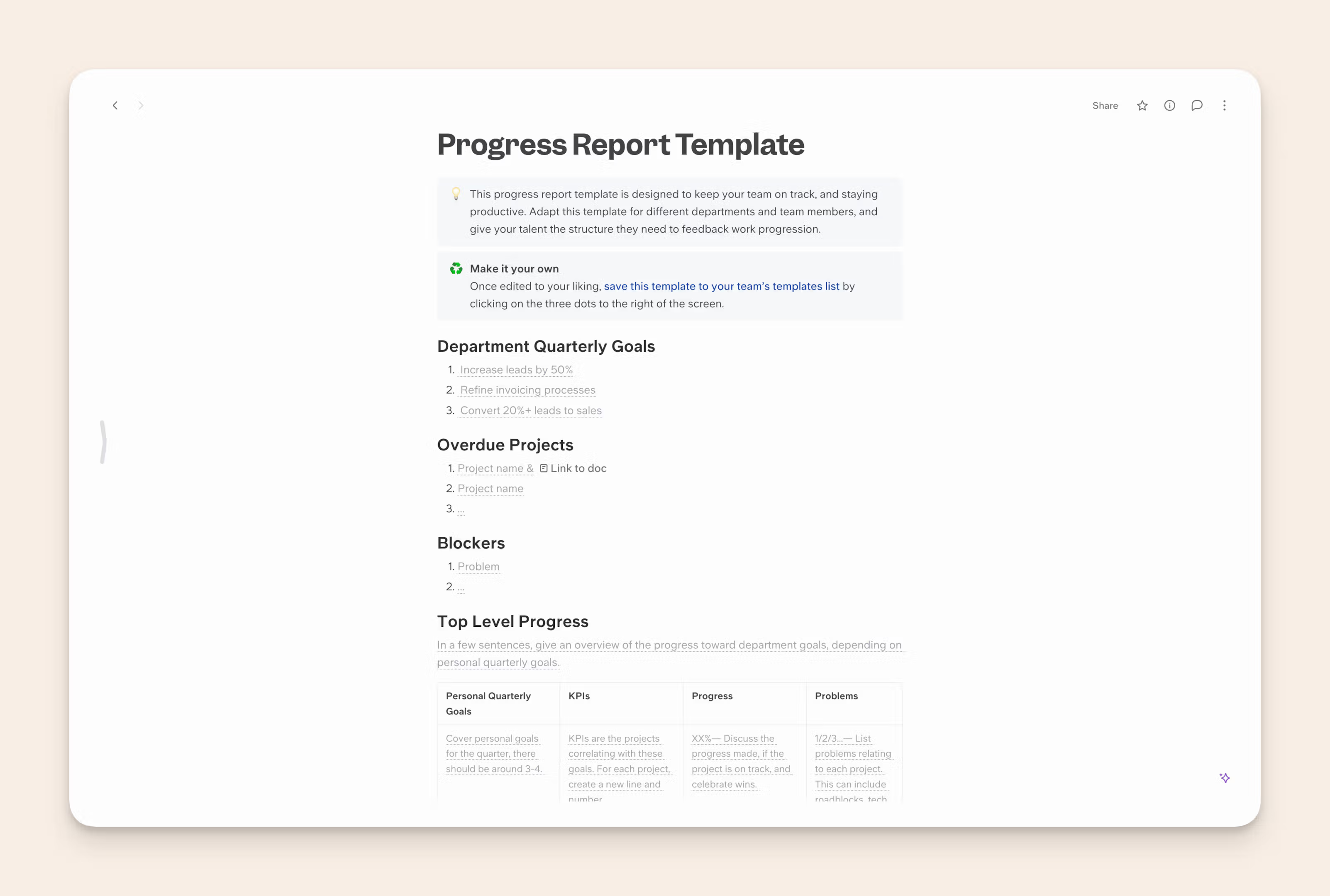
This way, you're not starting from scratch every time. In Slite, you can easily set up a template with all the sections we talked about earlier. Once you've got it set up, just duplicate it for each new report, and half the work's already done.
Heading hierarchy is your best friend
Use Slite's heading styles to create a clear structure. Your main sections (Project Overview, Accomplishments, etc.) can be H2s, with subsections as H3s.
Using subheadings bifurcates content thematically, leading to a better reading experience. It's also handy because in Slite, you can collapse and expand each of those sections.
This not only makes your report look neat, it makes it very scannable. That's a must for a long document with multiple stakeholders. Why? Your manager may already be up to speed on your progress and only interested in checking your blockers. Similarly, the COO might just want the top-level progress to see if everything's good.
And if you want to maximise for readability, add a Table of Contents (ToC). Edit the layout and click 'show table of contents' to get a sticky, clickable ToC presented at the right sidebar.
Use lists generously
For sections like Accomplishments and Upcoming Tasks, bulleted or numbered lists are your best friend. They're easy to scan and update. Plus, Slite's checkbox feature is perfect for tracking progress on upcoming tasks.
Tables for the win
When it comes to Key Metrics, nothing beats a good table. Slite's table feature lets you create clean, easy-to-read data presentations. You can even color-code cells to highlight important info.
Embed links for all working files
Got a detailed spreadsheet or a project board you want to include? Use Slite's embed feature to bring it right into your report. For less crucial info, you can use links to keep your report clean while still providing access to additional details.
Keep it consistent
Whatever structure you choose, stick with it. Consistency from report to report makes it easier for everyone to find the info they need quickly. It's also worth keeping the docs behind your reports current, so the numbers you pull in stay trustworthy, which is the whole idea behind keeping your docs up to date.
How often should you report?
For most projects, weekly is the right default: frequent enough to keep everyone informed, not so frequent that writing reports eats the work.
The four common cadences are daily, weekly, bi-weekly, and monthly.
And the right one depends on project length, phase, stakeholders, and team size.
When in doubt, start weekly and adjust.
The "it depends" factors
- Project length: A two-week sprint might need daily updates. A year-long project? Probably not.
- Stakeholder preferences: Some folks want to know every little detail. Others just want the highlights.
- Project phase: You might report more frequently during critical phases and less during slower periods.
- Team size: Larger teams might need more frequent check-ins to stay aligned.
Based on the factors, pick one of the 4 most common progress report frequencies.
Find your rhythm
| Cadence | Best for |
|---|---|
| Daily | Short, intense projects or critical phases. Keep these ultra-brief. |
| Weekly | A good default for most projects. Enough to keep everyone informed without overwhelming them. |
| Bi-weekly | Longer projects with a steady pace. |
| Monthly | Extended projects or high-level overviews. |
Make a decision and commit to one of these time-frames, and communicate it to all project stakeholders.
The Goldilocks zone
You're aiming for that sweet spot where you're keeping everyone informed without spending all your time writing reports.
If you're getting a lot of "What's the status on X?" questions between reports, you might need to increase frequency.
If your reports are met with crickets, you might be overdoing it.
Consistency over frequency
Whatever frequency you choose, stick to it. Regular updates create a rhythm that your team and stakeholders can rely on.
Use Slite's reminder feature to ping yourself when it's report time.
Quick updates vs. detailed reports
Consider a mix of quick, informal updates (think bullet points in a Slite doc) and more detailed formal reports. This gives you the best of both worlds - frequent communication without report fatigue.
One way to make the cadence sustainable is to let part of the report write itself.
Slite's automated Digests are scheduled, AI-generated summaries that pull activity from your connected tools (Slack, GitHub, Linear, Notion, Intercom) and deliver a clean recap on a schedule.
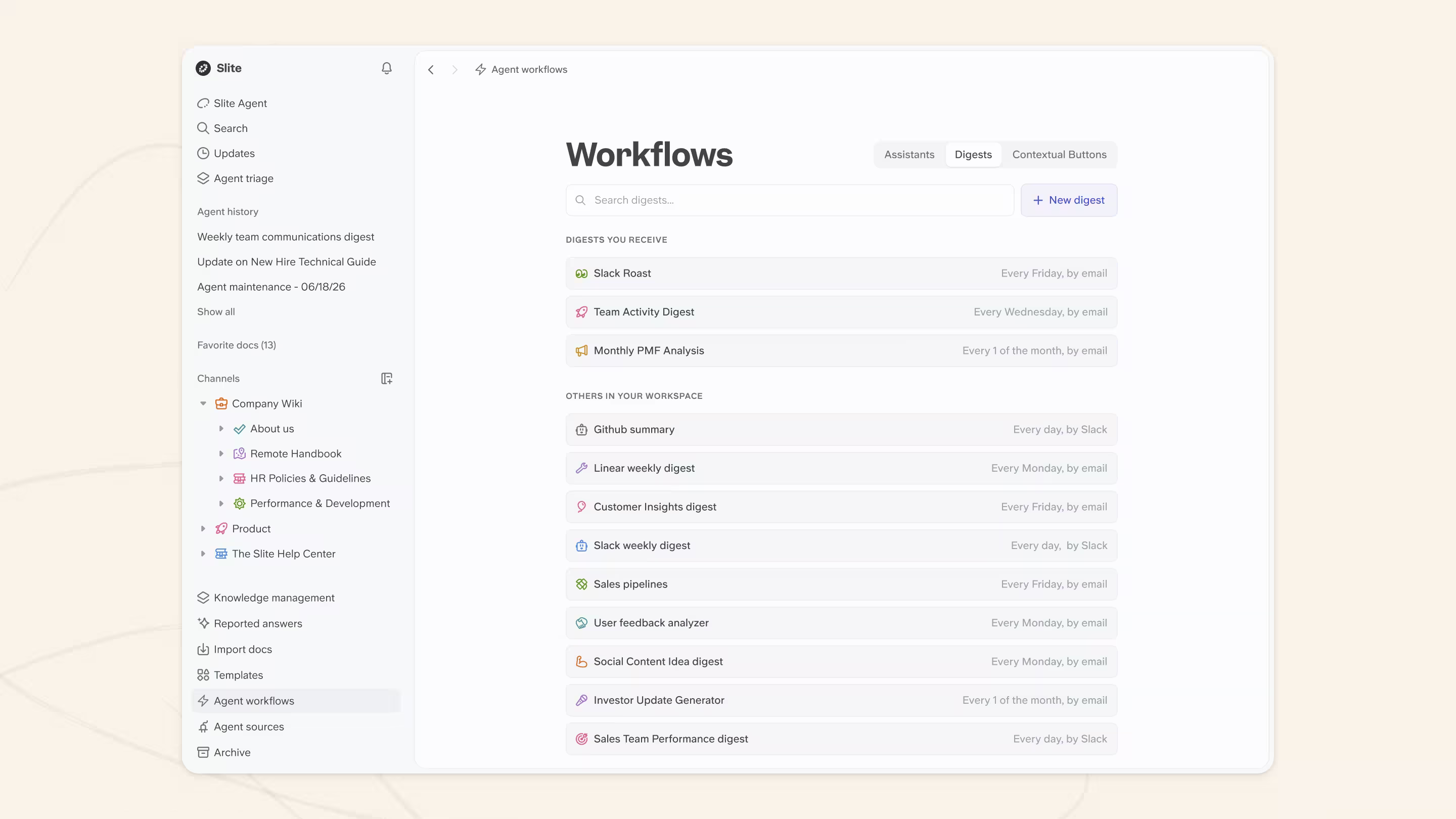
Some of the report is then assembled from work that already happened, so you're editing a draft instead of starting from a blank page.
Remember, the goal is to keep information flowing without bogging down the project. Find a rhythm that works for you, your team, and your stakeholders.
Best practices for writing a progress report
Whether you're putting together a business progress report, a research progress report, or any other - here are 13 tips to help it really stand out:
1. Use data
Where you can, always use data to showcase progress or lack of it. Think about ways you can generate data with the progress reporting tools you have and display the data in a clear way; always try to show movement toward the greater goal.
2. Use visual aids if necessary
Don't be afraid to support your report submission with visuals like flowcharts.
There's no point in wasting paragraphs of text explaining a situation when you can explain it with a screenshot. Writing a progress report isn't merely about passing information but also engaging the reader to absorb your headway with a project.
If there are any stonewalls, your visual aids make them easier to identify.
3. Be transparent
Transparency is invaluable if you want your reporting structure to be productive and positively contribute towards moving forward.
Highlight to staff that progress reports call for transparency. No one needs to hide behind fluff or try to optimize the status of a report for fear of looking bad. Address every project as it is, with no fluff pieces or grossly unnecessary information.
If your report is too short and there aren't enough details for a solid document, you can ask for an extension or simply turn in your document the way it is. As long as you stay honest and write appropriately, you'd have successfully done your job.
4. Make sure everything is dated
Due dates, report dates, task deliveries, the lot. Dated progress reports become a research source for any similar project the company runs in the future.
If you date everything, someone can dive into systems to pull metrics from the correct dates and understand the tools and talent the company had at that particular time.
5. Include company and department goals
If your progress reports are for inter-departmental use, then it's useful to share the goals that you personally, or your department, are working towards. Double-check what you can and can't share with human resources if you're ever unsure. In doing so, you'll give the reader greater insight into your logic and actions.
6. Discuss problems and progress
Every report is a platform for discussing problems and progress. When writing progress reports, kick conversations off via the content you provide and ask any questions you'd like answered from the reader. Write in a cordial, formal, and neutral tone.
Tip 💡: Your reader is there to help you, no matter what role they're in within the company; you'll be surprised by the innovative ideas you can get from other departments.
7. Share it wisely
Think wisely about who needs to see this document, especially the special progress report comments included by a top-level supervisor. Is it more than management? Perhaps other departments or even external stakeholders, like funding agencies, will benefit from reading this report. Try to identify those who need the report before writing it and then share it so that everyone has easy access.
8. Structure storage
You can store reports, no problem. However, think of the architecture around your report storage system. Try to build a map to guide people through reports and how they're stored. You want people to find a report quickly.
Figure out what someone needs to search for reporting project progress at any time, or the path they need to follow. This process will save a lot of time in the future and help employees use the reports at any time, not just when they're first delivered.
9. Add a call-to-action
This is a great opportunity to get instant help for the reader or your superiors. Call-to-actions are useful when there are uncertainties, confusions, or problems with the project. These could include task differentiation, unclear milestones, or shortage of funds.
A call-to-action could be asking the superior to supply clarification or some feedback in an email or a communication channel. You could also ask for a budget review or anything else your team might need to follow through to the successful completion of the project.
Note that when writing a progress report, you should still limit the use of CTAs to extreme necessities.
10. Get all hands on deck
Always consult your team members when working on progress reports. If you're the team leader, you can invite everyone to pitch in and submit informal reports of their personal progress with milestones in the project. If you're a team member assigned the role of progress report writing, you could reach out to everyone individually for their input.
One of the best ways to write a solid progress report is to include the personal overviews of the members of the team pushing the project forward. This may not exactly be possible with frequent progress report schedules, such as daily and weekly, but with longer timelines, team members are invaluable to the process.
11. Ditch the passive voice
Let's be honest - a lot of your superiors don't have the time to read all the reports that come their way. Using a lot of passive voice while writing a progress report reduces readability and most times, the reader will not engage with the content.
Instead of writing: "We were instructed by our manager to restart the milestone..."
You can write: "Our manager instructed us to restart the milestone..."
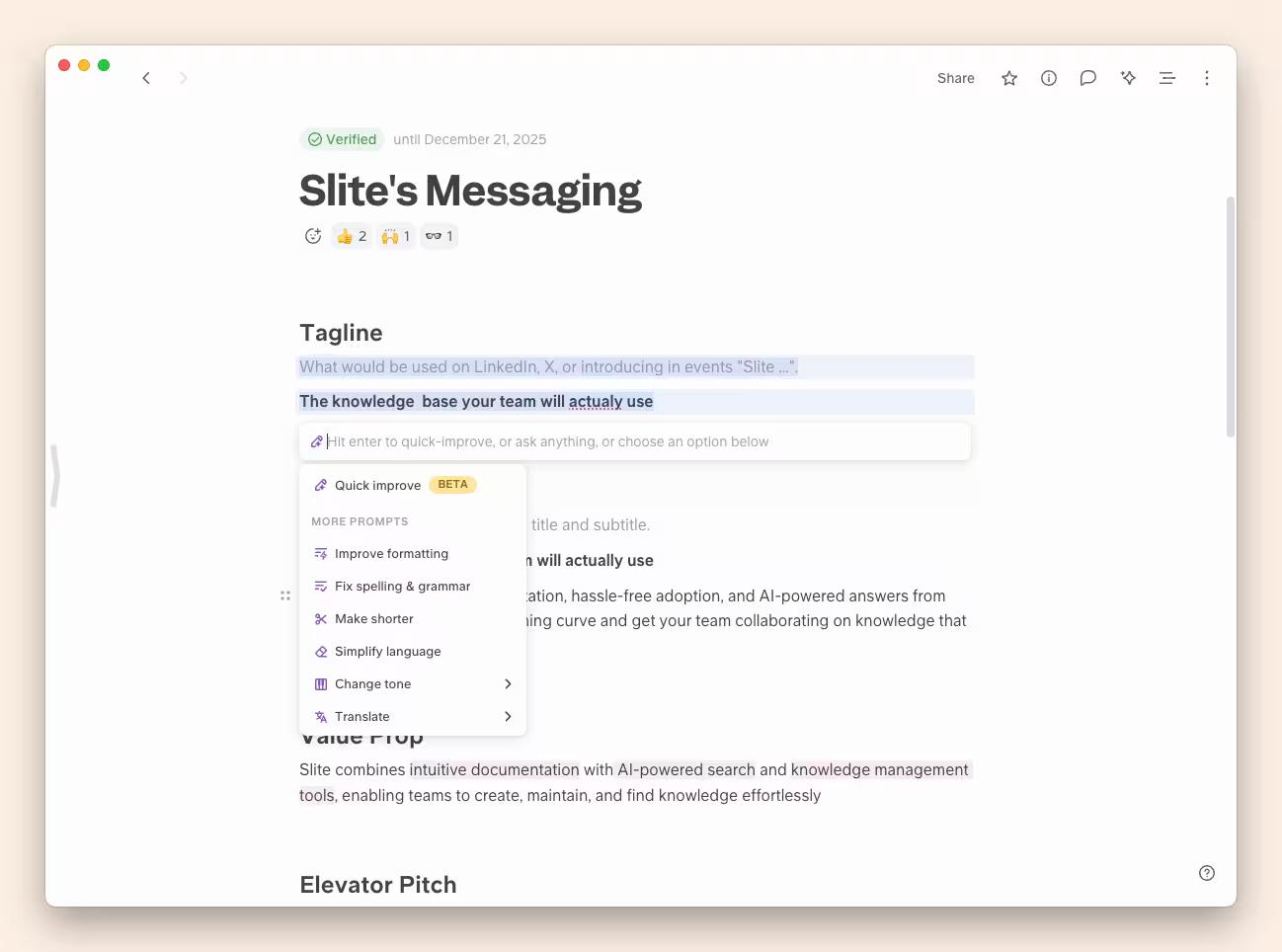
If you're having trouble rephrasing a sentence, select it and use Slite's AI writing assistant to simplify or rewrite it.
12. Keep the length optimal
If your progress report is very short, no one will take you seriously. If it's too long, you can be certain your managers aren't going to read it.
It's wasted effort to spend hours on a detailed report only to have it skimmed and dumped, and it's simply not efficient.
It's important to keep the length of your report reasonable. If you can fit everything you have to report into one page, go for it. This also depends on the frequency of the report. If it's a daily progress report, keep it as short as half a page. A weekly progress report can be longer, quarterly reports can be a couple of pages while the annual report is the only one where it makes sense to have several pages in the document.
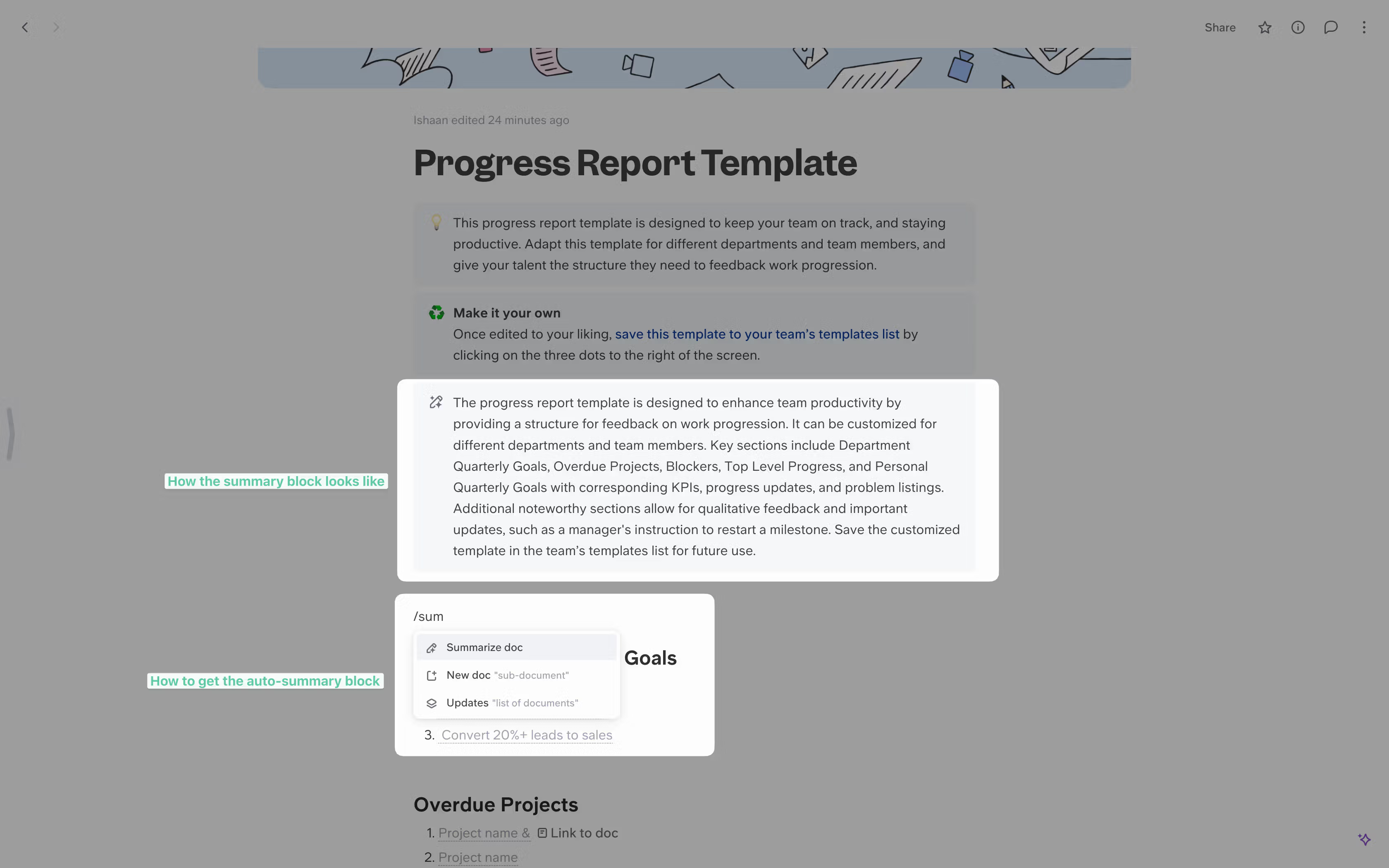
As a rule of thumb, at the beginning of every report, consider adding a 'Summary' section.
13. Always edit and proofread
Obviously. It's important to maintain great writing standards to communicate efficiently and impress your readers. No one will enjoy reading a report with grammatical and typographical errors.
Always read through your report at least twice. Slite's AI writing assistant can also help tighten and clean up your draft before you share it.
A few craft rules that actually make reports get read
The best practices above get you a report. These make it one people look forward to:
- Keep each update single-topic and short. One update, one thread of thought. Long, multi-topic reports get skimmed.
- Publish on a fixed day and time. We send ours around Monday midday, so reading it becomes a habit rather than a surprise.
- Rotate who writes it. It doesn't have to be the same leader every week. At Slite, the Head of Product and the CTO take turns, not just one voice.
- Use storytelling to hold attention. Our CTO once used the Battle of Agincourt as a metaphor for aligning the team around customers. A little narrative goes a long way toward getting a report actually read.
FAQ
What should a progress report include?
At minimum, a progress report covers the PPP structure: the Plan (what you set out to do), the Progress (what's been done and what's next), and the Problems (blockers that need help). Many reports add a short summary, key metrics, and a clear next step.
How often should you write a progress report?
Weekly is the default for most projects. Match the cadence to the work: daily for short, intense sprints or critical phases; bi-weekly or monthly for longer projects. Whatever you pick, keep it consistent.
What does a progress report look like?
A good progress report is scannable: a short plan recap, a bulleted list of accomplishments with numbers where possible, a list of upcoming tasks, and a clear section on challenges and how you're handling them. See the filled-in example above for a weekly version.