Every growing team hits the same wall. Early on, the people who built things just know how they work, and answers travel by a tap on the shoulder.
Cross a hundred people and that breaks down: knowledge scatters across a dozen systems of record, with decisions buried in Slack, specs in Confluence, numbers in a spreadsheet no one kept current, and the real process still in one senior engineer's head.
Ask five people where the latest version of something lives and you get five answers, no single source of truth, and no confidence about which doc is actually right.
Knowledge management is how you close that gap: capturing what your team knows, keeping it current, and making it findable in one authoritative place.
It gives you a single source of truth, a clear context layer that both people and the AI agents now working beside them can rely on to get the right answer.
Without it every new hire, every automation, and every decision inherits the same confusion.
In this article we go over the basics of knowledge management as well as the landscape for 2026.
Key takeaways
- Knowledge management is how a team captures, organizes, maintains, and retrieves what it knows.
- Getting it wrong is costly: lost time, repeated work, and wrong answers that reach customers.
- A knowledge management system (KMS) is the software layer that holds it together.
- Ownership and verification keep a knowledge base trustworthy; tooling alone does not.
- In 2026, AI raises the stakes: your KB is the ground truth for every assistant and agent.
What is a knowledge management system (KMS)?
A knowledge management system is the software where your team captures, organizes, shares, and edits its collective knowledge. In practice, people also call it a knowledge base, or an internal knowledge base when it is scoped to one company.
Every team already has a default KMS, even if no one chose it deliberately.
Early on it is usually Notion or Google Docs: familiar, easy, and good enough while the team is small.
As the company grows, information needs get more complex, and general-purpose doc tools start to strain.
That is when teams move to a purpose-built knowledge management solution designed around finding, maintaining, and trusting information rather than just writing it down.
A specialized KMS connects to the all the tools your team already works in, from Slack, Google Drive, and GitHub to Linear, Jira, and Confluence, so knowledge stays findable across your stack instead of trapped in one app.
Done well, a KMS pays off in ways every documentation owner recognizes:
- People find answers without digging through email threads and Slack DMs.
- Expertise stays with the team when a veteran leaves, instead of walking out the door as tribal knowledge.
- New hires ramp faster because the knowledge base guides them.
- Your most-asked people field fewer repeat questions.
The catch is that none of this holds without maintenance, which is where most knowledge bases quietly fall apart.
Why knowledge management matters in 2026
When knowledge is hard to reach, work stalls. 60% of employees say it is difficult, very difficult, or nearly impossible to get the information they need from colleagues, and every blocked task is someone waiting on an answer that should already be written down.
The root cause is almost always an information silo: knowledge locked inside one team, one tool, or one person's head, where the people who need it cannot get to it.
Knowledge management exists to break those silos down, and that job only gets harder as a company grows.
What is new in 2026 is how fast the stakes are rising. An aging workforce and steady turnover mean institutional knowledge leaves the building more often, and AI adoption means a messy knowledge base now feeds wrong answers to every assistant your team runs.
Existence is no longer enough; the quality of the KB is what matters.
Different types of knowledge
Not all knowledge is written down, and the types of knowledge you are managing decide how you have to capture them. Three matter most:
- Explicit knowledge: the codified stuff, facts, procedures, and guidelines you can write into a document, manual, or database. It is the structured data your company already produces, and it is the easiest to manage: write it clearly, then organize it so people can find it.
- Tacit knowledge: the skills, instincts, and mental models people build through experience, like a staff engineer's feel for which service will buckle under load. It is nearly impossible to fully articulate, so it tends to leave with the person, which is why it needs deliberate practice and mentorship. See our detailed guide to tacit knowledge.
- Implicit knowledge: the tribal knowledge in your team's heads, the reasoning behind a decision or the shortcut that saves an hour, that could be written down but usually is not. It moves through mentoring and working side by side until someone finally captures it.
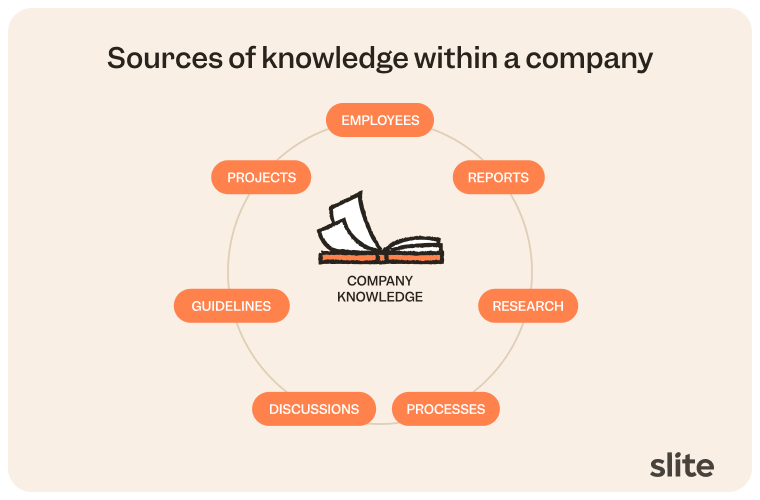
Each type needs a different home, which is why no single tool or habit covers all three on its own.
Knowledge management strategy
A knowledge management strategy is what keeps the practice from collapsing into a pile of documents nobody trusts. But, how will your team will actually share what it knows?
That question has a well-known answer, drawn from a classic Harvard Business Review distinction: codification versus personalization.
- Codification captures knowledge into a searchable source of truth, moving it from people into documents so anyone can reuse it later.
- Personalization connects people directly so they can trade the tacit knowledge that never makes it onto a page, moving it from person to person.
The same split is sometimes called push versus pull. Almost no team runs one to the exclusion of the other; most settle on roughly an 80/20 blend with one clear default, and naming yours is the first strategic decision.
From there, three pillars turn that choice into a working system:
- Establish a single source of truth. Pick one place that is authoritative, so people stop guessing which copy of a document is current.
- Break down information silos. Codification only pays off when knowledge is not trapped in separate tools and teams. A strategy has to actively pull it into the open, not wait for people to volunteer it.
- Embed capture in the workflow, with ownership and verification. Knowledge should get written down close to where the work happens, and every important document needs an owner and a review cadence so it stays current instead of quietly rotting.
If you want to understand more about this topic, we cover it in our guide to knowledge management frameworks.
How to implement knowledge management (step by step)
Here is how to actually stand knowledge management up, in the order that works.
- Audit and capture what you have. Find the knowledge already scattered across docs, tickets, and people's heads, and get the high-value pieces written down. Starting from a blank page is rare; starting from a mess is normal. Knowledge base templates shortcut the first drafts.
- Pick a system. Choose a KMS that fits how your team already works rather than one that forces a new process. Findability and maintenance matter most.
- Assign ownership and a verification cadence. Give every important document an owner, a single person or a group, and a verification status with a review cycle: six months, a year, a custom interval, or verified-forever for things that do not change. When a document expires, the owner is notified, so readers can trust that a verified page is actually current.
- Integrate where work happens. Connect the KMS to the tools your team lives in, so knowledge is one search away instead of one more app to remember.
- Drive adoption. Make contributing easy, recognize the people who keep pages fresh, and route repeat questions back to the doc instead of answering them again.
- Measure and iterate. Watch what people search for and fail to find, then close those gaps. A knowledge base is a living system, and treating it as finished is how it starts to rot.
What makes knowledge management succeed
Whether a knowledge base becomes a living resource or a dead repository comes down to five levers:
- people who own and contribute,
- process for capture and review,
- technology that makes both easy,
- culture that treats documentation as real work,
- and governance that sets the rules for what gets kept and verified.
Technology is the one teams overweight. A better tool removes friction, but it does not change behavior on its own.
Without owners, a cadence, and a culture that rewards keeping knowledge current, the best KMS still fills up with pages no one trusts.
Metrics of a knowledge management system
You can measure a KMS on hard numbers and soft signals, and you need both.
The hard metrics are the countable ones as they tell you whether the system is being used and whether people find what they search for.
The soft signals tell you whether it is actually working.
Here they are at a glance:
| Hard signals | Soft signals |
|---|---|
| Adoption rate | Active knowledge sharing: pages get updated and expanded without being chased, a sign the culture is healthy. |
| Documents created | Better decisions: people cite the knowledge base when they make calls, because they trust what is in it. |
| Search effectiveness | Fewer repeat questions: the same answer stops getting asked in Slack. |
| AI search usage | Qualitative feedback: people suggest topics and flag gaps instead of routing around the KB entirely. |
| Top contributors and readers | |
| Reduced support tickets |
Watch the soft signals closely.
A knowledge base can score well on page views while quietly losing the trust that makes it useful, and by the time the hard numbers dip, people have already stopped relying on it.
Adoption and knowledge sharing are downstream of trust.
Who is responsible for knowledge management?
Documentation ownership scales with the team.
In a small company, the leadership team plays knowledge manager by default. As you grow, department heads take on the knowledge in their area.
Ultimately the goal is for each document to have a dedicated owner to make sure it is updated, honest and true to use by team members and agents.
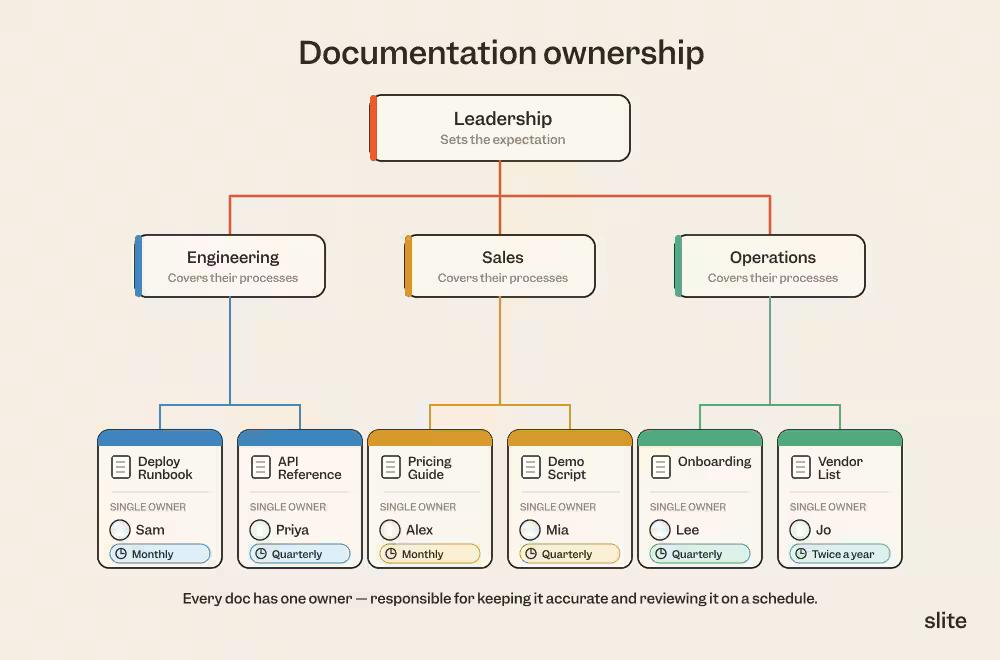
In some cases the defacto knowledge managers do not hold the title, in fact the job is coordination rather than authorship.
A knowledge manager sets standards, assigns document owners, tracks verification, and closes gaps rather than writing every page themselves.
The people doing the work know it best; the manager makes sure that knowledge gets captured, owned, and kept current across the team.
What a modern KM setup needs
Tooling is not the hard part of knowledge management, but the wrong setup makes every other part harder. A modern setup has a few components, and how they fit together matters more than any single product:
- A knowledge base: one place that holds your structured documentation and is meant to be the source of truth, not a dumping ground.
- AI and enterprise search: the ability to ask a natural-language question and get an answer from across your knowledge, since nobody browses folder trees anymore.
- Documentation tooling: editing, structure, and collaboration good enough that writing and updating docs is not a chore people avoid.
- Upstream-source hygiene: the docs are only as current as the systems feeding them, so connected tools and clean inputs keep the base from drifting.
- Verification and freshness: ownership, review cycles, and a way to see whether a page is trusted, which is what keeps the whole thing credible as it grows.
That last pair is where most tools stop, and where the category is moving.
A newer generation of self-maintaining knowledge bases treats verification and freshness as first-class: Slite, for example, is built around document ownership and verification status so the base stays trustworthy as it scales.
AI and agentic knowledge management
Every knowledge base decays. Left alone, it fills with what practitioners bluntly call data rot: half-finished pages, docs that are woefully out of date, a graveyard nobody trusts.
As one team described the before state, "we had a wiki for years and it became a graveyard of half-finished pages. Switching to a knowledge base meant we finally had owners and a process for keeping content fresh" (one of many reasons teams switch to Slite).
The failure is rarely dramatic. A few stale pages erode trust, people stop checking the KB, so it gets updated even less, and the death spiral runs on its own.
AI raises the stakes on all of it, because the same messy base now answers questions on your team's behalf.
That’s why the AI-first companies are leaning on agentic knowledge management to help them out keep their knowledge base honest and up-to-date.
How is AI used in KB, though?
AI search over your knowledge base
An AI assistant is only as good as the knowledge base you feed it. Natural-language answers and RAG grounding are useful, but the model retrieves from your docs, so answer quality is capped by KB quality.
In one survey of founders, 76% had an AI tool surface a stale document and return a wrong answer, roughly 40% saw that answer reach a customer or create compliance exposure, and one in five traced a financial loss to it.
Fix the foundation first: a clean, owned, verified base is what makes AI search trustworthy.
For the mechanics, see our guide to building an AI knowledge base.
AI-assisted maintenance and verification
The same AI that reads your KB can help keep it current, flagging stale or duplicate docs, suggesting updates, and routing them to the right owner.
That is the premise of a self-maintaining knowledge base. The critical design choice is human review: a mistake in a shared KB reaches every reader and every downstream agent, so a person approves changes before they land.
Automation surfaces the work; people stay accountable for the truth, which is how you avoid the dangers of stale documentation.
Docs as infrastructure for humans and machines
Your knowledge base now serves two audiences: the people who read it, and the LLMs and agents that retrieve from it. Garbage in, garbage out applies to both.
Drift usually starts upstream, when a source system changes and the wiki is the last place to find out, so keeping the base current means watching where knowledge actually originates.
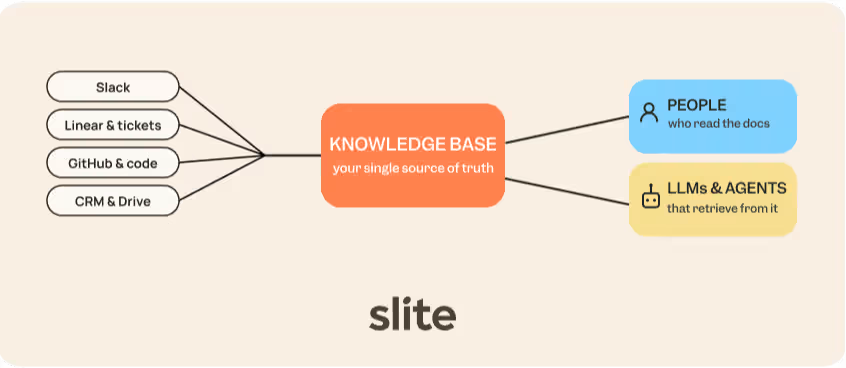
Workers already spend around 3.2 hours every week hunting across the many tools where knowledge lives, from CRM to GitHub to Slack, to piece together a complete answer.
Because Slite exposes the KB over MCP on every plan, those same trusted docs can feed agents and LLM knowledge base workflows directly, instead of each tool guessing.
The agent frontier
The direction is clear: the knowledge base becomes the trusted layer underneath an AI interface. Teams are already re-tooling for it.
Companies now assign owners and freshness deadlines programmatically, and detect drift automatically when upstream sources change, so the KB stays reliable enough for agents to build on.
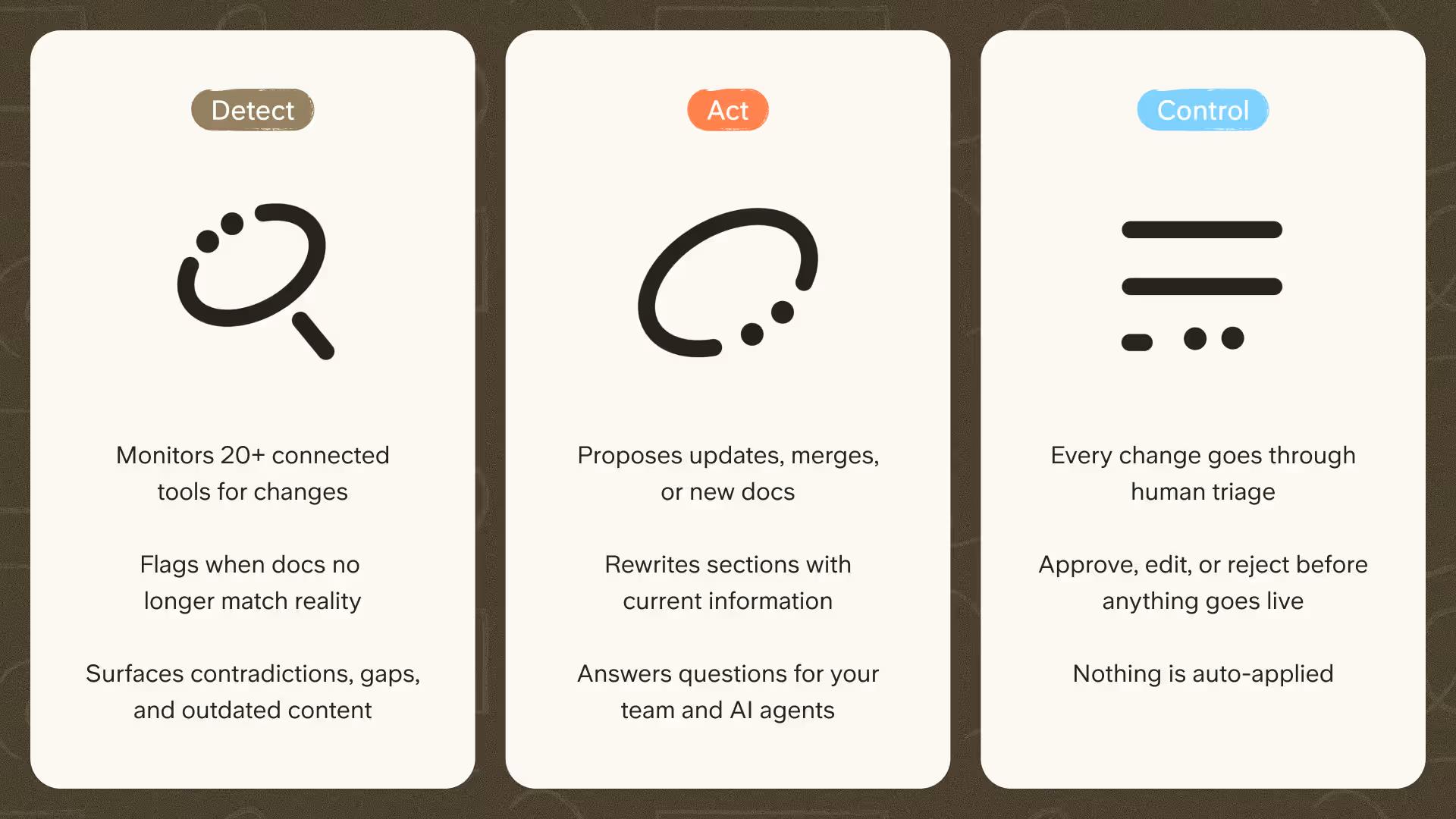
Slite Agent points the same way, working on a detect, act, and control model: it flags what needs attention and acts on it, while a human stays in control of what actually ships. Slite Agent amplifies your existing KMS strategy rather than replacing it.
Where this leaves you
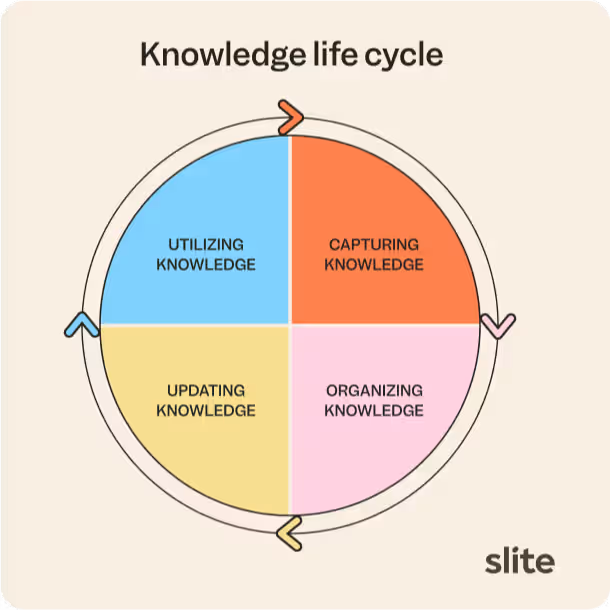
The knowledge lifecycle has not changed: capture, organize, maintain, apply.
What has changed is that a stale or scattered base does more than slow people down; it now misleads the AI they have started to trust.
The teams that win in 2026 treat their knowledge base as living infrastructure, ready to serve both people and agents. If that is the system you are building, book a demo to see how Slite Agent keeps a knowledge base current in practice.
FAQ
Why is knowledge management important?
Knowledge management matters because unreachable knowledge is expensive: people wait on answers, repeat work others already did, and make decisions on outdated information. In 2026 the cost compounds, because AI assistants amplify whatever is in your knowledge base, turning stale docs into confident wrong answers at scale.
What is the difference between knowledge management and data management?
Data management handles raw, structured data: storage, quality, governance, and access for databases and pipelines. Knowledge management handles human knowledge: documents, decisions, know-how, and context that help people act. Data management keeps your numbers correct; knowledge management keeps your team's understanding findable and current. Most organizations need both, aimed at different problems.
Who owns knowledge management?
Ownership should be distributed rather than parked with one person. We recommend subject-matter experts owning the documents in their area, with a knowledge manager or admin coordinating instead of writing everything themselves.
In Slite, every document has an assigned owner: either a single person or a user group such as the engineering team. The owner is notified when verification expires, when someone flags a doc as outdated, or when someone requests verification, so pages do not silently go stale.
Can AI fix scattered information?
Not on its own. AI makes information easier to find, but it retrieves from whatever you already have, so messy, outdated, or scattered docs produce hallucinations, wrong answers, and eroded trust. The problem is the knowledge underneath; better search on top only surfaces it faster.
Real work naturally spreads knowledge across tools, and that is what tools like Slite Agent are built for: pairing a verified single source of truth (with document ownership and verification cycles) with search across Slack, Google Drive, Jira, and the rest of your stack. The cleaner the base, the more useful the AI sitting on top of it.