"We don't trust AI." That's the line a mid-market prospect dropped on us mid-demo last quarter after two hours of walkthrough and a long thread on Notion AI vs Slite’s AI possibilities.
It’s not that the technology had failed him. The gap between what the demos promise and what the daily experience delivers is what made him feel that way.
That said, most "how to use Notion AI" guides skip past that gap and hand you a feature list.
As we’ve already covered the head-to-head of Notion vs Slite in a previous write-up, here we do a walkthrough of every Notion AI opportunity in 2026.
What changed with Notion 3.0 Agents, what the pricing actually looks like now, and where Notion AI still earns the trust it asks for - read below to find out.
Key takeaways
- Notion 3.0 rebuilt Notion AI around Agents. Personal Agents (one per user, autonomous multi-step work for up to 20 minutes) and Custom Agents (shareable, scheduled, generally available May 4, 2026) layer on top of the legacy in-editor commands and Q&A chat.
- Multi-model picker, per Agent. Pick Claude Sonnet 4, GPT-5, or Claude Opus 4.6 — Notion is the first third-party product where Anthropic put Opus inside an Agent.
- AI Connectors extend Q&A across Slack, Drive, GitHub, Linear, Jira, and Notion Mail. The defining 2025–2026 capability and the main thing older Notion AI guides predate.
- The standalone $10/mo Notion AI add-on retired in May 2025. Full Notion AI now ships with the Business plan ($20/seat/mo annual); Custom Agents meter separately at $10 per 1,000 credits.
- Doc freshness is the gating factor. Notion AI's answers are only as accurate as the docs it reads from — Meeting Notes lacks speaker ID, auto-join, video, and timestamps; Q&A and Research Mode depend entirely on connector quality.
What's new in Notion AI: Agents, Custom Agents, and the 2025–2026 product layer
Notion AI in 2026 is not the product the older guides describe. The September 2025 release of Notion 3.0 rebuilt the AI surface around Agents, and Custom Agents reached general availability in May 2026.
There are three layers worth knowing about and compared with the best Notion alternatives in 2026, Notion AI agents are where Notion is currently betting hardest:
- Personal Agent. Each user has one. It takes on multi-step work for up to 20 minutes at a stretch with drafting across hundreds of pages, pulling from connected sources, applying custom instructions and memory you set per Agent. This is Notion's answer to "ask AI to actually do the work, not just summarize it."
- Custom Agents. Shareable across a workspace. Run on schedules or triggers, not just on demand. Generally available since May 4, 2026, with usage-based pricing. However, Custom Agents consume Notion Credits, sold separately at $10 per 1,000 credits per month on top of Business or Enterprise.
- In-editor AI commands and Q&A chat. Still there. Still triggered with
/AIor the space bar. Q&A is no longer a standalone feature with its own button as it has been folded into the same unified AI panel, and with AI Connectors it now reaches Slack, Google Drive, GitHub, Linear, and Notion Mail alongside the workspace itself.
Which models power Notion AI?
Notion's 3.0 release notes name Claude Sonnet 4 and GPT-5 as user-selectable inside Agents.
Anthropic's customer page for Notion confirms that Claude Opus 4.6 specifically powers the Notion Agent. Sarah Sachs, Notion's AI Lead Engineer, says Opus 4.6 'excels at interpreting what users actually want, producing shareable content on the first try.'
Basically, you can pick the model per Agent to do the word it’s best cut out to do - the same model-per-task choice you'd make if you were building your own LLM knowledge base.
The framing matters for the rest of this guide: Notion is doubling down on AI that writes into the workspace.
Whether that helps or hurts depends a lot on whether the docs the AI reads from are kept current. More on that below.
Notion AI features: in-editor, search, meeting notes, and database AI
The eight in-editor AI commands are still the most-used Notion AI surface.
They group cleanly into three sets, plus Q&A search, AI Meeting Notes, AI Connectors, and database AI on top.
At a glance:
| Surface | Commands / behavior | How to trigger | What you get |
|---|---|---|---|
| Writing | Write, Change tone, Change length | Highlight text + / | New or rewritten prose on demand |
| Editing | Ask AI to improve, Fix spelling and grammar | Place cursor + / | Grammar fixes, rephrasing, clarity passes |
| Transformation | Brainstorm, Summarize, Translate | /brainstorm, /summarize, /translate | New artifact built from existing content or a blank page |
| Q&A and Enterprise Search | Ask any question across workspace + connected sources | Cmd+K | Cited answer pulled from your docs |
| AI Meeting Notes | Records, transcribes, summarizes a meeting | Meeting Notes button (in-product) | Decisions + action items (not a compliance transcript) |
| Connectors | Slack, Google Drive, GitHub, Linear, Jira, Notion Mail | One-time admin connect | Cross-source answers in Q&A and Research Mode |
| Database AI | AI Skills / AI properties: categorize, summarize, sentiment, custom prompt per row | Add an AI property to a database | Auto-populated database fields |
Q&A and Enterprise Search
Q&A used to live as its own button on every doc. In Notion 3.0 the capability moved into the unified AI / Agent panel as the dedicated Q&A button is gone.
The shortcut is unchanged: Cmd+K opens AI-powered search. Type a question, get an answer pulled from your workspace.
The bigger change is reach.
With AI Connectors, Q&A now searches Slack, Google Drive, GitHub, Linear, Jira, and Notion Mail alongside Notion itself.
Sample questions Q&A handles well:
- How do I file a bug report with engineering?
- What was discussed in last week's investor meeting?
- When are we launching the website redesign?
- What were the action items and takeaways from the last standup?
- Which projects are at risk of getting delayed?
Looking for a robust and reliable AI search? Slite Agent, our premium enterprise AI search tool Slite Agent goes head-to-head with Notion AI and comes out the winner.
Writing
Like ChatGPT, Notion AI can draft from a query such as "write a [blog post, book, newsletter] about [topic]" or extend what you already have on the page.
To facilitate the use of this feature, Notion ships pre-built prompts (Blog post outline, Blog post draft, Poem, Essay, Sales letter), but they are mostly gimmicky.
If you have any experience with AI, you know prompting is everything.
The pre-built prompts drop your cursor after a half-finished string like "write a blog post outline about" and leave the actual prompt to you.
Our advice? Skip them, write your own.
Another writing feature Notion AI offers is the change tone of voice. Notion AI rewrites highlighted text in a different tone:
- Professional,
- Casual,
- Friendly,
- or Persuasive.
Highlight, type /, pick "Change tone," choose. The output is decent for short rewrites; on longer passages it tends to flatten.
Change content length. Highlight, type /, pick "Make longer" or "Make shorter." And remember: Notion AI hallucinates. While expanding text, always fact-check the result.
Editing
If you want to ask AI to edit or improve, place your cursor near the text you want improved, type /, pick "Ask AI to improve writing." Notion AI will return rephrased sentences, grammar fixes, and clarity edits.
Keep in mind that it tends to over-edit voice, so keep the suggestions you like, ignore the rest.
If you want to fix spelling and grammar, check out the misspelled words underline in red, and grammar errors in blue.
Transformation
For brainstorming, type /brainstorm or pick it from the AI menu. The AI generates topic lists for most work-related prompts.
If you’re looking to summarize, you can type /summarize or click "Summarize."
One useful pattern we’ve noticed is that if you create a custom AI block and add it to a recurring doc's template, every meeting-notes doc gets automated takeaways.
It’s a small feature, but offers real time savings if you scale it across a team.
For multilingual teams, the translate feature makes things much faster. All you have to do it highlight, type /, pick "Translate," choose a target language. The output appears inline.
AI Meeting Notes
Notion AI Meeting Notes records a meeting, transcribes it, and produces a summary block with decisions and action items.
In theory it is useful for standups, sales calls, and quick syncs that nobody is going to take real notes during.
The promise of a no-bot meeting transcripts are great, as it follows you into Zoom, Microsoft Teams or Slack to record meetings.
However, it lacks powerful features that dedicated tools for meeting minutes offer such as:
- Speaker identification,
- Auto-join,
- Video,
- Timestamps
Additionally, it is not a compliance transcript. Treat the output as a working draft, not a record of what was said. Edit before sharing externally.
Connectors and Enterprise Search
This is the defining 2025–2026 Notion AI capability and the one that wasn't in the product when most older guides were written.
AI Connectors plug Notion AI into Slack, Google Drive, GitHub, Linear, Jira, and Notion Mail.
From the same Cmd+K search bar, you can ask a question and get an answer that pulls from any of those sources.
Two distinct surfaces sit on top of Connectors:
- Enterprise Search — pulls from connected tools. Returns answers grounded in the source-of-truth doc, with citations.
- Research Mode — pulls from web + workspace, with source citations attached to every claim. Notion added "always cites sources" behavior in March 2026.
Just like with meeting minutes, if you are are looking for advanced data insights and reporting capabilities, you might prefer to go for a dedicated enterprise search software solution in 2026.
Connector quality is the gating factor for everything Notion AI does well. The more tightly your team's source-of-truth lives inside the connected sources, the more Notion AI's answers earn the trust it asks for.
Notion AI for databases
Notion AI can populate database properties. It can:
- categorize,
- summarize,
- sentiment-tag,
- or run a custom prompt per row.
Notion calls these AI Skills or AI properties.
They are useful for keeping a backlog tagged, classifying inbound feedback, or summarizing long records into a one-line title.
Our verdict:
- Where it works: properties with clear inputs and a tight prompt.
- Where it doesn't: free-text properties where the AI has to reach beyond the row's own context.
Connector dependency matters here too as autofill quality goes up when AI properties can pull source-of-truth context from connected tools.
How to write a Notion AI prompt that actually works
Notion AI's pre-built prompts are gimmicky precisely because they leave the prompt-writing work to you.
A working prompt has five ingredients:
| Ingredient | What to specify | How to specify / Example | Why it matters |
|---|---|---|---|
| Role | A role for the AI to take | "act as a sales engineer," "you are a copy editor" | Anchors tone and detail. |
| Source | The context to pull from | a page name, a connector, a verified doc | Without it, AI fills the gap with averages. |
| Constraint | What to do and what not to do | "Three sentences max. No marketing adjectives." | Keeps the output inside the bounds you actually need. |
| Format | Output shape | bullets, table, single paragraph, JSON-ish | Saves the reformat work later. |
| Follow-up | The next question you'll ask | Lets you write the prompt with the rewrite cycle in mind. |
Here is a working example we’ve tried:
"Act as a sales engineer. Pull from the meeting-notes page 'Microsoft sales call.' Summarize the customer's three biggest objections in three bullets, max 15 words each. No marketing adjectives. Then list the docs I should send as a follow-up."
That is more work than typing /brainstorm. It is also the difference between a paragraph you delete and a paragraph you ship.
How much does Notion AI cost in 2026?
Notion retired the standalone $10/user/month Notion AI add-on in May 2025. The pricing landscape changed substantially:
- Free and Plus plans get a one-time trial allocation of AI responses, then prompts to upgrade.
- Business plan ($20/user/month billed annually, $24/user/month billed monthly) includes full Notion AI access — Personal Agent, AI Meeting Notes, Enterprise Search, multi-model picker, in-editor commands.
- Enterprise is custom pricing and includes the same AI surface plus admin controls.
- Custom Agents consume Notion Credits on top of Business or Enterprise — $10 per 1,000 credits per month, metered by Custom Agent run.
- Legacy add-on subscribers from before May 2025 are grandfathered, but if they cancel they cannot re-subscribe.
Reviewer note before publishing: pricing was geo-served EUR from the research environment despite the /en-us/ URL prefix; the Business-tier USD figure should be re-verified from a US IP.
Notion AI alternatives
Most teams hitting "how to use Notion AI" aren't shopping for a marketing-copy generator.
They want AI inside the place their team's docs already live. That is the bucket Slite is built for:
- Ask answers questions from verified docs,
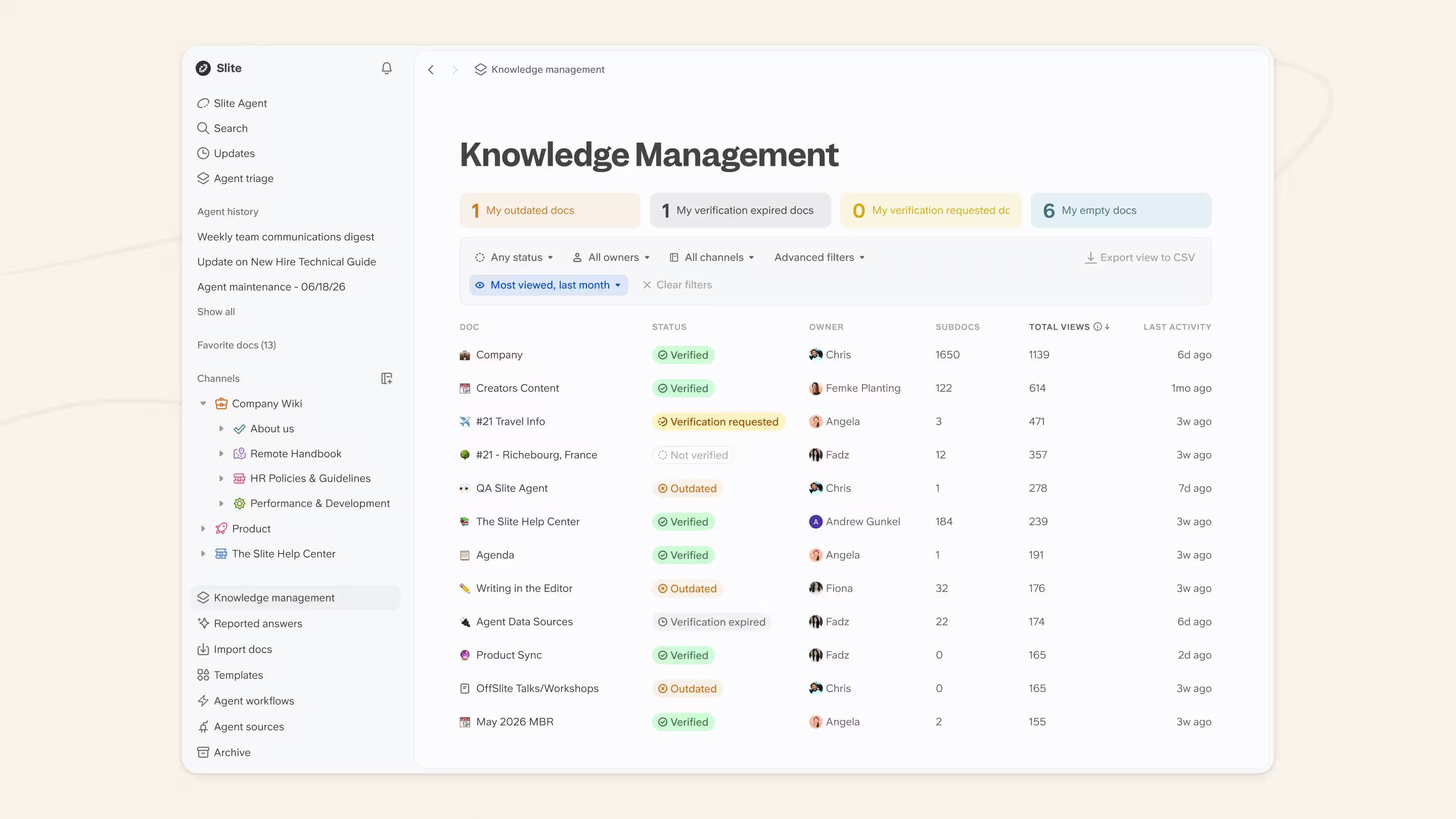
- and the Knowledge Management Panel keeps the source material clean enough for AI to be trustworthy.
To keep a knowledge base fresh, writing has to be human-first. AI shines in editing and helping you, not in firsthand creation where it lacks your industry-specific context and understanding.
Notion AI has no Knowledge Management features. It does nothing to address the chaos of lost nested docs within Notion. Some orphan, unlinked notes get buried forever.
As one VP Engineering at a mid-size cloud-infra company put it on a recent call:
There is a lot of knowledge that is stale. It doesn't really get updated automatically. Some teams are better at maintaining the actual knowledge management database. Others are not as much.
We at Slite try to develop our tools for the second group, and help make it easy for them to keep their knowledge up-to-date.
How the alternatives compare
| Tool | Best for | Workspace context | Pricing | Multi-model | Automation |
|---|---|---|---|---|---|
| Notion AI + Custom Agents | Teams already on Notion that want AI writing inside their docs | Native Notion plus AI Connectors (Slack, Drive, GitHub, Linear, Jira) | Bundled in Business at $20/seat/mo annual; Custom Agents metered at $10 per 1,000 credits | Yes (Sonnet 4, GPT-5, Opus 4.6) | Personal Agent + Custom Agents |
| Slite (Ask + Knowledge Management Panel) | Teams that need verified docs feeding their AI search | Slite workspace plus connected sources | Bundled across plans, no per-credit metering | Yes | AI search plus maintenance automation |
| ChatGPT (Workspace) | General-purpose writing and reasoning | Connectors via ChatGPT Workspace | Per-seat plan plus usage | Yes (OpenAI models) | GPTs and scheduled tasks |
| Claude Projects | Long-context reasoning and analysis on uploaded docs | Project-scoped | Per-seat plan | Anthropic models | Limited to in-project automation |
| Perplexity Spaces | Research with grounded citations | Web plus uploaded files | Per-seat plan | Yes | Light automation |
Slite's bet against Notion's
Notion's 2026 strategy pushes deeper into agents through Custom Agents that run scheduled work across the workspace.
Slite is shipping its own answer: Slite Agent, coming soon in June 2026.
On the surface it might seem like the same agent idea Notion is betting on with multi-step work, on schedules or triggers, scoped to a team's workspace, but with one important caveat.
It is built on top of the verified-docs layer rather than bolted onto a freeform one.
That foundation is the difference.
AI assistants are only as accurate as the docs they read from. Slite's verification layer keeps Ask reading from a source-of-truth that's been actively maintained — and when Slite Agent ships in June 2026, it inherits the same trust contract: Ask returns "no answer found" rather than confabulating, and Slite Agent runs on top of that floor. Notion AI's freeform Q&A doesn't have one. If AI hallucinates because the underlying docs are stale, no agent fixes that.
The outcomes already back the framing. Wuffes reports a 70% reduction in repetitive questions in six months and one to two hours saved per day after rolling Slite out across customer-facing teams. Agorapulse reports cutting Slack questions on customer-success channels by 5–10x. That's the verification dividend Slite Agent is built to compound when it lands in June 2026.
And it's not only search where the two diverge: when we benchmarked both tools' MCP connectors (the bridge that lets AI agents like Claude or Codex create and edit your docs for you) and Slite ran roughly 5–7× faster than Notion across every test, and didn't fail a single operation. Full numbers are in our Notion vs Slite comparison.
The best AI-powered Notion alternative is Slite — an AI-powered knowledge base where Ask answers questions from your team's verified docs.
Slite's AI search — branded Ask — lets your team ask questions and get answers pulled from verified docs in your workspace, instead of hunting through folders. Same primitive as Notion AI's Q&A, but Slite's verification layer means Ask is reading from docs that have actually been kept current.
Slite's Knowledge Management Panel handles the upkeep work AI cannot trust stale docs to do — automated verification reminders, AI-suggested actions for what's outdated or duplicated, and workspace analytics on what's actually getting read. The same maintained-docs layer is what Slite Agent reads from when it ships in June 2026.
Which one's right for your team?
- Go for Notion AI + Custom Agents if your team is already deep in Notion, you want AI writing inside your docs, and you're comfortable layering credit-based metering on top of seat pricing.
- Go for ChatGPT or Claude Projects if you want a general-purpose AI assistant for long-form writing or reasoning that is not coupled to a knowledge base.
- Go for Slite (Ask + Knowledge Management Panel) if the binding constraint is trust — your team's docs need to stay current and your AI search needs to read from verified sources, not freeform-AI rot.
Related reading
- Notion vs Slite
- Notion vs Coda
- Obsidian vs Notion
- Best Notion alternatives in 2026
- What is an AI agent?
- Best AI search engines
- How to build an LLM knowledge base
Want to see Ask + the Knowledge Management Panel against your own docs? Book a demo.
FAQ
Which Notion plan includes Notion AI in 2026?
Notion AI is bundled into the Business plan ($20/user/month billed annually, $24 monthly) and Enterprise (custom pricing). Free and Plus plans get a one-time trial allocation of AI responses. Custom Agents consume Notion Credits on top of Business or Enterprise at $10 per 1,000 credits per month.
What LLM does Notion AI use?
Notion AI uses multiple models, user-selectable per Agent. The Notion 3.0 release notes name Claude Sonnet 4 and GPT-5 as built-in options. Anthropic's customer page for Notion confirms Claude Opus 4.6 powers the Notion Agent specifically — Notion is the first third-party product where Anthropic has made Opus broadly available.
How to access Notion AI
There are three ways to open Notion AI from anywhere in your workspace:
- Highlight any text → click "Ask AI" in the floating toolbar.
- Type
/AIin the slash menu on a new line. - Press Space on a new line.
Keyboard shortcut: Cmd+K still opens the unified AI search panel.
How do I cancel Notion AI?
- Notion AI is no longer a standalone subscription. To remove AI access, downgrade your plan from Business to Plus or Free in your workspace settings. Legacy add-on subscribers from before May 2025 can cancel from the same plan settings, but cannot re-subscribe to the standalone add-on if they cancel.
- Can Notion AI take meeting notes?
Yes. Notion AI Meeting Notes records, transcribes, and produces a summary block with decisions and action items. The feature is included with Business and Enterprise plans. It is not a compliance transcript — treat the output as a working draft and edit before sharing externally.
How do I write a good Notion AI prompt?
Five ingredients: a role for the AI to take, a source to pull from, a constraint on what to do and what not to do, a format for the output, and a follow-up question that anchors the rewrite cycle. Skip Notion's pre-built prompts — they leave the actual prompt-writing work to you. Write your own.